What is computer vision?
Level 0 · Chapter 1 · ⏱️ ~45 min read · Prerequisites: None
Computer vision is the craft of getting useful information out of pixels. This chapter shows what an image looks like to a computer, maps out the main tasks the field solves, walks through how the field got here, explains why the problem is so much harder than it looks, and gives you a plan for studying it.
Why it matters
Priya worked at a company that made packaging for medicines. A vision system checked every blister pack on the production line: if a tablet was missing, the pack was rejected. The system had passed every test in the lab, with 99.8% accuracy on a few thousand test photos.
Three weeks after launch, the reject rate jumped from 0.3% to 11%. Nothing was wrong with the tablets. Someone had replaced a dead fluorescent tube above the conveyor with an LED panel. The new light was slightly bluer and cast sharper shadows, and the model had never seen anything like it. To a person, the new photos looked identical to the old ones. To the model, every pixel value had shifted.
Priya fixed it in a day: they fixed the lighting with a diffuser, recorded a new set of photos under it, and added brightness and color jitter to the training data. But the lesson stuck. A camera doesn't see tablets. It records numbers, and those numbers depend on the light, the angle, the lens, the sensor, and the file format as much as on the object. Computer vision is the work of getting from those numbers to a reliable answer, and almost every hard part of the field comes from that gap.
Concepts
Seeing versus understanding
When you look at a photo of a cat, you see a cat. You don't notice the work your brain does: it separates the cat from the sofa, works out that the dark patch is a shadow and not a hole, guesses how far away the cat is, and recognizes it even though half of it is hidden behind a cushion.
A computer gets none of that for free. To a computer, a grayscale image is a grid of numbers, one per pixel (short for "picture element", the smallest dot of an image). Each number says how bright that dot is. A color image has three numbers per pixel: red, green, and blue.
Formally, a digital grayscale image is a function from pixel positions to brightness values:
Here \(H\) is the image height in pixels (the number of rows), \(W\) is the width (the number of columns), and \(I(r, c)\) is the brightness at row \(r\) and column \(c\). The range \(0\) to \(255\) is the usual 8-bit range, where \(0\) is black and \(255\) is white. A color image maps each position to three values instead, \(I(r, c) \in \{0, \dots, 255\}^3\).
There are two different jobs hidden in "seeing":
- Image processing turns an image into another image: brighter, sharper, less noisy, resized, straightened. The output is still pixels.
- Computer vision turns an image into a description: "this is a cat", "there are 24 coins", "the car is 14 m away", "the tumor boundary is here". The output is a decision, a list of objects, a measurement, or a 3D model.
The distance between the raw numbers and the description is called the semantic gap. Low-level facts, such as "pixel (120, 45) has value 37", are easy to compute. High-level facts, such as "this is a person riding a bicycle", are what you actually want. Most of computer vision is a ladder from one to the other: pixels, then edges and textures, then parts, then objects, then scenes and relationships.
You'll see this ladder again in deep networks. Early layers of a trained convolutional network respond to edges and color blobs, middle layers to textures and parts, and late layers to whole objects. The network builds the ladder itself, from data.
The main tasks
Computer vision isn't one problem. It's a family of problems that differ mainly in what the output looks like. Learn to name the task first, because the task decides the model, the labels you need, the loss you train with, and the metric you report.
| Task | Question it answers | Output | Example |
|---|---|---|---|
| Classification | What is in this image? | one label (or a probability per label) | "defective" vs "OK" for a part on a line |
| Detection | What objects are where? | a list of boxes, each with a label and a score | cars and pedestrians in a dashcam frame |
| Semantic segmentation | Which class does each pixel belong to? | an \(H \times W\) map of class labels | road, sidewalk, sky, building |
| Instance segmentation | Which pixels belong to each individual object? | one mask per object | each separate cell in a microscope image |
| Tracking | Where does each object go over time? | object identities linked across video frames | following each player in a football broadcast |
| Reconstruction | What is the 3D shape of the scene? | depth maps, point clouds, meshes, camera poses | measuring a room from phone photos |
| Generation | What image fits this description? | new pixels | filling in a removed object, text-to-image |
A few more tasks are variations on these: keypoint and pose estimation (where are a person's joints?), optical character recognition (OCR, reading text), image retrieval (find similar images), and visual question answering (answer a question in words about an image).
The outputs get richer as you go down the table. A classifier gives you one number per image. A detector gives you a handful of boxes. A segmenter gives you a label for every one of hundreds of thousands of pixels. Richer output costs more: labeling a segmentation mask by hand can take many minutes per image, while a classification label takes seconds. In practice, you pick the cheapest task that answers the business question. If the question is "does this pallet have a damaged box?", classification may be enough. If it's "how many boxes are damaged?", you need detection.
flowchart LR
    I["Image"] --> C["Classification<br/>'coins'"]
    I --> D["Detection<br/>boxes + labels"]
    I --> S["Segmentation<br/>a label per pixel"]
    V["Video"] --> T["Tracking<br/>IDs over time"]
    P["Several views"] --> R["Reconstruction<br/>depth / 3D"]
    X["Text or noise"] --> G["Generation<br/>new image"]
You'll build every one of these in this handbook. The In practice section below shows several on real images right away, using only simple tools, so you can see what each output looks like.
A short history: from edge detectors to foundation models
Computer vision has been "almost solved" several times. Knowing the history helps you understand why today's tools look the way they do, and why older techniques are still around.
The optimistic start (1960s). In 1963, Larry Roberts wrote a thesis on recovering 3D block shapes from photos, often called the first computer vision work. In 1966, Seymour Papert at MIT proposed the "Summer Vision Project": a group of students would build a significant part of a visual system over one summer. It took the field the next six decades. The lesson, which every new vision engineer relearns, is that seeing feels effortless only because our brains hide the work.
Edges, geometry, and theory (1970s–1990s). Researchers built hand-designed operators to find structure in images. The Sobel operator (1968) estimated brightness gradients. David Marr's book Vision (1982) framed vision as building up representations from a "primal sketch" of edges to full 3D. John Canny's 1986 edge detector is still in OpenCV and still used. The geometry of cameras and multiple views was worked out in detail; that work became the multi-view geometry you'll learn in Level 2, and it still powers calibration, 3D scanning, and augmented reality.
Hand-crafted features and learning (late 1990s–2000s). Instead of hand-writing rules for every object, researchers hand-designed features (summaries of local image patterns) and let a classical classifier learn from them. SIFT (1999, refined in 2004) found distinctive keypoints that survived rotation and scale changes, which made panorama stitching and object matching practical. The Viola–Jones face detector (2001) ran in real time on early-2000s hardware and put face detection in consumer cameras. HOG features with a linear SVM (2005) made pedestrian detection work.
The deep learning moment (2012). The ImageNet dataset (2009) had over a million labeled photos in 1,000 classes. In 2012, a convolutional neural network called AlexNet won the ImageNet challenge with a top-5 error of about 15%, far ahead of the runner-up at about 26%. Convolutional networks were not new (Yann LeCun's LeNet read handwritten digits around 1989–1998), but large labeled datasets plus GPUs made them dramatically better than hand-crafted features. Within a few years, deep networks took over classification (VGG, ResNet), detection (Faster R-CNN, YOLO, SSD), and segmentation (FCN, U-Net, Mask R-CNN).
Transformers and foundation models (2020s). The Vision Transformer (ViT, 2020) showed that the transformer architecture from language models works on images cut into patches. CLIP (2021) learned from hundreds of millions of image–caption pairs and could classify images into categories it was never explicitly trained on. Diffusion models (from 2020) made high-quality image generation practical. The Segment Anything Model (2023) segments almost any object from a click. These foundation models are trained once on huge data and then adapted to many tasks.
flowchart LR
    A["1960s<br/>blocks world,<br/>Summer Vision Project"] --> B["1970s–90s<br/>edges, Canny,<br/>multi-view geometry"]
    B --> C["2000s<br/>SIFT, Viola–Jones,<br/>HOG + SVM"]
    C --> D["2012<br/>AlexNet on ImageNet"]
    D --> E["2015–17<br/>ResNet, YOLO,<br/>U-Net, Mask R-CNN"]
    E --> F["2020s<br/>ViT, CLIP, diffusion,<br/>SAM"]
Two things to take from this. First, old ideas don't disappear. Camera calibration, homographies, and optical flow are classical and still run inside every phone and robot. Preprocessing such as resizing, color conversion, and normalization is the same math it was in 1990. Second, each wave moved work from people to data. Engineers once wrote rules, then designed features, and now mostly design datasets, training setups, and evaluations. That's why data quality, labeling, and evaluation get so much attention in this handbook.
Where computer vision is used
Vision is useful wherever a camera is cheaper, faster, or more consistent than a person looking:
- Manufacturing: checking welds, labels, fill levels, scratches, and missing parts at line speed.
- Medicine: screening retinal scans and chest X-rays, counting cells, outlining tumors for radiotherapy planning.
- Transport: driver assistance, lane keeping, traffic counting, license-plate reading, parking occupancy.
- Retail and logistics: shelf monitoring, self-checkout, package dimensioning, warehouse robots.
- Agriculture: spotting weeds for targeted spraying, estimating crop yield from drone images, grading fruit.
- Documents: scanning, deskewing, OCR, and form extraction.
- Consumer apps: portrait-mode blur, night mode, photo search ("show me photos of dogs on the beach"), AR filters.
- Earth observation: mapping floods, deforestation, and building footprints from satellite images.
Each domain has its own traps. Medical images are often 12- or 16-bit and grayscale. Satellite images can have more than three channels. Factory cameras run under controlled light, while dashcams face the sun, rain, and night. The fundamentals in Level 0 (what the numbers in an image mean and how to handle them correctly) apply to all of them.
Why vision is hard
A person sees the same cat whether it's in sunlight or shade, near or far, facing left or right. The pixel values, though, change completely. Here are the main sources of change, often called nuisance factors because they change the pixels without changing the answer:
- Viewpoint: the same object looks different from different angles.
- Illumination: brightness, color, and shadows change with the light source.
- Scale: a car 5 m away covers thousands of times more pixels than one 200 m away.
- Deformation: cats, people, and cloth change shape.
- Occlusion: objects hide parts of each other.
- Background clutter: the object blends into a busy scene.
- Intra-class variation: "chair" covers office chairs, stools, and beanbags.
- Sensor effects: noise, blur, compression artifacts, and lens distortion.
There's also a deeper problem: a photo throws away depth. A camera projects the 3D world onto a 2D sensor. In the simplest model, the pinhole camera (derived properly in Level 2), a point at position \((X, Y, Z)\) in front of the camera, with \(Z\) the distance along the viewing direction, lands on the image at
where \(f\) is the focal length (the distance from the pinhole to the sensor, measured in pixel units) and \((x, y)\) is the position on the image. Now double every coordinate: \((2X, 2Y, 2Z)\). The image position is \(f\,(2X)/(2Z) = f\,X/Z\), exactly the same. A toy car 1 m away and a real car 20 m away can produce the same image. Recovering 3D from one image is therefore ill-posed: many different scenes explain the same pixels. People resolve the ambiguity with prior knowledge ("cars are about 4.5 m long"). Machines have to learn those priors or use more than one view.
Finally, the space of images is enormous. A small \(256 \times 256\) grayscale image has \(65{,}536\) pixels, each with 256 possible values, so there are \(256^{65{,}536}\) possible images. That number has about 158,000 digits. Almost all of those images are random static. The images that look like real scenes form a tiny, oddly shaped subset, and learning the shape of that subset is what vision models do.
Pixel distance is not visual similarity
A natural first idea is to compare images by subtracting their pixels. The In practice section shows why this fails: shifting a photo by a few pixels can change it more, numerically, than replacing it with a different photo. Good representations, hand-crafted or learned, are the fix. That theme runs through the whole handbook.
How to study computer vision
Vision rewards a specific study habit: look at everything. Most vision bugs are visible if you plot the image at the right moment. A model that predicts nonsense is often being fed images that are upside down, in the wrong color order, stretched, or all black. Your first debugging step, always, is to display the exact array going into the model.
The handbook follows the same loop in every chapter:
flowchart LR
    I["Intuition<br/>(a picture)"] --> M["Math<br/>(the precise version)"]
    M --> C["Code<br/>(from scratch, then library)"]
    C --> P["Plot the result"]
    P --> Q["Predict, then check"]
    Q --> I
Some concrete advice:
- Run every code block in a notebook and change something. Swap the image, double a parameter, break it on purpose. Predict what the picture will look like before you run it.
- Implement it once from scratch, then use the library. Writing a 3×3 convolution or a color conversion yourself is the fastest way to understand what OpenCV does, and when its output looks wrong.
- Keep an "image bugs" log. BGR vs RGB,
uint8overflow,(x, y)vs(row, col), and CHW vs HWC will each bite you at least once. Write down what happened. - Use the companion ML Handbook for general foundations when you need them: NumPy, linear algebra, and later backpropagation and PyTorch.
- Finish each capstone without notes before moving to the next level.
In practice
The code in this section uses tools you'll learn properly in the next chapters. For now, read it for the ideas, run it, and look at the pictures. Every image comes from scikit-image's built-in samples, so nothing needs downloading.
Looking at the pixels
Load a sample photo and look at the actual numbers:
import numpy as np
import matplotlib.pyplot as plt
from skimage import data

img = data.camera()                 # a 512 x 512 grayscale photo
print(type(img).__name__, img.shape, img.dtype)
print("min:", img.min(), " max:", img.max(), " mean:", round(img.mean(), 1))

patch = img[200:208, 230:238]       # an 8 x 8 window
print(patch)
ndarray (512, 512) uint8
min: 0  max: 255  mean: 129.1
[[59 61 59 62 62 57 53 49]
 [56 60 57 60 58 51 48 27]
 [56 58 56 52 46 40 28 17]
 [54 52 48 43 37 18 13 17]
 [47 44 37 34 19 16 19 22]
 [39 35 30 36 37 38 40 42]
 [34 45 53 56 59 62 63 64]
 [65 71 74 76 78 78 78 79]]
The image is a NumPy array with 512 rows and 512 columns of 8-bit unsigned integers (uint8, whole numbers from 0 to 255). That's all a computer has to work with. This patch sits on the boundary between the photographer's dark coat and a brighter background: you can see a diagonal band of small numbers (dark pixels) with larger numbers on either side.
Now plot the image, a zoomed crop, and the numbers inside a tiny window:
fig, axes = plt.subplots(1, 3, figsize=(10, 3.6))
axes[0].imshow(img, cmap="gray", vmin=0, vmax=255)
axes[0].add_patch(plt.Rectangle((200, 60), 80, 80, fill=False, ec="red", lw=1.5))
axes[0].set_title("camera(): 512 x 512")

crop = img[60:140, 200:280]
axes[1].imshow(crop, cmap="gray", vmin=0, vmax=255)
axes[1].add_patch(plt.Rectangle((40, 30), 8, 8, fill=False, ec="red", lw=1.5))
axes[1].set_title("80 x 80 crop")

tiny = img[90:98, 240:248]
axes[2].imshow(tiny, cmap="gray", vmin=0, vmax=255)
for r in range(8):
    for c in range(8):
        v = tiny[r, c]
        axes[2].text(c, r, str(v), ha="center", va="center", fontsize=7,
                     color="white" if v < 128 else "black")
axes[2].set_title("8 x 8 window: the numbers")
for ax in axes:
    ax.axis("off")
plt.tight_layout()
plt.show()
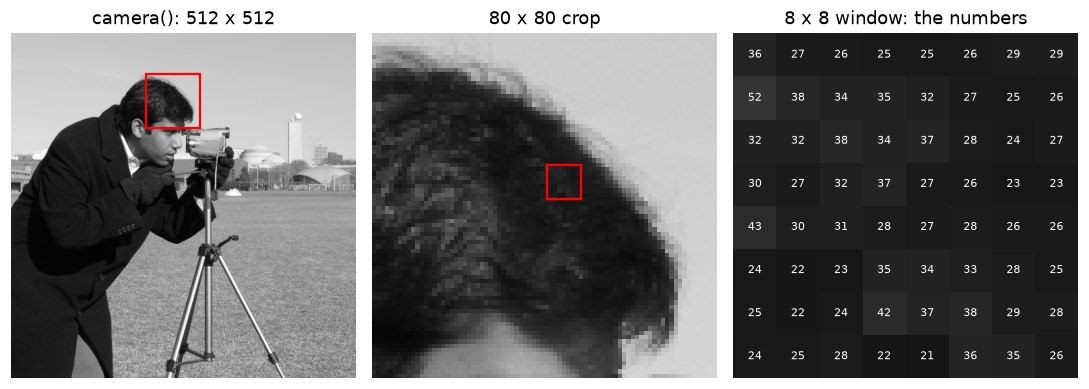
From photo to numbers: each square in the right panel is one pixel, and its brightness is the number written on it.
When you zoom far enough, the photo dissolves into squares, and each square is just a number. Everything a vision system "knows" about the scene has to be computed from numbers like these.
From pixels to tasks: counting coins
The coins sample is a photo of 24 old coins on a plain background. It's simple enough that a few lines of classical image processing can produce the output of several different tasks. You'll learn each step properly in Level 1: thresholding in Point operations and histograms, and labeling connected regions in Morphology and classical segmentation.
from skimage import filters, measure, morphology, segmentation, color

coins = data.coins()
t = filters.threshold_otsu(coins)                   # pick a brightness cutoff automatically
mask = coins > t                                    # True where it's brighter than the cutoff
mask = morphology.remove_small_objects(mask, max_size=99)    # drop specks of noise
mask = segmentation.clear_border(mask)              # drop blobs touching the edge
mask = morphology.closing(mask, morphology.disk(3)) # fill small gaps inside coins
labels = measure.label(mask)                        # give each connected blob an ID
regions = [r for r in measure.regionprops(labels) if r.area > 300]

print("threshold:", t)
print("coin-like regions found:", len(regions))
r0 = regions[0]
print("first region: bbox (min_row, min_col, max_row, max_col) =", r0.bbox,
      " area =", int(r0.area), "pixels")
threshold: 107
coin-like regions found: 23
first region: bbox (min_row, min_col, max_row, max_col) = (16, 305, 72, 365)  area = 2606 pixels
The pipeline finds 23 of the 24 coins. The one it misses, in the top-left corner, is dimmer than the others and falls below the single global threshold. That's a preview of why vision is hard: a rule that works for most of the image fails where the lighting or the object's color differs. Even so, the outputs show the shape of each task clearly:
fig, axes = plt.subplots(1, 4, figsize=(10, 2.9))
axes[0].imshow(coins, cmap="gray")
axes[0].set_title("Classification:\n'coins' (one label)")

axes[1].imshow(coins, cmap="gray")
for r in regions:
    r0_, c0_, r1_, c1_ = r.bbox
    axes[1].add_patch(plt.Rectangle((c0_, r0_), c1_ - c0_, r1_ - r0_,
                                    fill=False, ec="lime", lw=1.2))
axes[1].set_title(f"Detection:\n{len(regions)} boxes")

axes[2].imshow(mask, cmap="gray")
axes[2].set_title("Semantic segmentation:\ncoin vs background")

axes[3].imshow(color.label2rgb(labels, bg_label=0))
axes[3].set_title("Instance segmentation:\none color per coin")
for ax in axes:
    ax.axis("off")
plt.tight_layout()
plt.show()
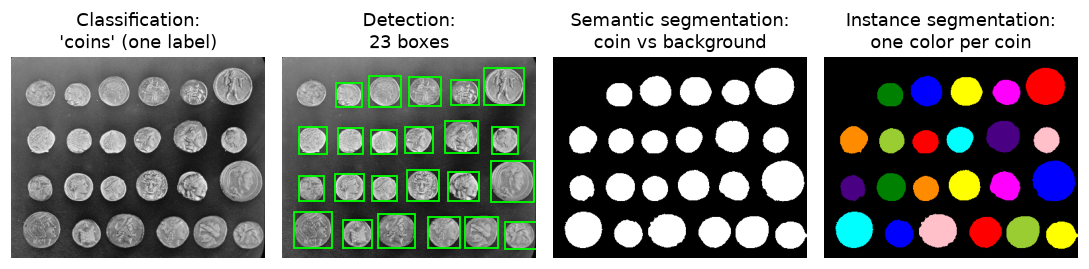
The same image, four tasks: one label, a list of boxes, a label per pixel, and a separate mask per object.
Notice how the output types differ:
print("classification output:", "'coins'")
print("detection output:     ", len(regions), "boxes, e.g.", regions[0].bbox)
print("semantic output:      ", mask.shape, mask.dtype, "unique:", np.unique(mask))
print("instance output:      ", labels.shape, labels.dtype, "IDs 0 ..", labels.max())
classification output: 'coins'
detection output:      23 boxes, e.g. (16, 305, 72, 365)
semantic output:       (303, 384) bool unique: [False  True]
instance output:       (303, 384) int32 IDs 0 .. 23
The detection output here uses scikit-image's (min_row, min_col, max_row, max_col) box convention. Other libraries use (x, y, width, height) or (x1, y1, x2, y2). Box-format mix-ups are one of the most common bugs in detection code, and you'll meet them again in Level 4.
Common mistake
Mixing up (row, col) and (x, y). NumPy indexes images as img[row, col], where row goes down and col goes right. Plotting and drawing functions take (x, y), where x goes right and y goes down. So (x, y) = (col, row). Look at the plotting code above: plt.Rectangle((c0_, r0_), ...) passes the column first.
Reconstruction and tracking at a glance
Two more tasks need more than a single image. Reconstruction often uses two cameras side by side, like your two eyes. scikit-image ships a stereo pair with its true disparity: how many pixels each point shifts between the left and right views. Near objects shift more, so disparity is a stand-in for depth.
For tracking, here's a tiny synthetic video: a bright disk moving across a noisy background. The "tracker" just finds the disk's center in each frame.
left, right, disp = data.stereo_motorcycle()
valid = np.isfinite(disp)
print("left view:", left.shape, " disparity range:",
      round(float(disp[valid].min()), 1), "to", round(float(disp[valid].max()), 1), "pixels")

rng = np.random.default_rng(0)
H, W, n_frames = 120, 160, 12
yy, xx = np.mgrid[0:H, 0:W]
track = []
for t in range(n_frames):
    cx, cy = 20 + 10 * t, 60 + 25 * np.sin(t / 2)          # true path of the disk
    frame = rng.normal(60, 15, (H, W))
    frame[(xx - cx) ** 2 + (yy - cy) ** 2 < 8 ** 2] = 200
    rows, cols = np.nonzero(frame > 150)                    # bright pixels
    track.append((cols.mean(), rows.mean()))                # centroid as (x, y)
track = np.array(track)
print("tracked (x, y) for the first 4 frames:\n", track[:4].round(1))

fig, axes = plt.subplots(1, 3, figsize=(10, 2.8))
axes[0].imshow(left)
axes[0].set_title("left view")
im = axes[1].imshow(np.where(valid, disp, np.nan), cmap="magma")
axes[1].set_title("disparity (bright = near)")
axes[2].imshow(np.clip(frame, 0, 255), cmap="gray", vmin=0, vmax=255)
axes[2].plot(track[:, 0], track[:, 1], "o-", color="orange", ms=3)
axes[2].set_title("tracking: centroid path")
for ax in axes:
    ax.axis("off")
plt.tight_layout()
plt.show()
left view: (500, 741, 3)  disparity range: 7.2 to 59.9 pixels
tracked (x, y) for the first 4 frames:
 [[20. 60.]
 [30. 72.]
 [40. 81.]
 [50. 85.]]
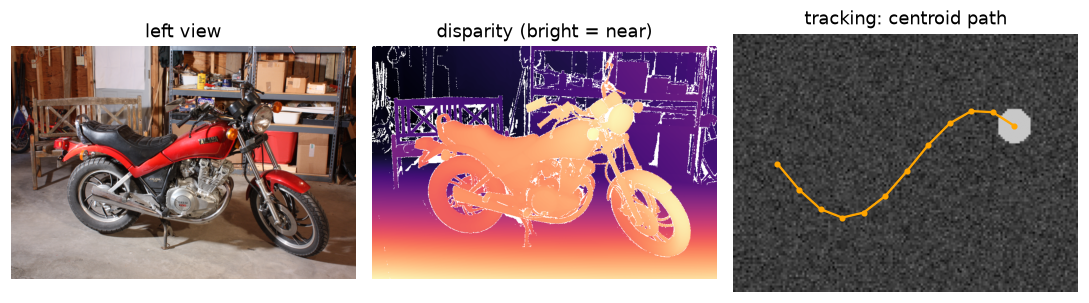
Reconstruction turns two views into per-pixel depth; tracking links an object's position across frames.
In the disparity map, the motorcycle is bright because it's close to the camera, and the back wall is dark because it's far. The black areas are pixels with no valid disparity, typically parts of the scene visible to only one camera. You'll compute disparity yourself in Level 2.
Measuring why vision is hard
Here's the experiment promised earlier. Take a photo of a cat. Make "nuisance" changes that leave it obviously the same cat: shift it a few pixels, make it darker, flip it, cover part of it. Then compare each version to the original using the mean absolute difference (MAD), the average size of the per-pixel change:
Here \(I\) and \(J\) are two images of the same size, \(C\) is the number of color channels, and \(k\) indexes the channel. Also compare the cat with a completely different photo, a cup of coffee, resized to the same shape.
from skimage.transform import resize

cat = data.chelsea().astype(np.float64)               # (300, 451, 3)
H, W, _ = cat.shape

def mad(a, b):
    return np.abs(a - b).mean()

shifted = np.roll(cat, shift=(6, 6), axis=(0, 1))     # 6 pixels down and right
darker = cat * 0.6
flipped = cat[:, ::-1]
occluded = cat.copy()
occluded[60:200, 150:300] = 0                         # a black box over the face
coffee = resize(data.coffee(), (H, W), preserve_range=True)

versions = {"shifted 6 px": shifted, "40% darker": darker, "mirrored": flipped,
            "occluded": occluded, "a different photo": coffee}
for name, v in versions.items():
    print(f"{name:>18}: MAD = {mad(cat, v):5.1f}")
      shifted 6 px: MAD =  19.9
        40% darker: MAD =  46.1
          mirrored: MAD =  36.2
          occluded: MAD =  16.5
 a different photo: MAD =  62.0
fig, axes = plt.subplots(1, 6, figsize=(10, 2.2))
axes[0].imshow(cat.astype(np.uint8))
axes[0].set_title("original", fontsize=9)
for ax, (name, v) in zip(axes[1:], versions.items()):
    ax.imshow(np.clip(v, 0, 255).astype(np.uint8))
    ax.set_title(f"{name}\nMAD {mad(cat, v):.0f}", fontsize=9)
for ax in axes:
    ax.axis("off")
plt.tight_layout()
plt.show()

Same cat, large pixel differences: darkening the cat changes the pixels about three-quarters as much as swapping in a different photo.
The darker cat is still obviously the same cat, but by pixel distance it's about three-quarters of the way to a cup of coffee. The mirrored cat, which any person would call the same picture flipped, is more than half as far as the coffee. Raw pixel comparison captures "how much did the numbers change", not "is it the same thing". Every method in this handbook, from edge detectors and SIFT to CNNs and CLIP, can be seen as a way of building a representation in which nuisance changes are small and meaningful changes are large.
Common mistake
Testing a vision model only on images that look like the training images. Priya's tablet checker failed because the test set had the same lighting as the training set. Always ask: which nuisance factors will change after deployment (light, camera, angle, season, compression), and does my test set include them?
Exercises
Exercise 1: Counting the numbers (easy)
A phone camera produces a \(4000 \times 3000\) color photo with 8 bits per channel. (a) How many pixels does it have? (b) How many numbers does the uncompressed image contain? (c) How many megabytes is that uncompressed? (d) How many different values can one pixel take?
Solution
(a) \(4000 \times 3000 = 12{,}000{,}000\) pixels, which is 12 megapixels.
(b) Three numbers per pixel (red, green, blue): \(36{,}000{,}000\) numbers.
(c) One byte per number, so \(36{,}000{,}000\) bytes, which is 36 MB (or about 34.3 MiB). The JPEG on your phone is usually a few MB, because compression throws away information your eye is unlikely to miss. Chapter 3 explains how.
(d) Each channel has \(2^8 = 256\) values, so one pixel has \(256^3 = 16{,}777{,}216\) possible colors, about 16.8 million.
Exercise 2: Name the task (easy)
For each scenario, name the cheapest task from the table that answers the question, and say what the label for one training image would look like.
- A recycling plant wants to know whether each photo of a conveyor section contains any glass.
- A city wants to count the cars passing an intersection each hour.
- A dermatology app must outline the exact boundary of a mole to measure its area.
- A drone must estimate the height of trees in an orchard.
- A football analytics company needs each player's running distance during a match.
Solution
- Classification (glass / no glass). Label: one tag per image.
- Detection plus tracking. Detection alone counts cars per frame, but the same car appears in many frames, so you must link detections over time to count each car once. Label: boxes per frame, plus track IDs for evaluation.
- Segmentation (semantic is enough, since there's one mole). Label: a pixel mask.
- Reconstruction (depth or 3D from multiple drone views). Label: often none at training time, since multi-view geometry can compute depth directly; ground truth would come from a laser scanner.
- Detection plus tracking, then convert pixel positions to meters on the pitch using the camera's geometry (a homography, Level 1). Label: player boxes with consistent IDs.
Exercise 3: The projection ambiguity (medium)
Using \(x = fX/Z\), a camera with focal length \(f = 1000\) pixels sees a person 1.8 m tall standing 6 m away. (a) How tall is the person in the image, in pixels? (b) A child 1.2 m tall appears exactly as tall in the image. How far away is the child? (c) Explain in one or two sentences why this means a single image can't tell you the person's height without extra information.
Solution
(a) The height in the image is \(f \cdot \text{height} / Z = 1000 \times 1.8 / 6 = 300\) pixels.
(b) Solve \(1000 \times 1.2 / Z = 300\), so \(Z = 4\) m.
(c) Image size depends only on the ratio of real size to distance. Any pair (size, distance) with the same ratio gives the same picture, so you need to know either the distance or a reference size (a door, a known object, a second camera) to recover the true height.
Exercise 4: Shift versus difference (medium)
Extend the MAD experiment. Compute the MAD between cat and np.roll(cat, s, axis=1) for shifts s from 0 to 30 pixels, and plot MAD against s. At what shift does the shifted cat become "farther" than the 40% darker cat? What does that tell you about comparing images pixel by pixel?
Solution
shifts = np.arange(31)
mads = [mad(cat, np.roll(cat, s, axis=1)) for s in shifts]
first = next((s for s, m in zip(shifts, mads) if m > mad(cat, darker)), None)
print("MAD at shifts 1, 5, 10, 30:", [round(float(mads[s]), 1) for s in (1, 5, 10, 30)])
print("first shift farther than the darker cat:", first)
MAD climbs quickly for small shifts and then keeps rising slowly as the shift grows. A shift of 1 pixel, invisible to a person, already gives a MAD of several gray levels. For this image, even a 30-pixel shift stays below the darker cat's MAD of about 46, so first is None: within this range, a uniform 40% darkening is a "bigger" change than any shift. Neither number says anything about whether the cat is still a cat. Pixel distance mixes up content and nuisance, which is why vision needs better representations. (Plot shifts against mads with plt.plot to see the curve.)
Exercise 5: A better coin counter (hard)
The threshold-based coin counter found fewer than 24 coins. Improve it. Ideas: lower the threshold slightly, use filters.threshold_local (adaptive thresholding), or keep the border coins. Report how many coins you find and show your mask. What's the trade-off when you lower the threshold?
Solution
One approach is adaptive thresholding, which compares each pixel to the average of its neighborhood instead of one global cutoff, so darker coins in darker regions still stand out:
local = filters.threshold_local(coins, block_size=95, offset=-10)
m2 = coins > local
m2 = morphology.remove_small_objects(m2, max_size=99)
m2 = morphology.closing(m2, morphology.disk(3))
m2 = morphology.remove_small_holes(m2, max_size=500)
lab2 = measure.label(m2)
big = [r for r in measure.regionprops(lab2) if r.area > 300]
print("coins found:", len(big))
Adaptive thresholding finds all 24 coins here. Lowering a global threshold also picks up more of the dark coins, but at some point the background noise and shadows start to join neighboring coins into one blob, so the count goes down again or becomes unreliable. Every threshold trades missed objects against false merges and false detections. Level 1 covers thresholding and morphology properly.
Check yourself
-
What's the difference between image processing and computer vision?
Answer
Image processing maps an image to another image (denoise, resize, sharpen). Computer vision maps an image to a description or decision: labels, boxes, masks, measurements, or 3D structure.
-
What is the semantic gap?
Answer
The distance between what's easy to compute from an image (pixel values, local statistics) and what you actually want to know (objects, their identities, relationships, and meaning).
-
Name the output format of classification, detection, semantic segmentation, and instance segmentation.
Answer
Classification: one label (or a probability per class) per image. Detection: a list of boxes, each with a class and a score. Semantic segmentation: an \(H \times W\) class map. Instance segmentation: one mask (plus class and score) per object.
-
Why is recovering depth from a single image ill-posed?
Answer
Projection divides by depth: \(x = fX/Z\). Scaling a scene and its distance by the same factor gives the same image, so many 3D scenes are consistent with the same pixels. Extra information (a second view, known object sizes, or learned priors) is needed.
-
List four nuisance factors and give a real deployment example of each.
Answer
Examples: illumination (a factory's light fixture is replaced), viewpoint (a shelf camera remounted at a different angle), scale (a drone flying higher), occlusion (a shopper's arm in front of products), sensor effects (a new camera model with different noise and JPEG settings), background clutter (a cluttered desk in a document-scanning app).
-
What was special about 2012 for computer vision?
Answer
AlexNet, a deep convolutional network trained on the large ImageNet dataset with GPUs, won the ImageNet challenge by a wide margin over hand-crafted-feature methods. That started the shift to deep learning across almost all of vision.
-
Why doesn't the mean absolute pixel difference measure whether two images show the same thing?
Answer
It responds to every numeric change equally. Small shifts, lighting changes, and flips change many pixel values a lot without changing the content, while two different scenes with similar overall colors can have a fairly small difference.
-
In NumPy,
img[50, 120]is which pixel in(x, y)terms?Answer
Row 50, column 120, which is \((x, y) = (120, 50)\).
Key takeaways
- To a computer, an image is an array of numbers: \(H \times W\) for grayscale, \(H \times W \times 3\) for color, usually
uint8from 0 to 255. - Computer vision turns those numbers into descriptions. Name the task first (classification, detection, segmentation, tracking, reconstruction, generation), because it decides the labels, model, and metric.
- The field moved from hand-written rules to hand-crafted features to learned features and foundation models, but classical geometry and preprocessing are still everywhere.
- Vision is hard because nuisance factors (light, viewpoint, scale, occlusion, deformation, sensor effects) change pixels without changing meaning, and projection discards depth.
- Raw pixel distance is a poor measure of similarity. Good representations make nuisance changes small and meaningful changes large.
- Always look at the exact array your code is using. Most vision bugs are visible.
Further reading
- Richard Szeliski, Computer Vision: Algorithms and Applications, 2nd edition (2022). The standard modern textbook; a free PDF is at szeliski.org/Book.
- Antonio Torralba, Phillip Isola, and William T. Freeman, Foundations of Computer Vision (MIT Press, 2024).
- Seymour Papert, "The Summer Vision Project", MIT AI Memo 100 (1966). Two pages, and a useful lesson in humility.
- Alex Krizhevsky, Ilya Sutskever, and Geoffrey Hinton, "ImageNet Classification with Deep Convolutional Neural Networks", NeurIPS 2012. The AlexNet paper.
Next
Set up the tools you'll use for the rest of the handbook: Setting up your vision toolkit.