Level 0 Capstone: Worked Solution
Level 0 · Capstone solution · Try the capstone yourself before reading this.
This is one good solution, not the only one. Compare your decisions with these, and pay most attention to the reasoning: where the color conversions happen, where statistics are measured, and how the tool fails gracefully. The complete script is also in the repository as scripts/capstones/level-0/photo_tool.py; the code blocks on this page, read in order, are that file.
Design
The tool is a set of small, testable functions plus a thin command-line layer. Every image is converted to RGB once, at load time, and back to BGR once, at save time. Everything in between works in RGB, so there's exactly one place where the BGR trap could happen.
flowchart LR
    F["find_images<br/>(by extension)"] --> L["load_rgb<br/>(decode, EXIF,<br/>BGR to RGB)"]
    L -->|error| E["CSV row with<br/>error status"]
    L --> R["resize_keep_aspect<br/>(INTER_AREA,<br/>never enlarge)"]
    R --> S["image_stats<br/>(color, brightness,<br/>sharpness)"]
    S --> A["add_caption /<br/>add_watermark"]
    A --> W["save_rgb<br/>(RGB to BGR,<br/>encode)"]
    A --> C["contact_sheet"]
    W --> CSV["report.csv"]
Three decisions worth calling out:
- Statistics are measured after resizing and before annotation. Measuring before annotation keeps the caption strip and watermark from changing the brightness and sharpness numbers. Measuring after resizing puts every image at a comparable scale, which matters for sharpness: the Laplacian variance of a 4000-pixel photo and of a 640-pixel thumbnail of the same scene are very different.
- Bad files don't stop the batch. A file that fails to decode gets a CSV row with an error status, and processing continues. In a weekly batch of hundreds of photos, one corrupt file shouldn't cost anyone their afternoon.
- The functions don't parse arguments or print.
process_foldertakes plain Python arguments and returns rows;mainhandles the command line. That makes the core reusable from a notebook or a test.
The code
Imports and constants
"""photo_tool.py: batch-convert, resize, annotate, and analyze a folder of images.

Level 0 capstone solution for the Computer Vision Handbook.

Usage:
    python photo_tool.py samples photos/
    python photo_tool.py process photos/ out/ --max-side 640 --format webp \
        --caption-from-filename --watermark "(c) Example Shop" --csv report.csv
"""

import argparse
import csv
import sys
from pathlib import Path

import cv2
import numpy as np

IMAGE_EXTS = {".jpg", ".jpeg", ".png", ".webp", ".bmp", ".tif", ".tiff"}
FORMATS = {"jpg": ".jpg", "png": ".png", "webp": ".webp"}
Loading and saving
load_rgb reads the file's bytes with NumPy and decodes them with cv2.imdecode. This works for non-ASCII paths on every operating system, and an empty or garbage file gives None, which becomes a clear ValueError. The default IMREAD_COLOR flag turns gray and palette images into 3 channels and applies the EXIF orientation, so every image arrives upright and in the same layout. save_rgb is the mirror image, and returns the size of the file it wrote, so the report can show real compression results.
# ---------------------------------------------------------------- loading and saving

def find_images(folder):
    """Return the image files in a folder (not recursive), sorted by name."""
    return sorted(p for p in Path(folder).iterdir() if p.is_file() and p.suffix.lower() in IMAGE_EXTS)


def load_rgb(path):
    """Read any supported image as an RGB uint8 array, applying EXIF orientation.

    Uses np.fromfile + cv2.imdecode so non-ASCII paths work on every OS.
    Raises ValueError if the file can't be decoded.
    """
    data = np.fromfile(str(path), dtype=np.uint8)
    bgr = cv2.imdecode(data, cv2.IMREAD_COLOR) if data.size else None
    if bgr is None:
        raise ValueError(f"cannot decode {Path(path).name}")
    return cv2.cvtColor(bgr, cv2.COLOR_BGR2RGB)


def save_rgb(img_rgb, path, quality=90):
    """Encode an RGB image to the format implied by the path's extension and write it."""
    ext = Path(path).suffix.lower()
    if ext in (".jpg", ".jpeg"):
        params = [cv2.IMWRITE_JPEG_QUALITY, int(quality)]
    elif ext == ".webp":
        params = [cv2.IMWRITE_WEBP_QUALITY, int(quality)]
    elif ext == ".png":
        params = [cv2.IMWRITE_PNG_COMPRESSION, 6]
    else:
        params = []
    ok, buf = cv2.imencode(ext, cv2.cvtColor(img_rgb, cv2.COLOR_RGB2BGR), params)
    if not ok:
        raise ValueError(f"cannot encode {ext}")
    buf.tofile(str(path))
    return Path(path).stat().st_size
Image operations
Each operation takes an RGB array and returns a new one; none modifies its input. The resize computes one scale factor from the longest side, so the aspect ratio is preserved, and returns a copy unchanged when the image is already small enough. Captions and watermarks are drawn on a copy and blended with cv2.addWeighted, which saturates rather than wrapping. _fit_font_scale shrinks the font until the text fits, which keeps captions inside narrow portrait images.
Sharpness is the variance of the Laplacian. The Laplacian \(\nabla^2 I = \partial^2 I/\partial x^2 + \partial^2 I/\partial y^2\) is close to zero in smooth regions and large in magnitude at edges and fine texture. A sharp photo has many strong responses of both signs, so their variance is high; blur weakens every response, so the variance drops. The output type cv2.CV_64F matters: with uint8 output, the negative half of every response would be clipped to zero.
# ---------------------------------------------------------------- image operations

def resize_keep_aspect(img, max_side):
    """Shrink so the longest side is at most max_side. Never enlarges."""
    h, w = img.shape[:2]
    s = max_side / max(h, w)
    if s >= 1:
        return img.copy()
    size = (max(1, round(w * s)), max(1, round(h * s)))      # cv2 wants (width, height)
    return cv2.resize(img, size, interpolation=cv2.INTER_AREA)


def _fit_font_scale(text, max_width, start_scale, thickness):
    """Largest font scale <= start_scale at which text fits in max_width pixels."""
    scale = start_scale
    while scale > 0.3:
        (tw, _), _ = cv2.getTextSize(text, cv2.FONT_HERSHEY_SIMPLEX, scale, thickness)
        if tw <= max_width:
            break
        scale *= 0.9
    return scale


def add_caption(img, text, alpha=0.6):
    """Draw text in white on a translucent black strip along the bottom edge."""
    out = img.copy()
    h, w = out.shape[:2]
    thickness = max(1, round(w / 500))
    scale = _fit_font_scale(text, w - 16, start_scale=max(0.5, w / 600), thickness=thickness)
    (tw, th), base = cv2.getTextSize(text, cv2.FONT_HERSHEY_SIMPLEX, scale, thickness)
    strip_h = th + base + 12
    overlay = out.copy()
    cv2.rectangle(overlay, (0, h - strip_h), (w, h), (0, 0, 0), cv2.FILLED)
    out = cv2.addWeighted(overlay, alpha, out, 1 - alpha, 0)
    cv2.putText(out, text, (8, h - base - 6), cv2.FONT_HERSHEY_SIMPLEX, scale,
                (255, 255, 255), thickness, cv2.LINE_AA)
    return out


def add_watermark(img, text, alpha=0.35):
    """Blend semi-transparent white text into the top-right corner."""
    h, w = img.shape[:2]
    thickness = max(1, round(w / 300))
    scale = _fit_font_scale(text, w // 2, start_scale=max(0.5, w / 700), thickness=thickness)
    (tw, th), base = cv2.getTextSize(text, cv2.FONT_HERSHEY_SIMPLEX, scale, thickness)
    overlay = img.copy()
    cv2.putText(overlay, text, (w - tw - 10, th + 10), cv2.FONT_HERSHEY_SIMPLEX, scale,
                (255, 255, 255), thickness, cv2.LINE_AA)
    return cv2.addWeighted(overlay, alpha, img, 1 - alpha, 0)


def image_stats(img_rgb):
    """Mean color, brightness (mean luma), and sharpness (variance of the Laplacian)."""
    mean_r, mean_g, mean_b = img_rgb.reshape(-1, 3).mean(axis=0)
    gray = cv2.cvtColor(img_rgb, cv2.COLOR_RGB2GRAY)
    sharpness = cv2.Laplacian(gray, cv2.CV_64F).var()
    return {"mean_r": round(float(mean_r), 1), "mean_g": round(float(mean_g), 1),
            "mean_b": round(float(mean_b), 1), "brightness": round(float(gray.mean()), 1),
            "sharpness": round(float(sharpness), 1)}


def letterbox(img, size, pad_value=235):
    """Fit img inside size=(W, H) without distortion, padding the rest."""
    tw, th = size
    h, w = img.shape[:2]
    s = min(tw / w, th / h)
    nw, nh = max(1, round(w * s)), max(1, round(h * s))
    interp = cv2.INTER_AREA if s < 1 else cv2.INTER_LINEAR
    resized = cv2.resize(img, (nw, nh), interpolation=interp)
    out = np.full((th, tw, 3), pad_value, np.uint8)
    y0, x0 = (th - nh) // 2, (tw - nw) // 2
    out[y0:y0 + nh, x0:x0 + nw] = resized
    return out


def contact_sheet(images, labels, cols=4, cell=(220, 165), pad=8, label_h=20):
    """Arrange RGB images in a labeled grid. Returns one RGB image."""
    cw, ch = cell
    rows = -(-len(images) // cols)                             # ceiling division
    H = pad + rows * (ch + label_h + pad)
    W = pad + cols * (cw + pad)
    sheet = np.full((H, W, 3), 255, np.uint8)
    for k, (im, label) in enumerate(zip(images, labels)):
        r, c = divmod(k, cols)
        y, x = pad + r * (ch + label_h + pad), pad + c * (cw + pad)
        sheet[y:y + ch, x:x + cw] = letterbox(im, (cw, ch))
        text = label if len(label) <= 28 else label[:25] + "..."
        cv2.putText(sheet, text, (x + 2, y + ch + 15), cv2.FONT_HERSHEY_SIMPLEX, 0.42,
                    (30, 30, 30), 1, cv2.LINE_AA)
    return sheet
The sample folder
The samples command builds the test folder from the capstone brief. Gray samples are stacked into 3 channels before saving, so save_rgb can treat everything alike (they still come out gray). The bad photos are made from good ones, so you know what the flags should say.
# ---------------------------------------------------------------- sample data

def make_samples(folder):
    """Build a test folder: scikit-image samples, synthetic images, and two problem files."""
    from skimage import data

    folder = Path(folder)
    folder.mkdir(parents=True, exist_ok=True)
    rng = np.random.default_rng(0)
    written = []

    def put(name, rgb):
        save_rgb(rgb, folder / name, quality=92)
        written.append(name)

    gray3 = lambda g: np.stack([g] * 3, axis=-1)
    put("astronaut.png", data.astronaut())
    put("chelsea.jpg", data.chelsea())
    put("coffee.jpg", data.coffee())
    put("rocket.webp", data.rocket())
    put("camera.png", gray3(data.camera()))
    put("coins.tif", gray3(data.coins()))
    put("hubble.jpg", data.hubble_deep_field())

    # synthetic: shapes on a gradient (640 x 480)
    xx = np.linspace(0, 1, 640)[None, :]
    yy = np.linspace(0, 1, 480)[:, None]
    shapes = np.stack([60 + 150 * xx + 0 * yy, 90 + 100 * yy + 0 * xx, 200 - 120 * xx + 0 * yy], -1)
    shapes = shapes.astype(np.uint8)
    cv2.circle(shapes, (180, 240), 90, (230, 60, 50), -1, cv2.LINE_AA)
    cv2.rectangle(shapes, (330, 120), (560, 330), (40, 170, 90), -1)
    cv2.putText(shapes, "SYNTHETIC", (190, 430), cv2.FONT_HERSHEY_SIMPLEX, 1.6, (255, 255, 255), 3, cv2.LINE_AA)
    put("shapes.png", shapes)

    # synthetic: a tall portrait-orientation image (400 x 900) of stripes
    stripes = np.zeros((900, 400, 3), np.uint8)
    for i, color in enumerate([(220, 50, 50), (240, 200, 40), (40, 120, 220)]):
        stripes[:, :, i] = (np.sin(np.arange(900) / (8 + 6 * i))[:, None] > 0) * color[i]
    put("tall_stripes.jpg", stripes)

    # deliberately poor photos: blurry and underexposed
    put("blurry_astronaut.jpg", cv2.GaussianBlur(data.astronaut(), (0, 0), 4))
    put("dark_coffee.jpg", (data.coffee() * 0.22).astype(np.uint8))
    put("noise.png", rng.integers(0, 256, (300, 300, 3), dtype=np.uint8))

    # problem files the tool must survive
    (folder / "broken.jpg").write_bytes(b"this is not really a JPEG")
    (folder / "notes.txt").write_text("not an image; should be ignored\n")
    return written
Note (data.coffee() * 0.22).astype(np.uint8): multiplying a uint8 array by a Python float produces float64, so nothing overflows, and the values stay below 255 before the conversion back.
The pipeline
# ---------------------------------------------------------------- the pipeline

def process_folder(in_dir, out_dir, max_side=640, fmt="jpg", quality=90, caption=None,
                   caption_from_filename=False, watermark=None, sheet_name="contact_sheet.jpg",
                   csv_name="report.csv", sheet_cols=4, dark_below=50.0, blurry_below=100.0):
    """Process every image in in_dir. Returns the list of report rows."""
    in_dir, out_dir = Path(in_dir), Path(out_dir)
    out_dir.mkdir(parents=True, exist_ok=True)
    rows, thumbs, labels = [], [], []

    for path in find_images(in_dir):
        row = {"file": path.name, "status": "ok", "in_bytes": path.stat().st_size}
        try:
            img = load_rgb(path)
        except ValueError as e:
            row["status"] = f"error: {e}"
            rows.append(row)
            continue
        h, w = img.shape[:2]
        small = resize_keep_aspect(img, max_side)
        stats = image_stats(small)                           # measured before annotation
        text = caption if caption else (path.stem if caption_from_filename else None)
        out = add_caption(small, text) if text else small
        if watermark:
            out = add_watermark(out, watermark)
        out_path = out_dir / (path.stem + FORMATS[fmt])
        out_bytes = save_rgb(out, out_path, quality)

        flags = []
        if stats["brightness"] < dark_below:
            flags.append("dark")
        if stats["sharpness"] < blurry_below:
            flags.append("blurry")
        row.update({"width": w, "height": h, "out_file": out_path.name,
                    "out_width": out.shape[1], "out_height": out.shape[0],
                    "out_bytes": out_bytes, **stats, "flags": " ".join(flags)})
        rows.append(row)
        thumbs.append(out)
        labels.append(f"{path.name} {' '.join(flags)}".strip())

    if thumbs and sheet_name:
        save_rgb(contact_sheet(thumbs, labels, cols=sheet_cols), out_dir / sheet_name, quality=90)
    if csv_name:
        fields = ["file", "status", "width", "height", "in_bytes", "out_file", "out_width",
                  "out_height", "out_bytes", "mean_r", "mean_g", "mean_b", "brightness",
                  "sharpness", "flags"]
        with open(out_dir / csv_name, "w", newline="") as f:
            writer = csv.DictWriter(f, fieldnames=fields)
            writer.writeheader()
            writer.writerows(rows)
    return rows
The contact sheet holds the processed images in memory, which is fine for a weekly batch of a few hundred thumbnails at 640 pixels (about 1 MB each). For tens of thousands of images, you'd write the thumbnails to disk and build the sheet in pages.
The command line
# ---------------------------------------------------------------- command line

def build_parser():
    p = argparse.ArgumentParser(prog="photo_tool",
                                description="Batch-convert, resize, annotate, and analyze a folder of images.")
    sub = p.add_subparsers(dest="command", required=True)

    s = sub.add_parser("samples", help="create a folder of sample images to test with")
    s.add_argument("folder")

    q = sub.add_parser("process", help="process every image in a folder")
    q.add_argument("input", help="folder of input images")
    q.add_argument("output", help="folder for results (created if missing)")
    q.add_argument("--max-side", type=int, default=640, help="longest side in pixels (default 640)")
    q.add_argument("--format", choices=sorted(FORMATS), default="jpg", help="output format")
    q.add_argument("--quality", type=int, default=90, help="JPEG/WebP quality 1-100 (default 90)")
    cap = q.add_mutually_exclusive_group()
    cap.add_argument("--caption", help="caption text for every image")
    cap.add_argument("--caption-from-filename", action="store_true", help="use each file name as its caption")
    q.add_argument("--watermark", help="watermark text (top right, translucent)")
    q.add_argument("--sheet", default="contact_sheet.jpg", help="contact sheet file name ('' to skip)")
    q.add_argument("--sheet-cols", type=int, default=4)
    q.add_argument("--csv", default="report.csv", help="report file name ('' to skip)")
    q.add_argument("--dark-below", type=float, default=50.0, help="flag images with brightness below this")
    q.add_argument("--blurry-below", type=float, default=100.0, help="flag images with sharpness below this")
    return p


def main(argv=None):
    args = build_parser().parse_args(argv)
    if args.command == "samples":
        names = make_samples(args.folder)
        print(f"wrote {len(names)} images plus 2 problem files to {Path(args.folder).name}/")
        return 0
    if not Path(args.input).is_dir():
        print(f"error: {args.input} is not a folder", file=sys.stderr)
        return 2
    if not 1 <= args.quality <= 100:
        print("error: --quality must be between 1 and 100", file=sys.stderr)
        return 2
    rows = process_folder(args.input, args.output, max_side=args.max_side, fmt=args.format,
                          quality=args.quality, caption=args.caption,
                          caption_from_filename=args.caption_from_filename, watermark=args.watermark,
                          sheet_name=args.sheet, csv_name=args.csv, sheet_cols=args.sheet_cols,
                          dark_below=args.dark_below, blurry_below=args.blurry_below)
    ok = [r for r in rows if r["status"] == "ok"]
    print(f"processed {len(ok)} of {len(rows)} images -> {Path(args.output).name}/")
    for r in rows:
        if r["status"] != "ok":
            print(f"  skipped {r['file']}: {r['status']}")
        elif r["flags"]:
            print(f"  flagged {r['file']}: {r['flags']}")
    return 0
The file ends with the standard entry point. sys.exit(main()) turns main's return value into the process exit code, so shell scripts and CI can tell success (0) from failure (2):
Running it
From a terminal:
python photo_tool.py samples photos/
python photo_tool.py process photos/ out/ --format webp --caption-from-filename \
    --watermark "(c) Example Shop"
python photo_tool.py process --help
Because main accepts an argument list, the same commands run from Python, which is how the rest of this page works:
import shutil
shutil.rmtree("photos", ignore_errors=True)
shutil.rmtree("out", ignore_errors=True)

main(["samples", "photos"])
print(sorted(p.name for p in Path("photos").iterdir()))
code = main(["process", "photos", "out", "--format", "webp", "--caption-from-filename",
             "--watermark", "(c) Example Shop"])
print("exit code:", code)
wrote 12 images plus 2 problem files to photos/
['astronaut.png', 'blurry_astronaut.jpg', 'broken.jpg', 'camera.png', 'chelsea.jpg', 'coffee.jpg', 'coins.tif', 'dark_coffee.jpg', 'hubble.jpg', 'noise.png', 'notes.txt', 'rocket.webp', 'shapes.png', 'tall_stripes.jpg']
processed 12 of 13 images -> out/
  flagged blurry_astronaut.jpg: blurry
  skipped broken.jpg: error: cannot decode broken.jpg
  flagged dark_coffee.jpg: dark blurry
  flagged hubble.jpg: dark
  flagged shapes.png: blurry
exit code: 0
notes.txt was ignored (wrong extension), broken.jpg was reported and skipped, and four images were flagged. Bad arguments fail cleanly with exit code 2:
print("missing folder ->", main(["process", "no_such_folder", "out2"]))
print("bad quality    ->", main(["process", "photos", "out2", "--quality", "150"]))
(The error messages go to stderr, so they don't appear above.)
The report
import pandas as pd

report = pd.read_csv("out/report.csv")
pd.set_option("display.width", 120)
cols = ["file", "width", "height", "out_width", "out_height", "in_bytes", "out_bytes",
        "brightness", "sharpness", "flags"]
print(report[cols].convert_dtypes().astype("string").fillna("").to_string(index=False))
                file width height out_width out_height in_bytes out_bytes brightness sharpness       flags
       astronaut.png   512    512       512        512   446008     51386      115.4     860.6
blurry_astronaut.jpg   512    512       512        512    35444     19334      115.4       4.0      blurry
          broken.jpg                                         25
          camera.png   512    512       512        512   220534     46178      129.1    1133.2
         chelsea.jpg   451    300       451        300    38702     29246      119.5     437.5
          coffee.jpg   600    400       600        400    79975     60786      103.6    1604.5
           coins.tif   384    303       384        303   145790     29678       96.9    1911.6
     dark_coffee.jpg   600    400       600        400    33493     20876       22.3      66.5 dark blurry
          hubble.jpg  1000    872       640        558   309829     82728       19.4     588.2        dark
           noise.png   300    300       300        300   270844     75822      127.1   48993.0
         rocket.webp   640    427       640        427    44600     36324       61.1     806.8
          shapes.png   640    480       640        480    11612     10844      134.2      49.5      blurry
    tall_stripes.jpg   400    900       284        640    70059      4564      106.2     703.2
Check the acceptance criteria with code rather than by eye:
ok = report[report.status == "ok"]
in_aspect = ok.width / ok.height
out_aspect = ok.out_width / ok.out_height
print("max aspect-ratio change:", round(float((in_aspect - out_aspect).abs().max()), 4))
print("all within max side:", bool((ok[["out_width", "out_height"]].max(axis=1) <= 640).all()))
print("none enlarged:", bool(((ok.out_width <= ok.width) & (ok.out_height <= ok.height)).all()))
gray_rows = ok[ok.file.isin(["camera.png", "coins.tif"])]
print("gray inputs stay gray (R == G == B means):",
      bool(((gray_rows.mean_r == gray_rows.mean_g) & (gray_rows.mean_g == gray_rows.mean_b)).all()))
from skimage import data
print("astronaut mean R > mean B, as in the original:",
      bool(ok.set_index("file").loc["astronaut.png", "mean_r"] > ok.set_index("file").loc["astronaut.png", "mean_b"]),
      "| original:", data.astronaut().reshape(-1, 3).mean(axis=0).round(1))
print("total bytes in -> out:", int(report.in_bytes.sum()), "->", int(ok.out_bytes.sum()))
max aspect-ratio change: 0.0007
all within max side: True
none enlarged: True
gray inputs stay gray (R == G == B means): True
astronaut mean R > mean B, as in the original: True | original: [141.6 105.8  96.5]
total bytes in -> out: 1706915 -> 467766
The aspect-ratio change is a rounding effect: the tall image became 284 × 640, and \(400 \times 640 / 900 = 284.4\). The color check is a cheap guard against the BGR trap: if channels had been swapped anywhere, the astronaut's mean red and blue would be swapped too.
The contact sheet
import matplotlib.pyplot as plt

sheet = load_rgb("out/contact_sheet.jpg")
print("contact sheet:", sheet.shape)
plt.figure(figsize=(8, 5.1))
plt.imshow(sheet)
plt.axis("off")
plt.show()
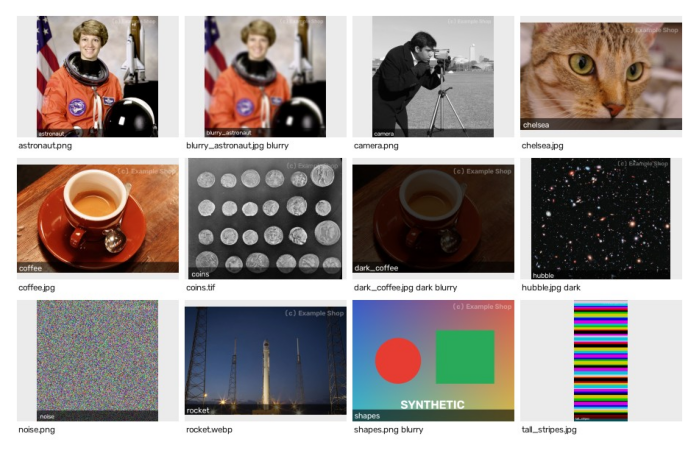
The contact sheet: every processed image letterboxed into an equal cell, with captions, watermarks, and the flags from the report.
Do the flags make sense?
Compare the flags with the contact sheet:
blurry_astronaut.jpg: correct. Its sharpness is 4.0, against 860.6 for the original: a Gaussian blur with \(\sigma = 4\) removes almost all fine detail.dark_coffee.jpg: correctly dark, questionably blurry. It's exactly as sharp ascoffee.jpg, just darker. But scaling an image by 0.22 scales its Laplacian by 0.22 and the Laplacian's variance by \(0.22^2 \approx 0.048\), and indeed \(1604.5 \times 0.048 \approx 78\), close to the measured 66.5 (the rest is rounding to integers in the dark image). Sharpness measured this way confuses low contrast with blur.hubble.jpg: a false positive for "dark". A deep-space photo is supposed to be mostly black. Mean brightness can't tell a badly exposed photo from a correctly exposed dark scene.shapes.png: a false positive for "blurry". Its edges are perfectly sharp, but there are very few of them: most of the image is smooth gradient and flat color, where the Laplacian is zero. The variance averages over the whole image, so sparse sharp edges score low.noise.png: a false negative waiting to happen. Random noise has the highest "sharpness" of all (48,993). A noisy, out-of-focus phone photo could pass the blur check because of its noise.
Ways to make the flags more reliable, roughly in order of effort:
- Normalize sharpness by contrast, for example by dividing by the variance of the gray image, so darkening alone doesn't change it.
- Measure sharpness locally: split the image into tiles and use a high percentile of per-tile scores, so a few sharp edges count and smooth backgrounds don't drag the score down.
- Denoise slightly (a small Gaussian blur) before the Laplacian, so noise doesn't masquerade as detail.
- Use exposure measures that look at the histogram, such as the fraction of pixels clipped at 0 or 255, rather than the mean.
- Calibrate thresholds on real data: label a few hundred of Priya's photos as fine or bad, and pick thresholds from the score distributions, or train a small classifier on several of these features (Level 3 territory).
These are the tradeoffs you should write up in NOTES.md. A hand-tuned heuristic is a fine first tool, as long as everyone knows its blind spots.
Testing ideas
A few pytest tests that catch the bugs this capstone is about:
# test_photo_tool.py
import numpy as np
from photo_tool import resize_keep_aspect, image_stats, add_caption, load_rgb, save_rgb

def test_resize_keeps_aspect_and_never_enlarges():
    img = np.zeros((900, 400, 3), np.uint8)
    assert resize_keep_aspect(img, 640).shape == (640, 284, 3)
    assert resize_keep_aspect(img, 2000).shape == img.shape

def test_save_load_round_trip_keeps_channel_order(tmp_path):
    img = np.zeros((10, 10, 3), np.uint8)
    img[..., 0] = 200                                   # pure red, in RGB
    save_rgb(img, tmp_path / "red.png")
    assert load_rgb(tmp_path / "red.png")[0, 0].tolist() == [200, 0, 0]

def test_caption_does_not_wrap_bright_pixels():
    img = np.full((100, 300, 3), 250, np.uint8)
    out = add_caption(img, "caption")
    assert out.dtype == np.uint8 and out[:50].min() == 250   # area above the strip untouched

def test_blur_lowers_sharpness():
    rng = np.random.default_rng(0)
    img = rng.integers(0, 256, (64, 64, 3), dtype=np.uint8)
    blurred = np.repeat(np.repeat(img[::4, ::4], 4, axis=0), 4, axis=1)
    assert image_stats(blurred)["sharpness"] < image_stats(img)["sharpness"]
The round-trip test is the one that would have saved Sam's tomato grader from Working with images and video: it pins down the channel order at the boundary.
What's next
With Level 0 done, you can load, inspect, convert, and annotate images and video without the classic bugs. Level 1: Image processing starts changing the pixels themselves, beginning with point operations and histograms, where you'll build better exposure measures than the mean brightness used here.