Level 1 Capstone Solution: A Document Scanner
Level 1 · Capstone solution · Back to the capstone brief
This is a complete worked solution. Every number below comes from running the code on this page. The same code, as one runnable script, is in the repository at scripts/capstones/level-1/scanner.py:
python scripts/capstones/level-1/scanner.py          # evaluation table for seeds 0-4
python scripts/capstones/level-1/scanner.py --save   # also writes the photos and scans as images
Your numbers should be close if you made similar choices, but there are many good designs. Check yours against the acceptance checklist rather than against these exact values.
Setup
The generator from the brief, unchanged, plus the first test photo:
import itertools
import time

import cv2
import numpy as np
import matplotlib.pyplot as plt
from skimage import data

A4_RATIO = np.sqrt(2)          # 297 / 210
PAGE_W, PAGE_H = 600, 849      # the clean page, A4 at about 2.86 px per mm
PHOTO_W, PHOTO_H = 960, 1280   # the simulated phone photo (portrait)

WORDS = ("the scanner finds the page corners and warps the sheet flat so that every line of text "
         "reads straight across while shadows and blur are removed before a final binary image is "
         "produced for archiving or optical character recognition").split()


def render_page(seed=0):
    """A clean A4 page (grayscale uint8): a title, paragraphs, a figure, and a table."""
    rng = np.random.default_rng(seed)
    page = np.full((PAGE_H, PAGE_W), 238, np.uint8)
    cv2.putText(page, "QUARTERLY REPORT", (60, 90), cv2.FONT_HERSHEY_DUPLEX, 1.3, 25, 2, cv2.LINE_AA)
    cv2.line(page, (60, 110), (540, 110), 25, 2)
    y = 150
    for _ in range(6):                                     # a paragraph of random words
        x = 60
        while True:
            w = WORDS[rng.integers(len(WORDS))]
            (tw, _), _ = cv2.getTextSize(w, cv2.FONT_HERSHEY_SIMPLEX, 0.6, 1)
            if x + tw > 540:
                break
            cv2.putText(page, w, (x, y), cv2.FONT_HERSHEY_SIMPLEX, 0.6, 30, 1, cv2.LINE_AA)
            x += tw + 10
        y += 28
    fig = cv2.resize(data.text(), (480, 184), interpolation=cv2.INTER_AREA)   # a "figure"
    page[330:514, 60:540] = fig
    cv2.rectangle(page, (60, 330), (540, 514), 30, 1)
    y0 = 560
    for r in range(6):                                     # a table
        cv2.line(page, (60, y0 + 36 * r), (540, y0 + 36 * r), 40, 1)
        if r < 5:
            for c, txt in enumerate(["Item %d" % (r + 1), str(rng.integers(1, 20)),
                                     "%.2f" % rng.uniform(1, 99)]):
                cv2.putText(page, txt, (75 + 170 * c, y0 + 36 * r + 25), cv2.FONT_HERSHEY_SIMPLEX,
                            0.6, 30, 1, cv2.LINE_AA)
    for xc in (60, 230, 400, 540):
        cv2.line(page, (xc, y0), (xc, y0 + 180), 40, 1)
    cv2.putText(page, "page 1 of 1", (250, 810), cv2.FONT_HERSHEY_SIMPLEX, 0.5, 60, 1, cv2.LINE_AA)
    return page


def wood_background(rng):
    """A brownish, grainy table texture (RGB uint8)."""
    grain = cv2.GaussianBlur(rng.normal(0, 1, (PHOTO_H, PHOTO_W)), (0, 0), sigmaX=40, sigmaY=2)
    grain = (grain - grain.mean()) / grain.std()
    fine = rng.normal(0, 1, (PHOTO_H, PHOTO_W))
    tone = 1 + 0.12 * grain + 0.03 * fine
    base = np.array([125, 88, 58], float)                  # RGB
    return np.clip(tone[..., None] * base, 0, 255)


def make_test_photo(seed=0):
    """Return (photo RGB uint8, true corners TL/TR/BR/BL as float32 (x, y), clean page)."""
    rng = np.random.default_rng(seed)
    page = render_page(seed)
    corners = np.float32([[230, 190], [740, 250], [820, 1100], [140, 1040]])
    corners += rng.uniform(-40, 40, corners.shape).astype(np.float32)
    # Pixel centers sit at integer coordinates, so the page's outer edge is at -0.5 and W - 0.5
    src = np.float32([[-0.5, -0.5], [PAGE_W - 0.5, -0.5], [PAGE_W - 0.5, PAGE_H - 0.5], [-0.5, PAGE_H - 0.5]])
    H = cv2.getPerspectiveTransform(src, corners)

    paper_rgb = np.dstack([page * 1.0, page * 0.99, page * 0.95])        # slightly warm paper
    warped = cv2.warpPerspective(paper_rgb, H, (PHOTO_W, PHOTO_H), flags=cv2.INTER_LINEAR)
    mask = cv2.warpPerspective(np.ones((PAGE_H, PAGE_W), np.float32), H, (PHOTO_W, PHOTO_H),
                               flags=cv2.INTER_LINEAR)[..., None]       # anti-aliased page edges
    photo = mask * warped + (1 - mask) * wood_background(rng)

    yy, xx = np.mgrid[:PHOTO_H, :PHOTO_W].astype(np.float64)
    light = 1.05 - 0.45 * (xx / PHOTO_W) * (yy / PHOTO_H)               # light from the top left
    cx, cy = rng.uniform(500, 800), rng.uniform(700, 1000)              # a soft shadow (a hand, a phone)
    shadow = np.exp(-(((xx - cx) / 260) ** 2 + ((yy - cy) / 180) ** 2))
    light *= 1 - 0.35 * shadow
    photo = photo * light[..., None]

    photo = cv2.GaussianBlur(photo, (0, 0), 1.2)                        # slight defocus
    photo = photo + rng.normal(0, 5, photo.shape)                       # sensor noise
    photo = np.clip(photo, 0, 255).astype(np.uint8)
    ok, buf = cv2.imencode(".jpg", cv2.cvtColor(photo, cv2.COLOR_RGB2BGR), [cv2.IMWRITE_JPEG_QUALITY, 85])
    photo = cv2.cvtColor(cv2.imdecode(buf, cv2.IMREAD_COLOR), cv2.COLOR_BGR2RGB)
    return photo, corners, page


photo, true_corners, page = make_test_photo(seed=0)
gray = cv2.cvtColor(photo, cv2.COLOR_RGB2GRAY)                  # the photo is RGB
print("photo:", photo.shape, "| gray:", gray.shape, gray.dtype)
Part A: Find the page
Which cue: brightness or edges?
First, look at the data. The paper is brighter than the table, so a threshold is tempting. But the lighting falls off toward the bottom right and a shadow lies across the page, so the paper's brightness varies a lot:
_, otsu = cv2.threshold(cv2.GaussianBlur(gray, (0, 0), 3), 0, 255, cv2.THRESH_BINARY + cv2.THRESH_OTSU)
tl, br = true_corners[0].astype(int), true_corners[2].astype(int)
print("paper near the top-left corner:", gray[tl[1] + 30, tl[0] + 30],
      "| paper near the bottom-right corner:", gray[br[1] - 30, br[0] - 30])
print("table near the top-left corner:", gray[tl[1] - 30, tl[0] - 30],
      "| table near the bottom-right corner:", gray[br[1] + 30, br[0] + 30])
print("Otsu threshold:", _)
paper near the top-left corner: 240 | paper near the bottom-right corner: 167
table near the top-left corner: 112 | table near the bottom-right corner: 67
Otsu threshold: 148.0
The paper in the dark corner (167) is only about 20 levels above Otsu's threshold (148), and a darker shadow would push it below, while the table never gets close to the paper locally (around 100 levels darker at both corners). That's the general lesson: a global brightness rule is fragile, while the local contrast across the page edge stays strong everywhere. So the main detector uses edges, and a threshold is only the fallback.
The edge map: Gaussian blur (to suppress JPEG noise and fine wood grain), Canny with thresholds proportional to the median brightness (a rule of thumb from Edges and gradients), then a 5 × 5 closing to bridge small gaps in the outline:
def page_mask(gray, scale=1.0):
    """Canny edges (thresholds from the median brightness, times `scale`), closed to bridge gaps."""
    blur = cv2.GaussianBlur(gray, (0, 0), 2.0)
    v = np.median(blur)
    edges = cv2.Canny(blur, int(0.5 * v * scale), int(1.2 * v * scale))
    return cv2.morphologyEx(edges, cv2.MORPH_CLOSE, np.ones((5, 5), np.uint8))

edges = page_mask(gray)

fig, axes = plt.subplots(1, 3, figsize=(9, 4.2))
for ax, (im, t) in zip(axes, [(gray, "grayscale photo"), (otsu, "Otsu threshold"), (edges, "Canny + closing")]):
    ax.imshow(im, cmap="gray"); ax.set_title(t, fontsize=9); ax.axis("off")
plt.tight_layout()
plt.show()
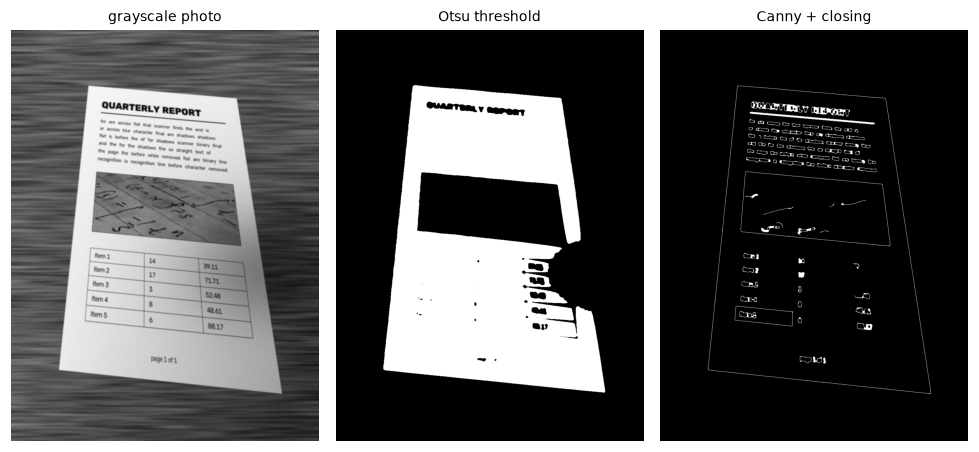
The shadow eats a large bite out of the Otsu mask. The edge map has a complete page outline, plus many small text edges, which the contour step ignores; most of the wood grain is too weak to survive the blur and thresholds.
The largest convex quadrilateral
Contours of the edge map come in all sizes. Sort them by area, and take the first that is large (at least 10% of the image), simplifies to exactly four vertices with approxPolyDP at 2% of its perimeter, is convex, and doesn't touch the image border (the closing can glue wood grain and the image edge into big false quadrilaterals). If none qualifies, retry with lower Canny thresholds, since a pale table gives weaker page edges. If that also fails, fall back to the rotated bounding rectangle of the largest bright region, with a warning.
RETR_LIST rather than RETR_EXTERNAL matters here: the page outline can end up nested inside a large wood-grain contour, and RETR_EXTERNAL would hide it.
Corner ordering uses the angle around the centroid, which works for any rotation, then starts the list at the point with the smallest \(x + y\):
def order_corners(pts):
    """Order 4 points as TL, TR, BR, BL (by angle around the centroid, then start at top-left)."""
    pts = np.asarray(pts, np.float32).reshape(4, 2)
    c = pts.mean(axis=0)
    ang = np.arctan2(pts[:, 1] - c[1], pts[:, 0] - c[0])               # clockwise on screen (y down)
    pts = pts[np.argsort(ang)]
    start = np.argmin(pts.sum(axis=1))                                 # smallest x + y = top-left
    return np.roll(pts, -start, axis=0)


def find_page_quad(gray, min_area_frac=0.1, scales=(1.0, 0.6, 0.35)):
    """Largest convex 4-vertex contour, trying progressively lower edge thresholds;
    falls back to the min-area rectangle of the largest bright region."""
    min_area = min_area_frac * gray.size
    for scale in scales:
        contours, _ = cv2.findContours(page_mask(gray, scale), cv2.RETR_LIST, cv2.CHAIN_APPROX_NONE)
        for c in sorted(contours, key=cv2.contourArea, reverse=True)[:10]:
            if cv2.contourArea(c) < min_area:
                break
            peri = cv2.arcLength(c, True)
            approx = cv2.approxPolyDP(c, 0.02 * peri, True)
            pts = approx.reshape(-1, 2)
            touches_border = (pts.min() <= 2 or np.any(pts[:, 0] >= gray.shape[1] - 3)
                              or np.any(pts[:, 1] >= gray.shape[0] - 3))
            if len(approx) == 4 and cv2.isContourConvex(approx) and not touches_border:
                return order_corners(approx), c
    print("warning: no quadrilateral found, using the fallback")
    # Fallback: Otsu threshold (paper is brighter than the table) and a rotated rectangle
    _, th = cv2.threshold(cv2.GaussianBlur(gray, (0, 0), 3), 0, 255, cv2.THRESH_BINARY + cv2.THRESH_OTSU)
    contours, _ = cv2.findContours(th, cv2.RETR_EXTERNAL, cv2.CHAIN_APPROX_NONE)
    c = max(contours, key=cv2.contourArea)
    return order_corners(cv2.boxPoints(cv2.minAreaRect(c))), c


quad, contour = find_page_quad(gray)
print("detected corners (TL, TR, BR, BL):\n", quad)
Part B: Corners
Ordering and raw error
The ordering function must give the same answer for every input order. There are \(4! = 24\) permutations; test them all:
def corner_errors(found, truth):
    return np.linalg.norm(np.asarray(found) - np.asarray(truth), axis=1)


ok = sum(np.allclose(order_corners(np.array(p)), true_corners) for p in itertools.permutations(true_corners))
print(f"order_corners correct on {ok}/24 permutations")
raw_err = corner_errors(quad, true_corners)
print("raw corner errors (px):", raw_err.round(2), "| mean %.2f, max %.2f" % (raw_err.mean(), raw_err.max()))
order_corners correct on 24/24 permutations
raw corner errors (px): [2.09 1.7  2.28 2.  ] | mean 2.02, max 2.28
The raw corners are about 2 pixels off, and always outward: the contour traces the outer boundary of a closed edge band that's a few pixels thick, and approxPolyDP keeps vertices that lie on the contour.
Sub-pixel refinement
Each side of the page is a straight line, and the contour has hundreds of points along it. Fitting a line to those points averages away the noise and the band's thickness. For each side: take the contour points in the middle 70% of the side and within 6 pixels of it, fit a line by total least squares (the direction of largest variance of the centered points, from the SVD; it minimizes perpendicular distances, unlike ordinary regression), and store it as a homogeneous line \((a, b, c)\). Adjacent lines meet at \(\mathbf{l}_1 \times \mathbf{l}_2\), exactly as in Geometric transformations.
def refine_corners(quad, contour, band=0.15):
    """Fit a line to the contour points along each side; intersect neighboring lines."""
    pts = contour.reshape(-1, 2).astype(np.float64)
    lines = []
    for i in range(4):
        p, q = quad[i].astype(np.float64), quad[(i + 1) % 4].astype(np.float64)
        d = q - p
        L = np.linalg.norm(d)
        n = np.array([-d[1], d[0]]) / L                                # unit normal of the side
        t = (pts - p) @ d / L ** 2                                     # position along the side, 0..1
        dist = np.abs((pts - p) @ n)
        sel = pts[(t > band) & (t < 1 - band) & (dist < 6)]            # middle of the side, near it
        if len(sel) < 10:
            sel = np.array([p, q])
        m = sel.mean(axis=0)
        _, _, Vt = np.linalg.svd(sel - m)                               # total least squares line
        normal = Vt[1]
        lines.append(np.array([normal[0], normal[1], -normal @ m]))    # ax + by + c = 0
    refined = []
    for i in range(4):
        X = np.cross(lines[i - 1], lines[i])                           # homogeneous intersection
        refined.append(X[:2] / X[2])
    return np.float32(refined)


refined = refine_corners(quad, contour)
ref_err = corner_errors(refined, true_corners)
print("refined corner errors (px):", ref_err.round(2), "| mean %.2f, max %.2f" % (ref_err.mean(), ref_err.max()))

fig, axes = plt.subplots(1, 4, figsize=(10, 2.8))
pts = contour.reshape(-1, 2)
for ax, name, q, r, t in zip(axes, ["top-left", "top-right", "bottom-right", "bottom-left"], quad, refined, true_corners):
    x0, y0 = int(t[0]) - 12, int(t[1]) - 12
    ax.imshow(gray[y0:y0 + 25, x0:x0 + 25], cmap="gray", extent=(x0 - 0.5, x0 + 24.5, y0 + 24.5, y0 - 0.5))
    near = (np.abs(pts[:, 0] - t[0]) < 12) & (np.abs(pts[:, 1] - t[1]) < 12)
    ax.plot(pts[near, 0], pts[near, 1], ".", color="orange", ms=3, label="contour")
    ax.plot(*q, "rx", ms=9, mew=2, label="raw")
    ax.plot(*r, "g+", ms=11, mew=2, label="refined")
    ax.plot(*t, "o", mfc="none", mec="cyan", ms=9, mew=1.5, label="true")
    ax.set_title(name, fontsize=9); ax.axis("off")
axes[0].legend(fontsize=7, loc="lower right")
plt.tight_layout()
plt.show()
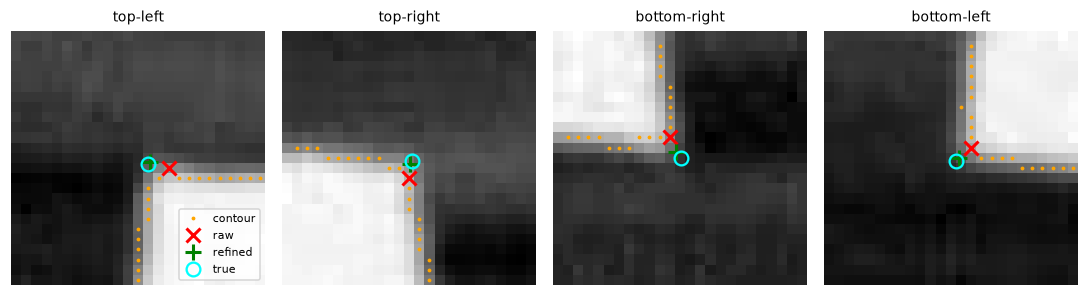
The raw corners (red) sit on the contour, a pixel or two outside the page. The refined corners (green) land within a pixel of the truth (cyan).
Refinement cuts the error by a factor of about 4, to under half a pixel on average.
Part C: Rectify
The homography from the refined corners to an upright A4 rectangle, with the normalized DLT. The width is the average of the top and bottom side lengths, which keeps roughly the photo's resolution, and the height is \(\sqrt{2}\) times that. For the warp, cubic interpolation: we're enlarging parts of the page (the far side is compressed in the photo), and text edges stay crisper than with bilinear. The border mode replicates edge pixels so that any sub-pixel overshoot at the page boundary doesn't bring in black.
def homography_dlt(src, dst):
    """Homography mapping src -> dst ((N, 2) arrays of (x, y), N >= 4): normalized DLT."""
    def normalizer(pts):
        m = pts.mean(axis=0)
        s = np.sqrt(2) / np.mean(np.linalg.norm(pts - m, axis=1))
        return np.array([[s, 0, -s * m[0]], [0, s, -s * m[1]], [0, 0, 1]])

    src, dst = np.asarray(src, np.float64), np.asarray(dst, np.float64)
    Ts, Td = normalizer(src), normalizer(dst)
    ps = np.c_[src, np.ones(len(src))] @ Ts.T
    pd = np.c_[dst, np.ones(len(dst))] @ Td.T
    rows = []
    for (x, y, _), (xp, yp, _) in zip(ps, pd):
        rows.append([-x, -y, -1, 0, 0, 0, xp * x, xp * y, xp])
        rows.append([0, 0, 0, -x, -y, -1, yp * x, yp * y, yp])
    _, _, Vt = np.linalg.svd(np.array(rows))
    H = np.linalg.inv(Td) @ Vt[-1].reshape(3, 3) @ Ts
    return H / H[2, 2]


def rectify(img, quad, ratio=A4_RATIO):
    """Warp the quadrilateral to an upright rectangle with the given height/width ratio."""
    tl, tr, br, bl = quad
    width = int(round((np.linalg.norm(tr - tl) + np.linalg.norm(br - bl)) / 2))
    height = int(round(width * ratio))
    dst = np.float32([[0, 0], [width - 1, 0], [width - 1, height - 1], [0, height - 1]])
    H = homography_dlt(quad, dst)
    return cv2.warpPerspective(img, H, (width, height), flags=cv2.INTER_CUBIC,
                               borderMode=cv2.BORDER_REPLICATE), H


warped, H = rectify(gray, refined)
h_out, w_out = warped.shape
dst = np.float32([[0, 0], [w_out - 1, 0], [w_out - 1, h_out - 1], [0, h_out - 1]])
print("DLT matches cv2.getPerspectiveTransform:",
      np.allclose(H, cv2.getPerspectiveTransform(np.float32(refined), dst), atol=1e-6))
print(f"scan size: {w_out} x {h_out} | height/width = {h_out / w_out:.4f} (sqrt 2 = {np.sqrt(2):.4f})")
DLT matches cv2.getPerspectiveTransform: True
scan size: 582 x 823 | height/width = 1.4141 (sqrt 2 = 1.4142)
Part D: Clean up
Illumination correction
A camera pixel records roughly reflectance × illumination: the paper's whiteness (or the ink's darkness) times the light falling on that spot. Under a shadow, both paper and ink get darker by the same factor. So the right correction is division: estimate the illumination (what the paper alone would look like) at every pixel, and divide it out. Subtracting would remove the same amount everywhere, leaving the ink in the shadow too light relative to its surroundings.
To estimate the paper's brightness, remove the ink: a grayscale closing with a 31 × 31 disk (larger than any stroke) replaces dark strokes with the surrounding paper level (Morphology and classical segmentation), and a blur removes the blockiness. Then gray / background × 235 makes the paper uniformly light.
Binarization
Adaptive Gaussian thresholding with a 25-pixel block (several stroke widths) and an offset of 15 (well above the paper's noise after correction). Here are the four variants from the brief, scored with the ink F1:
def flatten_illumination(gray, kernel=31):
    """Estimate the paper brightness with a closing (removes dark text) and divide it out."""
    se = cv2.getStructuringElement(cv2.MORPH_ELLIPSE, (kernel, kernel))
    background = cv2.morphologyEx(gray, cv2.MORPH_CLOSE, se)
    background = cv2.GaussianBlur(background, (0, 0), kernel / 4)
    flat = gray.astype(np.float64) / np.maximum(background, 1) * 235
    return np.clip(flat, 0, 255).astype(np.uint8), background


def binarize(flat, block=25, C=15):
    return cv2.adaptiveThreshold(flat, 255, cv2.ADAPTIVE_THRESH_GAUSSIAN_C, cv2.THRESH_BINARY, block, C)


def ink_f1(binary, page, tol=1):
    """F1 score of 'ink' pixels against the clean page (resized to the scan's size), with a
    tolerance of `tol` pixels, ignoring the photographic figure, whose 'true' ink is undefined."""
    h, w = binary.shape
    truth = cv2.resize(page, (w, h), interpolation=cv2.INTER_AREA) < 140
    pred = binary == 0
    keep = np.ones((h, w), bool)
    sy, sx = h / PAGE_H, w / PAGE_W
    keep[int(325 * sy):int(520 * sy), int(55 * sx):int(545 * sx)] = False     # the figure block
    near_truth = cv2.dilate(truth.astype(np.uint8), np.ones((2 * tol + 1,) * 2, np.uint8)) > 0
    near_pred = cv2.dilate(pred.astype(np.uint8), np.ones((2 * tol + 1,) * 2, np.uint8)) > 0
    precision = np.count_nonzero(pred & near_truth & keep) / max(np.count_nonzero(pred & keep), 1)
    recall = np.count_nonzero(truth & near_pred & keep) / max(np.count_nonzero(truth & keep), 1)
    return 2 * precision * recall / max(precision + recall, 1e-9)


flat, background = flatten_illumination(warped)
final = binarize(flat)
_, otsu_raw = cv2.threshold(warped, 0, 255, cv2.THRESH_BINARY + cv2.THRESH_OTSU)
_, otsu_flat = cv2.threshold(flat, 0, 255, cv2.THRESH_BINARY + cv2.THRESH_OTSU)
for name, b in [("Otsu, uncorrected", otsu_raw), ("adaptive, uncorrected", binarize(warped)),
                ("Otsu, corrected", otsu_flat), ("adaptive, corrected (final)", final)]:
    print(f"{name:28s} ink F1 = {ink_f1(b, page):.3f}")

fig, axes = plt.subplots(1, 5, figsize=(10, 3.4))
for ax, (im, t) in zip(axes, [(warped, "rectified"), (background, "background estimate"),
                              (flat, "divided by background"), (otsu_raw, "Otsu, uncorrected"),
                              (final, "final scan")]):
    ax.imshow(im, cmap="gray", vmin=0, vmax=255); ax.set_title(t, fontsize=9); ax.axis("off")
plt.tight_layout()
plt.show()
Otsu, uncorrected            ink F1 = 0.590
adaptive, uncorrected        ink F1 = 0.959
Otsu, corrected              ink F1 = 0.951
adaptive, corrected (final)  ink F1 = 0.958
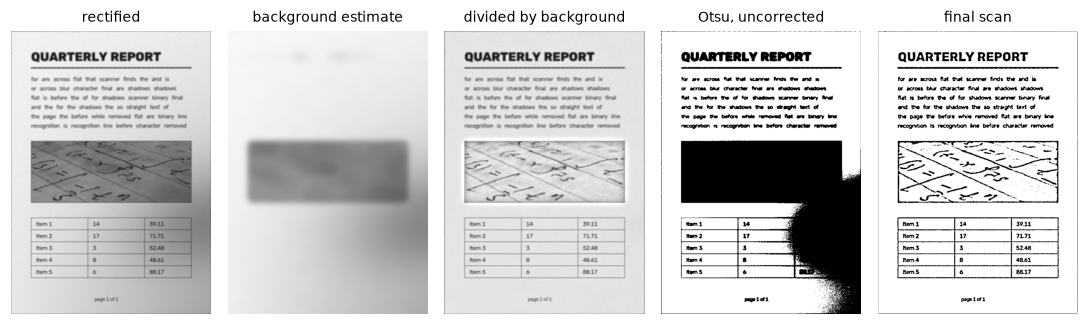
Dividing by the background estimate removes the gradient and the shadow. Global Otsu on the uncorrected warp turns the shadowed region black; the final scan is clean everywhere.
Global Otsu on the uncorrected warp fails badly (F1 0.59): it can't handle the shadow. Either fix works on its own: correcting the illumination makes even a global threshold good, and an adaptive threshold handles the shadow without correction. The final pipeline uses both, because the corrected grayscale image is useful in itself (it's the "enhanced grayscale" mode of scanning apps), and the combination is the most robust to darker shadows. In the figure you can also see the method's known limitation: the large dark figure block confuses the background estimate, which is why the F1 excludes it.
Part E: Evaluate
Seeds 0 to 4
def scan(photo_rgb):
    """The whole pipeline. Returns a dict with every intermediate result."""
    gray = cv2.cvtColor(photo_rgb, cv2.COLOR_RGB2GRAY)
    quad, contour = find_page_quad(gray)
    refined = refine_corners(quad, contour)
    warped, H = rectify(gray, refined)
    flat, background = flatten_illumination(warped)
    binary = binarize(flat)
    return dict(gray=gray, edges=page_mask(gray), quad=quad, refined=refined, warped=warped,
                background=background, flat=flat, binary=binary, H=H)


print(f"{'seed':>4s} {'raw err mean/max':>17s} {'refined mean/max':>17s} {'size':>9s} {'ink F1':>7s} {'time':>7s}")
for seed in range(5):
    ph, truth, pg = make_test_photo(seed)
    t0 = time.perf_counter()
    r = scan(ph)
    dt = time.perf_counter() - t0
    e_raw, e_ref = corner_errors(r["quad"], truth), corner_errors(r["refined"], truth)
    h, w = r["binary"].shape
    print(f"{seed:4d} {e_raw.mean():8.2f} / {e_raw.max():5.2f} {e_ref.mean():8.2f} / {e_ref.max():5.2f}"
          f" {w:4d}x{h:<4d} {ink_f1(r['binary'], pg):7.3f} {dt * 1000:5.0f} ms")
seed  raw err mean/max  refined mean/max      size  ink F1    time
   0     2.02 /  2.28     0.45 /  0.74  582x823    0.958    33 ms
   1     1.67 /  2.13     0.34 /  0.65  562x795    0.940    55 ms
   2     1.82 /  2.38     0.43 /  0.65  638x902    0.961    40 ms
   3     1.88 /  2.25     0.31 /  0.38  614x868    0.953    38 ms
   4     2.13 /  2.54     0.42 /  0.52  591x836    0.959    61 ms
Every seed meets the checklist: raw corners within about 2 pixels, refined corners within half a pixel on average (under 0.75 pixels worst case), an aspect ratio of \(\sqrt{2}\), ink F1 above 0.94, and well under a second per photo.
Stress tests
Now, break it. Four conditions: a paler table (closer to the paper's brightness), a page rotated by 50° and 90° (by rotating the whole photo), and a finger covering a corner:
original_wood = wood_background

def stress(name, ph, truth, pg):
    r = scan(ph)
    e = corner_errors(r["refined"], order_corners(truth))
    print(f"{name:24s} refined corner error mean {e.mean():7.2f} px | ink F1 {ink_f1(r['binary'], pg):.3f}")
    return r

results = {}
for k in [1.6, 1.9]:
    wood_background = lambda rng, k=k: np.clip(original_wood(rng) * k, 0, 255)
    results[f"pale table x{k}"] = stress(f"pale table x{k}", *make_test_photo(0))
wood_background = original_wood

ph, truth, pg = make_test_photo(0)
for ang in [50, 90]:
    M = cv2.getRotationMatrix2D((480, 640), ang, 0.7)
    rot = cv2.warpAffine(ph, M, (960, 1280), borderMode=cv2.BORDER_REFLECT)
    results[f"rotated {ang}"] = stress(f"rotated {ang} deg", rot, cv2.transform(truth.reshape(-1, 1, 2), M).reshape(-1, 2), pg)
covered = ph.copy()
cv2.circle(covered, tuple(int(v) for v in truth[1]), 70, (180, 120, 100), -1)    # a fingertip
results["finger"] = stress("finger over a corner", covered, truth, pg)

fig, axes = plt.subplots(1, 4, figsize=(10, 3.6))
for ax, key in zip(axes, ["pale table x1.6", "pale table x1.9", "rotated 50", "finger"]):
    ax.imshow(results[key]["binary"], cmap="gray"); ax.set_title(key, fontsize=9); ax.axis("off")
plt.tight_layout()
plt.show()
pale table x1.6          refined corner error mean    0.99 px | ink F1 0.962
warning: no quadrilateral found, using the fallback
pale table x1.9          refined corner error mean  260.63 px | ink F1 0.131
rotated 50 deg           refined corner error mean    0.22 px | ink F1 0.179
rotated 90 deg           refined corner error mean    0.32 px | ink F1 0.179
finger over a corner     refined corner error mean   17.94 px | ink F1 0.202
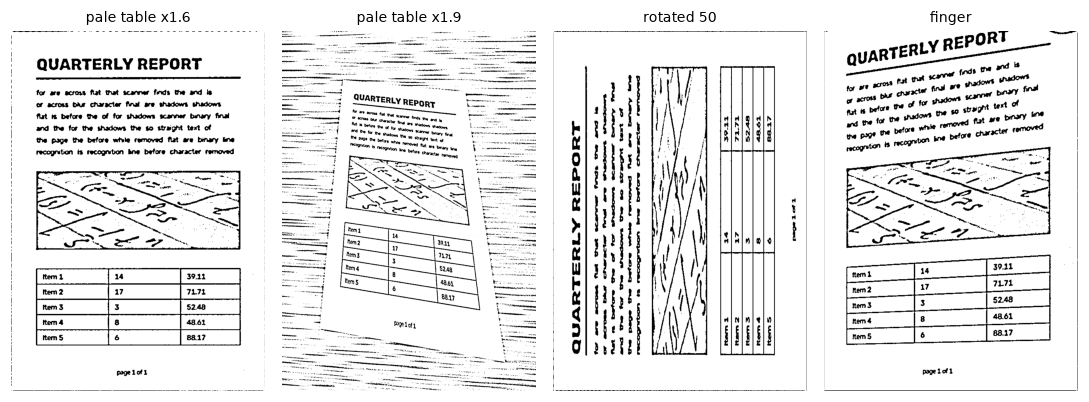
A moderately pale table still works. A very pale one defeats the edge detector. A rotated page is found perfectly but comes out sideways. A covered corner bends the page.
Each failure points to the step that broke:
- Very pale table (×1.9). The page edges become weak where the lighting is dim, because the table is now nearly as bright as the shadowed paper; the median-based Canny thresholds also rise with the overall brightness. No closed four-sided outline survives at any of the three threshold scales, and in the Otsu fallback, the brightest stretches of the pale table join the paper in one bright region, so its bounding rectangle is far too big: the "scan" shows a small, tilted page surrounded by table. The retry with lower thresholds was itself the fix for the ×1.6 case, which failed in an earlier version of this solution. Next steps: thresholds from the gradient-magnitude distribution rather than intensity, or a line-based detector (Hough lines, Level 2) that can find the four sides even when the outline has gaps.
- Rotated 50° and 90°. The corners are found to a fraction of a pixel, but the scan comes out sideways: "top-left" is defined geometrically (the smallest \(x + y\)), and a page photographed sideways has no geometric top. Choosing the correct orientation needs content: the text-line orientation (gradient histograms or projection profiles from Edges and gradients give the 0° vs 90° choice) and then a 0° vs 180° decision, which in practice needs OCR confidence or a small classifier.
- A finger over a corner. The outline is no longer four-sided: the fingertip's edge becomes part of the contour, and
approxPolyDPcuts the corner off. The refined corner lands 70 pixels away, and the page is bent. A fix: fit lines to the sides (the parts that are visible) and intersect them, ignoring the corner region, which is exactly whatrefine_cornersdoes when it starts from a good quadrilateral; you'd need a line-based detector to find the sides in the first place.
Report: design choices
- Edges over thresholds for finding the page, because local contrast across the page edge survives shadows and gradients that break any global threshold. Threshold-based detection is the fallback.
- The largest convex, non-border quadrilateral from
approxPolyDP, with retries at lower edge thresholds. This is simple and fast, and the checks (area, convexity, four vertices, not touching the image border) reject almost every false candidate. - Sub-pixel corner refinement by total-least-squares line fits on each side and homogeneous intersections. It removes the outward bias of contour vertices and cuts the corner error by a factor of about 4, to under a pixel.
- Normalized DLT for the homography and A4 aspect ratio for the output, with the width taken from the photo so the resolution is roughly preserved. Cubic interpolation for crisper text.
- Illumination correction by division, because light multiplies reflectance, with a closing-based background estimate. Adaptive Gaussian thresholding for the final binarization; together they're robust to shadows that defeat global Otsu.
- What I'd try next: a Hough-line page detector for occluded corners and low-contrast tables; text-orientation detection; Sauvola binarization for faint print; and a color mode.
Next
You've finished Level 1. Move on to Level 2: Classical computer vision.