Geometric Transformations
Level 1 · Chapter 6 · ⏱️ ~60 min read · Prerequisites: Images as arrays, Morphology and classical segmentation; the ML Handbook's Linear algebra helps
Every operation so far changed pixel values. Geometric transformations change pixel positions: they rotate, scale, shear, and re-project images. This chapter covers homogeneous coordinates, translation, rotation, scaling, and shear, affine and projective transforms, homographies (estimated from point pairs with the DLT), forward versus inverse mapping, interpolation (nearest, bilinear implemented from scratch, and bicubic), and a preview of document rectification.
Why it matters
Wei built a receipt-scanning feature for an expense app. The user photographs a receipt, the app finds its four corners, and a perspective warp turns the slanted photo into a flat, rectangular scan. The demo went well, and then the bug reports arrived: some scans came out mirrored, some were twisted into bow-tie shapes, and enlarged scans were covered in a fine pattern of black dots.
Both bugs came from treating the warp as a black box. The corner detector returned the four corners in whatever order the contour happened to start, so sometimes "top-left" was matched to "top-right", and the homography dutifully mirrored the page. And Wei's first implementation pushed each input pixel to its new location (forward mapping), which leaves gaps whenever the output is larger than the input.
Once you know what a homography is, how it's estimated from four point pairs, and why every warp should loop over output pixels and look backward, both bugs are obvious, and both fixes are three lines. This chapter builds those pieces from scratch, and ends with exactly the rectification step that your capstone document scanner needs.
Concepts
Transformations move coordinates, not values
A geometric transformation is a function that maps each point \(\mathbf{p} = (x, y)\) in one image to a point \(\mathbf{p}' = T(\mathbf{p})\) in another. The output image is defined by \(g(T(\mathbf{p})) = f(\mathbf{p})\): the value that was at \(\mathbf{p}\) now appears at \(T(\mathbf{p})\). Resizing, rotating, flipping, cropping, correcting perspective, undistorting lenses, and the data augmentations used to train CNNs are all geometric transformations.
Throughout this chapter, \(x\) is the column (rightward) and \(y\) is the row (downward). This is the convention of OpenCV's geometric functions, which take and return points as (x, y), while NumPy indexes arrays as [row, col] = [y, x]. Keeping the two straight is half the battle.
Homogeneous coordinates
Linear maps are matrix multiplications: scaling by \(s\) is \(\mathbf{p}' = s\mathbf{p}\), and rotating by \(\theta\) is \(\mathbf{p}' = R\mathbf{p}\). But translation, \(\mathbf{p}' = \mathbf{p} + \mathbf{t}\), isn't linear (it moves the origin), so it can't be a \(2 \times 2\) matrix. That's awkward: you'd like to chain "translate, rotate, translate back" into one matrix.
Homogeneous coordinates fix this by adding a third coordinate. The point \((x, y)\) is represented by the 3-vector \((x, y, 1)\), and more generally by any multiple \((wx, wy, w)\) with \(w \neq 0\). To go back, divide by the last coordinate: \((X, Y, W) \mapsto (X/W, Y/W)\). Now translation is a matrix multiplication:
Every transform in this chapter becomes a \(3 \times 3\) matrix, and chaining transforms becomes multiplying matrices. One subtlety: matrices apply right to left. \(\mathbf{M} = \mathbf{A}\mathbf{B}\) applies \(\mathbf{B}\) first, then \(\mathbf{A}\). The inverse transform is the inverse matrix.
Two bonuses. Vectors with \(w = 0\), like \((1, 0, 0)\), are points at infinity: the direction "infinitely far to the right", where parallel horizontal lines meet. And lines also have homogeneous coordinates: the line \(ax + by + c = 0\) is the vector \(\mathbf{l} = (a, b, c)\), a point \(\mathbf{p}\) lies on it exactly when \(\mathbf{l}^\top\mathbf{p} = 0\), the line through two points is their cross product \(\mathbf{p}_1 \times \mathbf{p}_2\), and the intersection of two lines is \(\mathbf{l}_1 \times \mathbf{l}_2\). This is the language of projective geometry, used throughout Level 2.
The basic transforms
With homogeneous coordinates, the building blocks are:
Rotation by \(\theta\) about the origin follows from where the unit vectors go: \((1, 0) \mapsto (\cos\theta, \sin\theta)\) and \((0, 1) \mapsto (-\sin\theta, \cos\theta)\), which become the matrix's columns. Because \(y\) points down in images, a positive \(\theta\) in this matrix turns things clockwise on screen. Scaling with \(s_x \neq s_y\) stretches unevenly; a negative factor flips. Shear slides each row sideways in proportion to its \(y\), turning rectangles into parallelograms, like italic text.
To rotate about a center \(\mathbf{c}\) rather than the origin, translate \(\mathbf{c}\) to the origin, rotate, and translate back: \(\mathbf{M} = T(\mathbf{c})\,R(\theta)\,T(-\mathbf{c})\). OpenCV's cv2.getRotationMatrix2D(center, angle, scale) returns exactly this (as the top two rows), with one twist: its positive angle means counterclockwise on screen, so it uses \(R(-\theta)\).
The hierarchy of 2D transforms
Composing the building blocks gives a hierarchy of transform families. Each family has more degrees of freedom (DOF) and preserves fewer properties:
| Transform | Matrix form | DOF | Preserves | Example |
|---|---|---|---|---|
| Translation | \(\begin{pmatrix} I & \mathbf{t} \\ \mathbf{0}^\top & 1 \end{pmatrix}\) | 2 | Orientation, lengths, angles | Panning, cropping |
| Euclidean (rigid) | \(\begin{pmatrix} R & \mathbf{t} \\ \mathbf{0}^\top & 1 \end{pmatrix}\) | 3 | Lengths, angles, areas | A part rotated on a conveyor |
| Similarity | \(\begin{pmatrix} sR & \mathbf{t} \\ \mathbf{0}^\top & 1 \end{pmatrix}\) | 4 | Angles, ratios of lengths | Zoom plus rotation, face alignment |
| Affine | \(\begin{pmatrix} A & \mathbf{t} \\ \mathbf{0}^\top & 1 \end{pmatrix}\) | 6 | Parallel lines, ratios along a line, midpoints | Shear, uneven scaling, satellite images |
| Projective (homography) | \(\begin{pmatrix} h_{11} & h_{12} & h_{13} \\ h_{21} & h_{22} & h_{23} \\ h_{31} & h_{32} & h_{33} \end{pmatrix}\) | 8 | Straight lines (and cross-ratios) | A tilted photo of a document, a floor, a screen |
An affine transform is any linear map \(A\) (2 × 2, invertible) plus a translation. It maps parallel lines to parallel lines, so a rectangle becomes a parallelogram. Six unknowns means three point pairs determine it (each pair gives two equations): cv2.getAffineTransform(src3, dst3).
A projective transform, or homography, uses all nine entries. Its bottom row is no longer \((0, 0, 1)\), so after multiplying you must divide by the third coordinate:
That division makes it nonlinear in \((x, y)\), and it's what creates perspective: the denominator grows with distance along some direction, shrinking things that are "farther away". Parallel lines can now converge (the image of the point at infinity \((1, 0, 0)\) is the finite point \((h_{11}, h_{21}, h_{31})\), a vanishing point). Straight lines stay straight, but ratios of lengths and midpoints are not preserved. Since scaling \(\mathbf{H}\) by any nonzero constant gives the same mapping (it cancels in the division), a homography has \(9 - 1 = 8\) degrees of freedom, and four point pairs determine it, as long as no three of them are collinear.
When does a homography describe the relation between two images? In two cases, which you'll derive from the camera model in Level 2: when the scene is a plane (a document, a wall, a floor, a sports field, a screen) seen from any two viewpoints, and when the camera only rotates about its center (panoramas). A photo of a page is a homography of the flat page. That's why four corners are enough to rectify it.
import numpy as np
import cv2
import matplotlib.pyplot as plt
from skimage import data, transform

def T(tx, ty):
    return np.array([[1, 0, tx], [0, 1, ty], [0, 0, 1]], float)

def R(deg):
    t = np.deg2rad(deg)
    return np.array([[np.cos(t), -np.sin(t), 0], [np.sin(t), np.cos(t), 0], [0, 0, 1]])

def S(sx, sy):
    return np.diag([sx, sy, 1.0])

c = (50, 40)
ours = T(*c) @ R(-30) @ T(-c[0], -c[1])                 # -30: OpenCV's positive angle is counterclockwise
print("matches cv2.getRotationMatrix2D:", np.allclose(ours[:2], cv2.getRotationMatrix2D(c, 30, 1.0)))
print("center is a fixed point:", ours @ [50, 40, 1])
print("composition order matters:", np.allclose(T(10, 0) @ R(90), R(90) @ T(10, 0)))

def apply_h(H, pts):
    """Apply a 3x3 transform to an (N, 2) array of (x, y) points, with the perspective divide."""
    ph = np.c_[pts, np.ones(len(pts))] @ H.T
    return ph[:, :2] / ph[:, 2:]

src3 = np.float32([[0, 0], [100, 0], [0, 100]])
dst3 = np.float32([[10, 20], [110, 40], [-10, 130]])
A = cv2.getAffineTransform(src3, dst3)
print("affine from 3 pairs:\n", np.round(A, 3))
matches cv2.getRotationMatrix2D: True
center is a fixed point: [50. 40.  1.]
composition order matters: False
affine from 3 pairs:
 [[ 1.  -0.2 10. ]
 [ 0.2  1.1 20. ]]
Let's see the whole hierarchy on one image. A grid drawn over the cameraman makes the effect on lines visible:
img = data.camera()
grid = img.copy()
grid[::64, :] = 255; grid[:, ::64] = 255
h, w = grid.shape
Ms = {
    "similarity": T(w / 2, h / 2) @ R(-20) @ S(0.7, 0.7) @ T(-w / 2, -h / 2),
    "affine (shear)": T(w / 2, h / 2) @ np.array([[0.8, 0.35, 0], [0.1, 0.7, 0], [0, 0, 1]]) @ T(-w / 2, -h / 2),
}
corners = np.float32([[0, 0], [w, 0], [w, h], [0, h]])
squeezed = np.float32([[150, 60], [380, 90], [470, 470], [30, 420]])
Ms["projective"] = cv2.getPerspectiveTransform(corners, squeezed)

fig, axes = plt.subplots(1, 4, figsize=(10, 2.7))
axes[0].imshow(grid, cmap="gray"); axes[0].set_title("original", fontsize=9)
for ax, (name, M) in zip(axes[1:], Ms.items()):
    ax.imshow(cv2.warpPerspective(grid, M, (w, h)), cmap="gray"); ax.set_title(name, fontsize=9)
for ax in axes:
    ax.axis("off")
plt.tight_layout()
plt.show()

Hp = Ms["projective"]
mid_then_map = apply_h(Hp, np.array([[w / 2, h / 2]]))[0]
map_then_mid = apply_h(Hp, np.array([[0.0, 0.0], [w, h]])).mean(axis=0)
print("homography: image of the midpoint", mid_then_map.round(1), "vs midpoint of the images", map_then_mid.round(1))
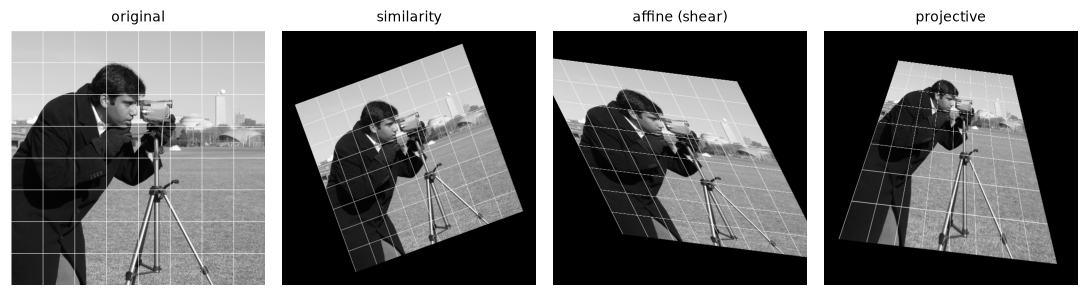
Similarity keeps the grid square. Affine keeps lines parallel but changes angles. Projective keeps lines straight but lets parallel lines converge.
The midpoint check makes "not preserved" concrete: under the homography, the image of the diagonal's midpoint is about 80 pixels away from the midpoint of the diagonal's mapped endpoints. Under an affine map, these would coincide.
Estimating a homography: the DLT
Given four or more point pairs \((x_i, y_i) \leftrightarrow (x'_i, y'_i)\), how do you find \(\mathbf{H}\)? Start from the projection equations and multiply out the denominators:
Both are linear in the nine unknowns \(\mathbf{h} = (h_{11}, h_{12}, \dots, h_{33})\). Move everything to one side and each pair gives two rows of a matrix \(\mathbf{A}\):
Stack the rows for all \(n\) pairs into a \(2n \times 9\) matrix and solve \(\mathbf{A}\mathbf{h} = \mathbf{0}\). The trivial solution \(\mathbf{h} = \mathbf{0}\) is excluded by asking for \(\lVert \mathbf{h} \rVert = 1\) (fixing the scale ambiguity). With exactly four pairs, \(\mathbf{A}\) is \(8 \times 9\) with a one-dimensional null space, and the solution is exact. With more pairs and noisy points, there's no exact solution, so minimize \(\lVert \mathbf{A}\mathbf{h} \rVert\) subject to \(\lVert \mathbf{h} \rVert = 1\). The answer is the right singular vector of \(\mathbf{A}\) for its smallest singular value: the last row of \(\mathbf{V}^\top\) in the SVD \(\mathbf{A} = \mathbf{U}\boldsymbol{\Sigma}\mathbf{V}^\top\). (This is the minimum of a quadratic form on the unit sphere, an eigenvector problem, as in the ML Handbook's Matrix decompositions.)
This is the direct linear transform (DLT). In practice, first normalize the points of each image (translate their centroid to the origin and scale their average distance to \(\sqrt{2}\)), solve, then undo the normalization. Pixel coordinates in the hundreds make the columns of \(\mathbf{A}\) differ in scale by a factor of \(10^4\) or more, and normalization makes the solution far more accurate with noisy points (Hartley's normalization; Exercise 5). cv2.getPerspectiveTransform solves the exact 4-point case; cv2.findHomography handles many points, with RANSAC to reject outliers (Level 2).
def homography_dlt(src, dst):
    """Homography mapping src -> dst ((N, 2) arrays of (x, y), N >= 4), via the DLT."""
    rows = []
    for (x, y), (xp, yp) in zip(src, dst):
        rows.append([-x, -y, -1, 0, 0, 0, xp * x, xp * y, xp])
        rows.append([0, 0, 0, -x, -y, -1, yp * x, yp * y, yp])
    _, _, Vt = np.linalg.svd(np.asarray(rows, float))
    H = Vt[-1].reshape(3, 3)
    return H / H[2, 2]

H_ours = homography_dlt(corners, squeezed)
H_cv = cv2.getPerspectiveTransform(corners, squeezed)
print("matches cv2.getPerspectiveTransform:", np.allclose(H_ours, H_cv))
print("corners map exactly:", np.allclose(apply_h(H_ours, corners), squeezed))
print("H (normalized so h33 = 1):\n", np.round(H_ours, 5))
matches cv2.getPerspectiveTransform: True
corners map exactly: True
H (normalized so h33 = 1):
 [[ 4.5697e-01 -2.6247e-01  1.5000e+02]
 [ 6.0430e-02  3.0986e-01  6.0000e+01]
 [ 2.0000e-05 -9.4000e-04  1.0000e+00]]
The bottom-row entries are tiny (about \(10^{-3}\) or less), but multiplied by coordinates in the hundreds they change the denominator by tens of percent: that's the perspective.
Forward versus inverse mapping
Now, how do you actually produce the output image? The obvious way is forward mapping: for each input pixel \(\mathbf{p}\), compute \(T(\mathbf{p})\), round it, and write the value there. It has two problems. When the transform enlarges anything (scaling up, or the near side of a perspective view), neighboring input pixels land more than one output pixel apart, leaving holes. Where it shrinks, several input pixels land on the same output pixel and overwrite each other. Rounding also jitters every pixel by up to half a pixel.
Inverse mapping turns the loop around. For each output pixel \(\mathbf{q}\), compute where it came from, \(\mathbf{p} = T^{-1}(\mathbf{q})\), and read the input there. Every output pixel gets exactly one value: no holes, no collisions. The catch is that \(\mathbf{p}\) is almost never at an integer position, so you must interpolate the input between pixel centers. Every serious warping function works this way. cv2.warpAffine and cv2.warpPerspective take the forward matrix and invert it internally (or take the inverse directly with the cv2.WARP_INVERSE_MAP flag), and cv2.remap takes the inverse map as explicit coordinate arrays. scikit-image's transform.warp expects the inverse map.
Interpolation
To read the image at a non-integer position \((x, y)\), estimate the value from nearby pixels:
- Nearest neighbor: round to the nearest pixel and take its value. Fast, and it never invents new values, which makes it the right choice for label maps and masks (blending class 3 and class 5 to get "class 4" would be nonsense). For photos it gives jagged, blocky results.
- Bilinear: blend the four surrounding pixels, linearly in each direction. Smooth, cheap, and the default almost everywhere. It slightly blurs.
- Bicubic: fit a cubic through the surrounding \(4 \times 4\) pixels, using a kernel with small negative lobes. Sharper than bilinear, and it can overshoot slightly near edges (values may need clipping).
- Lanczos: a windowed sinc over \(8 \times 8\) pixels. Sharper still, slower, with more ringing.
- Area (
cv2.INTER_AREA): for shrinking, average the input pixels that fall in each output pixel's footprint. This is an anti-aliasing filter built in (Chapter 4); the other methods sample and alias when you downscale a lot.
Bilinear interpolation, derived. Let \(x_0 = \lfloor x \rfloor\), \(y_0 = \lfloor y \rfloor\), and the fractional parts \(a = x - x_0\), \(b = y - y_0\), both in \([0, 1)\). First interpolate linearly along \(x\) on the two rows:
then linearly along \(y\) between them, \(f(y, x) \approx (1 - b)\, f_{\text{top}} + b\, f_{\text{bot}}\). Expanding gives four weights:
The weights are non-negative and sum to 1, and each is the area of the sub-rectangle opposite its pixel: the closer the sample is to a pixel, the larger the opposite rectangle, so the more that pixel counts. Doing \(x\) first or \(y\) first gives the same result.
Here's a complete perspective warp from scratch, with inverse mapping and bilinear interpolation, vectorized over all output pixels at once:
def bilinear_sample(img, xs, ys, fill=0.0):
    """Sample img at float coordinates (xs, ys) with bilinear interpolation; fill outside."""
    f = img.astype(np.float64)
    H, W = f.shape
    x0, y0 = np.floor(xs).astype(int), np.floor(ys).astype(int)
    a, b = xs - x0, ys - y0
    inside = (x0 >= 0) & (y0 >= 0) & (x0 < W - 1) & (y0 < H - 1)
    x0, y0 = np.clip(x0, 0, W - 2), np.clip(y0, 0, H - 2)
    out = ((1 - a) * (1 - b) * f[y0, x0] + a * (1 - b) * f[y0, x0 + 1]
           + (1 - a) * b * f[y0 + 1, x0] + a * b * f[y0 + 1, x0 + 1])
    return np.where(inside, out, fill)

def warp_perspective(img, H, out_size):
    """Inverse-mapping warp: for each output pixel, look up where it came from."""
    w_out, h_out = out_size                                    # (width, height), like OpenCV
    ys, xs = np.mgrid[:h_out, :w_out].astype(np.float64)
    src = np.stack([xs.ravel(), ys.ravel(), np.ones(xs.size)]) # homogeneous output coordinates
    back = np.linalg.inv(H) @ src
    sx, sy = back[0] / back[2], back[1] / back[2]              # perspective divide
    return bilinear_sample(img, sx, sy).reshape(h_out, w_out)

warped = warp_perspective(img, Hp, (w, h))
warped_cv = cv2.warpPerspective(img.astype(np.float32), Hp, (w, h), flags=cv2.INTER_LINEAR)
inner = warped > 0
inner = cv2.erode(inner.astype(np.uint8), np.ones((3, 3), np.uint8)) > 0     # skip the boundary pixels
print("vs cv2.warpPerspective: max diff %.4f, mean diff %.6f" % (np.abs(warped - warped_cv)[inner].max(),
                                                                 np.abs(warped - warped_cv)[inner].mean()))
sk = transform.warp(img.astype(np.float64), transform.ProjectiveTransform(matrix=np.linalg.inv(Hp)),
                    order=1, preserve_range=True)
print("vs skimage.transform.warp (order=1): max diff %.2e" % np.abs(warped - sk)[inner].max())
vs cv2.warpPerspective: max diff 0.0083, mean diff 0.000271
vs skimage.transform.warp (order=1): max diff 2.68e-11
The from-scratch warp matches scikit-image to round-off and OpenCV to within a hundredth of a gray level (OpenCV computes its coordinates in single precision). Note the conventions on display here: our function and OpenCV take the forward matrix and size as (width, height); scikit-image's warp takes the inverse transform.
Now the forward-mapping problem, side by side with inverse mapping, for a 1.8× enlargement with rotation:
crop = img[100:260, 180:340]
M = T(160, 160) @ R(-15) @ S(1.8, 1.8) @ T(-80, -80)          # enlarge 1.8x and rotate, centered
out_h = out_w = 320

forward = np.zeros((out_h, out_w))
hit = np.zeros((out_h, out_w), bool)
ys, xs = np.mgrid[:crop.shape[0], :crop.shape[1]]
dst = apply_h(M, np.c_[xs.ravel(), ys.ravel()]).round().astype(int)
ok = (dst[:, 0] >= 0) & (dst[:, 0] < out_w) & (dst[:, 1] >= 0) & (dst[:, 1] < out_h)
forward[dst[ok, 1], dst[ok, 0]] = crop.ravel()[ok]
hit[dst[ok, 1], dst[ok, 0]] = True
inverse = warp_perspective(crop, M, (out_w, out_h))
support = warp_perspective(np.ones_like(crop, float) * 255, M, (out_w, out_h)) > 254   # inside the warped crop
print(f"forward mapping: {np.count_nonzero(support & ~hit)} holes inside the image area "
      f"({np.mean(~hit[support]) * 100:.0f}% of it)")
print("inverse mapping: holes = 0 by construction")

fig, axes = plt.subplots(1, 3, figsize=(10, 3.4))
for ax, (im, t) in zip(axes, [(crop, "input crop (160×160)"), (forward, "forward mapping: holes"),
                              (inverse, "inverse mapping + bilinear")]):
    ax.imshow(im, cmap="gray", vmin=0, vmax=255); ax.set_title(t, fontsize=9); ax.axis("off")
plt.tight_layout()
plt.show()
forward mapping: 55344 holes inside the image area (69% of it)
inverse mapping: holes = 0 by construction
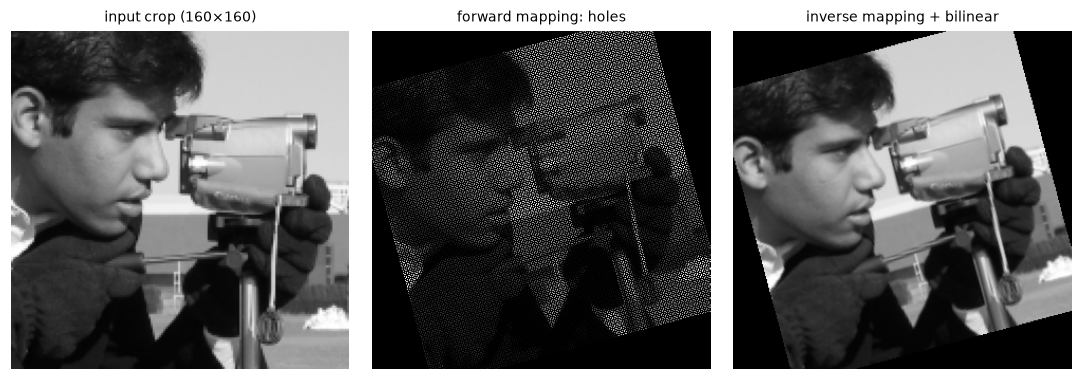
Forward mapping a 1.8× enlargement leaves most output pixels empty, in a regular pattern of black gaps. Inverse mapping fills every output pixel.
With a scale of 1.8, each input pixel covers about \(1.8^2 \approx 3.2\) output pixels, so forward mapping can fill at most a third of them. That's Wei's black-dot pattern.
Comparing interpolation methods
Interpolation quality matters most in two situations: enlarging (you see the interpolation kernel directly) and repeated warps (errors accumulate). Here's both:
eye = img[90:130, 230:270]                                      # 40 x 40 crop, enlarged 8x
methods = [("nearest", cv2.INTER_NEAREST), ("bilinear", cv2.INTER_LINEAR), ("bicubic", cv2.INTER_CUBIC)]

def psnr(a, b):
    return 10 * np.log10(255 ** 2 / np.mean((a.astype(float) - b.astype(float)) ** 2))

center = np.hypot(*np.mgrid[-256:256, -256:256]) < 180          # region that stays inside after rotating
for name, flag in methods:
    out = img.copy()
    for _ in range(12):                                          # 12 x 30 deg = a full turn
        out = cv2.warpAffine(out, cv2.getRotationMatrix2D((255.5, 255.5), 30, 1.0), (512, 512), flags=flag)
    print(f"{name:9s} after 12 rotations of 30 deg: PSNR {psnr(out[center], img[center]):5.1f} dB")

fig, axes = plt.subplots(1, 3, figsize=(10, 3.5))
for ax, (name, flag) in zip(axes, methods):
    ax.imshow(cv2.resize(eye, None, fx=8, fy=8, interpolation=flag), cmap="gray", vmin=0, vmax=255)
    ax.set_title(f"{name} (8× enlargement)", fontsize=9); ax.axis("off")
plt.tight_layout()
plt.show()
nearest   after 12 rotations of 30 deg: PSNR  28.4 dB
bilinear  after 12 rotations of 30 deg: PSNR  26.3 dB
bicubic   after 12 rotations of 30 deg: PSNR  31.5 dB
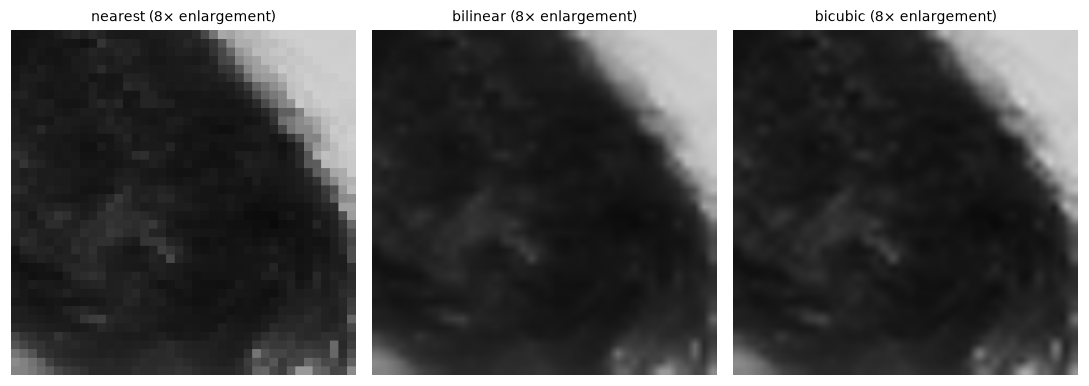
Nearest neighbor shows the pixel grid as blocks. Bilinear is smooth but soft, with faint star-shaped artifacts. Bicubic is smooth and visibly crisper.
Each bilinear resampling is a slight blur, and twelve of them add up, so bilinear scores lowest. Nearest neighbor never blurs; each step only moves pixels to a neighboring grid position, so its PSNR stays higher, but those small displacements accumulate into ragged edges, which PSNR doesn't penalize much. Bicubic's sharper kernel loses the least. The practical lesson: compose transforms into one matrix and resample once, rather than warping step by step. In a data-augmentation pipeline, for example, combine the rotation, scaling, and shear into a single affine matrix.
Document rectification
Now the payoff: turning a photo of a page into a flat scan. The page is a plane, so the photo is a homography of it. If you know where the page's four corners are in the photo, you can compute the homography that sends them to the corners of an upright rectangle, and warp. Three details matter:
- Corner order. The four photo corners must be matched to the rectangle's corners in the same order: top-left, top-right, bottom-right, bottom-left. A simple, robust-enough rule for pages that aren't rotated by more than about 45°: the top-left corner has the smallest \(x + y\), the bottom-right the largest; the top-right has the smallest \(y - x\), the bottom-left the largest. Mismatched order produces a mirrored or bow-tie warp, Wei's first bug.
- Output size and aspect ratio. A homography from four points can't tell you the page's true aspect ratio without knowing the camera (that needs the calibration of Level 2). If you know the paper size, use it: A4 is \(210 \times 297\) mm, a ratio of \(1 : \sqrt{2}\). Otherwise, estimate it from the average lengths of opposite sides.
- Resolution. Choose an output size that roughly preserves the photo's resolution (around the longer measured side length), so you neither throw away detail nor invent it.
Here's a synthetic test: a page with text, warped into a "photo" with a known homography, then rectified using the true corners. The capstone does the hard part, finding the corners automatically.
def order_corners(pts):
    """Return the 4 points ordered TL, TR, BR, BL (for pages rotated less than ~45 degrees)."""
    pts = np.asarray(pts, np.float32)
    s, d = pts.sum(axis=1), pts[:, 1] - pts[:, 0]
    return np.float32([pts[np.argmin(s)], pts[np.argmin(d)], pts[np.argmax(s)], pts[np.argmax(d)]])

PW, PH = 420, 594                                                 # A4 at 2 px per mm
page = np.full((PH, PW), 245, np.uint8)
txt = data.text()                                                 # 172 x 448 sample text image
page[40:40 + 172, 10:410] = cv2.resize(txt, (400, 172), interpolation=cv2.INTER_AREA)
for i, line in enumerate(["INVOICE  #2024-117", "Item        Qty   Price", "Widget       4     12.50",
                          "Gadget       1     99.00", "TOTAL              149.00"]):
    cv2.putText(page, line, (30, 280 + 50 * i), cv2.FONT_HERSHEY_SIMPLEX, 0.8, 30, 2)

true_corners = np.float32([[230, 100], [500, 140], [610, 630], [80, 570]])     # where the page lands in the photo
H_true = cv2.getPerspectiveTransform(np.float32([[0, 0], [PW, 0], [PW, PH], [0, PH]]), true_corners)
photo = cv2.warpPerspective(page, H_true, (700, 700), borderValue=90)          # gray table around the page

shuffled = true_corners[[2, 0, 3, 1]]                             # corners in some arbitrary order
ordered = order_corners(shuffled)
target = np.float32([[0, 0], [PW - 1, 0], [PW - 1, PH - 1], [0, PH - 1]])
H_rect = homography_dlt(ordered, target)
flat = cv2.warpPerspective(photo, H_rect, (PW, PH), flags=cv2.INTER_CUBIC)
bad = cv2.warpPerspective(photo, homography_dlt(shuffled, target), (PW, PH))  # wrong correspondence
print("ordered corners:", ordered.tolist())
print(f"rectified vs original page: correlation {np.corrcoef(flat.ravel(), page.ravel())[0, 1]:.3f}")

fig, axes = plt.subplots(1, 4, figsize=(10, 3.4))
for ax, (im, t) in zip(axes, [(page, "original page"), (photo, "\"photo\" (perspective)"),
                              (flat, "rectified (ordered corners)"), (bad, "unordered corners")]):
    ax.imshow(im, cmap="gray", vmin=0, vmax=255); ax.set_title(t, fontsize=9); ax.axis("off")
axes[1].plot(*np.vstack([true_corners, true_corners[:1]]).T, "r-", lw=1)
plt.tight_layout()
plt.show()
ordered corners: [[230.0, 100.0], [500.0, 140.0], [610.0, 630.0], [80.0, 570.0]]
rectified vs original page: correlation 0.964
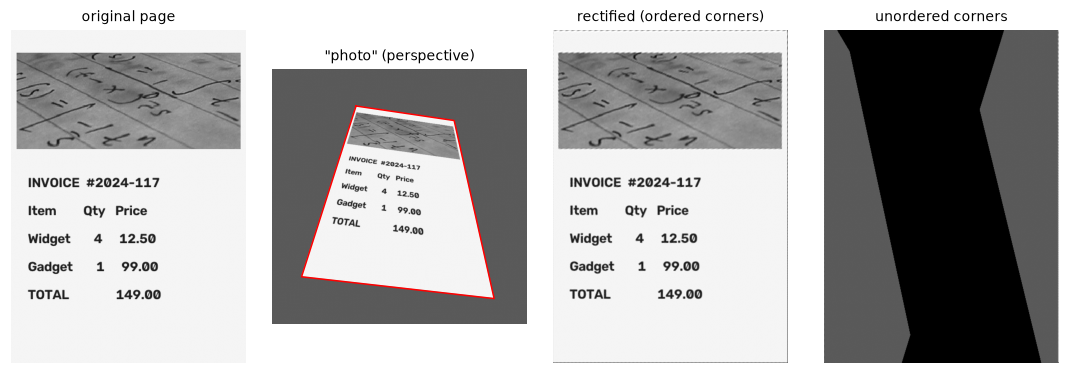
With correctly ordered corners, the rectified page is nearly identical to the original. With the corners in the wrong order, the homography twists the mapping into a bow-tie shape that samples mostly from outside the photo.
The rectified page correlates at 0.964 with the original; the remaining difference is the blur from resampling twice (into the photo and back). In the capstone, you'll find the corners from the photo itself, with edges or thresholds, contours, and approxPolyDP.
In practice
OpenCV and scikit-image warp APIs
| Task | OpenCV | scikit-image |
|---|---|---|
| Resize | cv2.resize(img, (w, h), interpolation=...) |
transform.resize(img, (h, w), anti_aliasing=True) |
| Rotate about a point | M = cv2.getRotationMatrix2D((cx, cy), deg, scale), then cv2.warpAffine(img, M, (w, h)) |
transform.rotate(img, deg, resize=..., center=(x, y)) |
| Affine from 3 pairs | cv2.getAffineTransform(src, dst) |
transform.AffineTransform.from_estimate(src, dst) |
| Homography from 4 pairs | cv2.getPerspectiveTransform(src, dst) |
transform.ProjectiveTransform.from_estimate(src, dst) |
| Homography from many noisy pairs | cv2.findHomography(src, dst, cv2.RANSAC, 3.0) |
measure.ransac(...) with ProjectiveTransform |
| Apply to an image | cv2.warpAffine / cv2.warpPerspective(img, H, (w, h)) |
transform.warp(img, inverse_map) |
| Apply to points | cv2.perspectiveTransform(pts.reshape(-1, 1, 2), H) |
tform(pts) |
| Arbitrary per-pixel map | cv2.remap(img, map_x, map_y, interpolation) |
transform.warp(img, coords) |
Interpolation flags: INTER_NEAREST for masks and labels, INTER_LINEAR as the default, INTER_CUBIC or INTER_LANCZOS4 for high-quality enlargement, and INTER_AREA for shrinking. Border modes: borderMode=cv2.BORDER_CONSTANT (with borderValue) fills outside with a constant, BORDER_REPLICATE and BORDER_REFLECT continue the image, which is useful for augmentation so that rotated images don't have black corners.
Rotating without cropping
cv2.warpAffine(img, M, (w, h)) keeps the original canvas, so a rotated image loses its corners. To keep everything, compute where the four corners go, take their bounding box, and add a translation so the box starts at the origin:
def rotate_bound(img, deg):
    h, w = img.shape[:2]
    M = np.vstack([cv2.getRotationMatrix2D((w / 2, h / 2), deg, 1.0), [0, 0, 1]])
    box = apply_h(M, np.float32([[0, 0], [w, 0], [w, h], [0, h]]))
    new_w, new_h = np.ceil(box.max(0) - box.min(0)).astype(int)
    M = T(-box[:, 0].min(), -box[:, 1].min()) @ M                 # shift the bounding box to the origin
    return cv2.warpAffine(img, M[:2], (int(new_w), int(new_h)))

rotated = rotate_bound(img, 30)
print("rotated canvas size (w, h):", rotated.shape[::-1], "| expected:",
      round(512 * np.cos(np.pi / 6) + 512 * np.sin(np.pi / 6), 1))
print("pixel sum kept: %.4f" % (rotated.sum() / img.sum()))
The total intensity is preserved (to interpolation round-off): nothing fell off the canvas.
Common mistake: (width, height) vs (rows, cols)
OpenCV's dsize arguments (cv2.resize, cv2.warpAffine, cv2.warpPerspective) are (width, height), while img.shape is (height, width). Passing img.shape[:2] as dsize silently transposes a non-square output. Use (img.shape[1], img.shape[0]). Points are (x, y), arrays are [y, x].
Common mistake: interpolating label maps
Warping a segmentation mask or class-label image with INTER_LINEAR blends labels, creating invalid classes (or, for 0/255 masks, gray edge pixels). Use INTER_NEAREST for masks and label maps, and apply the same geometric transform to the image and its labels, keypoints, and boxes during augmentation.
Common mistake: chaining warps
Rotating, then scaling, then shearing with three separate warpAffine calls resamples three times and blurs three times (and may crop in between). Multiply the matrices and warp once.
Exercises
Exercise 1: A rotation matrix by hand (easy)
Write down, by hand, the \(3 \times 3\) matrix that rotates an image by 90° counterclockwise on screen about the center \((c_x, c_y) = (100, 50)\). Where does the point \((150, 50)\) go? Check your matrix against cv2.getRotationMatrix2D.
Solution
Counterclockwise on screen (with \(y\) down) is \(R(-90°) = \begin{pmatrix} 0 & 1 \\ -1 & 0 \end{pmatrix}\). With \(\mathbf{M} = T(\mathbf{c})R(-90°)T(-\mathbf{c})\): \(x' = (y - 50) + 100 = y + 50\) and \(y' = -(x - 100) + 50 = 150 - x\). So
and \((150, 50) \mapsto (100, 0)\): a point 50 pixels right of the center moves to 50 pixels above it, which is counterclockwise on screen.
Exercise 2: Bilinear interpolation by hand (easy)
The four pixels around a sample point have values \(f_{00} = 10\) (top-left), \(f_{01} = 20\) (top-right), \(f_{10} = 30\) (bottom-left), and \(f_{11} = 60\) (bottom-right). Compute the bilinear estimate at fractional offset \(a = 0.25\) (rightward), \(b = 0.5\) (downward), first along \(x\) then along \(y\), and then the other way around. Check with bilinear_sample.
Solution
Along \(x\) first: top \(= 0.75 \cdot 10 + 0.25 \cdot 20 = 12.5\); bottom \(= 0.75 \cdot 30 + 0.25 \cdot 60 = 37.5\); then \(0.5 \cdot 12.5 + 0.5 \cdot 37.5 = 25\). Along \(y\) first: left \(= 0.5 \cdot 10 + 0.5 \cdot 30 = 20\); right \(= 0.5 \cdot 20 + 0.5 \cdot 60 = 40\); then \(0.75 \cdot 20 + 0.25 \cdot 40 = 25\). Same answer, as it must be.
patch = np.array([[10, 20], [30, 60]], float)
print(bilinear_sample(np.pad(patch, ((0, 1), (0, 1)), mode="edge"), np.array([0.25]), np.array([0.5])))
(The padding just keeps the sample point strictly inside, since bilinear_sample fills points on the last row or column with the fill value.)
Exercise 3: What does each transform preserve? (medium)
Generate a random similarity, a random affine, and a random homography (perturb the identity). For each, map a square's four corners and check numerically: (a) are the opposite sides still parallel, (b) is the ratio of the diagonals' lengths still 1, (c) is the image of the square's center still the intersection of the image's diagonals? Predict the answers from the hierarchy table first.
Solution
Predictions: the similarity preserves all three. The affine preserves parallelism and (c) (affine maps preserve midpoints, and the center is the diagonals' midpoint), but not the diagonal ratio. The homography preserves (c) (lines map to lines, so the image of an intersection is the intersection of the images) but neither parallelism nor the ratio.
rng = np.random.default_rng(2)
sq = np.float32([[0, 0], [100, 0], [100, 100], [0, 100]])
tf = {"similarity": T(30, 10) @ R(25) @ S(1.4, 1.4),
      "affine": np.array([[1.2, 0.4, 5], [-0.2, 0.8, 3], [0, 0, 1]]),
      "homography": np.eye(3) + np.r_[rng.normal(0, 0.2, 6), rng.normal(0, 0.002, 2), 0].reshape(3, 3)}

def cross2(u, v):
    return u[0] * v[1] - u[1] * v[0]

for name, M in tf.items():
    p = apply_h(M, sq)
    parallel = abs(cross2(p[1] - p[0], p[2] - p[3])) < 1e-6 * np.linalg.norm(p[1] - p[0]) ** 2
    ratio = np.linalg.norm(p[2] - p[0]) / np.linalg.norm(p[3] - p[1])
    l1 = np.cross(np.r_[p[0], 1], np.r_[p[2], 1]); l2 = np.cross(np.r_[p[1], 1], np.r_[p[3], 1])
    X = np.cross(l1, l2); X = X[:2] / X[2]                    # diagonals' intersection
    center = apply_h(M, np.array([[50.0, 50.0]]))[0]
    print(f"{name:10s} parallel: {parallel!s:5s} diagonal ratio: {ratio:.3f} center on intersection: {np.allclose(X, center)}")
similarity parallel: True  diagonal ratio: 1.000 center on intersection: True
affine     parallel: True  diagonal ratio: 1.334 center on intersection: True
homography parallel: False diagonal ratio: 0.563 center on intersection: True
The diagonals' intersection was computed with homogeneous cross products: the line through two points is \(\mathbf{p}_1 \times \mathbf{p}_2\), and two lines meet at \(\mathbf{l}_1 \times \mathbf{l}_2\).
Exercise 4: Resizing: aliasing meets interpolation (medium)
Shrink the camera image to 1/8 of its size with INTER_NEAREST, INTER_LINEAR, and INTER_AREA, then enlarge each back to 512 × 512 with INTER_CUBIC, and compare PSNR against the original. Before you run it, predict the ranking using what you learned about aliasing in Chapter 4.
Solution
Prediction: INTER_AREA wins, because it averages each 8 × 8 block (a low-pass prefilter), while nearest and bilinear sample only 1 or 4 of the 64 input pixels, so they alias.
for name, flag in [("nearest", cv2.INTER_NEAREST), ("linear", cv2.INTER_LINEAR), ("area", cv2.INTER_AREA)]:
    small = cv2.resize(img, (64, 64), interpolation=flag)
    back = cv2.resize(small, (512, 512), interpolation=cv2.INTER_CUBIC)
    print(f"{name:8s} PSNR after the round trip: {psnr(back, img):.2f} dB")
nearest  PSNR after the round trip: 19.22 dB
linear   PSNR after the round trip: 22.15 dB
area     PSNR after the round trip: 23.26 dB
INTER_AREA is best: about 1 dB above INTER_LINEAR and 4 dB above nearest neighbor. INTER_LINEAR already helps a lot over nearest because it averages several pixels instead of picking one, but that's still too few for a factor of 8. For large reductions, use INTER_AREA or a pyramid.
Exercise 5: Why normalize before the DLT? (hard)
Generate 8 random points in a 4000 × 3000 image (a 12-megapixel photo), map them through a homography, and add Gaussian noise with a standard deviation of 2 pixels to the destination points. Estimate \(\mathbf{H}\) with homography_dlt directly, and with Hartley normalization: translate each point set to zero mean and scale it so the average distance from the origin is \(\sqrt{2}\), run the DLT on the normalized points, and undo the normalization with \(\mathbf{H} = \mathbf{T}_{\text{dst}}^{-1}\,\tilde{\mathbf{H}}\,\mathbf{T}_{\text{src}}\). Repeat for 200 random trials and compare the mean reprojection error on noise-free test points (median, mean, and worst trial), and the condition number of \(\mathbf{A}^\top\mathbf{A}\).
Solution
def normalizer(pts):
    m = pts.mean(0)
    s = np.sqrt(2) / np.mean(np.linalg.norm(pts - m, axis=1))
    return np.array([[s, 0, -s * m[0]], [0, s, -s * m[1]], [0, 0, 1]])

def homography_dlt_normalized(src, dst):
    Ts, Td = normalizer(src), normalizer(dst)
    Hn = homography_dlt(apply_h(Ts, src), apply_h(Td, dst))
    H = np.linalg.inv(Td) @ Hn @ Ts
    return H / H[2, 2]

def dlt_matrix(src, dst):
    rows = []
    for (x, y), (xp, yp) in zip(src, dst):
        rows += [[-x, -y, -1, 0, 0, 0, xp * x, xp * y, xp], [0, 0, 0, -x, -y, -1, yp * x, yp * y, yp]]
    return np.array(rows)

rng = np.random.default_rng(7)
H_gt = np.array([[0.9, 0.05, 30], [-0.04, 1.1, -20], [2e-5, 4e-5, 1]])
errs = {"plain DLT": [], "normalized DLT": []}
for trial in range(200):
    src = rng.uniform([0, 0], [4000, 3000], (8, 2))
    dst = apply_h(H_gt, src) + rng.normal(0, 2.0, (8, 2))
    test = rng.uniform([0, 0], [4000, 3000], (200, 2))
    for name, fn in [("plain DLT", homography_dlt), ("normalized DLT", homography_dlt_normalized)]:
        err = np.linalg.norm(apply_h(fn(src, dst), test) - apply_h(H_gt, test), axis=1)
        errs[name].append(err.mean())
for name, e in errs.items():
    print(f"{name:15s} reprojection error: median {np.median(e):.2f} px, mean {np.mean(e):.2f} px, worst {np.max(e):.1f} px")
A_raw = dlt_matrix(src, dst)
A_norm = dlt_matrix(apply_h(normalizer(src), src), apply_h(normalizer(dst), dst))
print("condition number of A^T A: raw %.1e | normalized %.1e" % (np.linalg.cond(A_raw.T @ A_raw),
                                                                 np.linalg.cond(A_norm.T @ A_norm)))
plain DLT       reprojection error: median 2.69 px, mean 7.95 px, worst 354.9 px
normalized DLT  reprojection error: median 2.39 px, mean 2.59 px, worst 8.8 px
condition number of A^T A: raw 2.1e+16 | normalized 3.2e+06
In a typical trial the two are close: the medians differ by little, because double precision copes with the bad scaling most of the time. But the mean and the worst trial are much worse without normalization. The columns of \(\mathbf{A}\) mix entries around 1 with products around \(10^7\), so \(\mathbf{A}^\top\mathbf{A}\) is extremely ill-conditioned, and the algebraic error being minimized weights some equations far more than others. With few points and unlucky geometry, that amplifies the noise badly. Normalization brings every column to a similar scale and removes those failures. Always normalize; cv2.findHomography does it internally.
Exercise 6: Vanishing points and the horizon (hard)
Under the homography Hp from this chapter, the image's horizontal grid lines converge. (a) Compute the vanishing point of horizontal lines as the image of the point at infinity \((1, 0, 0)\), and check it by intersecting the images of two horizontal lines with cross products. (b) Lines map by \(\mathbf{l}' = \mathbf{H}^{-\top}\mathbf{l}\). Use this to compute the image of the line at infinity \((0, 0, 1)\), the "horizon" of the plane, and show that both vanishing points (horizontal and vertical) lie on it.
Solution
(a) \(\mathbf{H}(1, 0, 0)^\top\) is the first column of \(\mathbf{H}\). (b) If \(\mathbf{l}^\top\mathbf{p} = 0\) and \(\mathbf{p}' = \mathbf{H}\mathbf{p}\), then \((\mathbf{H}^{-\top}\mathbf{l})^\top\mathbf{p}' = \mathbf{l}^\top\mathbf{H}^{-1}\mathbf{H}\mathbf{p} = 0\), so incidence is preserved by \(\mathbf{l}' = \mathbf{H}^{-\top}\mathbf{l}\).
vp_h = Hp[:, 0]; vp_v = Hp[:, 1]                               # images of (1,0,0) and (0,1,0)
line_through = lambda p, q: np.cross(np.r_[p, 1], np.r_[q, 1])
a = apply_h(Hp, np.array([[0.0, 100], [500, 100]]))           # two points on y = 100
b = apply_h(Hp, np.array([[0.0, 400], [500, 400]]))           # two points on y = 400
X = np.cross(line_through(*a), line_through(*b))
print("vanishing point (horizontal):", (vp_h[:2] / vp_h[2]).round(1), "| intersection:", (X[:2] / X[2]).round(1))
horizon = np.linalg.inv(Hp).T @ np.array([0, 0, 1.0])
print("horizon line (a, b, c):", (horizon / np.linalg.norm(horizon[:2])).round(4))
print("both vanishing points on it:", np.isclose(horizon @ vp_h, 0), np.isclose(horizon @ vp_v, 0))
vanishing point (horizontal): [22392.4  2961.2] | intersection: [22392.4  2961.2]
horizon line (a, b, c): [-1.473000e-01  9.891000e-01  3.685933e+02]
both vanishing points on it: True True
The vanishing point lies far outside the image, tens of thousands of pixels to the right, which is typical: the horizontal lines converge, but slowly. The horizon is the image of the plane's line at infinity, and every family of parallel lines in the plane vanishes somewhere on it. Level 2 uses vanishing points to estimate camera orientation and focal length, and rectifying a plane "affinely" amounts to sending its horizon back to infinity.
Check yourself
-
Why do we use homogeneous coordinates for image transforms?
Answer
They turn translation (and perspective) into matrix multiplication, so every transform is a \(3 \times 3\) matrix, and chains of transforms become a single matrix product.
-
Rank the transform families by degrees of freedom and say what each preserves.
Answer
Translation (2: everything but position), Euclidean (3: lengths, angles), similarity (4: angles, length ratios), affine (6: parallelism, ratios along lines, midpoints), projective (8: straight lines, incidence, cross-ratios).
-
Why does a homography have 8 degrees of freedom, and how many point pairs determine it?
Answer
It has 9 entries, but scaling the whole matrix gives the same mapping, so 8 are free. Each point pair gives 2 equations, so 4 pairs (no three collinear) determine it.
-
When are two images related by a homography?
Answer
When the scene is planar (any two viewpoints), or when the camera only rotates about its optical center (any scene).
-
What goes wrong with forward mapping, and how does inverse mapping fix it?
Answer
Forward mapping leaves holes where the transform enlarges and collisions where it shrinks. Inverse mapping visits every output pixel and looks up its source location, so each gets exactly one value, at the cost of interpolating at non-integer positions.
-
Derive the bilinear weights and say what they mean geometrically.
Answer
With fractional offsets \(a\), \(b\): \((1-a)(1-b)\), \(a(1-b)\), \((1-a)b\), \(ab\) for the top-left, top-right, bottom-left, and bottom-right pixels. Each weight is the area of the sub-rectangle opposite that pixel, so nearer pixels count more, and the weights sum to 1.
-
Which interpolation should you use for (a) a segmentation mask, (b) shrinking a photo by 4×, (c) enlarging a photo?
Answer
(a) Nearest neighbor, so labels aren't blended. (b)
INTER_AREA(or blur then sample), to avoid aliasing. (c) Bicubic or Lanczos for quality, bilinear for speed. -
Your rectified document comes out mirrored. What's the most likely cause?
Answer
The source corners weren't in the same order as the destination corners (for example, top-right matched to top-left). Order both as top-left, top-right, bottom-right, bottom-left before computing the homography.
Key takeaways
- Geometric transforms move coordinates. Homogeneous coordinates make every 2D transform a \(3 \times 3\) matrix: compose by multiplying (right to left), undo by inverting.
- The hierarchy runs translation, Euclidean, similarity, affine, projective: more freedom, fewer invariants. Affine keeps parallel lines; a homography keeps only straightness.
- A homography (8 DOF) maps a plane between views. Estimate it from 4+ point pairs with the DLT (SVD of a \(2n \times 9\) system), normalizing the points first.
- Always warp by inverse mapping, and interpolate: nearest for labels, bilinear by default, bicubic for quality, area for shrinking. Resample once.
- Document rectification is a homography from four ordered corners to an upright rectangle of known aspect ratio.
- Watch the conventions: points are
(x, y), arrays are[y, x], OpenCV sizes are(width, height), and scikit-image'swarpwants the inverse map.
Further reading
- Richard Hartley and Andrew Zisserman, Multiple View Geometry in Computer Vision, 2nd edition, Cambridge University Press, 2004, chapters 2 and 4 (projective geometry of the plane, and homography estimation with the normalized DLT).
- Richard Hartley, "In Defense of the Eight-Point Algorithm", IEEE Transactions on Pattern Analysis and Machine Intelligence, 1997. The paper that showed why normalization matters.
- Richard Szeliski, Computer Vision: Algorithms and Applications, 2nd edition, sections 2.1 and 3.6 (2D transformations and geometric warping), free at szeliski.org/Book.
- OpenCV tutorial: Geometric transformations of images.
Next
You have every tool you need for the Level 1 capstone: build a document scanner. After that, Level 2 begins with Features and keypoints.