Setting up your vision toolkit
Level 0 · Chapter 2 · ⏱️ ~45 min read · Prerequisites: What is computer vision?
This chapter sets up the Python vision stack used throughout the handbook. You'll learn what each library is for, how they represent images differently, how to install them cleanly, where to find sample images that need no download, how to work with images in notebooks, and when a GPU is worth it.
Why it matters
Sam trained a classifier for grading strawberries. In training, images were loaded and resized with Pillow, because that's what the tutorial used. The deployed service was written by another team, who used OpenCV, because it was faster. Same model weights, same photos, same 224 × 224 input size.
Validation accuracy had been 94%. In production it was 89%, and nobody could explain the gap. After a week of searching, someone saved the exact input tensor from both pipelines and subtracted them. The images differed by up to 40 gray levels near every edge. Pillow's resize smooths the image before shrinking it, and OpenCV's default INTER_LINEAR resize doesn't. The model had learned on slightly blurry strawberries and was being tested on slightly sharp ones.
Both libraries were working correctly. They just make different default choices. A vision engineer needs to know what each tool in the stack does by default, where they disagree, and how to move images between them without silent changes. That's this chapter.
Concepts
The Python vision stack
Almost every vision tool in Python agrees on one thing: an image is an array of numbers. They disagree on almost everything else: the order of the color channels, the number type, the value range, the axis order, and how coordinates are written. Here's how the pieces fit:
flowchart TB
    subgraph Core["The common currency"]
        NP["NumPy ndarray<br/>H x W x C"]
    end
    CV["OpenCV<br/>fast classical vision,<br/>video, geometry"] <--> NP
    PIL["Pillow<br/>file formats,<br/>EXIF, simple edits"] <--> NP
    SK["scikit-image<br/>readable algorithms,<br/>sample data"] <--> NP
    MPL["matplotlib<br/>display and plots"] <--> NP
    NP <--> T["PyTorch tensor<br/>N x C x H x W"]
    T --> TV["torchvision<br/>datasets, transforms,<br/>pretrained models"]
NumPy sits in the middle. OpenCV, scikit-image, and matplotlib all take and return NumPy arrays directly. Pillow has its own Image object, but converts to and from NumPy in one line. PyTorch uses its own Tensor type, which shares memory with NumPy arrays when possible. If you're not yet comfortable with NumPy arrays, indexing, and broadcasting, read the ML Handbook's NumPy chapter alongside this level. Images as arrays covers the image-specific parts.
What each library is for
NumPy is the array library. You'll use it for pixel arithmetic, masks, crops, statistics, and writing algorithms from scratch.
OpenCV (Open Source Computer Vision Library, imported as cv2) is a large C++ library with Python bindings. It started at Intel in 1999 and has thousands of functions: color conversion, filtering, geometric transforms, feature detection, camera calibration, stereo, optical flow, video reading and writing, and a deep-learning inference module. It's fast because the work happens in optimized C++, often with SIMD instructions and multiple threads. Its quirks come from its history: color images are stored in BGR order (blue, green, red) rather than RGB, sizes are often given as (width, height), and its functions are very particular about array types.
Pillow (the maintained fork of PIL, the Python Imaging Library, imported as PIL) is the standard library for image files. It reads and writes dozens of formats, handles metadata such as EXIF (the camera information stored inside photos, including orientation), and does simple edits: resize, crop, rotate, draw, and add text with real fonts. Many deep-learning data loaders open images with Pillow.
scikit-image (imported as skimage) is a collection of image-processing algorithms written for clarity and correctness. It has filters, segmentation, feature detectors, geometric transforms, measurement tools, and the built-in sample images used throughout this handbook. It follows NumPy conventions: RGB order, (row, col) coordinates, and floating-point images in \([0, 1]\) for most outputs. It's usually slower than OpenCV.
matplotlib displays images and plots results. ax.imshow(array) shows an image, and side-by-side panels with plt.subplots are how you'll compare before-and-after throughout the handbook.
PyTorch is the deep-learning framework, and torchvision is its vision companion: datasets, image transforms and augmentation, image decoding, and pretrained models for classification, detection, and segmentation. PyTorch stores a batch of images as a 4D tensor with shape \(N \times C \times H \times W\) (batch, channels, height, width), which differs from the \(H \times W \times C\) layout used everywhere else. The ML Handbook covers PyTorch in depth.
A few other libraries you'll meet later:
| Library | What it's for |
|---|---|
SciPy (scipy.ndimage) |
n-dimensional filtering, morphology, interpolation; good for 3D medical volumes |
| imageio | simple reading and writing of images and videos, including GIFs |
| Albumentations | fast augmentation pipelines that transform images, masks, boxes, and keypoints together |
| Kornia | classical vision operations written in PyTorch, so they run on the GPU and are differentiable |
| timm | a large collection of pretrained image models for PyTorch |
Conventions: where the libraries disagree
This table is the most useful thing in the chapter. Most bugs at library boundaries come from one of its rows.
| OpenCV | Pillow | scikit-image | matplotlib | torchvision | |
|---|---|---|---|---|---|
| Image type | np.ndarray |
PIL.Image.Image |
np.ndarray |
np.ndarray (or tensor-like) |
torch.Tensor |
| Channel order | BGR | RGB | RGB | RGB | RGB |
| Layout | \(H \times W \times C\) | (internal) | \(H \times W \times C\) | \(H \times W \times C\) | \(C \times H \times W\) |
| Typical dtype | uint8 |
8 bits per channel | uint8 in, often float64 in \([0, 1]\) out |
uint8 or float in \([0, 1]\) |
uint8, or float32 in \([0, 1]\) |
| Size written as | (width, height) in resize |
img.size == (width, height) |
shape == (rows, cols) |
shape |
shape[-2:] == (H, W) |
| Point written as | (x, y) |
(x, y) |
(row, col) |
(x, y) |
depends on the op |
Three rules of thumb follow from this table:
- Convert at the boundary. When an image leaves OpenCV, convert BGR to RGB right away. When it enters a model, convert to the model's layout and dtype right away.
- Know your dtype and range. A
float64image in \([0, 1]\) and auint8image in \([0, 255]\) can look identical on screen and behave completely differently in arithmetic. - Write sizes explicitly.
cv2.resize(img, (w, h))takes width first;img.shapegives height first. Name your variablesh, wand pass them in the right order.
The cost of different defaults
Libraries also differ in algorithm defaults, as Sam's team discovered. The most important case is resizing, because nearly every vision pipeline resizes.
To shrink an image by a factor of 4, a resize function has to decide what to do with the 16 input pixels that map onto each output pixel. A plain bilinear interpolation (OpenCV's INTER_LINEAR) only looks at the 4 input pixels nearest each output position and ignores the rest. Fine detail in the ignored pixels can produce jagged edges and moiré patterns; this is aliasing, covered in Digital images. An antialiased resize first blurs the image (or, equivalently, averages over the whole footprint of each output pixel), so every input pixel contributes. OpenCV's INTER_AREA, Pillow's resampling filters, scikit-image's anti_aliasing=True, and torchvision's antialias=True all do some version of this, each with slightly different weights.
Formally, for a shrink factor \(s\), an area-averaging resize computes each output pixel as the mean over the \(s \times s\) block of input pixels it covers:
where \(I\) is the input, \(J\) is the output, and \((r, c)\) is an output position. Bilinear interpolation instead computes a weighted average of only the 4 input pixels around the point \((s\,r + \tfrac{s-1}{2},\, s\,c + \tfrac{s-1}{2})\), so for \(s = 4\) it uses 4 of the 16 pixels. The practical consequence: use the same resize function, with the same settings, in training and in deployment. The In practice section measures how big the differences are.
Installing the stack
Use a virtual environment per project, so each project has its own pinned library versions. The ML Handbook's environment setup chapter explains virtual environments, uv, and lock files in detail. The short version:
# create and activate an environment (uv is fast; python -m venv also works)
uv venv --python 3.12
source .venv/bin/activate

# the core stack
uv pip install numpy opencv-python-headless pillow scikit-image matplotlib scipy jupyterlab

# PyTorch and torchvision, CPU-only build (smaller download)
uv pip install torch torchvision --index-url https://download.pytorch.org/whl/cpu
OpenCV is published on PyPI as four packages that all provide the same cv2 module:
| Package | GUI windows (cv2.imshow) |
Extra "contrib" modules |
|---|---|---|
opencv-python |
yes | no |
opencv-python-headless |
no | no |
opencv-contrib-python |
yes | yes |
opencv-contrib-python-headless |
no | yes |
Install exactly one. If two are installed, they overwrite each other's files and import cv2 can break in confusing ways. Use a headless build on servers, in Docker, and in notebooks, where there's no screen for cv2.imshow anyway; display images with matplotlib instead. The contrib packages add extra modules (some feature detectors, tracking algorithms, text detection) that you'll rarely need in this handbook.
For PyTorch with an NVIDIA GPU, use the install selector on pytorch.org to get the command for your CUDA version. On Apple Silicon Macs, the standard install includes the MPS (Metal Performance Shaders) backend.
OpenCV 4 and 5
This handbook targets OpenCV 4.10+ and 5.x, and its code was run with OpenCV 5.0. The core functions in Level 0 (imread, imwrite, cvtColor, resize, drawing, and video I/O) work the same in both. Where a difference matters, the text points it out.
Built-in sample images
You don't need to download anything to start. scikit-image ships sample images as functions in skimage.data that return NumPy arrays:
| Function | Shape | What it's good for |
|---|---|---|
camera() |
512 × 512, gray | the classic test image: edges, texture, a smooth sky |
astronaut() |
512 × 512 × 3 | a color portrait with skin, fabric, a flag |
coins() |
303 × 384, gray | counting, thresholding, segmentation |
chelsea() / cat() |
300 × 451 × 3 | a cat: fur texture, color |
coffee() |
400 × 600 × 3 | color, specular highlights |
rocket() |
427 × 640 × 3 | sky, strong vertical structure |
checkerboard() |
200 × 200, gray | geometry, aliasing, calibration ideas |
page(), text() |
gray | document processing, thresholding |
brick(), grass(), gravel() |
512 × 512, gray | textures |
moon() |
512 × 512, gray | low contrast, histogram equalization |
hubble_deep_field() |
872 × 1000 × 3 | many small objects |
immunohistochemistry() |
512 × 512 × 3 | stained microscopy (medical imaging) |
stereo_motorcycle() |
two views + disparity | stereo and depth |
lfw_subset() |
200 faces, 25 × 25 | small face dataset |
You'll also generate synthetic images with NumPy and OpenCV: gradients, shapes, noise, and rendered scenes. Synthetic images have a huge advantage for learning: you know the ground truth exactly. If you draw a circle of radius 30 at \((80, 50)\), you know what a detector should report.
Real datasets come later: CIFAR-10, Pascal VOC, COCO, and others are downloaded with a line of torchvision code when you need them. sklearn's load_digits (8 × 8 handwritten digits) is bundled with scikit-learn and is handy for tiny experiments.
Notebooks for vision work
Jupyter notebooks (JupyterLab, VS Code, or Google Colab) are the natural place to learn and explore vision, because you can see each image right after the code that produced it. A few habits make notebook vision work much smoother:
- Display with matplotlib, not
cv2.imshow.cv2.imshowopens a separate desktop window, which doesn't work in notebooks, on servers, or with headless OpenCV. In a headless build it raises an error saying the function isn't implemented. - Write a small
showhelper that takes several images and titles and draws them side by side, with gray images shown withcmap="gray"and a fixed 0–255 range. You'll call it constantly. The In practice section builds one. - Restart and run all before trusting a result. Notebooks let you run cells out of order, and an image variable you overwrote three cells ago is a classic source of confusion.
- Watch memory. A 4000 × 3000 photo is 36 MB as
uint8and 288 MB asfloat64. Keep a few dozen of those in a notebook and you'll run out of RAM. Convert tofloat32rather thanfloat64when you need floats, and delete large arrays you no longer need. - Move finished code into
.pyfiles. A notebook is for exploring. Once a function works, put it in a module and import it, so your tools are testable and reusable. The Level 0 capstone is a command-line script, not a notebook, for this reason.
GPUs: when you need one
Everything in Levels 0–2 runs comfortably on a CPU. Classical vision with OpenCV is fast enough on a laptop for real-time video at modest resolutions.
GPUs matter once you train deep networks (Level 3 onward). A GPU runs thousands of simple arithmetic operations in parallel, which is exactly what convolutions and matrix multiplications need. Rough guide:
| Work | CPU is fine | GPU strongly helps |
|---|---|---|
| Classical processing (Levels 0–2) | yes | rarely |
| Running a small pretrained model on a few images | yes | not needed |
| Training a small CNN on 28 × 28 images | yes (minutes) | faster |
| Fine-tuning a ResNet on thousands of 224 × 224 images | slow (hours) | yes (minutes) |
| Training detectors, segmenters, diffusion models | impractical | required |
You check what PyTorch can see with torch.cuda.is_available() (NVIDIA) and torch.backends.mps.is_available() (Apple). The handbook's deep-learning examples are sized to train on a CPU in minutes. When a GPU would help, the text says so. Free GPUs are available on Google Colab and Kaggle notebooks for occasional use.
OpenCV also has a CUDA module, but the pip wheels don't include it; you'd need to build OpenCV from source. For most work, it's simpler to do heavy lifting in PyTorch on the GPU and use OpenCV on the CPU for I/O and classical steps.
In practice
Check your environment
Run this first in any new environment. It confirms everything imports and records the versions you're using, which you should note in any bug report or project README.
import sys
import numpy as np
import cv2
import PIL
import skimage
import matplotlib
import torch
import torchvision

print("Python      ", sys.version.split()[0])
for name, mod in [("NumPy", np), ("OpenCV", cv2), ("Pillow", PIL), ("scikit-image", skimage),
                  ("matplotlib", matplotlib), ("PyTorch", torch), ("torchvision", torchvision)]:
    print(f"{name:<12}", mod.__version__)
print("CUDA GPU:", torch.cuda.is_available(), "| Apple MPS:", torch.backends.mps.is_available())
Python       3.13.5
NumPy        2.5.3
OpenCV       5.0.0
Pillow       12.3.0
scikit-image 0.26.0
matplotlib   3.11.2
PyTorch      2.14.1+cpu
torchvision  0.29.1+cpu
CUDA GPU: False | Apple MPS: False
Your version numbers will probably differ a little. That's fine, as long as the major versions match what the handbook targets.
A helper for showing images
This helper is worth copying into every notebook. It handles gray and color images, any number of panels, and optional titles:
import matplotlib.pyplot as plt

def show(images, titles=None, size=3.0, cmap="gray"):
    """Show images side by side. Color images must be RGB."""
    if not isinstance(images, (list, tuple)):
        images = [images]
    fig, axes = plt.subplots(1, len(images), figsize=(size * len(images), size))
    axes = np.atleast_1d(axes)
    for i, (ax, im) in enumerate(zip(axes, images)):
        if im.ndim == 2:                      # grayscale: fix the range so it isn't auto-stretched
            vmax = 1.0 if im.dtype.kind == "f" else 255
            ax.imshow(im, cmap=cmap, vmin=0, vmax=vmax)
        else:
            ax.imshow(im)
        if titles:
            ax.set_title(titles[i], fontsize=9)
        ax.axis("off")
    plt.tight_layout()
    return fig
The vmin and vmax arguments matter. Without them, matplotlib stretches a grayscale image so its darkest pixel is black and its brightest is white, which hides real differences in brightness. Working with images and video shows this trap.
A tour of the sample images
from skimage import data

names = ["astronaut", "camera", "coins", "chelsea", "coffee", "rocket",
         "checkerboard", "page", "brick", "moon", "hubble_deep_field", "immunohistochemistry"]
fig, axes = plt.subplots(2, 6, figsize=(10, 3.6))
for ax, name in zip(axes.ravel(), names):
    im = getattr(data, name)()
    ax.imshow(im, cmap="gray" if im.ndim == 2 else None)
    ax.set_title(f"{name}\n{im.shape}", fontsize=7)
    ax.axis("off")
plt.tight_layout()
plt.show()
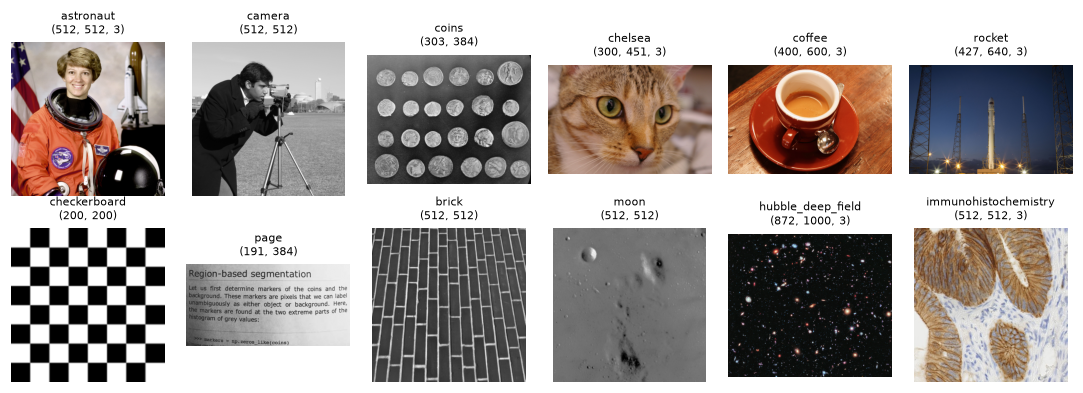
scikit-image's bundled sample images: gray images have a 2D shape, color images a 3D shape with 3 channels.
One file, four readers
Save a sample image as a PNG, then read it back with each library. Watch the types, shapes, and channel orders.
import os
from PIL import Image
from skimage import io as skio
from torchvision.io import read_image

rgb = data.astronaut()                                          # RGB, uint8, (512, 512, 3)
cv2.imwrite("astronaut.png", cv2.cvtColor(rgb, cv2.COLOR_RGB2BGR))   # OpenCV expects BGR
print("file size:", os.path.getsize("astronaut.png") // 1024, "KiB")

a_cv = cv2.imread("astronaut.png")                  # BGR ndarray
a_pil = Image.open("astronaut.png")                 # PIL Image (lazy)
a_sk = skio.imread("astronaut.png")                 # RGB ndarray
a_tv = read_image("astronaut.png")                  # RGB uint8 tensor, CHW

print("OpenCV      ", type(a_cv).__name__, a_cv.shape, a_cv.dtype)
print("Pillow      ", type(a_pil).__name__, a_pil.size, a_pil.mode)
print("scikit-image", type(a_sk).__name__, a_sk.shape, a_sk.dtype)
print("torchvision ", type(a_tv).__name__, tuple(a_tv.shape), a_tv.dtype)

print("OpenCV pixel [0,0]:", a_cv[0, 0], " Pillow:", a_pil.getpixel((0, 0)),
      " skimage:", a_sk[0, 0], " torchvision:", a_tv[:, 0, 0].tolist())
file size: 454 KiB
OpenCV       ndarray (512, 512, 3) uint8
Pillow       PngImageFile (512, 512) RGB
scikit-image ndarray (512, 512, 3) uint8
torchvision  Tensor (3, 512, 512) torch.uint8
OpenCV pixel [0,0]: [151 147 154]  Pillow: (154, 147, 151)  skimage: [154 147 151]  torchvision: [154, 147, 151]
The same pixel comes out as [151, 147, 154] from OpenCV and (154, 147, 151) from everyone else: OpenCV reversed the channels. Pillow reports the size as (width, height) and the mode "RGB" instead of a shape. torchvision puts the channels first.
Now check that all four agree once converted to the same convention:
def to_rgb_hwc(x):
    """Convert any of the four results to an RGB uint8 HWC NumPy array."""
    if isinstance(x, Image.Image):
        return np.asarray(x.convert("RGB"))
    if isinstance(x, torch.Tensor):
        return x.permute(1, 2, 0).numpy()
    return x

same = [np.array_equal(to_rgb_hwc(x), rgb) for x in (a_pil, a_sk, a_tv)]
print("Pillow, skimage, torchvision match the original:", same)
print("OpenCV matches as-is:          ", np.array_equal(a_cv, rgb))
print("OpenCV matches after BGR->RGB: ", np.array_equal(cv2.cvtColor(a_cv, cv2.COLOR_BGR2RGB), rgb))
Pillow, skimage, torchvision match the original: [True, True, True]
OpenCV matches as-is:           False
OpenCV matches after BGR->RGB:  True
PNG is lossless, so every reader gets back exactly the original numbers once the conventions match. With JPEG, different decoders can produce slightly different values, which is another reason to use one library for decoding in both training and deployment.
Same operation, different results
Convert to grayscale with three libraries and compare:
from skimage import color

g_cv = cv2.cvtColor(rgb, cv2.COLOR_RGB2GRAY)                 # uint8
g_pil = np.asarray(Image.fromarray(rgb).convert("L"))        # uint8
g_sk = color.rgb2gray(rgb)                                   # float64 in [0, 1]

print("OpenCV :", g_cv.dtype, g_cv[100, 100])
print("Pillow :", g_pil.dtype, g_pil[100, 100])
print("skimage:", g_sk.dtype, round(float(g_sk[100, 100]), 4), "->", round(float(g_sk[100, 100]) * 255, 1))
diff = np.abs(g_sk * 255 - g_cv.astype(np.float64))
print("max |OpenCV - Pillow|:", np.abs(g_cv.astype(int) - g_pil).max())
print("max |OpenCV - skimage*255|:", round(float(diff.max()), 1),
      " mean:", round(float(diff.mean()), 2))
OpenCV : uint8 178
Pillow : uint8 178
skimage: float64 0.6974 -> 177.8
max |OpenCV - Pillow|: 1
max |OpenCV - skimage*255|: 15.5  mean: 2.76
OpenCV and Pillow agree to within 1 gray level (rounding). scikit-image returns a float in \([0, 1]\), and uses different weights. OpenCV and Pillow compute \(0.299R + 0.587G + 0.114B\), the luma weights from the old Rec. 601 television standard. scikit-image uses \(0.2125R + 0.7154G + 0.0721B\), the Rec. 709 weights. On saturated red or blue areas, the two disagree by about 15 gray levels. Digital images explains where these weights come from.
Now resize the astronaut from 512 × 512 to 128 × 128 with five methods, using OpenCV's INTER_AREA as the reference:
from skimage import transform
from torchvision.transforms.v2 import functional as TF

size = 128
r = {
    "OpenCV INTER_AREA": cv2.resize(rgb, (size, size), interpolation=cv2.INTER_AREA),
    "OpenCV INTER_LINEAR": cv2.resize(rgb, (size, size), interpolation=cv2.INTER_LINEAR),
    "Pillow (bicubic)": np.asarray(Image.fromarray(rgb).resize((size, size))),
    "skimage (antialias)": (transform.resize(rgb, (size, size), anti_aliasing=True) * 255)
                           .round().astype(np.uint8),
    "torchvision (antialias)": TF.resize(torch.from_numpy(rgb).permute(2, 0, 1), [size, size],
                                         antialias=True).permute(1, 2, 0).numpy(),
}
ref = r["OpenCV INTER_AREA"].astype(int)
for name, im in r.items():
    d = np.abs(im.astype(int) - ref)
    print(f"{name:<24} mean diff {d.mean():5.2f}   max diff {d.max():3d}")
OpenCV INTER_AREA        mean diff  0.00   max diff   0
OpenCV INTER_LINEAR      mean diff  3.34   max diff  69
Pillow (bicubic)         mean diff  1.39   max diff  26
skimage (antialias)      mean diff  1.74   max diff  37
torchvision (antialias)  mean diff  2.23   max diff  47
Every method produces a reasonable-looking thumbnail, but they differ by up to dozens of gray levels at some pixels. The antialiased methods are close to each other, and plain bilinear is the odd one out. Look at a zoomed crop and the difference map:
crop = (slice(20, 60), slice(40, 80))           # around the astronaut's face, at 128 x 128 scale
d_lin = np.abs(r["OpenCV INTER_LINEAR"].astype(int) - ref).sum(axis=2)
fig, axes = plt.subplots(1, 4, figsize=(10, 2.8))
axes[0].imshow(r["OpenCV INTER_AREA"][crop]);    axes[0].set_title("INTER_AREA (antialiased)", fontsize=9)
axes[1].imshow(r["OpenCV INTER_LINEAR"][crop]);  axes[1].set_title("INTER_LINEAR (no antialias)", fontsize=9)
axes[2].imshow(r["Pillow (bicubic)"][crop]);     axes[2].set_title("Pillow default", fontsize=9)
im = axes[3].imshow(d_lin, cmap="magma")
axes[3].set_title("|LINEAR - AREA|, full image", fontsize=9)
fig.colorbar(im, ax=axes[3], fraction=0.046)
for ax in axes:
    ax.axis("off")
plt.tight_layout()
plt.show()
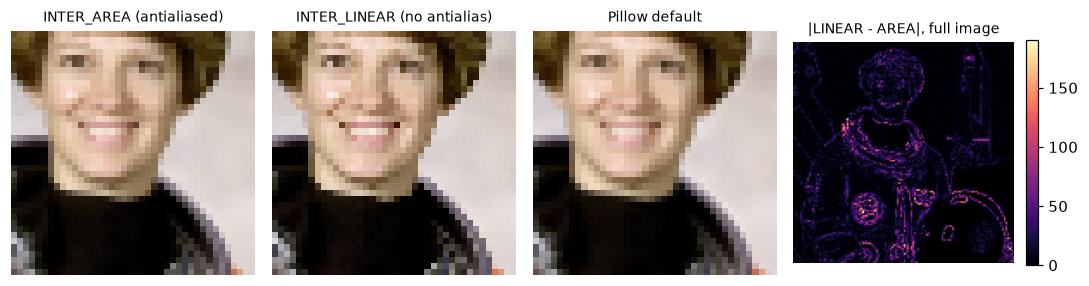
Plain bilinear shrinking (second panel) looks sharper and more jagged; the differences concentrate on edges and fine texture.
The difference map is dark in smooth areas and bright along edges and fine texture: exactly the places a model looks at. That's Sam's 5-point accuracy drop.
Common mistake
Using one library to preprocess training images and another at inference. Decoding, color conversion, and especially resizing can all differ. Put preprocessing in one function, use it in both places, and test it: save a preprocessed tensor from each pipeline and assert they're (nearly) equal.
Speed
OpenCV is usually much faster than scikit-image for the same operation, because it's optimized C++ working directly on uint8, while scikit-image often converts to float64 first. Time a resize of a 2048 × 2048 image down to 512 × 512:
import timeit

big = np.ascontiguousarray(np.tile(rgb, (4, 4, 1)))           # 2048 x 2048 x 3
t_cv = min(timeit.repeat(lambda: cv2.resize(big, (512, 512), interpolation=cv2.INTER_AREA),
                         number=5, repeat=3)) / 5
t_sk = min(timeit.repeat(lambda: transform.resize(big, (512, 512), anti_aliasing=True),
                         number=1, repeat=3))
print("input:", big.shape, f"({big.nbytes / 1e6:.1f} MB)")
print("OpenCV at least 20x faster than scikit-image here:", t_sk / t_cv > 20)
On the machine used to build this handbook, OpenCV took about 2 ms and scikit-image about half a second, a ratio of a couple of hundred. Exact timings depend on your CPU, so run it yourself. The rule of thumb: use scikit-image when you want a readable, well-documented algorithm, especially while learning; use OpenCV when speed matters, such as in video and production pipelines.
Moving between libraries
These one-liners cover almost every conversion you'll need. All of them assume a 3-channel color image.
bgr = cv2.cvtColor(rgb, cv2.COLOR_RGB2BGR)

rgb_from_cv = cv2.cvtColor(bgr, cv2.COLOR_BGR2RGB)         # OpenCV -> everyone else
pil_img = Image.fromarray(rgb)                             # NumPy RGB -> Pillow
back = np.asarray(pil_img)                                 # Pillow -> NumPy (read-only view)
tensor = torch.from_numpy(rgb).permute(2, 0, 1).float() / 255   # NumPy HWC uint8 -> CHW float
back2 = (tensor.permute(1, 2, 0) * 255).round().byte().numpy()  # and back

print(np.array_equal(rgb_from_cv, rgb), np.array_equal(back, rgb), np.array_equal(back2, rgb))
print("tensor:", tuple(tensor.shape), tensor.dtype, float(tensor.min()), float(tensor.max()))
print("np.asarray(PIL) writeable:", back.flags.writeable)
Two details. First, np.asarray on a Pillow image can return a read-only array; use np.array(pil_img) if you need to modify it. Second, torch.from_numpy shares memory with the NumPy array, so changing one changes the other; the .float() call above makes a copy. Images as arrays covers layouts and dtypes in depth, and the OpenCV cheat sheet collects these conversions.
Exercises
Exercise 1: Conventions quiz (easy)
Without running code, answer: (a) cv2.imread on a 640 × 480 color JPEG returns what shape, and in what channel order? (b) Image.open on the same file reports what .size? (c) torchvision.io.read_image returns what shape? (d) What does skimage.color.rgb2gray return for a pure white uint8 pixel?
Solution
(a) (480, 640, 3), BGR. A "640 × 480" image is 640 wide and 480 tall, and NumPy shapes put height first.
(b) (640, 480), width first.
(c) (3, 480, 640), channels first, RGB.
(d) 1.0 (a float). The weights sum to 1, and scikit-image converts uint8 input to floats in \([0, 1]\).
Exercise 2: Luma weights sum to one (easy)
The OpenCV gray conversion is \(Y = 0.299R + 0.587G + 0.114B\). (a) Show that a pure gray pixel \(R = G = B = v\) maps to \(Y = v\). (b) What gray value does pure green \((0, 255, 0)\) get? Pure blue? (c) Why do you think green gets the largest weight?
Solution
(a) \(Y = (0.299 + 0.587 + 0.114)\,v = 1.000\,v = v\). Because the weights sum to 1, gray stays the same gray.
(b) Green: \(0.587 \times 255 \approx 149.7\), which rounds to 150. Blue: \(0.114 \times 255 \approx 29.1\), which rounds to 29.
(c) Human vision is most sensitive to green light and least sensitive to blue, so pure green looks much brighter than pure blue at the same intensity. The weights model perceived brightness. Digital images covers this in more detail.
Exercise 3: A safe image loader (medium)
cv2.imread returns None instead of raising an error when a file is missing or unreadable, which leads to confusing errors later. Write load_rgb(path) that returns an RGB uint8 array, and raises FileNotFoundError for a missing file and ValueError for an unreadable one. Test it on astronaut.png, a missing path, and a text file renamed to .png.
Solution
from pathlib import Path

def load_rgb(path):
    path = Path(path)
    if not path.exists():
        raise FileNotFoundError(path)
    bgr = cv2.imread(str(path), cv2.IMREAD_COLOR)
    if bgr is None:
        raise ValueError(f"could not decode {path.name} as an image")
    return cv2.cvtColor(bgr, cv2.COLOR_BGR2RGB)

Path("not_an_image.png").write_text("hello")
print(load_rgb("astronaut.png").shape)
for p in ["missing.png", "not_an_image.png"]:
    try:
        load_rgb(p)
    except (FileNotFoundError, ValueError) as e:
        print(type(e).__name__, "-", e)
(512, 512, 3)
FileNotFoundError - missing.png
ValueError - could not decode not_an_image.png as an image
OpenCV also prints a warning to stderr for unreadable files, but your code only learns about the problem by checking for None.
Exercise 4: How much does the resize method matter? (medium)
Using the five resized astronauts from Same operation, different results, build a 5 × 5 table of mean absolute differences between every pair of methods. Which two methods are most similar? Then repeat at a gentler shrink, 512 → 384. Do the differences grow or shrink, and why?
Solution
def pairwise(results):
    names = list(results)
    m = np.zeros((len(names), len(names)))
    for i, a in enumerate(names):
        for j, b in enumerate(names):
            m[i, j] = np.abs(results[a].astype(int) - results[b].astype(int)).mean()
    return names, m

names, m = pairwise(r)
np.fill_diagonal(m, np.inf)
i, j = np.unravel_index(m.argmin(), m.shape)
print("most similar at 128:", names[i], "&", names[j], round(m[i, j], 2))

s2 = 384
r2 = {
    "AREA": cv2.resize(rgb, (s2, s2), interpolation=cv2.INTER_AREA),
    "LINEAR": cv2.resize(rgb, (s2, s2), interpolation=cv2.INTER_LINEAR),
    "Pillow": np.asarray(Image.fromarray(rgb).resize((s2, s2))),
}
print("at 384, LINEAR vs AREA mean diff:",
      round(np.abs(r2["LINEAR"].astype(int) - r2["AREA"].astype(int)).mean(), 2))
most similar at 128: skimage (antialias) & torchvision (antialias) 0.54
at 384, LINEAR vs AREA mean diff: 0.62
The antialiased methods are close to each other. At a gentle shrink, the differences get smaller, because each output pixel covers fewer than 2 × 2 input pixels, so there's little detail for plain bilinear to skip. Aliasing problems grow with the shrink factor.
Exercise 5: Your environment report (hard)
Write a function env_report() that returns a dictionary with the versions of every library in the stack, whether cv2.imshow is usable (try it inside try/except on a tiny array, and catch cv2.error), and which image formats OpenCV can write, by trying cv2.imencode for .png, .jpg, .webp, .tiff, and .jp2. Print it. Why is it worth knowing which formats your OpenCV build supports?
Solution
def env_report():
    rep = {name: mod.__version__ for name, mod in
           [("numpy", np), ("opencv", cv2), ("pillow", PIL), ("skimage", skimage), ("torch", torch)]}
    try:
        cv2.imshow("test", np.zeros((2, 2), np.uint8))
        cv2.destroyAllWindows()
        rep["imshow"] = True
    except cv2.error:
        rep["imshow"] = False
    tiny = np.zeros((8, 8, 3), np.uint8)
    writable = []
    for ext in [".png", ".jpg", ".webp", ".tiff", ".jp2"]:
        try:
            ok, _ = cv2.imencode(ext, tiny)
            if ok:
                writable.append(ext)
        except cv2.error:
            pass
    rep["writes"] = writable
    return rep

rep = env_report()
print("imshow usable:", rep["imshow"])
print("can write:", rep["writes"])
With a headless build, imshow is unavailable, as expected. Notice that .jp2 (JPEG 2000) is missing: the OpenCV 5.0 wheel used for this handbook can't write it. Format support depends on how OpenCV was built: the pip wheels include common codecs, but a system OpenCV or a custom build might not. A pipeline that writes WebP on your laptop could fail silently (or loudly) on a server, so checking once at startup avoids surprises.
Check yourself
-
Which channel order does OpenCV use, and which do Pillow, scikit-image, matplotlib, and torchvision use?
Answer
OpenCV uses BGR. Pillow, scikit-image, matplotlib, and torchvision use RGB.
-
Why should you install only one of the four OpenCV pip packages?
Answer
They all install the same
cv2module into the same place. Installing two makes them overwrite each other's files, which can break imports or mix incompatible pieces. -
What shape does PyTorch expect for a batch of color images, and how does it differ from NumPy's convention?
Answer
\(N \times C \times H \times W\) (batch, channels, height, width). NumPy, OpenCV, and matplotlib use \(H \times W \times C\) for a single image, with channels last.
-
When would you choose scikit-image over OpenCV, and the other way round?
Answer
scikit-image when you want readable, well-documented algorithms and NumPy conventions (RGB, row-col, floats), especially for learning and scientific analysis. OpenCV when speed matters (video, production, large batches) or you need its specific features (camera calibration, video I/O, optical flow, DNN inference).
-
Why can two libraries' resize functions give different results for the same target size?
Answer
They use different interpolation kernels and different antialiasing defaults. OpenCV's
INTER_LINEARuses only the 4 nearest pixels and doesn't smooth first, while Pillow, scikit-image withanti_aliasing=True, and torchvision withantialias=Trueaverage over the footprint of each output pixel. -
Why shouldn't you use
cv2.imshowin a notebook?Answer
It opens a separate desktop window, which doesn't work in notebooks or on servers, and it's unavailable entirely in headless OpenCV builds. Use matplotlib's
imshowinstead. -
A 6000 × 4000 RGB photo is converted to
float64. How much memory does it use?Answer
\(6000 \times 4000 \times 3 \times 8 = 576{,}000{,}000\) bytes, about 576 MB. As
uint8it's 72 MB, and asfloat32288 MB.
Key takeaways
- NumPy arrays are the common currency of Python vision. OpenCV, scikit-image, and matplotlib use them directly; Pillow and PyTorch convert in one line.
- The libraries disagree on channel order (OpenCV is BGR), dtype and range (
uint80–255 vs float 0–1), layout (HWC vs CHW), and size order ((w, h)vs(h, w)). Convert at the boundaries. - Defaults differ too, especially for resizing. Use the same preprocessing code in training and deployment.
- Install exactly one OpenCV package; prefer
opencv-python-headlessfor servers and notebooks, and display with matplotlib. - scikit-image's sample images and synthetic images let you learn without downloading data.
- A CPU is enough for Levels 0–2; GPUs matter once you train deep networks.
Further reading
- OpenCV documentation and its Python tutorials.
- scikit-image user guide, especially "Image data types and what they mean".
- Pillow documentation.
- torchvision documentation, including the transforms v2 guide.
Next
Now that the tools are ready, learn what the numbers in an image actually mean, from light hitting a sensor to JPEG files: Digital images.