Level 1 Capstone: Build a Document Scanner
Level 1 · Capstone · ⏱️ 8–12 h · Prerequisites: all of Level 1: Image processing
Build the core of a phone scanning app with classical image processing only: find the page in a photo, rectify it into a flat, upright A4 image, and clean it up into a crisp black-and-white scan. Then measure how well it works: how far your detected corners are from the true ones, and how much of the ink survives. No deep learning, no pretrained models: just thresholds, edges, contours, homographies, and morphology.
Scenario
Sam runs a two-person startup that makes bookkeeping software for small shops. Their customers keep losing paper invoices, so Sam wants a "scan" button: the shop owner photographs an invoice on the counter, and the app stores a clean, flat, black-and-white copy. It must run offline on cheap phones, in a fraction of a second, and it must work on cluttered counters, under a single overhead light, with the shadow of the phone falling across the page.
Sam has asked you, Priya, to build and validate the image-processing core. Real customer photos aren't available yet (and wouldn't come with ground truth anyway), so you'll test on synthetic photos with known answers. The generator below renders an A4 page with a title, paragraphs, a photographic figure, and a table; places it on a wooden table with a random perspective; adds a lighting gradient and a soft shadow; then blurs, adds sensor noise, and JPEG-compresses the result. Because you rendered it, you know exactly where the corners are and exactly what the clean page looks like.
Use exactly this generator (copy it into your code):
import cv2
import numpy as np
import matplotlib.pyplot as plt
from skimage import data

A4_RATIO = np.sqrt(2)          # 297 / 210
PAGE_W, PAGE_H = 600, 849      # the clean page, A4 at about 2.86 px per mm
PHOTO_W, PHOTO_H = 960, 1280   # the simulated phone photo (portrait)

WORDS = ("the scanner finds the page corners and warps the sheet flat so that every line of text "
         "reads straight across while shadows and blur are removed before a final binary image is "
         "produced for archiving or optical character recognition").split()


def render_page(seed=0):
    """A clean A4 page (grayscale uint8): a title, paragraphs, a figure, and a table."""
    rng = np.random.default_rng(seed)
    page = np.full((PAGE_H, PAGE_W), 238, np.uint8)
    cv2.putText(page, "QUARTERLY REPORT", (60, 90), cv2.FONT_HERSHEY_DUPLEX, 1.3, 25, 2, cv2.LINE_AA)
    cv2.line(page, (60, 110), (540, 110), 25, 2)
    y = 150
    for _ in range(6):                                     # a paragraph of random words
        x = 60
        while True:
            w = WORDS[rng.integers(len(WORDS))]
            (tw, _), _ = cv2.getTextSize(w, cv2.FONT_HERSHEY_SIMPLEX, 0.6, 1)
            if x + tw > 540:
                break
            cv2.putText(page, w, (x, y), cv2.FONT_HERSHEY_SIMPLEX, 0.6, 30, 1, cv2.LINE_AA)
            x += tw + 10
        y += 28
    fig = cv2.resize(data.text(), (480, 184), interpolation=cv2.INTER_AREA)   # a "figure"
    page[330:514, 60:540] = fig
    cv2.rectangle(page, (60, 330), (540, 514), 30, 1)
    y0 = 560
    for r in range(6):                                     # a table
        cv2.line(page, (60, y0 + 36 * r), (540, y0 + 36 * r), 40, 1)
        if r < 5:
            for c, txt in enumerate(["Item %d" % (r + 1), str(rng.integers(1, 20)),
                                     "%.2f" % rng.uniform(1, 99)]):
                cv2.putText(page, txt, (75 + 170 * c, y0 + 36 * r + 25), cv2.FONT_HERSHEY_SIMPLEX,
                            0.6, 30, 1, cv2.LINE_AA)
    for xc in (60, 230, 400, 540):
        cv2.line(page, (xc, y0), (xc, y0 + 180), 40, 1)
    cv2.putText(page, "page 1 of 1", (250, 810), cv2.FONT_HERSHEY_SIMPLEX, 0.5, 60, 1, cv2.LINE_AA)
    return page


def wood_background(rng):
    """A brownish, grainy table texture (RGB uint8)."""
    grain = cv2.GaussianBlur(rng.normal(0, 1, (PHOTO_H, PHOTO_W)), (0, 0), sigmaX=40, sigmaY=2)
    grain = (grain - grain.mean()) / grain.std()
    fine = rng.normal(0, 1, (PHOTO_H, PHOTO_W))
    tone = 1 + 0.12 * grain + 0.03 * fine
    base = np.array([125, 88, 58], float)                  # RGB
    return np.clip(tone[..., None] * base, 0, 255)


def make_test_photo(seed=0):
    """Return (photo RGB uint8, true corners TL/TR/BR/BL as float32 (x, y), clean page)."""
    rng = np.random.default_rng(seed)
    page = render_page(seed)
    corners = np.float32([[230, 190], [740, 250], [820, 1100], [140, 1040]])
    corners += rng.uniform(-40, 40, corners.shape).astype(np.float32)
    # Pixel centers sit at integer coordinates, so the page's outer edge is at -0.5 and W - 0.5
    src = np.float32([[-0.5, -0.5], [PAGE_W - 0.5, -0.5], [PAGE_W - 0.5, PAGE_H - 0.5], [-0.5, PAGE_H - 0.5]])
    H = cv2.getPerspectiveTransform(src, corners)

    paper_rgb = np.dstack([page * 1.0, page * 0.99, page * 0.95])        # slightly warm paper
    warped = cv2.warpPerspective(paper_rgb, H, (PHOTO_W, PHOTO_H), flags=cv2.INTER_LINEAR)
    mask = cv2.warpPerspective(np.ones((PAGE_H, PAGE_W), np.float32), H, (PHOTO_W, PHOTO_H),
                               flags=cv2.INTER_LINEAR)[..., None]       # anti-aliased page edges
    photo = mask * warped + (1 - mask) * wood_background(rng)

    yy, xx = np.mgrid[:PHOTO_H, :PHOTO_W].astype(np.float64)
    light = 1.05 - 0.45 * (xx / PHOTO_W) * (yy / PHOTO_H)               # light from the top left
    cx, cy = rng.uniform(500, 800), rng.uniform(700, 1000)              # a soft shadow (a hand, a phone)
    shadow = np.exp(-(((xx - cx) / 260) ** 2 + ((yy - cy) / 180) ** 2))
    light *= 1 - 0.35 * shadow
    photo = photo * light[..., None]

    photo = cv2.GaussianBlur(photo, (0, 0), 1.2)                        # slight defocus
    photo = photo + rng.normal(0, 5, photo.shape)                       # sensor noise
    photo = np.clip(photo, 0, 255).astype(np.uint8)
    ok, buf = cv2.imencode(".jpg", cv2.cvtColor(photo, cv2.COLOR_RGB2BGR), [cv2.IMWRITE_JPEG_QUALITY, 85])
    photo = cv2.cvtColor(cv2.imdecode(buf, cv2.IMREAD_COLOR), cv2.COLOR_BGR2RGB)
    return photo, corners, page


photo, true_corners, page = make_test_photo(seed=0)
print("photo:", photo.shape, photo.dtype, "| clean page:", page.shape)
print("true corners (x, y), TL TR BR BL:\n", np.round(true_corners, 1))

fig, axes = plt.subplots(1, 2, figsize=(7, 4.6))
axes[0].imshow(page, cmap="gray"); axes[0].set_title("clean page (ground truth)", fontsize=9)
axes[1].imshow(photo); axes[1].set_title("test photo, seed 0", fontsize=9)
axes[1].plot(*np.vstack([true_corners, true_corners[:1]]).T, "c--", lw=0.8)
for ax in axes:
    ax.axis("off")
plt.tight_layout()
plt.show()
photo: (1280, 960, 3) uint8 | clean page: (849, 600)
true corners (x, y), TL TR BR BL:
 [[ 241.   171.6]
 [ 703.3  211.3]
 [ 845.1 1133. ]
 [ 148.5 1058.4]]
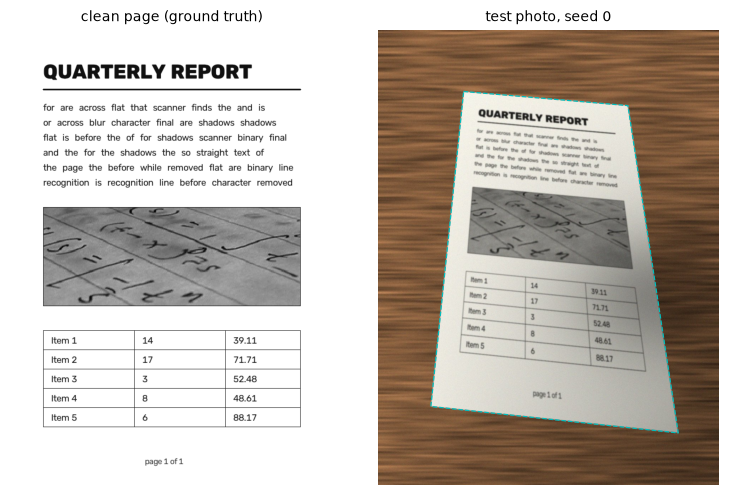
Left: the ground-truth page. Right: the photo your scanner receives (the dashed outline shows the true page boundary, which your code must find on its own).
The photo is RGB (as if decoded by Pillow). The corners are in pixel coordinates (x, y), ordered top-left, top-right, bottom-right, bottom-left, with pixel centers at integer coordinates. Pretend you don't know true_corners or page until you evaluate.
Tasks
Use NumPy, OpenCV, SciPy, and scikit-image. Each part builds on the previous one.
Part A: Find the page
- Convert the photo to grayscale and look at it, its histogram, and its edges. Which is the more reliable cue for the page boundary here: brightness (the paper is lighter than the table) or edges? What could break each one (a white counter, a shadow across the page edge, wood grain)?
- Build a binary map of the page boundary: either edges (Gaussian blur, Canny with thresholds chosen from the image, then a morphological closing to bridge small gaps) or a threshold (Otsu or adaptive, then opening and closing).
- Find contours, and select the largest convex contour that simplifies to four vertices with
cv2.approxPolyDP(with \(\varepsilon\) a few percent of the perimeter). Reject contours smaller than about 10% of the image. - Provide a fallback for when no 4-vertex contour is found (for example, the minimum-area rectangle of the largest contour), and print a warning when it's used.
Part B: Corners
- Order the four corners as top-left, top-right, bottom-right, bottom-left. Your method must work no matter where the contour starts or which direction it runs. Test it on all 24 permutations of a set of corners.
- Report the corner error: the Euclidean distance in pixels between each detected corner and the true one, plus the mean and maximum.
- Refine the corners to sub-pixel accuracy: fit a straight line to the contour points along each side (excluding the points near the corners), and intersect adjacent lines using homogeneous coordinates. Report the error again.
Part C: Rectify
- Compute the homography from the four ordered corners to an upright rectangle with the A4 aspect ratio (\(297/210 = \sqrt{2}\)). Choose the width from the average length of the top and bottom sides so that you roughly preserve the photo's resolution.
- Implement the homography estimation yourself (the DLT from Geometric transformations) and check it against
cv2.getPerspectiveTransform. - Warp the grayscale photo with inverse mapping and a good interpolation method. Explain your choice of interpolation.
Part D: Clean up
- Correct the illumination. Estimate the paper's brightness at every pixel without the ink (for example, a morphological closing with a structuring element larger than the strokes, followed by a blur), then divide the image by it. Explain why dividing is better than subtracting for lighting (hint: light multiplies reflectance).
- Binarize the corrected image with adaptive thresholding (or Sauvola). Choose the block size from the stroke width and the offset from the paper's noise level.
- Compare four binarizations: global Otsu on the uncorrected warp, adaptive on the uncorrected warp, global Otsu on the corrected image, and your final method. Use the ink F1 score: resize the clean page to your scan's size, call pixels darker than 140 "ink", exclude the photographic figure (page rows 325–520, columns 55–545, scaled), and compute precision and recall with a 1-pixel tolerance.
Part E: Evaluate
- Run the full pipeline on seeds 0 to 4. Make a table with the raw and refined mean and maximum corner errors, the output size, and the ink F1 for each seed.
- Stress test it: make the shadow darker, make the table lighter (closer to the paper), or rotate the page by more than 45°. Find at least one condition under which your scanner fails, and explain the failure in terms of the step that broke.
Stretch goals (optional)
- Make a color scan: apply the illumination correction to each channel (or to L in Lab), so stamps and highlighter survive.
- Deskew the text inside the rectified page using the gradient-orientation histogram from Edges and gradients, for pages that were printed slightly crooked.
- Estimate the page's true aspect ratio from the photo instead of assuming A4 (search for "rectangle aspect ratio from a single perspective image"; you'll need an assumption about the camera's focal length, which Level 2 makes precise).
- Try your pipeline on real photos of paper taken with your own phone. What breaks first?
Deliverables
- A script,
scanner.py, that runs top to bottom with fixed seeds and prints every number in your report. - A figure of the pipeline's stages for one photo: edges or mask, the detected quadrilateral, the rectified page, the background estimate, and the final scan.
- The evaluation table from Part E, and the binarization comparison from Part D.
- A short report (about one page): your design choices and why, the stress-test failure and its explanation, and what you'd try next.
Acceptance checklist
- Nothing is hard-coded from the ground truth: the pipeline sees only the photo.
- The corner ordering function passes all 24 permutations of a test quadrilateral.
- On seeds 0–4, the raw detected corners are within 4 px of the truth (mean per photo), and the refined corners within 1 px.
- Your DLT homography matches
cv2.getPerspectiveTransformwithnp.allclose. - The scan's height-to-width ratio is \(\sqrt{2}\) within 1%.
- The final scan's ink F1 is at least 0.9 on every seed, and the report shows that global Otsu on the uncorrected warp is clearly worse.
- The illumination correction divides by a background estimate, and you can explain why division matches the physics.
- You found and explained at least one failure case.
- The whole pipeline runs in under a second per photo on a laptop CPU.
Hints
Hint for Part A: edges or threshold?
On this data both can work. The paper is much brighter than the wood, but the shadow and the lighting gradient make a single global threshold fragile near the darker corner, while edges follow the page boundary regardless of brightness. Wood grain produces many short edges; that's fine, because you keep only the largest contour. Choose Canny's thresholds from the image, for example around 0.5 and 1.2 times the median of the blurred image, and close gaps with a 5 × 5 closing. See Edges and gradients and Morphology and classical segmentation.
Hint for Part A: which contours?
With edges, use cv2.RETR_LIST (the page outline may be nested inside wood-grain contours), sort the contours by area, and test the ten largest: approxPolyDP(c, 0.02 * cv2.arcLength(c, True), True) should give exactly four points, and cv2.isContourConvex should be true.
Hint for Part B: ordering corners robustly
The "smallest \(x + y\) is top-left" rule fails for pages rotated near 45°. A more robust approach: sort the points by their angle around the centroid with np.arctan2(y - cy, x - cx) (which goes clockwise on screen, since \(y\) points down), then rotate the list so that it starts at the point with the smallest \(x + y\).
Hint for Part B: why are the raw corners biased?
The closed edge band is a few pixels thick, and contours trace its outer boundary, so the polygon sits slightly outside the true page. A line fit through the middle of each side's points, using total least squares (the SVD of the centered points), and an intersection of neighboring lines with np.cross removes most of the bias and averages out the noise.
Hint for Part D: background estimation
A closing with a disk larger than the stroke width (for example 31 × 31 for strokes 2–4 pixels wide at this resolution) replaces the dark text with the surrounding paper brightness. Blur the result to remove blockiness, then compute gray / background * 235 and clip. The figure block is a large dark region, so it gets partly "corrected" too: that's an inherent limitation of the method, and it's why the F1 score excludes it.
Hint for Part D: adaptive threshold parameters
cv2.adaptiveThreshold(flat, 255, cv2.ADAPTIVE_THRESH_GAUSSIAN_C, cv2.THRESH_BINARY, 25, 15) is a good start. The block should be several times the stroke width; the offset should be large enough that the paper's noise doesn't flip pixels. See Point operations and histograms.
Solution
When you're done, or truly stuck, compare with the worked solution. The complete script is in the repository at scripts/capstones/level-1/scanner.py.
Next
You've finished Level 1. Move on to Level 2: Classical computer vision, where you'll find corresponding points between images automatically and use the homographies from this level to stitch panoramas.