Images as arrays
Level 0 · Chapter 4 · ⏱️ ~60 min read · Prerequisites: Digital images
Every vision library represents an image as an array. This chapter makes you fluent with those arrays: their shape and memory layout, their dtypes and the overflow bugs that come with them, indexing and cropping, channel manipulation, broadcasting for color math, the HWC and CHW layouts, normalization, and stacking images into batches for a neural network.
Why it matters
Alex was building a defect detector for printed circuit boards. To make dark images easier to see, the preprocessing added 60 to every pixel. On the test boards it worked: the images got brighter, and accuracy went up a little.
Then a batch of boards with shiny solder pads arrived. The pads were near-white, values around 220. After adding 60, they became 24: nearly black. The arrays were uint8, which holds 0 to 255, and NumPy's uint8 arithmetic wraps around silently: \(220 + 60 = 280\), and \(280 - 256 = 24\). The model saw black holes where the brightest features should be, and flagged every board as defective. No error, no warning.
The fix was one function call (cv2.add, which clips at 255 instead of wrapping, or converting to float first). Finding the bug took two days, because nobody looked at the preprocessed images. This chapter is about knowing exactly what your arrays contain, so bugs like this never happen to you, or at least so you recognize them in minutes.
Concepts
Height × width × channels
A grayscale image is a 2D array with shape (H, W): \(H\) rows and \(W\) columns. A color image is a 3D array with shape (H, W, C), where \(C\) is the number of channels: 3 for RGB (or BGR), and 4 when there's an alpha channel, which stores opacity (0 is fully transparent, 255 fully opaque). This layout, with the channel axis last, is called HWC or channels-last.
The element img[r, c, k] is channel \(k\) of the pixel at row \(r\), column \(c\). Rows count down from the top, columns count right from the left, and img[0, 0] is the top-left pixel.
In memory, NumPy stores the array as one flat block of bytes, in row-major order: the whole of row 0, then row 1, and so on. Within a row, each pixel's channels sit next to each other: R, G, B, R, G, B, and so on. This is called interleaved storage. The array's strides say how many bytes to skip to move one step along each axis. For a uint8 image of shape (H, W, 3), the strides are (3W, 3, 1): moving down one row skips a whole row of \(3W\) bytes, moving right one pixel skips 3 bytes, and moving to the next channel skips 1 byte. The byte offset of element \((r, c, k)\) is
Understanding strides explains why some operations are free and others aren't. Cropping, flipping, and transposing just create a new view: a new shape and new strides over the same bytes, with no copying. Operations that rearrange the bytes themselves, such as converting HWC to a contiguous CHW layout, must copy. The ML Handbook's NumPy chapter covers views, copies, and strides in general.
Coordinates: (row, col) versus (x, y)
NumPy indexes images by (row, col). Almost everything else in vision uses (x, y), where \(x\) is the horizontal position (the column) and \(y\) the vertical position (the row), with \(y\) pointing down in image coordinates. So
OpenCV's drawing functions, keypoints, bounding boxes, and contours all use \((x, y)\). OpenCV's sizes are (width, height), while img.shape is (height, width, channels). scikit-image mostly uses (row, col). Keep the two systems straight by naming variables x, y or r, c (never i, j) and writing h, w = img.shape[:2].
dtypes and what their values mean
An image's dtype (data type) sets both its storage size and the meaning of its values:
| dtype | Bytes per value | Range | Conventional meaning |
|---|---|---|---|
bool |
1 | False/True | masks |
uint8 |
1 | 0 to 255 | 0 is black, 255 is white; almost every file and dataset |
uint16 |
2 | 0 to 65,535 | 16-bit PNG/TIFF, depth maps in millimeters, medical images |
float32 |
4 | about \(\pm 3.4 \times 10^{38}\) | usually 0.0 to 1.0; neural network inputs |
float64 |
8 | about \(\pm 1.8 \times 10^{308}\) | NumPy's default float; scikit-image outputs |
The same picture can be stored as uint8 in \([0, 255]\) or as a float in \([0, 1]\). They look the same when displayed, but they behave completely differently in arithmetic, and functions often assume one convention. scikit-image's img_as_float converts uint8 to floats in \([0, 1]\) by dividing by 255, and img_as_ubyte goes back. OpenCV mostly works with uint8 and keeps whatever range you give it.
A common mistake is mixing the conventions: passing a float image in \([0, 255]\) to a function that expects \([0, 1]\) (matplotlib clips it to all white), or a float in \([0, 1]\) to a function that expects 0–255 (it comes out nearly black).
Overflow, wraparound, and saturation
Integer overflow happens when a result doesn't fit in the dtype. NumPy's unsigned integer arithmetic is modular: results wrap around, modulo \(2^8 = 256\) for uint8:
So \(200 + 100 = 300 \bmod 256 = 44\), and \(50 - 100 = -50 \bmod 256 = 206\). A bright pixel becomes dark, a dark pixel becomes bright, and there's no error. This is what bit Alex.
Saturating arithmetic clips the result to the valid range instead:
OpenCV's cv2.add and cv2.subtract saturate. So does any approach that converts to a wider type first: compute in int16, int32, or a float, then clip with np.clip and convert back.
A few related traps:
- Averaging two
uint8images with(a + b) / 2overflows in the addition before the division ever happens. Use(a.astype(np.uint16) + b) // 2,cv2.addWeighted, or float arithmetic. - Converting floats to
uint8with.astype(np.uint8)doesn't clip. Out-of-range values give garbage (the result is undefined in C; on common hardware it wraps). Alwaysnp.clip(x, 0, 255)first, and round if you want the nearest integer, sinceastypetruncates toward zero. - Subtracting images to find differences in
uint8wraps negative differences to large positive values. Usecv2.absdiff, or convert to a signed type first. - NumPy 2 is stricter with Python integers.
img + 10keeps theuint8dtype and can still wrap, butimg + 300raises anOverflowError, because 300 can't be auint8at all.
Indexing, cropping, and channels
Basic slicing works per axis: img[r0:r1, c0:c1] crops rows r0 to r1 - 1 and columns c0 to c1 - 1. A crop is a view: no pixels are copied, and writing to the crop writes into the original image. That's efficient and sometimes exactly what you want (draw into a region of interest), and sometimes a nasty surprise (you "edit a copy" and corrupt the source). Call .copy() when you need independence.
Other useful slices:
| Operation | Code | Note |
|---|---|---|
| one channel | img[:, :, 0] or img[..., 0] |
2D view |
| reverse channel order (RGB ↔ BGR) | img[..., ::-1] |
view with a negative stride |
| flip vertically / horizontally | img[::-1], img[:, ::-1] |
views |
| rotate 90° | np.rot90(img) |
view (a transpose plus a flip) |
| downsample by 2 (no antialiasing) | img[::2, ::2] |
view; aliases, see Digital images |
| select pixels by a mask | img[mask] where mask is (H, W) bool |
returns an (N, 3) copy |
| keep a channel axis | img[..., 0:1] |
shape (H, W, 1) |
Boolean masks are how you work with "the pixels where something is true". If mask has shape (H, W), then img[mask] returns an \(N \times 3\) array of the \(N\) selected pixels' colors, and img[mask] = (255, 0, 0) paints them red.
Broadcasting for color math
Broadcasting is NumPy's rule for combining arrays of different shapes: dimensions are compared from the right, and a dimension of size 1 (or a missing one) is stretched to match. For images, it makes per-channel and per-pixel operations one-liners:
| You want to | Multiply img (H, W, 3) by |
Shape |
|---|---|---|
| scale each channel differently (white balance) | gains |
(3,) |
| weight each pixel (vignette, mask) | weight[..., None] |
(H, W, 1) |
| weight each row (vertical gradient) | ramp[:, None, None] |
(H, 1, 1) |
White balance is a good example. A photo taken under orange light has a color cast: gray objects come out orange. The gray-world assumption says that, on average, a scene is neutral gray, so the three channel means should be equal. If the channel means are \(\mu_R, \mu_G, \mu_B\) and their overall average is \(\bar{\mu} = (\mu_R + \mu_G + \mu_B)/3\), the correction multiplies each channel by a gain:
After this, every channel's mean is \(\bar{\mu}\). In NumPy, that's img * (mu.mean() / mu), where mu has shape (3,) and broadcasts across all pixels. Gray-world fails on scenes dominated by one color (a forest, a sunset), but it's a reasonable baseline, and it shows up as a step in real camera pipelines.
Alpha blending combines a foreground \(F\) and background \(B\) with a per-pixel opacity \(\alpha(r, c) \in [0, 1]\):
With alpha of shape (H, W, 1), this is alpha * F + (1 - alpha) * B. It's how watermarks, overlays, segmentation-mask visualizations, and image compositing work.
Grayscale conversion is a weighted sum over the channel axis. With weights \(\mathbf{w} = (0.299, 0.587, 0.114)\), \(Y(r, c) = \sum_k w_k I(r, c, k)\), which in NumPy is img @ w: matrix multiplication contracts the last axis of img with w.
HWC versus CHW
PyTorch, and most deep-learning frameworks, store images channels-first: (C, H, W) for one image, and (N, C, H, W) for a batch of \(N\) images. This is called CHW or NCHW. Each channel is a contiguous \(H \times W\) plane, which historically made convolution implementations on GPUs efficient. (Modern hardware often prefers channels-last internally, and PyTorch can store tensors that way via memory_format=torch.channels_last, but the tensor's shape stays NCHW.)
Converting HWC to CHW reorders the axes: np.transpose(img, (2, 0, 1)) in NumPy, or tensor.permute(2, 0, 1) in PyTorch. The tuple says "new axis 0 is old axis 2 (channels), new axis 1 is old axis 0 (rows), new axis 2 is old axis 1 (columns)". Transposing is a view, so it's free, but the result is not contiguous: walking it in order jumps around memory. Some functions need contiguous input, and will either copy silently, complain, or (in OpenCV's case) refuse. np.ascontiguousarray or tensor.contiguous() makes a contiguous copy.
Common mistake
Using reshape to convert HWC to CHW. img.reshape(3, H, W) has the right shape but the wrong contents: it reinterprets the same flat sequence R, G, B, R, G, B, ... as three planes, so each "channel" contains a scrambled mix of all three. Use transpose or permute, which move axes, never reshape or view, which only reinterpret.
Normalization
Neural networks train best when their inputs are small and centered near zero. Two steps are standard:
- Scale
uint8values to \([0, 1]\) by dividing by 255. - Standardize each channel with a fixed mean \(\mu_k\) and standard deviation \(\sigma_k\):
For models pretrained on ImageNet, the conventional values are \(\boldsymbol{\mu} = (0.485, 0.456, 0.406)\) and \(\boldsymbol{\sigma} = (0.229, 0.224, 0.225)\) for R, G, B: the channel statistics of the ImageNet training set, in the \([0, 1]\) scale. After this, a typical pixel value lies roughly between \(-2\) and \(+2.6\).
To display a normalized tensor, invert it: \(x = x' \sigma_k + \mu_k\), then clip to \([0, 1]\).
The golden rule: inference must use exactly the same preprocessing as training. Same channel order, same scaling, same mean and standard deviation, same resize. A pretrained model fed BGR instead of RGB, or 0–255 instead of normalized values, still produces confident predictions. They're just wrong.
Stacking images into batches
A batch is a single 4D array holding several images. np.stack([a, b, c]) creates a new leading axis: three (H, W, 3) images become (3, H, W, 3). (np.concatenate instead joins along an existing axis.) In PyTorch, torch.stack does the same, and a DataLoader stacks individual samples for you.
Stacking requires every image to have the same shape, so images are resized, cropped, or padded to a common size first. Memory adds up fast: a batch of \(N\) images of size \(C \times H \times W\) in float32 takes \(4NCHW\) bytes. For \(N = 64\), \(C = 3\), \(H = W = 224\), that's \(4 \times 64 \times 3 \times 224 \times 224 \approx 38.5\) MB for the input alone, before any activations.
flowchart LR
    A["Files on disk<br/>(JPEG/PNG)"] --> B["Decode<br/>H x W x 3 uint8<br/>(RGB!)"]
    B --> C["Resize / crop<br/>to fixed H x W"]
    C --> D["Scale to [0, 1]<br/>float32"]
    D --> E["Normalize<br/>(x - mean) / std"]
    E --> F["HWC to CHW<br/>3 x H x W"]
    F --> G["Stack<br/>N x 3 x H x W"]
    G --> H["Model"]
In practice
Anatomy of an image array
import numpy as np
import cv2
import matplotlib.pyplot as plt
from skimage import data

img = data.astronaut()                          # RGB, uint8
h, w, c = img.shape
print("shape (H, W, C):", img.shape, " dtype:", img.dtype, " bytes:", img.nbytes)
print("strides (bytes per step along each axis):", img.strides)
print("pixel at row 10, col 20:", img[10, 20], "  its red value:", img[10, 20, 0])

flat = img.ravel()                               # the underlying flat sequence
r, col, k = 10, 20, 0
print("same value via the offset formula:", flat[r * 3 * w + col * 3 + k])
print("first 9 bytes of memory (R,G,B, R,G,B, ...):", flat[:9])
shape (H, W, C): (512, 512, 3)  dtype: uint8  bytes: 786432
strides (bytes per step along each axis): (1536, 3, 1)
pixel at row 10, col 20: [3 1 8]   its red value: 3
same value via the offset formula: 3
first 9 bytes of memory (R,G,B, R,G,B, ...): [154 147 151 109 103 124  63  58 102]
The strides (1536, 3, 1) match \((3W, 3, 1)\) with \(W = 512\), and the offset formula finds the same byte as img[10, 20, 0].
Now check the coordinate convention by drawing at an \((x, y)\) point with OpenCV and reading back with NumPy:
canvas = np.zeros((100, 200, 3), np.uint8)       # 100 rows (height), 200 columns (width)
x, y = 150, 30
cv2.circle(canvas, (x, y), 3, (255, 255, 255), -1)    # OpenCV takes (x, y)
print("canvas[y, x]:", canvas[y, x], " canvas[x, y] is out of bounds?", x >= canvas.shape[0])
rows, cols = np.nonzero(canvas[..., 0])
print("circle center from NumPy (row, col):", (int(rows.mean()), int(cols.mean())))
canvas[y, x]: [255 255 255]  canvas[x, y] is out of bounds? True
circle center from NumPy (row, col): (30, 150)
The circle drawn at \((x, y) = (150, 30)\) lives at NumPy index [30, 150]. Writing canvas[x, y] would raise an IndexError here, because the canvas has only 100 rows. With a square image, it wouldn't raise anything; it would silently read the wrong pixel.
uint8 overflow, and how to avoid it
a = np.array([[200, 250, 10]], dtype=np.uint8)
print("a + 100          :", a + 100)                       # wraps
print("a - 50           :", a - 50)                        # wraps below zero
print("cv2.add(a, 100)  :", cv2.add(a, np.full_like(a, 100)))       # saturates
print("cv2.subtract     :", cv2.subtract(a, np.full_like(a, 50)))  # saturates at 0
print("via int16 + clip :", np.clip(a.astype(np.int16) + 100, 0, 255).astype(np.uint8))

b = np.array([[100, 200, 250]], dtype=np.uint8)
print("(a + b) / 2      :", (a + b) / 2, " <- wrong")
print("correct average  :", ((a.astype(np.uint16) + b) // 2).astype(np.uint8))
print("a - b (uint8)    :", a - b, " cv2.absdiff:", cv2.absdiff(a, b))

f = np.array([300.0, -5.0, 127.9])
print("float.astype(uint8):", f.astype(np.uint8), " clip+round first:",
      np.clip(np.round(f), 0, 255).astype(np.uint8))
a + 100          : [[ 44  94 110]]
a - 50           : [[150 200 216]]
cv2.add(a, 100)  : [[255 255 110]]
cv2.subtract     : [[150 200   0]]
via int16 + clip : [[255 255 110]]
(a + b) / 2      : [[22. 97.  2.]]  <- wrong
correct average  : [[150 225 130]]
a - b (uint8)    : [[100  50  16]]  cv2.absdiff: [[100  50 240]]
float.astype(uint8): [ 44 251 127]  clip+round first: [255   0 128]
Every "wrong" line above runs without an error or a warning. NumPy 2 does catch one case, a Python integer that can't fit in the dtype at all:
Here's what wraparound looks like on a whole image, compared with saturation:
cam = data.camera()
wrapped = cam + np.uint8(100)                              # modular
saturated = cv2.add(cam, np.full_like(cam, 100))            # clipped at 255
darker_wrapped = cam - np.uint8(100)
print("pixels that wrapped when brightening:", f"{np.mean(cam > 155):.1%}")

fig, axes = plt.subplots(1, 4, figsize=(10, 2.8))
for ax, im, t in zip(axes, [cam, wrapped, saturated, darker_wrapped],
                     ["original", "cam + 100 (uint8 wraps)", "cv2.add (saturates)", "cam - 100 (uint8 wraps)"]):
    ax.imshow(im, cmap="gray", vmin=0, vmax=255)
    ax.set_title(t, fontsize=9)
    ax.axis("off")
plt.tight_layout()
plt.show()
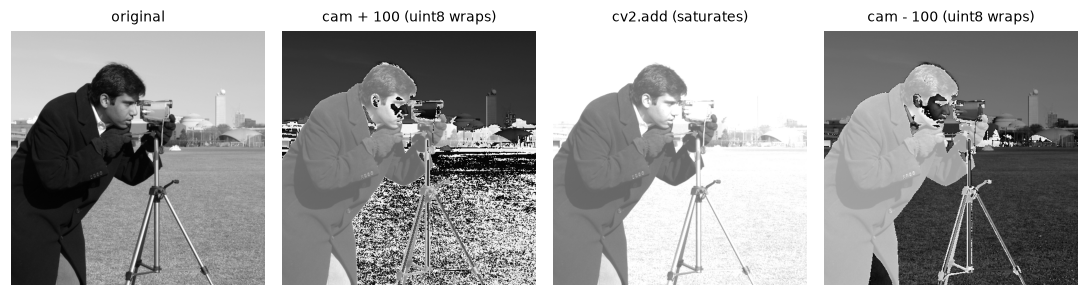
Wraparound in action: brightening turns the bright sky dark, and darkening turns the black coat bright. Saturating arithmetic (third panel) behaves as intended.
OpenCV 4 vs 5: adding a plain number
In OpenCV 4.x, cv2.add(img, 50) turns the Python number 50 into the 4-element scalar (50, 0, 0, 0), so only the first channel (blue, for a BGR image) gets brighter. In OpenCV 5.0, the same call adds 50 to every channel. We also found that OpenCV 5.0 treats a 1D NumPy array of up to 4 elements as a scalar rather than as an image. To get the same result on both versions, pass a full-size array, as in cv2.add(img, np.full_like(img, 50)), and keep your images 2D or 3D.
Cropping is a view
img = data.astronaut()
face = img[60:220, 160:330]                     # rows 60..219, cols 160..329
print("crop shape:", face.shape, " shares memory with img:", np.shares_memory(face, img))
face[:] = 0                                     # "black out the crop"
print("original pixel [100, 200] is now:", img[100, 200])

img = data.astronaut()                          # reload
face = img[60:220, 160:330].copy()
face[:] = 0
print("with .copy(), original pixel [100, 200]:", img[100, 200])
crop shape: (160, 170, 3)  shares memory with img: True
original pixel [100, 200] is now: [0 0 0]
with .copy(), original pixel [100, 200]: [81 57 17]
Channels: split, swap, and select
img = data.astronaut()
R, G, B = img[..., 0], img[..., 1], img[..., 2]          # three 2D views
bgr_view = img[..., ::-1]                                # RGB -> BGR without copying
only_red = img.copy()
only_red[..., 1:] = 0                                    # zero green and blue

gray = (img @ np.array([0.299, 0.587, 0.114])).round().astype(np.uint8)
print("gray via matmul matches OpenCV within 1:",
      np.abs(gray.astype(int) - cv2.cvtColor(img, cv2.COLOR_RGB2GRAY)).max() <= 1)

red_flag = (R > 150) & (G < 80) & (B < 80)               # boolean mask: strongly red-orange pixels
print("red pixels:", int(red_flag.sum()), " their colors:", img[red_flag].shape,
      " mean color:", img[red_flag].mean(axis=0).round())

fig, axes = plt.subplots(1, 5, figsize=(10, 2.3))
panels = [(R, "R channel"), (G, "G channel"), (B, "B channel"),
          (bgr_view, "channels reversed"), (red_flag, "mask: R>150, G<80, B<80")]
for ax, (im, t) in zip(axes, panels):
    ax.imshow(im, cmap="gray" if im.ndim == 2 else None)
    ax.set_title(t, fontsize=9)
    ax.axis("off")
plt.tight_layout()
plt.show()
gray via matmul matches OpenCV within 1: True
red pixels: 11210  their colors: (11210, 3)  mean color: [179.  61.  22.]
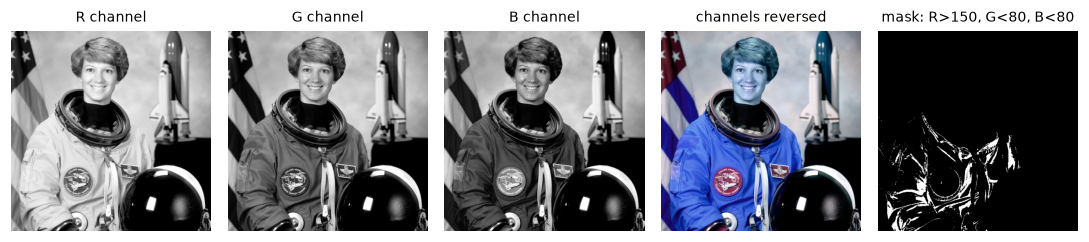
Each channel is a grayscale image. Reversing the channel order (what happens when BGR is shown as RGB) swaps red and blue: skin turns blue. The boolean mask picks out the strongly red-orange pixels, mostly on the orange spacesuit.
In each channel image, bright means "a lot of that color". The red stripes of the flag and the orange spacesuit are bright in R and much darker in G and B. The channel-reversed panel is exactly what you see when you display an OpenCV BGR image with matplotlib without converting it, the classic BGR trap covered in the next chapter.
OpenCV and non-contiguous arrays
The channel-reversed view is a perfectly good NumPy array, but OpenCV functions that write into an image need a contiguous block of memory:
view = img[..., ::-1]                                   # negative stride along channels
print("contiguous:", view.flags["C_CONTIGUOUS"], " strides:", view.strides)
try:
    cv2.rectangle(view, (10, 10), (60, 60), (255, 0, 0), 2)
except cv2.error as e:
    print("cv2.error:", str(e).strip().splitlines()[-1].strip())

fixed = np.ascontiguousarray(view)                      # one copy, now contiguous
cv2.rectangle(fixed, (10, 10), (60, 60), (255, 0, 0), 2)
print("after np.ascontiguousarray: drawing works, contiguous =", fixed.flags["C_CONTIGUOUS"])
contiguous: False  strides: (1536, 3, -1)
cv2.error: >  - Expected Ptr<cv::UMat> for argument 'img'
after np.ascontiguousarray: drawing works, contiguous = True
The error message is cryptic (the full message starts with "Layout of the output array img is incompatible with cv::Mat"). When you see it, the fix is almost always np.ascontiguousarray, or using cv2.cvtColor for the channel swap, which returns a new contiguous array.
Broadcasting: white balance, vignettes, and blending
Give the cat photo an orange cast with per-channel gains (a (3,) array broadcast over all pixels), then remove it with gray-world white balance:
cat = data.chelsea().astype(np.float32)                 # work in float to avoid overflow
cast = np.clip(cat * np.array([1.25, 1.0, 0.65]), 0, 255)    # warm, orange light

mu = cast.reshape(-1, 3).mean(axis=0)                   # channel means, shape (3,)
gains = mu.mean() / mu
balanced = np.clip(cast * gains, 0, 255)
print("channel means before:", mu.round(1))
print("gains:", gains.round(3))
print("channel means after: ", balanced.reshape(-1, 3).mean(axis=0).round(1))
print("original cat means:  ", cat.reshape(-1, 3).mean(axis=0).round(1))

# vignette: a per-pixel weight of shape (H, W, 1)
H, W, _ = cat.shape
yy, xx = np.mgrid[0:H, 0:W]
dist = np.sqrt(((xx - W / 2) / (W / 2)) ** 2 + ((yy - H / 2) / (H / 2)) ** 2)
weight = np.clip(1.2 - 0.6 * dist, 0, 1)[..., None]
vignette = cat * weight
print("weight shape:", weight.shape, "x image", cat.shape, "->", vignette.shape)

# alpha blend a red overlay into a circular region
alpha = (dist < 0.5).astype(np.float32)[..., None] * 0.5
red = np.zeros_like(cat)
red[..., 0] = 255
blend = alpha * red + (1 - alpha) * cat

fig, axes = plt.subplots(1, 4, figsize=(10, 2.2))
for ax, im, t in zip(axes, [cast, balanced, vignette, blend],
                     ["orange cast", "gray-world balanced", "vignette (H, W, 1)", "alpha blend"]):
    ax.imshow(im.astype(np.uint8))
    ax.set_title(t, fontsize=9)
    ax.axis("off")
plt.tight_layout()
plt.show()
channel means before: [184.6 111.4  56.4]
gains: [0.636 1.054 2.082]
channel means after:  [117.5 117.5 117.5]
original cat means:   [147.7 111.4  86.8]
weight shape: (300, 451, 1) x image (300, 451, 3) -> (300, 451, 3)

Broadcasting in action: a (3,) gain vector fixes the color cast, an (H, W, 1) weight darkens the corners, and an (H, W, 1) alpha blends in an overlay.
Gray-world removed the orange cast, but notice the "after" means are equal while the original cat's means aren't: the real scene is a warm-toned cat on a warm background, not gray on average. Gray-world over-corrects a little toward blue. That's the assumption's known weakness.
HWC to CHW, normalization, and batching
Convert one image to the format a pretrained PyTorch model expects, by hand and with torchvision, and check they match:
import torch
from torchvision.transforms import v2

MEAN = np.array([0.485, 0.456, 0.406], dtype=np.float32)
STD = np.array([0.229, 0.224, 0.225], dtype=np.float32)

img = data.astronaut()                                       # HWC, RGB, uint8
x = img.astype(np.float32) / 255.0                           # scale to [0, 1]
x = (x - MEAN) / STD                                         # broadcast (3,) over (H, W, 3)
x = np.ascontiguousarray(x.transpose(2, 0, 1))               # HWC -> CHW
print("manual:", x.shape, x.dtype, " range:", round(float(x.min()), 2), "to", round(float(x.max()), 2))

tv = v2.Compose([v2.ToImage(),                               # HWC ndarray -> CHW tensor
                 v2.ToDtype(torch.float32, scale=True),      # uint8 -> float in [0, 1]
                 v2.Normalize(mean=MEAN.tolist(), std=STD.tolist())])
t = tv(img)
print("torchvision:", tuple(t.shape), t.dtype, " max |diff| vs manual:",
      float((t - torch.from_numpy(x)).abs().max()))

wrong = img.reshape(3, 512, 512)                             # NOT a layout conversion
right = img.transpose(2, 0, 1)
print("reshape gives the red channel?", np.array_equal(wrong[0], img[..., 0]),
      "| transpose does?", np.array_equal(right[0], img[..., 0]))
print("transpose is contiguous?", right.flags["C_CONTIGUOUS"],
      "| torch permute contiguous?", torch.from_numpy(img).permute(2, 0, 1).is_contiguous())
manual: (3, 512, 512) float32  range: -2.12 to 2.64
torchvision: (3, 512, 512) torch.float32  max |diff| vs manual: 7.152557373046875e-07
reshape gives the red channel? False | transpose does? True
transpose is contiguous? False | torch permute contiguous? False
The hand-written version matches torchvision to within float rounding. Now build a batch from four different sample images. They have different sizes, so resize each to 128 × 128 first:
from torchvision.utils import make_grid

samples = [data.astronaut(), data.chelsea(), data.coffee(), data.rocket()]
print("original shapes:", [s.shape for s in samples])
resized = [cv2.resize(s, (128, 128), interpolation=cv2.INTER_AREA) for s in samples]
batch = torch.stack([tv(r) for r in resized])               # N x C x H x W
print("batch:", tuple(batch.shape), batch.dtype, f"{batch.element_size() * batch.nelement() / 1e6:.2f} MB")

np_batch = np.stack(resized)                                # N x H x W x C, uint8
print("np.stack:", np_batch.shape, " np.concatenate:", np.concatenate(resized).shape)

def denormalize(t):
    mean = torch.tensor(MEAN).view(-1, 1, 1)                # (3, 1, 1) broadcasts over H, W
    std = torch.tensor(STD).view(-1, 1, 1)
    return (t * std + mean).clamp(0, 1)

grid = make_grid(denormalize(batch), nrow=4, padding=4, pad_value=1.0)   # C x H x W
fig, axes = plt.subplots(1, 2, figsize=(10, 2.8))
axes[0].imshow(grid.permute(1, 2, 0).numpy())               # back to HWC to display
axes[0].set_title("batch (denormalized, CHW -> HWC)", fontsize=9)
axes[1].imshow(np.clip(batch[0].permute(1, 2, 0).numpy(), 0, 1))
axes[1].set_title("first image, still normalized (clipped)", fontsize=9)
for ax in axes:
    ax.axis("off")
plt.tight_layout()
plt.show()
original shapes: [(512, 512, 3), (300, 451, 3), (400, 600, 3), (427, 640, 3)]
batch: (4, 3, 128, 128) torch.float32 0.79 MB
np.stack: (4, 128, 128, 3)  np.concatenate: (512, 128, 3)
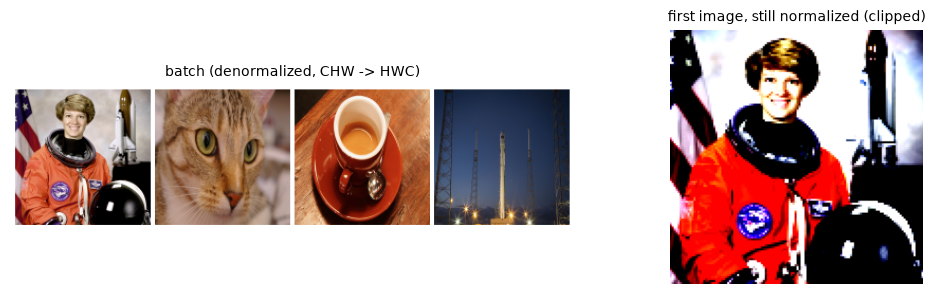
Left: the batch, denormalized and converted back to HWC for display. Right: displaying a normalized tensor directly gives exaggerated contrast and clipped colors.
The wrongly displayed panel is a useful diagnostic. If a "preview" of your model input looks like that, you're looking at normalized values; if your model is getting inputs that look unnormalized when it expects normalized ones, its predictions will be garbage. Notice also that the cat, coffee, and rocket were squashed to squares, because cv2.resize to 128 × 128 ignores aspect ratio. The next chapter shows how to resize without distortion.
Common mistake
Normalizing with the wrong statistics, or not at all. A model pretrained with ImageNet mean and std, fed raw 0–255 values, sees inputs about 100 times too large. A model trained on images scaled to \([0, 1]\) and fed images scaled to \([-1, 1]\) is subtly off. Store your preprocessing settings next to your model weights, and reuse the same function at inference.
Exercises
Exercise 1: Predict the output (easy)
Without running it, predict what each line prints. Then run it to check.
p = np.array([250, 5, 128], dtype=np.uint8)
print(p + 10)
print(p - 10)
print(p * 2)
print(p // 2 + p // 2)
print(cv2.add(p.reshape(1, 3), np.full((1, 3), 10, np.uint8)))
Solution
Line by line: \(250 + 10 = 260 \bmod 256 = 4\), and \(5 + 10 = 15\). \(5 - 10 = -5 \bmod 256 = 251\). \(250 \times 2 = 500 \bmod 256 = 244\), and \(128 \times 2 = 256 \bmod 256 = 0\). The fourth line divides first, so nothing overflows: \(125 + 125 = 250\), \(2 + 2 = 4\) (integer division drops the remainder of \(5 / 2\)), and \(64 + 64 = 128\).
The last line saturates: \(250 + 10\) clips to 255.
Exercise 2: Memory budget (easy)
(a) How many bytes does a batch of 32 RGB images at 224 × 224 take as uint8 and as float32? (b) A 4K video frame is 3840 × 2160 × 3. How many seconds of 30 fps video fit in 8 GB of RAM as uint8 frames?
Solution
(a) \(32 \times 3 \times 224 \times 224 = 4{,}816{,}896\) values. As uint8: about 4.8 MB. As float32: \(4 \times\) that, about 19.3 MB.
(b) One frame is \(3840 \times 2160 \times 3 = 24{,}883{,}200\) bytes, about 24.9 MB. At 30 fps, one second is about 746 MB. So \(8 \times 10^9 / 7.46 \times 10^8 \approx 10.7\) seconds. That's why video is processed as a stream, frame by frame, rather than loaded whole.
Exercise 3: Composite a logo (medium)
Create a 120 × 120 RGBA "logo": a filled circle in orange with alpha 255 inside the circle and 0 outside, and a soft edge (alpha fading over a few pixels) if you like. Composite it onto the bottom-right corner of the astronaut, 10 pixels from each edge, using the alpha blending formula with broadcasting. Don't use any OpenCV blending function.
Solution
S = 120
yy, xx = np.mgrid[0:S, 0:S]
d = np.sqrt((xx - S / 2) ** 2 + (yy - S / 2) ** 2)
logo = np.zeros((S, S, 4), np.uint8)
logo[..., :3] = (255, 140, 0)                                     # orange
logo[..., 3] = (np.clip((50 - d) / 4, 0, 1) * 255).astype(np.uint8)   # soft 4-px edge

base = data.astronaut().astype(np.float32)
H, W, _ = base.shape
r0, c0 = H - 10 - S, W - 10 - S
roi = base[r0:r0 + S, c0:c0 + S]                                   # a view into base
a = logo[..., 3:4].astype(np.float32) / 255                         # (S, S, 1)
roi[:] = a * logo[..., :3] + (1 - a) * roi
out = base.astype(np.uint8)
print(out[r0 + S // 2, c0 + S // 2], out[r0 + 2, c0 + 2])
The center of the logo is pure orange (alpha 1), and the corner of the logo region keeps the background (alpha 0). Writing through roi[:] = ... works because roi is a view into base.
Exercise 4: White patch versus gray world (medium)
Another white-balance method, white patch, assumes the brightest pixels in the scene are white: it scales each channel so that its 99th percentile becomes 255. Implement it with broadcasting, apply it to the orange-cast cat from the broadcasting section, and compare the result's channel means with gray-world's and the original's. Which is closer to the original here?
Solution
p99 = np.percentile(cast.reshape(-1, 3), 99, axis=0)
white_patch = np.clip(cast * (255 / p99), 0, 255)
for name, im in [("original", cat), ("gray-world", balanced), ("white patch", white_patch)]:
    print(f"{name:<12}", im.reshape(-1, 3).mean(axis=0).round(1))
White patch keeps more of the scene's warmth: its red-to-blue ratio is about 1.5, against 1.7 in the original and exactly 1.0 after gray-world, because it doesn't force the averages to be equal. But it also brightens the whole image, since it stretches each channel's 99th percentile all the way to 255. It fails instead when the brightest pixels aren't white (a yellow lamp in the frame) or are clipped. Real cameras combine several cues.
Exercise 5: Why not reshape? (hard)
Take a tiny 2 × 2 RGB image whose values are np.arange(12).reshape(2, 2, 3). Write out by hand the result of .transpose(2, 0, 1) and of .reshape(3, 2, 2). Then explain, using strides, why transpose is free and why np.ascontiguousarray of the transposed array has to copy.
Solution
The image, pixel by pixel: (0,0)=[0,1,2], (0,1)=[3,4,5], (1,0)=[6,7,8], (1,1)=[9,10,11]. So the red channel is [[0,3],[6,9]], green [[1,4],[7,10]], blue [[2,5],[8,11]].
transpose(2, 0, 1) gives exactly those three planes. reshape(3, 2, 2) cuts the flat sequence 0, 1, ..., 11 into three groups of 4: [[0,1],[2,3]], [[4,5],[6,7]], [[8,9],[10,11]], which mixes channels.
tiny = np.arange(12, dtype=np.uint8).reshape(2, 2, 3)
t = tiny.transpose(2, 0, 1)
print(t[0].tolist(), tiny.reshape(3, 2, 2)[0].tolist())
print("strides HWC:", tiny.strides, " transposed:", t.strides,
      " contiguous copy:", np.ascontiguousarray(t).strides)
[[0, 3], [6, 9]] [[0, 1], [2, 3]]
strides HWC: (6, 3, 1)  transposed: (1, 6, 3)  contiguous copy: (4, 2, 1)
The transposed array reuses the same bytes, with the strides permuted to (1, 6, 3): moving to the next channel steps 1 byte, the next row 6, the next column 3. No data moves, so it's free. But walking it in order (channel 0's row 0, then row 1, ...) jumps around memory. A contiguous CHW array needs strides (4, 2, 1), where each channel is one solid block, and that requires physically rearranging the bytes: a copy.
Check yourself
-
What does
img.shapereturn for a 640 × 480 RGB image, and what doesimg[10, 20]return?Answer
(480, 640, 3).img[10, 20]is the 3-element color of the pixel at row 10, column 20, which is the point \((x, y) = (20, 10)\). -
What is \(200 + 100\) in
uint8NumPy arithmetic, and incv2.add?Answer
NumPy wraps: \(300 \bmod 256 = 44\).
cv2.addsaturates: 255. -
Why is
(a + b) / 2wrong for twouint8images, and what's a correct alternative?Answer
The addition happens in
uint8and wraps before the division. Convert first, for example(a.astype(np.uint16) + b) // 2, or usecv2.addWeighted(a, 0.5, b, 0.5, 0). -
You crop
roi = img[100:200, 50:150]and then setroi[:] = 0. What happens toimg?Answer
The same region of
imgbecomes black, because basic slicing returns a view that shares memory. Use.copy()for an independent crop. -
What shapes do you multiply an
(H, W, 3)image by to (a) scale each channel, (b) weight each pixel?Answer
(a) A
(3,)array. (b) An(H, W, 1)array, for exampleweight[..., None]. -
Why does
img.reshape(3, H, W)not convert HWC to CHW?Answer
reshapekeeps the flat element order and only changes how it's grouped, so each "channel" gets a mix of R, G, and B values.transpose(2, 0, 1)moves the channel axis, which is what's needed. -
What does ImageNet normalization do to a pixel with value 0 in the red channel?
Answer
Scale to \([0, 1]\): 0. Then \((0 - 0.485) / 0.229 \approx -2.12\).
-
You need to stack images of different sizes into a batch. What must you do first?
Answer
Make them the same shape: resize, crop, or pad (letterbox) them to a common height and width.
Key takeaways
- Images are arrays of shape
(H, W)or(H, W, C), stored row-major with interleaved channels. Index withimg[row, col]; drawing and geometry use(x, y) = (col, row). uint8arithmetic wraps silently. Use saturating OpenCV functions, or convert to a wider or float type, clip, and convert back.- Slices, flips, and transposes are views. Copy when you need independence, and use
np.ascontiguousarraybefore passing views to OpenCV functions that write. - Broadcasting turns per-channel and per-pixel color math (white balance, vignettes, alpha blending) into one-liners.
- PyTorch wants
N × C × H × Wfloat tensors. Convert withtranspose/permute, neverreshape, and normalize exactly as in training. - Batching requires equal shapes; memory is \(4NCHW\) bytes for
float32.
Further reading
- NumPy user guide: Broadcasting, and the ML Handbook's NumPy chapter.
- scikit-image user guide: Image data types and what they mean.
- PyTorch tutorial: Channels Last Memory Format.
- Stéfan van der Walt, S. Chris Colbert, and Gaël Varoquaux, "The NumPy Array: A Structure for Efficient Numerical Computation", Computing in Science & Engineering, 2011.
Next
Put it all together with real files and video: Working with images and video.