Working with images and video
Level 0 · Chapter 5 · ⏱️ ~60 min read · Prerequisites: Images as arrays
This chapter covers the everyday mechanics of vision work: reading and writing image files with OpenCV and Pillow, avoiding the BGR vs RGB trap, displaying images correctly with matplotlib, resizing without distortion, drawing shapes and text, and reading, analyzing, and writing video frame by frame, including from a webcam.
Why it matters
Sam's team built a tomato-ripeness grader for a packing house. A camera above the conveyor photographed each tomato, and a small CNN sorted it into "ripe" or "unripe". The training script loaded images with cv2.imread. The model reached 97% validation accuracy.
For deployment, another engineer wrapped the model in a web service that received uploaded images and opened them with Pillow. Within an hour, the packing house called: the machine was sending ripe red tomatoes to the "unripe" bin and green ones to "ripe".
cv2.imread returns pixels in BGR order, and Pillow returns them in RGB order. The model had learned, in effect, that "ripe" means "high values in channel 2". In BGR, channel 2 is red. In RGB, channel 2 is blue, and green tomatoes have more blue than red ones. Every prediction flipped. The fix took one line. The lesson is to know exactly what each library hands you, and to look at what goes into your model. This chapter gives you the habits that prevent this kind of bug.
Concepts
Reading and writing images
Image files are compressed (Chapter 3). Decoding turns a file's bytes into a pixel array; encoding turns an array back into bytes in some format.
OpenCV reads with cv2.imread(path, flags) and writes with cv2.imwrite(path, img, params):
- The default flag,
cv2.IMREAD_COLOR(also calledIMREAD_COLOR_BGR), always returns a 3-channel BGRuint8array, even for a grayscale or 16-bit file. cv2.IMREAD_GRAYSCALEreturns a 2D array.cv2.IMREAD_UNCHANGEDkeeps the file's channels and bit depth: an alpha channel, 16-bit values, or floats.- Newer releases, including OpenCV 5, add
cv2.IMREAD_COLOR_RGB, which decodes straight to RGB. Code that must also run on older OpenCV 4 versions should keep usingcvtColor. - If the file is missing or can't be decoded,
imreadreturnsNonerather than raising an exception. Always check. imwritepicks the format from the file extension and returnsTrueon success. Format options go inparams, for example[cv2.IMWRITE_JPEG_QUALITY, 90].cv2.imdecodeandcv2.imencodedo the same in memory, on a byte buffer, which is how you handle images from a web request or a database without temporary files.- By default,
imreadapplies the EXIF orientation tag, rotating the image upright.IMREAD_IGNORE_ORIENTATIONturns that off.
Pillow opens files with Image.open(path), which is lazy: it reads the header right away but decodes pixels only when you need them. A Pillow image has a mode that says how pixels are stored: "L" (8-bit gray), "RGB", "RGBA", "P" (palette, common in GIFs and some PNGs), "I;16" (16-bit gray), and others. img.convert("RGB") normalizes almost anything to 8-bit RGB. np.asarray(img) gives a NumPy array, and Image.fromarray(arr) goes the other way. Pillow doesn't apply the EXIF orientation automatically; call ImageOps.exif_transpose(img).
The EXIF orientation detail causes real bugs. Phones usually save photos in the sensor's native landscape orientation and record "rotate 90° when displaying" in the metadata. If one part of your pipeline honors the tag and another ignores it, the same photo arrives in two different orientations, and any boxes or masks drawn on one are wrong for the other.
The BGR vs RGB trap
OpenCV stores color channels in BGR order for historical reasons: early camera drivers and the Windows BMP format stored bytes that way, and OpenCV kept the convention for compatibility. Almost everything else (Pillow, scikit-image, matplotlib, torchvision, and nearly every pretrained model) uses RGB.
Converting between them is a permutation of the channel axis: channel 0 and channel 2 swap, and channel 1 stays. A permutation that swaps two items is its own inverse, which is why COLOR_BGR2RGB and COLOR_RGB2BGR do exactly the same thing. It's also why the bug is easy to introduce twice and have it "cancel out" in one code path but not another.
You can usually see the trap. Shown with the channels swapped, skin turns blue-gray, red objects turn blue, blue skies turn orange-brown, and green stays green. If a displayed image has blue faces, a channel-order mistake is the first thing to check.
The safest policy: convert to RGB immediately after cv2.imread, and convert back to BGR immediately before cv2.imwrite or other OpenCV functions that assume BGR (such as drawing with a specific color, or cvtColor codes that start with BGR). Keep everything in between RGB.
Displaying images correctly with matplotlib
plt.imshow (or ax.imshow) is the standard way to look at images in Python. Its rules:
- A 3-channel array is shown as RGB. A
uint8array is interpreted on the 0–255 scale; a float array on the 0–1 scale, and float values outside \([0, 1]\) are clipped (with a warning). - A 2D array is not treated as a gray image. It's treated as data to be colormapped: by default with the
viridiscolormap (purple to yellow), and with the color scale stretched from the array's minimum to its maximum. Passcmap="gray"to get gray, andvmin=0, vmax=255(orvmax=1for floats) to stop the automatic stretching. interpolation="nearest"shows individual pixels as crisp squares, which is what you want when you zoom in. The default smooths when the displayed size differs from the image size.- Use
ax.axis("off")to remove ticks, and side-by-side panels withplt.subplots(1, n)to compare.
The automatic stretching on 2D arrays deserves a warning. A nearly black image with values from 0 to 20 is displayed with full contrast, as if it were a well-exposed photo, so you can't tell from the plot that it's nearly black. That's helpful for exploring data such as depth maps, and misleading when you're checking brightness.
Resizing and aspect ratio
The aspect ratio of an image is \(W / H\). Resizing a \(W \times H\) image directly to a target \(W_t \times H_t\) with a different aspect ratio stretches or squashes it: circles become ellipses, people become thin or wide. For many models this distortion hurts accuracy. Three standard strategies:
-
Resize to fit, then pad (letterbox). Scale by the largest factor that fits the whole image inside the target, then pad the rest with a constant color. The scale factor is
\[ s = \min\!\left(\frac{W_t}{W}, \frac{H_t}{H}\right), \qquad W' = \operatorname{round}(sW), \quad H' = \operatorname{round}(sH) \]and the padding splits the leftover space between the two sides: \(p_x = \lfloor (W_t - W')/2 \rfloor\), \(p_y = \lfloor (H_t - H')/2 \rfloor\). Nothing is lost, nothing is distorted, and some pixels are wasted on padding. Object detectors such as YOLO use this.
-
Resize the short side, then center crop. Scale by \(s = \max(W_t/W, H_t/H)\) so the image covers the target, then cut out the center. No padding and no distortion, but the edges are lost. Image classifiers usually do this (for example, resize the short side to 256, then center crop 224).
-
Resize to keep the aspect ratio, with no fixed target. For example, "make the longest side 1024 pixels". Thumbnails and photo tools do this, including the Level 0 capstone.
When you letterbox, any coordinates computed on the resized image (boxes, keypoints) must be mapped back to the original. A point \((x', y')\) in the letterboxed image corresponds to
in the original. Forgetting to undo the padding offset is a classic detection bug: all boxes are shifted by the same amount.
Interpolation decides how new pixel values are computed. Level 1's geometric transformations chapter derives the math. The practical choices:
| Situation | OpenCV flag | Why |
|---|---|---|
| Shrinking a photo | INTER_AREA |
averages each output pixel's footprint: no aliasing |
| Enlarging a photo | INTER_LINEAR (fast) or INTER_CUBIC (sharper) |
smooth interpolation between pixels |
| High-quality enlarging | INTER_LANCZOS4 |
sharpest, slowest; can ring near edges |
| Label maps, masks, class IDs | INTER_NEAREST |
never invents values that weren't in the input |
| Pixel art, or seeing exact pixels | INTER_NEAREST |
keeps hard edges |
The mask rule matters. Resizing a segmentation mask with bilinear interpolation averages class IDs at boundaries: halfway between class 1 (road) and class 3 (car) you get 2 (sidewalk), a class that isn't there.
Remember that cv2.resize takes the size as (width, height), the opposite of img.shape. Alternatively, pass None for the size and give scale factors with fx and fy.
Drawing shapes and text
Annotating images is how you debug and present vision results: boxes around detections, keypoints, contours, labels. OpenCV's drawing functions all modify the image in place, take points as integer \((x, y)\) tuples, and take colors in the image's channel order (a "red" (0, 0, 255) is red only on a BGR image):
| Function | Draws |
|---|---|
cv2.line(img, p1, p2, color, thickness) |
a line segment |
cv2.rectangle(img, p1, p2, color, thickness) |
a rectangle from top-left p1 to bottom-right p2 |
cv2.circle(img, center, radius, color, thickness) |
a circle |
cv2.ellipse(...), cv2.polylines(img, [pts], closed, color, thickness) |
ellipses, polygons |
cv2.fillPoly(img, [pts], color) |
a filled polygon |
cv2.putText(img, text, org, font, scale, color, thickness) |
text, with org at the bottom-left of the text |
cv2.getTextSize(text, font, scale, thickness) |
the text's width, height, and baseline, for placing a background box |
A thickness of -1 (or cv2.FILLED) fills the shape. lineType=cv2.LINE_AA gives antialiased, smoother lines. OpenCV's built-in Hershey fonts are simple vector fonts that support only basic ASCII. For nicer text, real fonts, or non-Latin scripts, draw with Pillow's ImageDraw and a TrueType font.
Video: frames, codecs, and containers
A video is a sequence of images (frames) shown at a fixed frame rate, measured in frames per second (fps). Storing frames independently would be enormous: one minute of 1080p at 30 fps is \(1920 \times 1080 \times 3 \times 30 \times 60 \approx 11\) GB uncompressed. So video is compressed by a codec (coder–decoder) such as H.264, H.265/HEVC, VP9, or AV1. Codecs exploit similarity between frames: they store occasional full keyframes and, for the frames in between, mostly the motion and changes relative to nearby frames. The compressed streams are packaged in a container file (.mp4, .mkv, .avi, .mov) along with audio and timing information. The container and the codec are separate choices.
OpenCV reads video with cv2.VideoCapture. The pattern is always the same: open, loop over cap.read() (which returns a success flag and a BGR frame), stop when the flag is False, and release. Properties such as frame rate, frame size, and frame count are available through cap.get(cv2.CAP_PROP_...); the frame count is read from the container metadata and is sometimes inaccurate, so don't rely on it for loop bounds.
Writing uses cv2.VideoWriter(path, fourcc, fps, (width, height)). A FourCC is a four-character code naming the codec, such as "mp4v" (MPEG-4 Part 2) or "MJPG" (Motion JPEG). Which codecs work depends on how OpenCV was built: the pip wheels can write mp4v to .mp4 and MJPG to .avi, but H.264 ("avc1") usually fails for licensing reasons. Two silent failures to watch for: if the frames you write don't match the (width, height) you gave the writer, or have the wrong number of channels, OpenCV typically writes nothing and raises no error. Always check writer.isOpened(), and check the output file afterwards.
A webcam is just another VideoCapture source: cv2.VideoCapture(0) opens the first camera. You read frames in a loop exactly as from a file, usually showing them in a window with cv2.imshow and polling the keyboard with cv2.waitKey. That needs a non-headless OpenCV and a desktop session.
flowchart LR
    S["Source<br/>file / camera / stream"] --> C["cv2.VideoCapture"]
    C -->|"cap.read()"| F["frame<br/>H x W x 3 BGR uint8"]
    F --> P["process<br/>(convert, analyze, draw)"]
    P --> W["cv2.VideoWriter<br/>(same W x H, BGR)"]
    P --> D["display or log<br/>statistics"]
    F -->|"loop until<br/>ok == False"| C
In practice
Reading and writing with OpenCV
import os
import numpy as np
import cv2
import matplotlib.pyplot as plt
from PIL import Image, ImageOps
from skimage import data

rgb = data.coffee()                                          # RGB, (400, 600, 3)
ok = cv2.imwrite("coffee.png", cv2.cvtColor(rgb, cv2.COLOR_RGB2BGR))
print("imwrite returned:", ok, "| size on disk:", os.path.getsize("coffee.png"), "bytes")

bgr = cv2.imread("coffee.png")                               # default: BGR, 3 channels
gray = cv2.imread("coffee.png", cv2.IMREAD_GRAYSCALE)
print("IMREAD_COLOR    :", bgr.shape, bgr.dtype, " pixel[0,0] =", bgr[0, 0])
print("IMREAD_GRAYSCALE:", gray.shape, gray.dtype)
print("original RGB pixel[0,0] =", rgb[0, 0])

if hasattr(cv2, "IMREAD_COLOR_RGB"):                          # OpenCV 5 (and recent 4.x)
    direct = cv2.imread("coffee.png", cv2.IMREAD_COLOR_RGB)
    print("IMREAD_COLOR_RGB matches original:", np.array_equal(direct, rgb))

missing = cv2.imread("no_such_file.png")
print("missing file gives:", missing)

ok, buf = cv2.imencode(".jpg", bgr, [cv2.IMWRITE_JPEG_QUALITY, 85])     # encode in memory
print("in-memory JPEG:", type(buf).__name__, buf.dtype, len(buf), "bytes")
decoded = cv2.imdecode(np.frombuffer(buf.tobytes(), np.uint8), cv2.IMREAD_COLOR)
print("decoded from bytes:", decoded.shape)
imwrite returned: True | size on disk: 459805 bytes
IMREAD_COLOR    : (400, 600, 3) uint8  pixel[0,0] = [ 8 13 21]
IMREAD_GRAYSCALE: (400, 600) uint8
original RGB pixel[0,0] = [21 13  8]
IMREAD_COLOR_RGB matches original: True
missing file gives: None
in-memory JPEG: ndarray uint8 56809 bytes
decoded from bytes: (400, 600, 3)
The imencode/imdecode pair is also the workaround for file paths with non-ASCII characters on Windows, where cv2.imread can fail: read the bytes with np.fromfile(path, np.uint8) and decode them with cv2.imdecode.
Reading and writing with Pillow, and EXIF orientation
pil = Image.open("coffee.png")
print("mode:", pil.mode, " size (W, H):", pil.size, " format:", pil.format)
arr = np.asarray(pil)
print("as array:", arr.shape, " equals original RGB:", np.array_equal(arr, rgb))

pil.convert("L").save("coffee_gray.jpg", quality=90)          # Pillow writes RGB-order data
print("gray JPEG mode on reload:", Image.open("coffee_gray.jpg").mode)

# A photo whose EXIF says "rotate 90 degrees clockwise to display" (orientation 6)
exif = Image.Exif()
exif[0x0112] = 6                                               # 0x0112 is the Orientation tag
Image.fromarray(rgb).save("phone_photo.jpg", exif=exif.tobytes())

p = Image.open("phone_photo.jpg")
print("Pillow raw size (W, H):        ", p.size, " orientation tag:", p.getexif().get(0x0112))
print("Pillow after exif_transpose:   ", ImageOps.exif_transpose(p).size)
print("cv2.imread shape (H, W, C):    ", cv2.imread("phone_photo.jpg").shape)
print("cv2 IGNORE_ORIENTATION shape:  ", cv2.imread("phone_photo.jpg",
      cv2.IMREAD_COLOR | cv2.IMREAD_IGNORE_ORIENTATION).shape)
mode: RGB  size (W, H): (600, 400)  format: PNG
as array: (400, 600, 3)  equals original RGB: True
gray JPEG mode on reload: L
Pillow raw size (W, H):         (600, 400)  orientation tag: 6
Pillow after exif_transpose:    (400, 600)
cv2.imread shape (H, W, C):     (600, 400, 3)
cv2 IGNORE_ORIENTATION shape:   (400, 600, 3)
OpenCV rotated the photo upright (now 600 tall and 400 wide); Pillow didn't, until exif_transpose. If your labeling tool shows photos rotated and your training code doesn't, every label is wrong.
Common mistake
Mixing libraries that disagree about EXIF orientation. Pick one policy for the whole pipeline (usually: apply the orientation once at load time, then strip it), and apply it in training, labeling, and inference alike.
The BGR vs RGB trap
Here's the trap made visible. Load with OpenCV and display with matplotlib, with and without the conversion:
astro_bgr = cv2.cvtColor(data.astronaut(), cv2.COLOR_RGB2BGR)
cv2.imwrite("astronaut.jpg", astro_bgr)

loaded = cv2.imread("astronaut.jpg")                         # BGR
wrong = loaded                                               # passed straight to matplotlib
right = cv2.cvtColor(loaded, cv2.COLOR_BGR2RGB)
also_right = loaded[..., ::-1]                               # same pixels, as a view

pil_rgb = np.asarray(Image.open("astronaut.jpg"))
print("cv2 pixel  [300, 100]:", loaded[300, 100])
print("PIL pixel  [300, 100]:", pil_rgb[300, 100])
print("cvtColor result equals the ::-1 view:", np.array_equal(right, also_right))
print("BGR2RGB is its own inverse:",
      np.array_equal(cv2.cvtColor(right, cv2.COLOR_BGR2RGB), loaded))

fig, axes = plt.subplots(1, 3, figsize=(10, 3.4))
for ax, im, t in zip(axes, [wrong, right, np.abs(right.astype(int) - wrong).sum(axis=2)],
                     ["imshow(cv2.imread(...)): BGR shown as RGB", "after cvtColor(BGR2RGB)",
                      "|right - wrong| summed over channels"]):
    ax.imshow(im, cmap="magma" if im.ndim == 2 else None)
    ax.set_title(t, fontsize=9)
    ax.axis("off")
plt.tight_layout()
plt.show()
cv2 pixel  [300, 100]: [ 92 131 237]
PIL pixel  [300, 100]: [237 131  92]
cvtColor result equals the ::-1 view: True
BGR2RGB is its own inverse: True
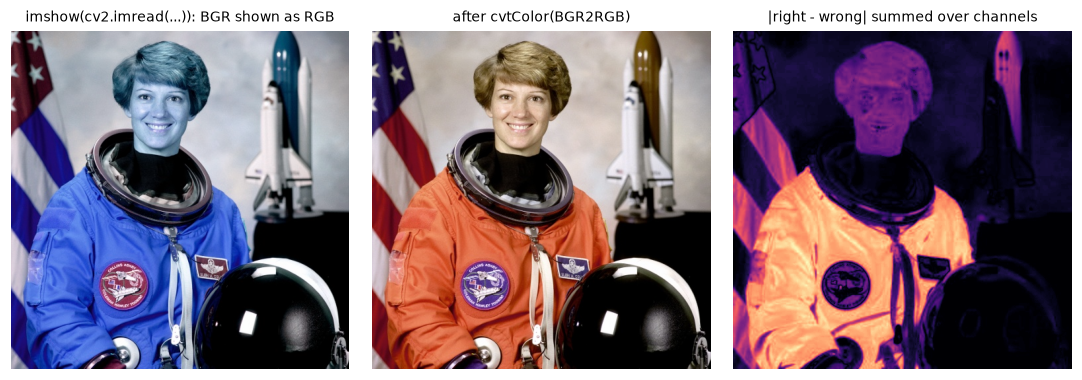
The BGR trap: skin and the orange suit turn blue when OpenCV's BGR array is displayed as RGB. The difference is largest where red and blue differ most.
The difference map is dark wherever red and blue are similar (grays, whites, blacks) and bright on strongly colored areas. That's why the bug can hide on gray-ish test images and appear on colorful real ones.
Common mistake
Feeding OpenCV-loaded images to a model trained on RGB, or the reverse. The model still produces confident predictions; they're just wrong, as with Sam's tomatoes. Convert at the boundary, and add an assertion in your preprocessing tests: load a known image with your pipeline and compare a pixel against its known RGB value.
Displaying correctly with matplotlib
Three more display traps, side by side: a 2D array without cmap, automatic contrast stretching, and float images outside \([0, 1]\).
moon = data.moon()
dim = (moon // 12).astype(np.uint8)                          # a very dark version: max ~21
print("dim image range:", dim.min(), "-", dim.max())
as_float255 = data.astronaut().astype(np.float32)            # float, but still 0-255

fig, axes = plt.subplots(1, 4, figsize=(10, 2.8))
axes[0].imshow(moon)                                         # no cmap: viridis
axes[0].set_title("2D array, no cmap", fontsize=9)
axes[1].imshow(dim, cmap="gray")                             # auto-stretched to min..max
axes[1].set_title("dim image, auto vmin/vmax", fontsize=9)
axes[2].imshow(dim, cmap="gray", vmin=0, vmax=255)           # true brightness
axes[2].set_title("dim image, vmin=0, vmax=255", fontsize=9)
axes[3].imshow(np.clip(as_float255, 0, 1))                   # what imshow does with floats > 1
axes[3].set_title("float in 0-255: clipped to 1", fontsize=9)
for ax in axes:
    ax.axis("off")
plt.tight_layout()
plt.show()
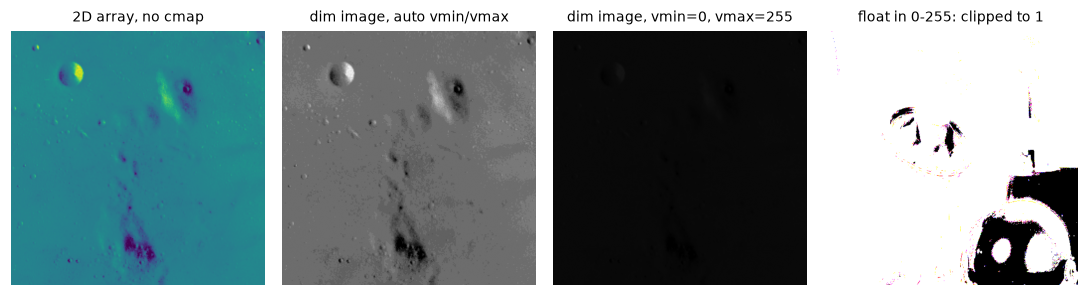
Panel 1: 2D arrays get a colormap unless you pass cmap="gray". Panels 2–3: auto-scaling makes a nearly black image look normal. Panel 4: float images must be in [0, 1].
The second and third panels show the same array. Without vmin and vmax, you'd never know the image is nearly black. For the fourth panel, the fix is to divide by 255 (or convert to uint8) before displaying. (Passing a float array with values above 1 to imshow directly gives the same result, plus a warning about clipping.)
Resizing and aspect ratio
Implement letterboxing and center cropping, and compare them with a naive resize to a square:
def letterbox(img, size=(256, 256), pad_value=114):
    """Resize to fit inside size=(W, H) keeping aspect ratio, then pad. Returns image, scale, (px, py)."""
    tw, th = size
    h, w = img.shape[:2]
    s = min(tw / w, th / h)
    nw, nh = round(w * s), round(h * s)
    interp = cv2.INTER_AREA if s < 1 else cv2.INTER_LINEAR
    resized = cv2.resize(img, (nw, nh), interpolation=interp)
    px, py = (tw - nw) // 2, (th - nh) // 2
    out = np.full((th, tw) + img.shape[2:], pad_value, dtype=img.dtype)
    out[py:py + nh, px:px + nw] = resized
    return out, s, (px, py)

def center_crop_resize(img, size=(256, 256)):
    tw, th = size
    h, w = img.shape[:2]
    s = max(tw / w, th / h)
    nw, nh = round(w * s), round(h * s)
    resized = cv2.resize(img, (nw, nh), interpolation=cv2.INTER_AREA if s < 1 else cv2.INTER_LINEAR)
    x0, y0 = (nw - tw) // 2, (nh - th) // 2
    return resized[y0:y0 + th, x0:x0 + tw]

rocket = data.rocket()                                       # (427, 640, 3): wide
squashed = cv2.resize(rocket, (256, 256), interpolation=cv2.INTER_AREA)
boxed, s, (px, py) = letterbox(rocket)
cropped = center_crop_resize(rocket)
print("original:", rocket.shape, f"aspect {rocket.shape[1] / rocket.shape[0]:.3f}")
print(f"letterbox: scale {s:.4f}, content {round(640 * s)} x {round(427 * s)}, padding (px, py) = ({px}, {py})")

# map a point from the letterboxed image back to the original
xb, yb = 128, 128                                            # center of the 256 x 256 output
print("letterbox point (128, 128) -> original:", ((xb - px) / s, (yb - py) / s))

fig, axes = plt.subplots(1, 4, figsize=(10, 2.8))
for ax, im, t in zip(axes, [rocket, squashed, boxed, cropped],
                     ["original 640 x 427", "resize to 256 x 256: squashed",
                      "letterbox: fit + pad", "short side + center crop"]):
    ax.imshow(im)
    ax.set_title(t, fontsize=9)
    ax.axis("off")
plt.tight_layout()
plt.show()
original: (427, 640, 3) aspect 1.499
letterbox: scale 0.4000, content 256 x 171, padding (px, py) = (0, 42)
letterbox point (128, 128) -> original: (320.0, 215.0)
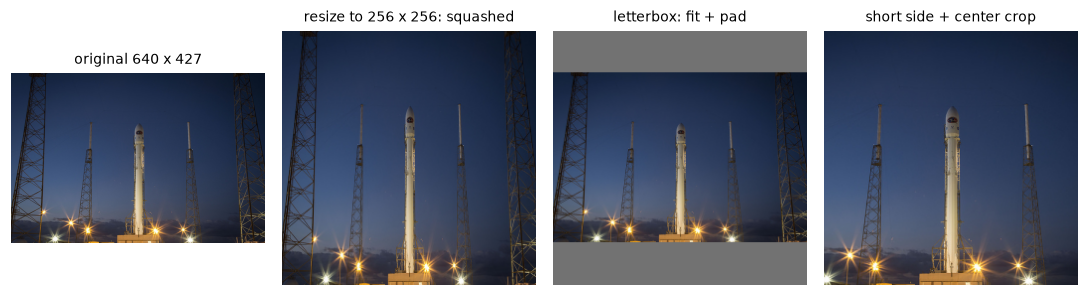
Three ways to get a square input: squash (distorts), letterbox (keeps everything, adds padding), center crop (keeps the aspect ratio, loses the sides).
The center of the letterboxed output maps to \((320, 215)\), close to the original's center \((320, 213.5)\); the small difference is the rounding of the content height to 171 pixels.
Now resize a label mask both ways (here enlarging it 1.5×) and look at the values:
mask = np.zeros((40, 60), np.uint8)
mask[:, 20:40] = 1                                           # class 1: road
mask[:, 40:] = 3                                             # class 3: car
up_lin = cv2.resize(mask, (90, 60), interpolation=cv2.INTER_LINEAR)
up_nn = cv2.resize(mask, (90, 60), interpolation=cv2.INTER_NEAREST)
print("classes in original:      ", np.unique(mask))
print("after INTER_LINEAR resize:", np.unique(up_lin), " <- class 2 appeared from nowhere")
print("after INTER_NEAREST resize:", np.unique(up_nn))
classes in original:       [0 1 3]
after INTER_LINEAR resize: [0 1 2 3]  <- class 2 appeared from nowhere
after INTER_NEAREST resize: [0 1 3]
Common mistake
Resizing masks, label maps, or any image of class IDs with bilinear or bicubic interpolation. Use INTER_NEAREST for anything where the values are labels rather than intensities.
Drawing shapes and text
Annotate the coins image as a detector would: boxes, centers, a polygon, and labels with a filled background so they're readable on any image.
canvas = cv2.cvtColor(data.coins(), cv2.COLOR_GRAY2BGR)      # 3 channels so we can draw in color
font = cv2.FONT_HERSHEY_SIMPLEX
detections = [((131, 28, 179, 74), "coin 0.97"), ((305, 16, 365, 72), "coin 0.91"),
              ((189, 170, 237, 216), "coin 0.66")]
for (x1, y1, x2, y2), label in detections:
    cv2.rectangle(canvas, (x1, y1), (x2, y2), (0, 255, 0), 2)                 # green in BGR
    cv2.circle(canvas, ((x1 + x2) // 2, (y1 + y2) // 2), 3, (0, 0, 255), -1)  # filled red dot
    (tw, th), base = cv2.getTextSize(label, font, 0.45, 1)
    ty = max(y1, th + base + 2)                               # keep the label inside the image
    cv2.rectangle(canvas, (x1, ty - th - base - 2), (x1 + tw + 4, ty), (0, 255, 0), cv2.FILLED)
    cv2.putText(canvas, label, (x1 + 2, ty - base), font, 0.45, (0, 0, 0), 1, cv2.LINE_AA)

pts = np.array([[150, 230], [190, 290], [120, 295]], np.int32)               # (x, y) points
cv2.polylines(canvas, [pts], isClosed=True, color=(255, 0, 255), thickness=2)
cv2.line(canvas, (0, 300), (383, 300), (255, 255, 0), 1)
print("text size of 'coin 0.97' (w, h), baseline:", cv2.getTextSize("coin 0.97", font, 0.45, 1))
print("canvas still uint8 BGR:", canvas.shape, canvas.dtype)

plt.figure(figsize=(6, 4.8))
plt.imshow(cv2.cvtColor(canvas, cv2.COLOR_BGR2RGB))          # convert before showing!
plt.axis("off")
plt.title("boxes, centers, labels, a polygon, and a line", fontsize=9)
plt.show()
text size of 'coin 0.97' (w, h), baseline: ((52, 12), 1)
canvas still uint8 BGR: (303, 384, 3) uint8
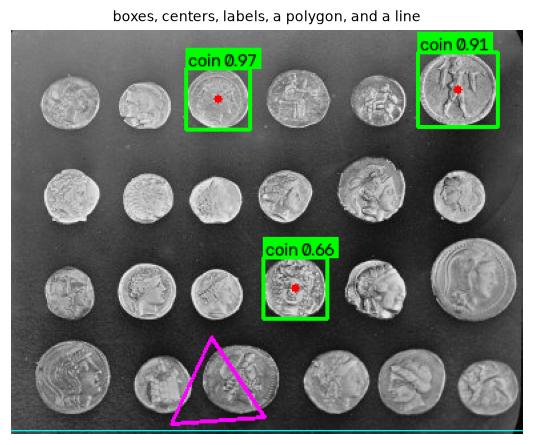
OpenCV drawing: colors are given in BGR, points as (x, y), and everything is drawn in place.
A few details in this code are worth copying: drawing on a 3-channel copy of a gray image, so colors work; measuring text with getTextSize to draw a background box; clamping the label's position so it doesn't fall off the top edge; and converting to RGB before display, because the colors were specified in BGR.
OpenCV 4 vs 5: text rendering
OpenCV 5 renders text differently from 4.x: it adds a cv2.FontFace API for TrueType-style fonts, and the classic FONT_HERSHEY_* constants no longer produce the old stroke-font look (notice the slashed zeros in the labels above). Text sizes from cv2.getTextSize differ between versions too, so always measure text instead of hard-coding offsets.
Writing a synthetic video
Create a short video with known content: a gradient background fading in from black, a ball moving across it, and a hard scene cut two-thirds of the way through. Because we generate every frame, we know exactly what the statistics should show.
W, H, FPS, N = 320, 240, 20, 60
fourcc = cv2.VideoWriter_fourcc(*"mp4v")
writer = cv2.VideoWriter("synthetic.mp4", fourcc, FPS, (W, H))      # size is (width, height)
print("writer opened:", writer.isOpened())

xx = np.linspace(0, 1, W)[None, :, None]
yy = np.linspace(0, 1, H)[:, None, None]
scene_a = (np.concatenate([40 + 120 * xx + 0 * yy, 60 + 80 * yy + 0 * xx, 140 + 0 * xx + 0 * yy],
                          axis=2)).astype(np.uint8)                   # BGR gradient
scene_b = cv2.resize(cv2.cvtColor(data.coffee(), cv2.COLOR_RGB2BGR), (W, H),
                     interpolation=cv2.INTER_AREA)

written = []
for i in range(N):
    base = scene_a if i < 40 else scene_b                             # hard cut at frame 40
    fade = min(1.0, i / 10)                                           # fade in over 10 frames
    frame = (base.astype(np.float32) * fade).astype(np.uint8)
    cx = int(20 + i * (W - 40) / (N - 1))
    cy = int(H / 2 + 60 * np.sin(i / 6))
    cv2.circle(frame, (cx, cy), 14, (0, 220, 255), -1, cv2.LINE_AA)    # yellow-orange ball (BGR)
    cv2.putText(frame, f"{i:02d}", (8, 22), cv2.FONT_HERSHEY_SIMPLEX, 0.6, (255, 255, 255), 1, cv2.LINE_AA)
    writer.write(frame)                                               # must be (H, W, 3) uint8 BGR
    written.append(frame)
writer.release()
print("file size:", os.path.getsize("synthetic.mp4"), "bytes for", N, "frames",
      f"(raw would be {N * H * W * 3:,} bytes)")
Reading video frame by frame
Read it back with VideoCapture, one frame at a time, and compute statistics for every frame: mean brightness, mean color, and how much the frame changed from the previous one.
cap = cv2.VideoCapture("synthetic.mp4")
print("opened:", cap.isOpened(),
      "| fps:", cap.get(cv2.CAP_PROP_FPS),
      "| size:", int(cap.get(cv2.CAP_PROP_FRAME_WIDTH)), "x", int(cap.get(cv2.CAP_PROP_FRAME_HEIGHT)),
      "| frame count (metadata):", int(cap.get(cv2.CAP_PROP_FRAME_COUNT)))

stats, frames, prev = [], [], None
while True:
    ok, frame = cap.read()                                   # BGR uint8, or ok=False at the end
    if not ok:
        break
    gray = cv2.cvtColor(frame, cv2.COLOR_BGR2GRAY)
    b, g, r = frame.reshape(-1, 3).mean(axis=0)
    change = 0.0 if prev is None else float(cv2.absdiff(gray, prev).mean())
    stats.append((gray.mean(), r, g, b, change))
    frames.append(frame)
    prev = gray
cap.release()

stats = np.array(stats)
print("frames read:", len(frames))
print("brightness of frames 0, 5, 10, 39, 40:", stats[[0, 5, 10, 39, 40], 0].round(1))
cut = int(np.argmax(stats[:, 4]))
print("largest frame-to-frame change at frame", cut, f"(mean |diff| = {stats[cut, 4]:.1f}),",
      f"typical change elsewhere: {np.median(stats[1:, 4]):.1f}")
print(f"PSNR of decoded frame 20 vs written frame 20: "
      f"{10 * np.log10(255 ** 2 / np.mean((frames[20].astype(float) - written[20]) ** 2)):.1f} dB")
opened: True | fps: 20.0 | size: 320 x 240 | frame count (metadata): 60
frames read: 60
brightness of frames 0, 5, 10, 39, 40: [  2.2  55.3 110.6 110.6 103.3]
largest frame-to-frame change at frame 40 (mean |diff| = 52.5), typical change elsewhere: 0.9
PSNR of decoded frame 20 vs written frame 20: 38.2 dB
The statistics recover what we put in: brightness ramps up during the fade, the cut at frame 40 is by far the largest frame-to-frame change, and the decoded frames are close to (but not exactly) what we wrote, because mp4v is lossy. Plot them:
t = np.arange(len(stats)) / FPS
fig = plt.figure(figsize=(10, 4.2))
for j, idx in enumerate([2, 20, 39, 41, 59]):
    ax = fig.add_subplot(2, 5, j + 1)
    ax.imshow(cv2.cvtColor(frames[idx], cv2.COLOR_BGR2RGB))
    ax.set_title(f"frame {idx}", fontsize=9)
    ax.axis("off")
ax = fig.add_subplot(2, 2, 3)
ax.plot(t, stats[:, 1], "r-", label="mean R")
ax.plot(t, stats[:, 2], "g-", label="mean G")
ax.plot(t, stats[:, 3], "b-", label="mean B")
ax.plot(t, stats[:, 0], "k--", label="brightness")
ax.set_xlabel("time (s)")
ax.set_ylabel("mean value")
ax.legend(fontsize=7, ncol=2)
ax = fig.add_subplot(2, 2, 4)
ax.plot(t, stats[:, 4], "m-")
ax.axvline(cut / FPS, color="gray", ls=":")
ax.set_xlabel("time (s)")
ax.set_ylabel("mean |frame diff|")
ax.set_title(f"scene cut detected at frame {cut}", fontsize=9)
plt.tight_layout()
plt.show()
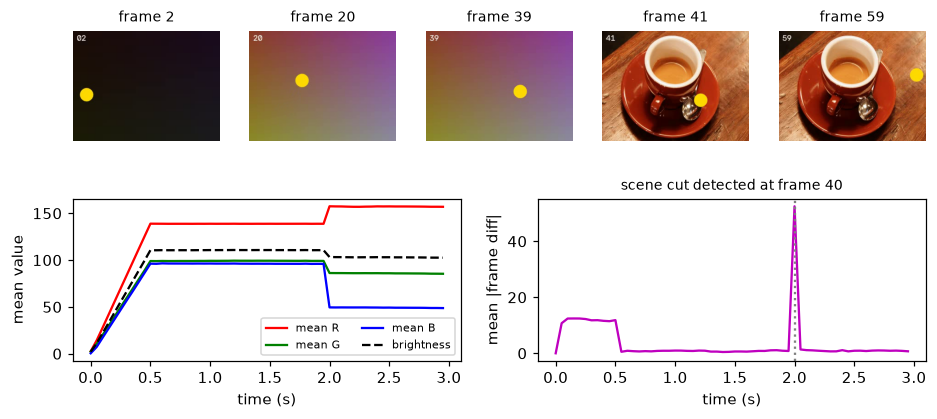
Per-frame statistics: brightness ramps during the fade-in, colors jump at the scene cut, and the frame-difference curve spikes at frame 40.
This tiny pipeline (read, compute per-frame statistics, plot) is the skeleton of many real video tools: shot-boundary detection, exposure monitoring for a security camera, detecting when a production line stops moving. The plateau in the frame-difference curve during the first half second is the fade-in: every pixel gets brighter each frame. After that, the small residual differences come from the moving ball and the changing frame counter.
Webcams
A webcam works exactly like a video file, except it never ends. This needs a camera, a desktop session, and a non-headless OpenCV build (opencv-python), so it isn't run here:
cap = cv2.VideoCapture(0)                       # 0 = first camera; try 1, 2 for others
if not cap.isOpened():
    raise RuntimeError("no camera found")
cap.set(cv2.CAP_PROP_FRAME_WIDTH, 640)          # a request; the camera may choose another size
cap.set(cv2.CAP_PROP_FRAME_HEIGHT, 480)
try:
    while True:
        ok, frame = cap.read()
        if not ok:
            break
        gray = cv2.cvtColor(frame, cv2.COLOR_BGR2GRAY)
        cv2.putText(frame, f"brightness {gray.mean():.0f}", (10, 30),
                    cv2.FONT_HERSHEY_SIMPLEX, 0.8, (0, 255, 0), 2)
        cv2.imshow("webcam", frame)             # needs a GUI build of OpenCV
        if cv2.waitKey(1) & 0xFF == ord("q"):   # waitKey also lets the window redraw
            break
finally:
    cap.release()
    cv2.destroyAllWindows()
Three practical notes. cv2.waitKey(1) is required: without it, the window never updates. Camera settings such as resolution and exposure are requests, and drivers may ignore them, so read back the actual frame size from the first frame. In a notebook, grab a single frame and show it with matplotlib instead of using imshow.
Exercises
Exercise 1: Spot the conversions (easy)
For each line, say whether the displayed colors are correct, and why: (a) plt.imshow(cv2.imread("a.jpg")) (b) plt.imshow(np.asarray(Image.open("a.jpg"))) (c) plt.imshow(cv2.imread("a.jpg")[..., ::-1]) (d) cv2.imwrite("b.jpg", np.asarray(Image.open("a.jpg"))) (then opening b.jpg in a photo viewer).
Solution
(a) Wrong: BGR shown as RGB, red and blue swapped.
(b) Correct: Pillow gives RGB, matplotlib expects RGB.
(c) Correct: reversing the last axis converts BGR to RGB.
(d) Wrong: imwrite assumes BGR, so writing an RGB array swaps red and blue in the saved file. Convert with cv2.cvtColor(arr, cv2.COLOR_RGB2BGR) first, or save with Pillow.
Exercise 2: Letterbox arithmetic (easy)
A 1920 × 1080 frame is letterboxed into a 640 × 640 model input. (a) What are the scale factor, the content size, and the padding? (b) The model outputs a box from \((100, 200)\) to \((300, 400)\) in input coordinates. What is the box in the original frame?
Solution
(a) \(s = \min(640/1920, 640/1080) = \min(0.3333, 0.5926) = 1/3\). Content: \(640 \times 360\). Padding: \(p_x = 0\), \(p_y = (640 - 360)/2 = 140\).
(b) \(x = (x' - 0) \cdot 3\) and \(y = (y' - 140) \cdot 3\): \((100, 200) \to (300, 180)\) and \((300, 400) \to (900, 780)\).
Exercise 3: A labeled thumbnail (medium)
Write thumbnail(img_rgb, max_side, caption) that resizes an RGB image so its longest side is max_side (keeping the aspect ratio, with INTER_AREA), then draws the caption in white on a semi-transparent black strip along the bottom (alpha 0.6). Return an RGB image. Test it on data.chelsea() with max_side=200.
Solution
def thumbnail(img_rgb, max_side, caption):
    h, w = img_rgb.shape[:2]
    s = max_side / max(h, w)
    small = cv2.resize(img_rgb, (round(w * s), round(h * s)), interpolation=cv2.INTER_AREA)
    out = small.copy()
    strip_h = 22
    overlay = out.copy()
    cv2.rectangle(overlay, (0, out.shape[0] - strip_h), (out.shape[1], out.shape[0]), (0, 0, 0), -1)
    out = cv2.addWeighted(overlay, 0.6, out, 0.4, 0)          # 60% black strip
    cv2.putText(out, caption, (5, out.shape[0] - 7), cv2.FONT_HERSHEY_SIMPLEX, 0.45,
                (255, 255, 255), 1, cv2.LINE_AA)
    return out

th = thumbnail(data.chelsea(), 200, "chelsea.png")
print(th.shape, th.dtype)
cv2.addWeighted(a, 0.6, b, 0.4, 0) computes \(0.6a + 0.4b\) with saturation, so blending the fully drawn overlay with the original gives a translucent strip. The text is drawn after blending, so it stays fully opaque. Because this function works on RGB, "white" and "black" are the same in either order; if you used a color, you'd give it in RGB order here.
Exercise 4: Find the frozen frames (medium)
Security cameras sometimes freeze: the stream keeps running, but the same frame repeats. Modify the synthetic video writer so frames 25 to 31 repeat frame 24 exactly. Then read the video back and detect the frozen stretch from the per-frame differences. Why can't you require the difference to be exactly zero?
Solution
writer = cv2.VideoWriter("frozen.mp4", fourcc, FPS, (W, H))
for i in range(N):
    writer.write(written[24] if 25 <= i <= 31 else written[i])
writer.release()

cap = cv2.VideoCapture("frozen.mp4")
diffs, prev = [], None
while True:
    ok, frame = cap.read()
    if not ok:
        break
    g = cv2.cvtColor(frame, cv2.COLOR_BGR2GRAY)
    diffs.append(np.nan if prev is None else float(cv2.absdiff(g, prev).mean()))
    prev = g
cap.release()
diffs = np.array(diffs)
frozen = np.where(diffs < 0.2)[0]
print("frames nearly identical to the previous one:", frozen.tolist())
print("their diffs:", diffs[frozen].round(3).tolist())
frames nearly identical to the previous one: [25, 26, 27, 28, 29, 30, 31]
their diffs: [0.173, 0.007, 0.0, 0.0, 0.0, 0.0, 0.0]
The first two repeated frames aren't exactly identical to the frame before them after decoding (differences of 0.17 and 0.007), because a lossy codec doesn't reproduce a repeated input frame perfectly on the first try; it refines it over the next frames. Real cameras add sensor noise on top. Use a small threshold, tuned on real footage, rather than exact equality.
Exercise 5: A contact sheet (hard)
Write contact_sheet(images, cols, cell=(160, 120), pad=6) that letterboxes each RGB image into a cell, arranges them in a grid with cols columns and padding between cells, and draws each image's index in the top-left corner of its cell. Use it on six sample images from skimage.data (convert gray ones to RGB with np.stack([g] * 3, axis=-1)). What's the output shape for 6 images in 3 columns? This is part of the Level 0 capstone.
Solution
def contact_sheet(images, cols, cell=(160, 120), pad=6, bg=255):
    cw, ch = cell
    rows = -(-len(images) // cols)                                   # ceiling division
    sheet = np.full((pad + rows * (ch + pad), pad + cols * (cw + pad), 3), bg, np.uint8)
    for k, im in enumerate(images):
        r, c = divmod(k, cols)
        tile, _, _ = letterbox(im, (cw, ch), pad_value=230)
        y, x = pad + r * (ch + pad), pad + c * (cw + pad)
        sheet[y:y + ch, x:x + cw] = tile
        cv2.putText(sheet, str(k), (x + 4, y + 16), cv2.FONT_HERSHEY_SIMPLEX, 0.5,
                    (255, 0, 0), 1, cv2.LINE_AA)
    return sheet

def as_rgb(im):
    return np.stack([im] * 3, axis=-1) if im.ndim == 2 else im

imgs = [as_rgb(getattr(data, n)()) for n in ["astronaut", "camera", "coffee", "chelsea", "rocket", "coins"]]
sheet = contact_sheet(imgs, cols=3)
print(sheet.shape)
Height: \(6 + 2 \times (120 + 6) = 258\). Width: \(6 + 3 \times (160 + 6) = 504\). The drawing color (255, 0, 0) is red because the sheet is RGB.
Check yourself
-
What does
cv2.imreadreturn for a file that doesn't exist, and what should your code do about it?Answer
None, with no exception (only a warning on stderr). Check forNoneand raise a clear error, or use a wrapper function that does. -
Why do
COLOR_BGR2RGBandCOLOR_RGB2BGRproduce identical results?Answer
Both swap channels 0 and 2 and leave channel 1 alone. That permutation is its own inverse, so applying it in either "direction" is the same operation.
-
How does
plt.imshowtreat a 2Duint8array by default, and how do you show it as a true gray image?Answer
It applies the
viridiscolormap and stretches the colors from the array's min to max. Usecmap="gray", vmin=0, vmax=255. -
Give the letterbox scale factor formula, and the formula to map a point back to the original image.
Answer
\(s = \min(W_t/W, H_t/H)\). A point \((x', y')\) maps back to \(((x' - p_x)/s, (y' - p_y)/s)\), where \(p_x, p_y\) are the left and top padding.
-
Which interpolation should you use to shrink a photo, and which to resize a segmentation mask?
Answer
INTER_AREAfor shrinking photos (it averages and avoids aliasing).INTER_NEARESTfor masks, so no new, invalid class values are invented. -
cv2.putText(img, "hi", (10, 10), ...): where does the text appear relative to the point \((10, 10)\)?Answer
The point is the bottom-left corner of the text's baseline, so the text extends upward from \(y = 10\) and is mostly cut off at the top of the image. Use \(y\) at least the text height, measured with
cv2.getTextSize. -
What's the difference between a video container and a codec?
Answer
The codec (H.264, VP9, MPEG-4, MJPEG) compresses and decompresses the frames. The container (
.mp4,.mkv,.avi) packages the compressed streams, audio, and timing. The same codec can live in different containers. -
Your
VideoWriterproduced a tiny, unplayable file. Name two likely causes.Answer
The frame size you wrote didn't match the
(width, height)given to the writer (often because(h, w)was passed), frames had the wrong number of channels or dtype, or the FourCC codec isn't available in your OpenCV build. CheckisOpened()and the frame shapes, and read the file back to verify.
Key takeaways
cv2.imreadreturns BGRuint8(orNoneon failure); Pillow returns RGB with a mode, lazily. Convert to RGB right after loading with OpenCV, and back to BGR right before OpenCV writes or draws with specific colors.- OpenCV applies EXIF orientation by default; Pillow needs
ImageOps.exif_transpose. Use one policy across labeling, training, and inference. - With matplotlib, convert BGR to RGB, use
cmap="gray"with fixedvmin/vmaxfor gray images, and keep floats in \([0, 1]\). - Preserve the aspect ratio by letterboxing or center cropping, map coordinates back carefully, and use
INTER_AREAto shrink photos andINTER_NEARESTfor masks. - Drawing functions work in place with integer \((x, y)\) points and colors in the image's channel order.
- Video I/O is a loop:
VideoCapture.read()until it fails, process each BGR frame, and write with aVideoWriterwhose size and codec match. Verify output files by reading them back.
Further reading
- OpenCV documentation: Getting started with images and the video I/O tutorials in the same collection.
- Pillow handbook: Concepts, on modes, sizes, and coordinate systems.
- matplotlib: Image tutorial.
- Iain E. Richardson, The H.264 Advanced Video Compression Standard, 2nd edition (Wiley, 2010), for how video codecs work.
Next
You've finished the Level 0 chapters. Put everything together in the capstone: Build a photo-processing tool.