Point Operations and Histograms
Level 1 · Chapter 1 · ⏱️ ~60 min read · Prerequisites: Digital images, Images as arrays
The simplest image operations change each pixel on its own, using only that pixel's value. This chapter covers brightness and contrast, gamma correction, lookup tables, histograms, histogram equalization (derived from the cumulative distribution) and CLAHE, thresholding (global, Otsu's method derived, and adaptive), and color-based segmentation in HSV.
Why it matters
Sam built a quality-inspection station for a bakery. A camera above the conveyor photographed each tray, and a script counted the cookies by marking every pixel brighter than 120 as "cookie" and counting the blobs. In the test week it was perfect.
Then the bakery moved the line closer to a window. On sunny mornings, the background tray brightened past 120 and the whole image became one giant "cookie". On cloudy afternoons, the darker cookies dropped below 120 and vanished. The count swung between 1 and 40 for the same tray, and nobody trusted the station again.
The number 120 was the bug. It encoded one lighting condition. A threshold chosen from the image's own histogram (Otsu's method, which you'll derive here) would have followed the lighting. A local threshold (adaptive thresholding) would also have handled the shadow from the window frame. Both take one line of code once you understand them. This chapter gives you that understanding, starting from the simplest tool of all: a function applied to every pixel.
Concepts
Point operations
A point operation (or pixel-wise transform) computes each output pixel from the input pixel at the same location and nothing else:
Here \(f\) is the input image, \(g\) is the output, \((x, y)\) is a pixel location, and \(T\) is a function from input intensities to output intensities. The same \(T\) is used everywhere. Neighbors don't matter, and location doesn't matter. That makes point operations fast, easy to reason about, and completely described by a single curve: plot \(T(r)\) against \(r\), the input intensity, and you know everything about the operation.
For an 8-bit image, \(r\) takes the values \(0, 1, \dots, 255\). We'll write \(L = 256\) for the number of levels, so intensities run from \(0\) to \(L - 1\).
Brightness and contrast
The workhorse point operation is linear:
The gain \(\alpha\) controls contrast, the spread between dark and bright: \(\alpha > 1\) pushes values apart, \(\alpha < 1\) squeezes them together. The bias \(\beta\) controls brightness: it shifts every value up or down. On the transfer curve, \(\beta\) moves the line up and \(\alpha\) makes it steeper.
There's a catch. The result has to fit back into \([0, 255]\), so it's clipped (or saturated): anything below 0 becomes 0 and anything above 255 becomes 255. Clipping destroys information. Two pixels at 230 and 250, both pushed past 255, become identical, and no later operation can tell them apart.
The other catch is the one from Images as arrays: NumPy's uint8 arithmetic doesn't clip, it wraps around modulo 256. A bright pixel of 200 plus 100 gives 44, a dark pixel. You must either convert to a wider type first or use OpenCV's saturating functions.
import numpy as np
import cv2
import matplotlib.pyplot as plt
from skimage import data

img = data.camera()                      # 512 x 512, uint8 grayscale
print(img.shape, img.dtype, img.min(), img.max())

r, c = np.unravel_index(img.argmax(), img.shape)    # the brightest pixel
wrong = img + 100                                    # uint8 wraps around
right = np.clip(img.astype(np.int16) + 100, 0, 255).astype(np.uint8)
saturated = cv2.add(img, 100)                        # OpenCV saturates
print("brightest pixel:", img[r, c], "-> numpy", wrong[r, c],
      "| clipped", right[r, c], "| cv2.add", saturated[r, c])
print("wrapped pixels:", np.count_nonzero(wrong < img))
(512, 512) uint8 0 255
brightest pixel: 255 -> numpy 99 | clipped 255 | cv2.add 255
wrapped pixels: 122048
A plain img + 100 turned more than 120,000 pixels, almost half the image, darker instead of brighter. The sky would look like a photographic negative. Always widen the dtype, or use cv2.add, cv2.subtract, and cv2.convertScaleAbs, which saturate.
A useful variant stretches contrast around a pivot instead of around 0, so the midtones stay put: \(g = \alpha (f - m) + m\), with \(m\) the mean or 128. Without the pivot, raising \(\alpha\) also brightens the whole image.
Gamma correction
Linear operations treat all intensities alike. Often you want to brighten the shadows without blowing out the highlights. Gamma correction does this with a power law on intensities normalized to \([0, 1]\):
The exponent \(\gamma\) ("gamma") controls the bend. For \(\gamma < 1\), the curve rises steeply near 0 and flattens near 1, so dark values get spread apart (more contrast in the shadows) and bright values get compressed: the image brightens. For \(\gamma > 1\), the reverse: the image darkens and the highlights gain contrast. For \(\gamma = 1\), nothing changes. Black stays black and white stays white for every \(\gamma\), because \(0^\gamma = 0\) and \(1^\gamma = 1\). Nothing is clipped.
The slope of the curve tells you the local contrast change: \(\frac{ds}{dr} = \gamma r^{\gamma - 1}\). Where the slope exceeds 1, nearby input levels are pushed apart; where it's below 1, they're squeezed together. That's the general rule for any point operation, and it's the key to understanding histogram equalization later.
You met gamma in Digital images, where sRGB encoding applies a curve close to \(\gamma = 1/2.2\) so that 8 bits are spent where human vision is sensitive. That's an encoding gamma. Here we use gamma as an editing tool. Don't confuse them: blending, blurring, and resizing are physically correct only on linear light, while a gamma tweak for appearance is applied to the encoded values.
def gamma_correct(img, gamma):
    r = img.astype(np.float64) / 255.0
    return np.round(255.0 * r ** gamma).astype(np.uint8)

bright = cv2.convertScaleAbs(img, alpha=1.0, beta=60)      # brightness +60
contrast = np.clip(1.8 * (img.astype(np.float64) - 128) + 128, 0, 255).astype(np.uint8)
g_low, g_high = gamma_correct(img, 0.5), gamma_correct(img, 2.0)

fig, axes = plt.subplots(1, 5, figsize=(10, 2.6))
rr = np.linspace(0, 1, 256)
for gam, ls in [(0.5, "-"), (1.0, ":"), (2.0, "--")]:
    axes[0].plot(rr, rr ** gam, ls, label=f"γ={gam}")
axes[0].set_title("gamma curves", fontsize=9); axes[0].legend(fontsize=7)
axes[0].set_aspect("equal")
for ax, im, t in zip(axes[1:], [img, contrast, g_low, g_high],
                     ["original", "contrast ×1.8", "γ = 0.5", "γ = 2.0"]):
    ax.imshow(im, cmap="gray", vmin=0, vmax=255); ax.set_title(t, fontsize=9); ax.axis("off")
plt.tight_layout()
plt.show()
print("fraction clipped by contrast x1.8:", np.round(np.mean((contrast == 0) | (contrast == 255)), 3))
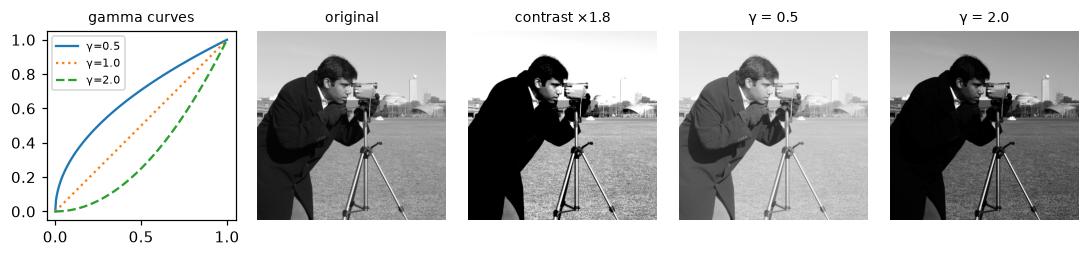
Left: the transfer curves. Linear contrast stretching clips about half of the pixels to pure black or white; gamma bends the curve without clipping anything.
Lookup tables
An 8-bit image has only 256 possible input values, so any point operation, however expensive its formula, can be computed once per level and stored in a 256-entry array, a lookup table (LUT). Applying it is pure indexing: lut[img]. NumPy's fancy indexing does exactly this, and OpenCV's cv2.LUT does it with a tight, multithreaded loop.
A LUT turns "compute \(r^\gamma\) for 12 million pixels" into "compute it 256 times, then look up 12 million times". It also composes: applying table \(A\) then table \(B\) is the single table B[A]. Any chain of point operations on 8-bit data collapses into one LUT.
import time

lut = np.round(255 * (np.arange(256) / 255.0) ** 0.5).astype(np.uint8)
print("same as formula:", np.array_equal(lut[img], gamma_correct(img, 0.5)),
      "| cv2.LUT agrees:", np.array_equal(cv2.LUT(img, lut), lut[img]))

big = np.random.default_rng(0).integers(0, 256, size=(3000, 4000), dtype=np.uint8)
for name, fn in [("formula", lambda: gamma_correct(big, 0.5)),
                 ("numpy LUT", lambda: lut[big]),
                 ("cv2.LUT", lambda: cv2.LUT(big, lut))]:
    t0 = time.perf_counter(); fn(); dt = time.perf_counter() - t0
    print(f"{name:10s} {dt * 1000:7.1f} ms")
On a 12-megapixel image the table is more than ten times faster than the formula in NumPy, and cv2.LUT is faster still. (Your timings will differ; the ranking won't.) Photo apps implement "curves" and color grading presets exactly this way.
Histograms
A point operation is easiest to design when you know how the intensities are distributed. The histogram of an image counts how many pixels have each intensity:
Divide by the number of pixels \(N\) and you get the normalized histogram \(p(k) = h(k)/N\): the probability that a randomly chosen pixel has intensity \(k\). Its running sum is the cumulative distribution function (CDF):
the fraction of pixels at or below intensity \(k\). The CDF rises from \(p(0)\) to exactly 1, and it climbs fastest where the histogram has the most pixels.
The histogram throws away where each pixel is; it keeps only how many there are at each level. Even so, it diagnoses a lot at a glance:
- Underexposed: mass piled against the left edge. Overexposed: piled against the right, often with a spike at 255 (clipped highlights).
- Low contrast: all the mass in a narrow band. The image looks gray and flat.
- Bimodal: two separate humps, typically background and objects. A threshold in the valley separates them.
There are three standard ways to compute it. They agree exactly, but watch the defaults: cv2.calcHist wants lists and a half-open range [0, 256], and scikit-image's exposure.histogram covers only the image's own min-to-max range unless you ask for the full dtype range.
from skimage import exposure

moon = data.moon()
h_np = np.bincount(moon.ravel(), minlength=256)
h_cv = cv2.calcHist([moon], [0], None, [256], [0, 256]).ravel().astype(int)
h_sk, centers = exposure.histogram(moon, source_range="dtype")
print("moon range:", moon.min(), "to", moon.max())
print("numpy == OpenCV:", np.array_equal(h_np, h_cv), "| numpy == skimage:", np.array_equal(h_np, h_sk))
cdf = np.cumsum(h_np) / moon.size
print("levels holding 98% of pixels:", np.searchsorted(cdf, 0.01), "to", np.searchsorted(cdf, 0.99))
moon range: 0 to 255
numpy == OpenCV: True | numpy == skimage: True
levels holding 98% of pixels: 58 to 141
The moon image technically uses the full range, but 98% of its pixels sit between levels 58 and 141, and most of them in a much narrower peak (the standard deviation is only about 13 levels). It's a classic low-contrast image: lots of detail, crammed into a fraction of the available range.
Histogram equalization, derived
Histogram equalization finds the point operation that spreads the intensities out as evenly as possible, aiming for a flat histogram. The result is automatic contrast enhancement with no parameters. Let's derive it.
The continuous case. Treat intensity as a continuous random variable \(r \in [0, 1]\) with probability density \(p_r(r)\). We want a monotonically increasing function \(s = T(r)\) such that \(s\) is uniformly distributed on \([0, 1]\), meaning its density is \(p_s(s) = 1\).
Monotonic \(T\) maps the interval \([r, r + dr]\) onto \([s, s + ds]\), and the same pixels land in both, so the probability mass is conserved:
For \(p_s(s) = 1\) we need \(T'(r) = p_r(r)\): the transfer curve's slope must equal the density. Integrate both sides, with \(T(0) = 0\):
The equalizing transform is the CDF itself. This connects to the slope rule from the gamma section. Where many pixels share similar intensities (high density), the CDF is steep, so those intensities get pushed apart. Where few pixels live (low density), the CDF is flat, so those sparse levels get squeezed together. The contrast goes where the pixels are. (In probability, this is the probability integral transform: plugging any continuous random variable into its own CDF gives a uniform variable.)
The discrete case. For 8-bit images, replace the integral by the cumulative sum and scale to \([0, L - 1]\):
OpenCV uses a small refinement that guarantees the darkest occupied level maps to 0. If \(c_{\min}\) is the CDF at the first non-empty level, then
Why the result isn't perfectly flat. A point operation can move a whole histogram bin, but it can't split one: every pixel at level 100 must go to the same output level. So discrete equalization makes the CDF approximately a straight line, and leaves the histogram as spikes separated by gaps, with the average height roughly constant. That's the best any point operation can do.
def equalize(img):
    """Histogram equalization of a uint8 image via its CDF (OpenCV's formula)."""
    hist = np.bincount(img.ravel(), minlength=256)
    cdf = np.cumsum(hist)
    cdf_min = cdf[np.flatnonzero(hist)[0]]           # CDF at the first occupied level
    lut = np.round((cdf - cdf_min) / (img.size - cdf_min) * 255)
    return np.clip(lut, 0, 255).astype(np.uint8)[img]

eq = equalize(moon)
eq_cv = cv2.equalizeHist(moon)
eq_sk = exposure.equalize_hist(moon)               # float in [0, 1], slightly different formula
print("matches cv2.equalizeHist exactly:", np.array_equal(eq, eq_cv))
print("max difference from skimage (in levels):",
      np.abs(eq.astype(float) - 255 * eq_sk).max().round(1))
print("std before / after:", moon.std().round(1), "/", eq.std().round(1))
matches cv2.equalizeHist exactly: True
max difference from skimage (in levels): 0.7
std before / after: 13.3 / 74.0
The from-scratch version reproduces OpenCV bit for bit. scikit-image interpolates the CDF at bin centers and returns floats, so it differs by less than one level. The standard deviation, a rough measure of global contrast, grew more than fivefold.
fig, axes = plt.subplots(1, 4, figsize=(10, 2.8))
for col, (im, t) in enumerate([(moon, "original"), (eq, "equalized")]):
    axes[2 * col].imshow(im, cmap="gray", vmin=0, vmax=255)
    axes[2 * col].set_title(t, fontsize=9); axes[2 * col].axis("off")
    h = np.bincount(im.ravel(), minlength=256)
    ax = axes[2 * col + 1]
    ax.bar(np.arange(256), h, width=1.0, color="0.4")
    ax2 = ax.twinx(); ax2.plot(np.cumsum(h) / h.sum(), color="tab:red"); ax2.set_ylim(0, 1.05)
    ax.set_title("histogram + CDF (red)", fontsize=9); ax.set_yticks([]); ax2.set_yticks([])
plt.tight_layout()
plt.show()
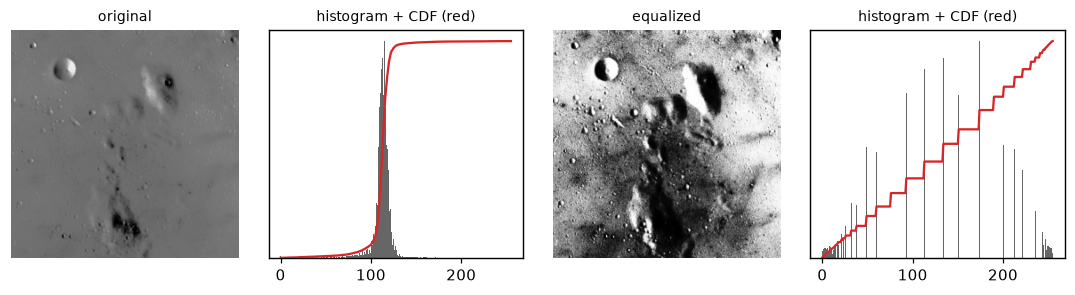
Before: a narrow histogram and a CDF that jumps steeply. After: spikes spread over the full range, and a CDF that is nearly a straight line.
Adaptive equalization and CLAHE
Global equalization uses one curve for the whole image. That fails when different regions need different curves. Picture a photo whose left half is in deep shade and right half in sunlight: the global histogram has two humps, equalization spreads both, and the shaded half still looks murky because it shares its curve with the bright half. Equalization also amplifies noise in flat regions, because a flat region is a tall, narrow peak, and tall peaks get stretched the most.
Adaptive histogram equalization (AHE) computes a separate equalization curve for each small region. CLAHE (Contrast Limited Adaptive Histogram Equalization) adds two fixes:
- Tiles with interpolation. The image is split into a grid of tiles (OpenCV's default is 8 × 8). Each tile gets its own equalization LUT. A pixel's output blends the LUTs of the four nearest tile centers with bilinear weights, so there are no visible seams at tile borders.
- Contrast limiting. Before computing each tile's CDF, the histogram is clipped at a limit, and the clipped excess is redistributed evenly across all bins. Since the CDF's slope equals the histogram height, capping the histogram caps the slope of the transfer curve, which caps how much contrast (and noise) can be amplified. A clip limit of 2 to 4 (relative to a flat histogram's height) is typical. Very large limits approach plain AHE.
CLAHE is the default choice for medical images (X-rays, retinal scans), underwater and foggy photos, and as a preprocessing step for feature detection in poorly lit scenes.
h, w = img.shape
shade = np.tile(np.linspace(0.12, 1.0, w), (h, 1))        # deep shadow on the left
shaded = np.round(img * shade).astype(np.uint8)

global_eq = cv2.equalizeHist(shaded)
clahe = cv2.createCLAHE(clipLimit=3.0, tileGridSize=(8, 8))
local_eq = clahe.apply(shaded)
local_sk = exposure.equalize_adapthist(shaded, kernel_size=64, clip_limit=0.02)

left = slice(None), slice(0, w // 4)                       # the darkest quarter
for name, im in [("shaded", shaded), ("global HE", global_eq), ("CLAHE", local_eq)]:
    print(f"{name:10s} left-quarter std = {im[left].std():5.1f}")

fig, axes = plt.subplots(1, 4, figsize=(10, 2.7))
for ax, im, t in zip(axes, [shaded, global_eq, local_eq, local_sk],
                     ["shaded input", "global equalization", "CLAHE (OpenCV)", "CLAHE (skimage)"]):
    ax.imshow(im, cmap="gray"); ax.set_title(t, fontsize=9); ax.axis("off")
plt.tight_layout()
plt.show()
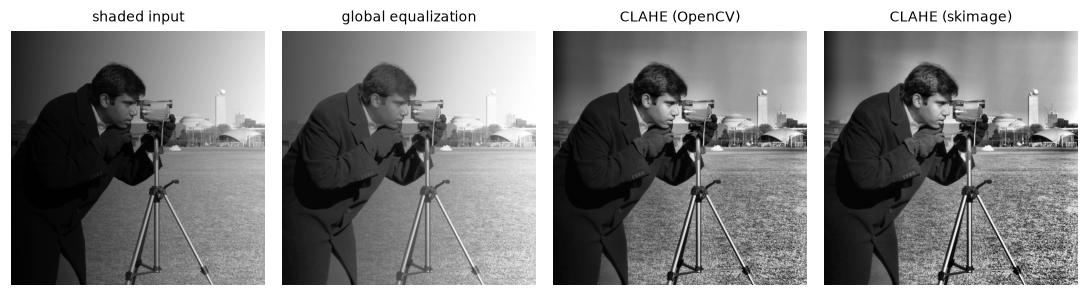
Global equalization brightens the shadow but leaves a strong left-to-right gradient. CLAHE evens out the illumination and recovers detail on both sides.
The numbers say the dark quarter gained similar overall spread under both methods, but the picture shows the difference: global equalization keeps the shadow's gradient, while CLAHE adapts the curve tile by tile, so local detail (the grass, the coat) comes through everywhere. Note that the two libraries parameterize differently: OpenCV's clipLimit is relative to the average bin height, while scikit-image's clip_limit is a fraction in \([0, 1]\), and its kernel_size is the tile size in pixels rather than the grid count.
Global thresholding
Thresholding turns a grayscale image into a binary image, a mask of foreground and background:
It's a point operation with a step-shaped curve, and it's the simplest form of segmentation (splitting an image into meaningful regions). It works when objects and background differ in brightness: coins on a dark table, text on paper, cells under a microscope, cookies on a tray. The question is how to choose \(t\). A hand-picked number is Sam's bug. You want a threshold computed from the image.
Otsu's method, derived
Nobuyuki Otsu's 1979 idea: choose the threshold that splits the histogram into two classes that are each as tight as possible. Tight means low variance. Let's set it up.
For a candidate threshold \(t\), class 0 is levels \(0..t\) and class 1 is levels \(t+1..L-1\). Using the normalized histogram \(p(k)\):
- Class weights (the fraction of pixels in each class): \(\omega_0(t) = \sum_{k=0}^{t} p(k)\) and \(\omega_1(t) = 1 - \omega_0(t)\).
- Class means: \(\mu_0(t) = \frac{1}{\omega_0}\sum_{k=0}^{t} k\, p(k)\) and \(\mu_1(t) = \frac{1}{\omega_1}\sum_{k=t+1}^{L-1} k\, p(k)\).
- Total mean: \(\mu_T = \sum_k k\, p(k) = \omega_0 \mu_0 + \omega_1 \mu_1\). It doesn't depend on \(t\).
- Class variances: \(\sigma_0^2 = \frac{1}{\omega_0}\sum_{k \le t} (k - \mu_0)^2 p(k)\), and similarly \(\sigma_1^2\).
The within-class variance is the weighted average spread inside the classes, \(\sigma_W^2 = \omega_0\sigma_0^2 + \omega_1\sigma_1^2\). Otsu's criterion is to minimize it. Now a decomposition makes the problem much easier.
Step 1: total variance splits into within and between. Start from the total variance and split the sum by class:
Inside class 0, write \(k - \mu_T = (k - \mu_0) + (\mu_0 - \mu_T)\) and expand the square:
The cross term vanishes because deviations from a class's own mean sum to zero. Do the same for class 1 and add:
The second group is the between-class variance \(\sigma_B^2\): how far the class means sit from the overall mean. Since \(\sigma_T^2\) is fixed for the image, minimizing \(\sigma_W^2\) is the same as maximizing \(\sigma_B^2\).
Step 2: simplify the between-class variance. Substitute \(\mu_T = \omega_0\mu_0 + \omega_1\mu_1\). Then \(\mu_0 - \mu_T = \omega_1(\mu_0 - \mu_1)\) and \(\mu_1 - \mu_T = \omega_0(\mu_1 - \mu_0)\), so
This reads well: a good split has well-separated class means, and both classes hold a decent share of the pixels (the product \(\omega_0\omega_1\) penalizes splitting off a tiny sliver).
Step 3: make it fast. Define the cumulative first moment \(\mu(t) = \sum_{k=0}^{t} k\,p(k)\). Then \(\mu_0 = \mu(t)/\omega_0\) and \(\mu_1 = (\mu_T - \mu(t))/\omega_1\), and a little algebra gives
Both \(\omega_0(t)\) and \(\mu(t)\) are cumulative sums, so one pass over the 256 bins gives \(\sigma_B^2\) for every threshold at once. No need to compute any class variance at all.
from skimage import filters

def otsu_threshold(img):
    p = np.bincount(img.ravel(), minlength=256) / img.size
    omega = np.cumsum(p)                       # class-0 weight for each t
    mu = np.cumsum(np.arange(256) * p)         # cumulative first moment
    mu_t = mu[-1]
    with np.errstate(divide="ignore", invalid="ignore"):
        sigma_b2 = (mu_t * omega - mu) ** 2 / (omega * (1 - omega))
    sigma_b2 = np.nan_to_num(sigma_b2)         # empty classes give 0/0
    return int(np.argmax(sigma_b2)), sigma_b2

coins = data.coins()
t_ours, sigma_b2 = otsu_threshold(coins)
t_cv, mask_cv = cv2.threshold(coins, 0, 255, cv2.THRESH_BINARY + cv2.THRESH_OTSU)
t_sk = filters.threshold_otsu(coins)
print("ours:", t_ours, "| OpenCV:", t_cv, "| skimage:", t_sk)

# Brute-force check: minimizing within-class variance picks the same t
levels = np.arange(256)
def within(t):
    a, b = coins[coins <= t], coins[coins > t]
    return (a.size * a.var() + b.size * b.var()) / coins.size
print("argmin within-class variance:", min(range(30, 220), key=within))
print("masks agree:", np.array_equal(mask_cv > 0, coins > t_ours))
All three libraries and the brute-force search agree. A convention note: OpenCV's THRESH_BINARY sets pixels strictly greater than t to the max value, and scikit-image's docs say the same (image > thresh is foreground), which matches our class split. The first argument of cv2.threshold is ignored when you add THRESH_OTSU, and the chosen threshold comes back as a float.
Adaptive thresholding
Otsu picks one threshold for the whole image. When the illumination varies across the image, no single threshold works: the "background" in the bright corner is brighter than the "foreground" in the dark corner. This is the normal situation for phone photos of documents, which always have a shadow somewhere.
Adaptive (or local) thresholding computes a different threshold for every pixel from its neighborhood:
where \(m(x, y)\) is the mean (or a Gaussian-weighted mean) of the pixels in a \(B \times B\) window centered at \((x, y)\), and \(C\) is a small constant offset. A pixel is foreground if it's brighter than its surroundings by more than \(-C\). Two parameters matter:
- Block size \(B\) (odd). It should be larger than the features you want to detect (for text, a few times the stroke width) but smaller than the scale at which the lighting changes.
- Offset \(C\). In flat background regions, a pixel is compared with a mean that equals itself, give or take noise. Without the offset, half of the flat paper would flip to "dark" at random. A positive \(C\) means "only call it dark ink if it's clearly darker than its neighborhood".
The local mean is computed fast with an integral image (or summed-area table): \(S(y, x) = \sum_{y' < y, x' < x} f(y', x')\). Any rectangle sum then costs four lookups, \(S(y_2, x_2) - S(y_1, x_2) - S(y_2, x_1) + S(y_1, x_1)\), no matter how big the window. You'll see the same trick in Viola-Jones face detection in Level 2.
Sauvola's method, popular for documents, scales the offset by the local standard deviation \(s\): \(t = m\left(1 + k\left(\frac{s}{R} - 1\right)\right)\), with \(R\) the dynamic range of \(s\) (128 for 8-bit) and \(k \approx 0.2\). In low-contrast regions it pulls the threshold below the mean, which suppresses noise in blank paper.
def adaptive_mean_threshold(img, block=35, C=10):
    """Local-mean threshold via an integral image, with replicated borders."""
    r = block // 2
    padded = np.pad(img.astype(np.int64), r, mode="edge")
    S = np.zeros((padded.shape[0] + 1, padded.shape[1] + 1), np.int64)
    S[1:, 1:] = padded.cumsum(0).cumsum(1)
    h, w = img.shape
    total = (S[block:block + h, block:block + w] - S[:h, block:block + w]
             - S[block:block + h, :w] + S[:h, :w])
    mean = np.round(total / block ** 2).astype(np.int64)
    return np.where(img.astype(np.int64) > mean - C, 255, 0).astype(np.uint8)

page = data.page()
ours = adaptive_mean_threshold(page, 35, 10)
ocv = cv2.adaptiveThreshold(page, 255, cv2.ADAPTIVE_THRESH_MEAN_C, cv2.THRESH_BINARY, 35, 10)
print("agreement with cv2.adaptiveThreshold:", np.round(np.mean(ours == ocv) * 100, 3), "%")

_, glob = cv2.threshold(page, 0, 255, cv2.THRESH_BINARY + cv2.THRESH_OTSU)
sauv = page > filters.threshold_sauvola(page, window_size=25)

fig, axes = plt.subplots(2, 3, figsize=(10, 4.2))
panels = [(coins, "coins"), (coins > t_ours, f"Otsu, t = {t_ours}"), (None, "σ_B² vs t"),
          (glob, "page: global Otsu"), (ocv, "page: adaptive mean"), (sauv, "page: Sauvola")]
for ax, (im, t) in zip(axes.ravel(), panels):
    if im is None:
        ax.plot(sigma_b2); ax.axvline(t_ours, color="tab:red", ls="--"); ax.set_yticks([])
    else:
        ax.imshow(im, cmap="gray"); ax.axis("off")
    ax.set_title(t, fontsize=9)
plt.tight_layout()
plt.show()
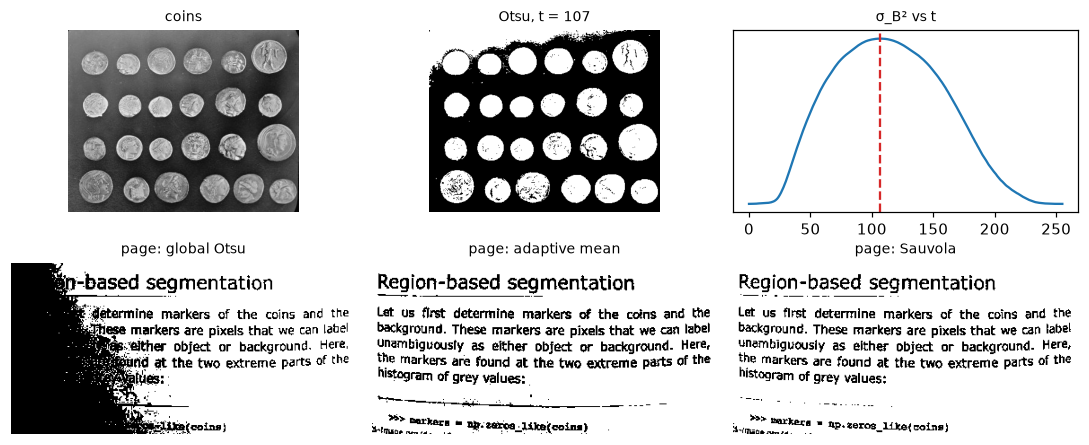
Top: Otsu's threshold sits at the peak of the between-class variance. Bottom: on the unevenly lit page, a global threshold loses the dark left side, while both local methods recover the text everywhere.
Look at the coins mask, too: several coins have holes or dark patches because parts of them are darker than 107. Thresholding alone rarely gives clean shapes. In Morphology and classical segmentation you'll clean such masks and count the coins.
Color-based segmentation in HSV
When objects differ by color rather than brightness, threshold in a color space where color is its own coordinate. In RGB, a red ball in shadow has small values in all three channels, and a red ball in sunlight has large ones: "redness" is spread over all channels and tangled with brightness. HSV (from Digital images) separates them:
- Hue \(H\): the color's angle on the color wheel (red at 0°, green at 120°, blue at 240°).
- Saturation \(S\): how pure the color is, from gray (0) to fully vivid.
- Value \(V\): brightness, the maximum of R, G, and B.
A shadow mostly lowers \(V\) and leaves \(H\) nearly unchanged, so a box in HSV (a hue range, a minimum saturation to reject grays, and a minimum value to reject near-black pixels where hue is meaningless) is robust to lighting in a way an RGB box isn't.
Two OpenCV details trip everyone up. First, for 8-bit images OpenCV stores hue as 0–179 (degrees divided by 2) so it fits in a byte, while S and V use 0–255. Second, hue is circular: red sits at both ends of the range, so a red mask needs two ranges, roughly \([0, 10]\) and \([170, 179]\), combined with OR.
rng = np.random.default_rng(0)
H, W = 240, 400
scene = np.full((H, W, 3), (150, 140, 120), np.float64)           # beige table (RGB)
truth = np.zeros((H, W), bool)
yy, xx = np.mgrid[:H, :W]
discs = [((70, 80), (200, 30, 35)), ((300, 70), (210, 25, 60)), ((190, 170), (40, 160, 60)),
         ((90, 180), (40, 70, 190)), ((320, 180), (220, 200, 40)), ((200, 60), (190, 40, 20))]
for (cx, cy), color in discs:
    m = (xx - cx) ** 2 + (yy - cy) ** 2 < 38 ** 2
    scene[m] = color
    if color[0] > 150 and color[1] < 60:                             # the three red discs
        truth |= m
light = np.linspace(0.25, 1.0, W)[None, :, None]                    # dark on the left
scene = np.clip(scene * light + rng.normal(0, 4, scene.shape), 0, 255).astype(np.uint8)

def iou(a, b):
    return (a & b).sum() / (a | b).sum()

rgb_mask = (scene[..., 0] > 120) & (scene[..., 1] < 70) & (scene[..., 2] < 70)
hsv = cv2.cvtColor(scene, cv2.COLOR_RGB2HSV)                        # H in 0..179
low_red = cv2.inRange(hsv, (0, 120, 40), (10, 255, 255))
high_red = cv2.inRange(hsv, (170, 120, 40), (179, 255, 255))
hsv_mask = (low_red | high_red) > 0
print("IoU with truth  RGB box:", iou(rgb_mask, truth).round(3), "| HSV box:", iou(hsv_mask, truth).round(3))
print("red pixels with hue >= 170:", np.count_nonzero(high_red))

fig, axes = plt.subplots(1, 3, figsize=(10, 2.4))
for ax, im, t in zip(axes, [scene, rgb_mask, hsv_mask],
                     ["scene (RGB)", "RGB threshold", "HSV threshold (two hue ranges)"]):
    ax.imshow(im, cmap="gray"); ax.set_title(t, fontsize=9); ax.axis("off")
plt.tight_layout()
plt.show()
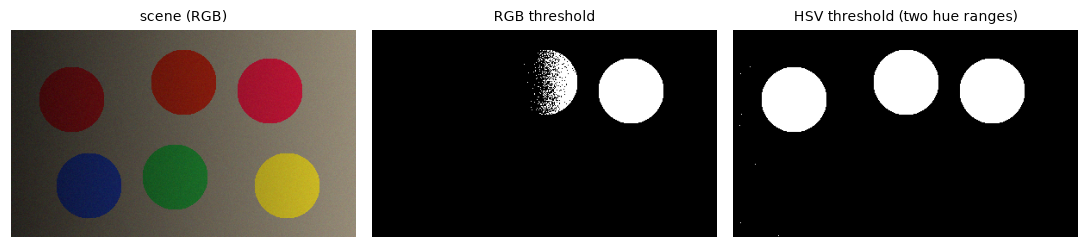
The RGB box catches the well-lit red disc and only the brighter half of the middle one, and misses the disc in shade. The HSV box finds all three, including the one in deep shade and the slightly purplish one whose hue wraps past 170.
In practice
A contrast-enhancement recipe
Real photos rarely need full equalization, which can look harsh. A gentler, very common fix is a percentile stretch: map the 2nd percentile to 0 and the 98th to 255 linearly, clipping the few pixels outside. It's robust to a handful of extreme pixels (a specular glint, a dead pixel), which would ruin a plain min-max stretch.
def percentile_stretch(img, lo=2, hi=98):
    a, b = np.percentile(img, (lo, hi))
    out = (img.astype(np.float64) - a) / (b - a) * 255
    return np.clip(np.round(out), 0, 255).astype(np.uint8)

p2, p98 = np.percentile(moon, (2, 98))
ours = percentile_stretch(moon)
sk = exposure.rescale_intensity(moon, in_range=(p2, p98), out_range=(0, 255)).astype(np.uint8)
print("percentiles:", p2, p98, "| max diff vs skimage:", np.abs(ours.astype(int) - sk).max())
print("std: original", moon.std().round(1), "| stretched", ours.std().round(1), "| equalized", eq.std().round(1))
percentiles: 78.0 129.0 | max diff vs skimage: 0
std: original 13.3 | stretched 42.3 | equalized 74.0
The from-scratch stretch matches scikit-image exactly. It raises the standard deviation about threefold, less than equalization does, but it keeps the shape of the histogram, so the result looks natural. Use percentile stretching as the default for display, CLAHE when lighting is uneven, and global equalization mostly as a teaching tool or for very flat images.
Enhancing color images
Equalization and gamma are defined for one channel. Applying them to R, G, and B separately changes the ratios between the channels, which changes the hue: skin turns orange, a gray sky turns blue. Instead, convert to a space that separates lightness from color (Lab or YCrCb, or HSV's V), process only the lightness channel, and convert back.
astro = data.astronaut()
dark = gamma_correct(astro, 2.2)                                  # an underexposed photo

per_channel = np.dstack([cv2.equalizeHist(dark[..., i]) for i in range(3)])
lab = cv2.cvtColor(dark, cv2.COLOR_RGB2LAB)
lab[..., 0] = cv2.createCLAHE(clipLimit=2.0, tileGridSize=(8, 8)).apply(lab[..., 0])
lightness_only = cv2.cvtColor(lab, cv2.COLOR_LAB2RGB)

def mean_hue_shift(a, b):
    ha = cv2.cvtColor(a, cv2.COLOR_RGB2HSV)[..., 0].astype(int)
    hb = cv2.cvtColor(b, cv2.COLOR_RGB2HSV)[..., 0].astype(int)
    d = np.abs(ha - hb)
    sat = cv2.cvtColor(a, cv2.COLOR_RGB2HSV)[..., 1] > 60          # hue only matters if saturated
    return (np.minimum(d, 180 - d)[sat] * 2).mean()               # degrees, circular
print("mean hue shift, per-channel equalization: %.1f deg" % mean_hue_shift(astro, per_channel))
print("mean hue shift, CLAHE on Lab L only:      %.1f deg" % mean_hue_shift(astro, lightness_only))
Measured against the original photo, per-channel equalization moved hues by more than twice as much. Processing lightness only keeps colors close to where they were.
Common mistake: equalizing RGB channels independently
cv2.equalizeHist on each of B, G, R gives each channel its own curve and shifts colors. Convert to Lab (or YCrCb), enhance the L (or Y) channel, and convert back. And remember the BGR trap: if the image came from cv2.imread, use COLOR_BGR2LAB, not COLOR_RGB2LAB.
Common mistake: uint8 arithmetic
img + 50, img * 1.5 followed by .astype(np.uint8), and img - background all go wrong on uint8 data, either by wrapping around or by wrapping after a float cast. Clip before casting: np.clip(x, 0, 255).astype(np.uint8), or use cv2.add, cv2.subtract, and cv2.convertScaleAbs.
Common mistake: threshold polarity
Text is dark on light paper, so THRESH_BINARY makes the paper white (255) and the text black. Many later steps (contours, connected components, morphology) treat white as foreground. Use cv2.THRESH_BINARY_INV when your objects are darker than the background.
Choosing a threshold method
| Situation | Method | Call |
|---|---|---|
| Known, controlled lighting | Fixed global threshold | cv2.threshold(img, t, 255, cv2.THRESH_BINARY) |
| Bimodal histogram, even lighting | Otsu | cv2.threshold(img, 0, 255, cv2.THRESH_BINARY + cv2.THRESH_OTSU) |
| Three or more brightness classes | Multi-Otsu | skimage.filters.threshold_multiotsu(img, classes=3) |
| Small object on a big background (skewed histogram) | Triangle | cv2.THRESH_TRIANGLE |
| Uneven lighting, documents | Adaptive mean or Gaussian | cv2.adaptiveThreshold(...) |
| Documents with stains, low contrast | Sauvola, Niblack | skimage.filters.threshold_sauvola |
| Objects differ by color | HSV box | cv2.inRange(hsv, lo, hi) |
Otsu fails gracefully but silently when its assumption is wrong. If the object is tiny (a scratch on a big part), the histogram has one big hump and a tiny bump, and Otsu splits the big hump in half. Always look at the histogram before trusting it.
Exercises
Exercise 1: Equalize by hand (easy)
A tiny 3-bit image (\(L = 8\) levels, \(N = 64\) pixels) has the histogram below. Compute the equalization mapping \(T(k) = \operatorname{round}(7\,c(k))\) by hand, then the output histogram. Is it flat?
| \(k\) | 0 | 1 | 2 | 3 | 4 | 5 | 6 | 7 |
|---|---|---|---|---|---|---|---|---|
| \(h(k)\) | 0 | 0 | 8 | 24 | 20 | 8 | 4 | 0 |
Solution
The cumulative counts are 0, 0, 8, 32, 52, 60, 64, 64. Divide by 64 and multiply by 7: 0, 0, 0.875, 3.5, 5.6875, 6.5625, 7, 7. Rounding (half to even, as NumPy does) gives \(T = [0, 0, 1, 4, 6, 7, 7, 7]\). Note that \(3.5\) rounds to 4 here (4 is even).
h = np.array([0, 0, 8, 24, 20, 8, 4, 0])
T = np.round(7 * np.cumsum(h) / h.sum()).astype(int)
out = np.bincount(np.repeat(T, h), minlength=8)
print("T:", T)
print("output histogram:", out)
It isn't flat: the four occupied input bins become four output bins (levels 5 and 6 merge into 7), with gaps between them. Equalization can move bins but never split them. What is improved is the spread: the occupied levels now run from 1 to 7 instead of 2 to 6, and the biggest bin (level 3, 24 pixels) has the most space around it.
Exercise 2: Composing point operations (easy)
You apply a gamma of 0.4 to data.camera() and store the result as uint8, then apply a gamma of 2.5 to undo it. Mathematically \((r^{0.4})^{2.5} = r\). Write the code, count the distinct gray levels in the original and in the round trip, and explain any difference. Then show that the round trip can be done as one composed LUT.
Solution
def gamma_lut(g):
    return np.round(255 * (np.arange(256) / 255.0) ** g).astype(np.uint8)

a, b = gamma_lut(0.4), gamma_lut(2.5)
trip = b[a[img]]
composed = b[a]                       # one 256-entry table
print("distinct levels: original", np.unique(img).size, "| round trip", np.unique(trip).size)
print("max error:", np.abs(trip.astype(int) - img).max(), "| composed LUT agrees:", np.array_equal(composed[img], trip))
The first curve has a slope below 1 for bright inputs, so it squeezes several bright input levels into the same output byte. Once they're merged, the second curve can't separate them again: quantization made the round trip lossy. The lesson: chain point operations as a composed LUT (or in floating point) and quantize once at the end.
Exercise 3: Three classes with multi-Otsu (medium)
Extend Otsu's criterion to two thresholds \(t_1 < t_2\) and three classes: maximize \(\sigma_B^2 = \sum_{i=0}^{2} \omega_i(\mu_i - \mu_T)^2\). Implement it by searching all pairs with cumulative sums, run it on data.camera(), and compare with skimage.filters.threshold_multiotsu(img, classes=3).
Solution
With cumulative sums \(\Omega(t) = \sum_{k \le t} p(k)\) and \(M(t) = \sum_{k \le t} k\,p(k)\), each class's weight and first moment are differences of these arrays, so every pair costs \(O(1)\). There are about 32,000 pairs, which vectorizes easily.
def multi_otsu_2(img):
    p = np.bincount(img.ravel(), minlength=256) / img.size
    Om = np.concatenate([[0], np.cumsum(p)])           # Om[t+1] = sum_{k<=t} p
    M = np.concatenate([[0], np.cumsum(np.arange(256) * p)])
    muT = M[-1]
    t1, t2 = np.meshgrid(np.arange(255), np.arange(255), indexing="ij")
    valid = t1 < t2
    bounds = [(np.zeros_like(t1), t1 + 1), (t1 + 1, t2 + 1), (t2 + 1, np.full_like(t1, 256))]
    sb = np.zeros(t1.shape)
    for lo, hi in bounds:
        w = Om[hi] - Om[lo]
        m = M[hi] - M[lo]
        with np.errstate(divide="ignore", invalid="ignore"):
            sb += np.where(w > 0, (m - w * muT) ** 2 / w, 0)
    sb[~valid] = -1
    i, j = np.unravel_index(np.argmax(sb), sb.shape)
    return int(i), int(j)

print("ours:   ", multi_otsu_2(img))
print("skimage:", filters.threshold_multiotsu(img, classes=3))
The term \((m - w\mu_T)^2/w\) is \(\omega_i(\mu_i - \mu_T)^2\) rewritten with \(\mu_i = m/w\). The thresholds agree. On the cameraman image the three classes are roughly the dark coat and camera, the mid-gray grass and buildings, and the bright sky.
Exercise 4: Why does equalization amplify noise? (medium)
Take a flat gray image at level 128 with Gaussian noise of standard deviation 2, np.clip(128 + rng.normal(0, 2, (200, 200)), 0, 255).astype(np.uint8). Before running anything, predict the standard deviation after cv2.equalizeHist, using the slope argument from this chapter. Then check your prediction, and do the same with CLAHE at a clip limit of 2.
Solution
The histogram is a narrow peak about 13 levels wide (±3σ). Equalization maps the CDF to \([0, 255]\), so those ~13 levels get stretched across the whole range: the slope of the transfer curve is about \(255/13 \approx 20\) near the peak, and the noise should grow to roughly \(20 \times 2 = 40\) or more, from almost invisible to a strong salt-and-pepper texture.
rng = np.random.default_rng(1)
flat = np.clip(128 + rng.normal(0, 2, (200, 200)), 0, 255).astype(np.uint8)
print("std before:", flat.std().round(2))
print("std after equalizeHist:", cv2.equalizeHist(flat).std().round(2))
print("std after CLAHE (clip 2):", cv2.createCLAHE(2.0, (8, 8)).apply(flat).std().round(2))
Global equalization blew the noise up by a factor of about 36, even more than predicted, because the Gaussian's CDF is steepest at the center. CLAHE's clip limit caps the histogram height, and so the slope of each tile's curve, which keeps the amplification small. This is exactly why the "CL" in CLAHE exists.
Exercise 5: Adaptive threshold parameters (medium)
Run cv2.adaptiveThreshold on data.page() with ADAPTIVE_THRESH_GAUSSIAN_C for block sizes 5, 35, and 151 (with C = 10), and for C of 0, 10, and 30 (with block 35). Describe what goes wrong at each extreme and why.
Solution
for B in [5, 35, 151]:
    m = cv2.adaptiveThreshold(page, 255, cv2.ADAPTIVE_THRESH_GAUSSIAN_C, cv2.THRESH_BINARY, B, 10)
    print(f"block={B:3d} C=10  dark fraction: {np.mean(m == 0):.3f}")
for C in [0, 10, 30]:
    m = cv2.adaptiveThreshold(page, 255, cv2.ADAPTIVE_THRESH_GAUSSIAN_C, cv2.THRESH_BINARY, 35, C)
    print(f"block= 35 C={C:<3d} dark fraction: {np.mean(m == 0):.3f}")
block=  5 C=10  dark fraction: 0.110
block= 35 C=10  dark fraction: 0.143
block=151 C=10  dark fraction: 0.153
block= 35 C=0   dark fraction: 0.337
block= 35 C=10  dark fraction: 0.143
block= 35 C=30  dark fraction: 0.106
- Block 5 is about the size of a stroke: inside a thick stroke the neighborhood is mostly ink, the local mean is dark, and the stroke's interior is declared background. Letters turn into thin, broken outlines.
- Block 151 spans a good part of the illumination gradient, so it behaves more like a global threshold: strokes get bolder and the dark smudges near the left edge and bottom start to show up as ink.
- C = 0 flips a large share of the flat paper pixels, because noise puts them below their own local mean about half the time: speckle and blotches everywhere (a third of the page is "dark").
- C = 30 demands that ink be 30 levels darker than its surroundings. The page is clean, but strokes get thinner and faint marks (the underline, the smudges) disappear. With fainter text, the letters themselves would start to break up.
A good rule of thumb: the block should be a few times the stroke width, and \(C\) should be a few times the noise standard deviation of the paper.
Exercise 6: CLAHE without interpolation (hard)
Implement a simplified CLAHE: split the image into an 8 × 8 grid of tiles; for each tile, clip its histogram at clip * (tile_pixels / 256), redistribute the excess evenly over all 256 bins, and equalize the tile with its own CDF. Skip the bilinear blending between tiles. Apply it to shaded from this chapter and compare with OpenCV's CLAHE. What artifact do you see, and what does OpenCV's interpolation fix?
Solution
def clahe_no_interp(img, clip=3.0, grid=8):
    out = np.empty_like(img)
    h, w = img.shape
    ys = np.linspace(0, h, grid + 1).astype(int)
    xs = np.linspace(0, w, grid + 1).astype(int)
    for i in range(grid):
        for j in range(grid):
            tile = img[ys[i]:ys[i + 1], xs[j]:xs[j + 1]]
            hist = np.bincount(tile.ravel(), minlength=256).astype(np.float64)
            limit = clip * tile.size / 256
            excess = np.maximum(hist - limit, 0).sum()
            hist = np.minimum(hist, limit) + excess / 256      # redistribute
            lut = np.round(255 * np.cumsum(hist) / hist.sum()).clip(0, 255).astype(np.uint8)
            out[ys[i]:ys[i + 1], xs[j]:xs[j + 1]] = lut[tile]
    return out

blocky = clahe_no_interp(shaded)
# Seam strength: mean absolute jump across tile borders vs elsewhere
def seam_ratio(im):
    d = np.abs(np.diff(im.astype(int), axis=1)).mean(axis=0)
    borders = np.arange(64, 512, 64) - 1
    return d[borders].mean() / np.delete(d, borders).mean()
print("seam ratio, no interpolation:", seam_ratio(blocky).round(2))
print("seam ratio, OpenCV CLAHE:    ", seam_ratio(local_eq).round(2))
Without interpolation, neighboring tiles use different curves, so a smooth region that crosses a tile border jumps in brightness: a visible checkerboard of tiles. The horizontal jumps at tile borders are more than three times as large as elsewhere. OpenCV blends the four nearest tiles' LUTs with bilinear weights, so the effective curve changes smoothly with position and the borders are indistinguishable from any other column (ratio about 1).
Check yourself
-
What makes an operation a point operation, and why can every point operation on an 8-bit image be implemented as a 256-entry lookup table?
Answer
Each output pixel depends only on the input pixel at the same location, through one function \(T\) used everywhere. Because an 8-bit pixel can take only 256 values, you can compute \(T\) once for each and index into the table.
-
Why does
img + 100on auint8array produce dark pixels in bright areas, and what are two correct alternatives?Answer
NumPy's
uint8arithmetic is modulo 256, so 200 + 100 wraps to 44. Usenp.clip(img.astype(np.int16) + 100, 0, 255).astype(np.uint8)orcv2.add(img, 100), which saturates at 255. -
In one sentence, why is the CDF the equalizing transform?
Answer
Mapping a variable through its own CDF makes the slope of the mapping equal to the density, so dense intensity ranges get stretched and sparse ones compressed exactly enough to make the output uniform.
-
Why isn't the histogram of an equalized 8-bit image flat?
Answer
A point operation sends all pixels of one input level to the same output level, so it can move bins and merge them but never split them. The CDF becomes approximately linear, but the histogram is spikes with gaps.
-
State Otsu's criterion two equivalent ways, and say why they're equivalent.
Answer
Minimize the within-class variance \(\omega_0\sigma_0^2 + \omega_1\sigma_1^2\), or maximize the between-class variance \(\omega_0\omega_1(\mu_0 - \mu_1)^2\). The total variance equals their sum and doesn't depend on the threshold.
-
When does Otsu's method fail, and what would you use instead?
Answer
When the histogram isn't bimodal: uneven illumination (use adaptive thresholding or correct the lighting first), a tiny object on a large background (use the triangle method or a known threshold), or more than two classes (use multi-Otsu).
-
What do the block size and the constant \(C\) control in adaptive thresholding?
Answer
The block size sets the neighborhood used for the local mean: larger than the objects, smaller than the lighting variation. \(C\) is an offset that keeps flat regions from flipping randomly due to noise: a pixel must be darker than its local mean by more than \(C\) to count as dark.
-
Why does red need two ranges in OpenCV's HSV, and what is OpenCV's hue range for 8-bit images?
Answer
Hue is an angle, and red sits at 0° = 360°, so red pixels have hues near both ends of the range. For 8-bit images OpenCV stores hue as degrees divided by 2, from 0 to 179, so you OR together masks for roughly 0–10 and 170–179.
Key takeaways
- A point operation is one curve \(T(r)\) applied to every pixel. Its slope tells you where contrast is gained or lost, and on 8-bit data any chain of them is a single lookup table.
- Brightness and contrast are \(\alpha f + \beta\); always clip (or saturate) instead of letting
uint8wrap around. Gamma bends the curve without clipping. - Histogram equalization maps intensities through their own CDF, which is derived by requiring a uniform output. CLAHE does it per tile with a clipped histogram so noise isn't amplified.
- Otsu's threshold maximizes the between-class variance \(\omega_0\omega_1(\mu_0 - \mu_1)^2\), computed for all thresholds at once with cumulative sums.
- Uneven lighting breaks every global method. Adaptive thresholds compare each pixel with its local mean, computed in constant time per pixel with an integral image.
- Segment by color in HSV, not RGB; in OpenCV, hue runs from 0 to 179 and red wraps around.
Further reading
- Rafael C. Gonzalez and Richard E. Woods, Digital Image Processing, 4th edition, chapter 3 (intensity transformations and histogram processing). The standard textbook treatment.
- Nobuyuki Otsu, "A Threshold Selection Method from Gray-Level Histograms", IEEE Transactions on Systems, Man, and Cybernetics, 1979. The original paper is short and readable.
- Karel Zuiderveld, "Contrast Limited Adaptive Histogram Equalization", in Graphics Gems IV, 1994. The CLAHE algorithm as most libraries implement it.
- Richard Szeliski, Computer Vision: Algorithms and Applications, 2nd edition, section 3.1, free at szeliski.org/Book.
- OpenCV tutorials on histograms and thresholding.
Next
Point operations look at one pixel at a time. Next, you'll let each pixel see its neighbors: Convolution and filtering.