Morphology and Classical Segmentation
Level 1 · Chapter 5 · ⏱️ ~65 min read · Prerequisites: Point operations and histograms, Convolution and filtering
Thresholding gives you a mask; this chapter turns masks into objects. It covers binary images and structuring elements, erosion, dilation, opening and closing (with top-hat background removal), connected components (counting the coins), contours and shape descriptors, the distance transform, watershed for separating touching objects, region growing, and k-means color segmentation.
Why it matters
Alex built a pill counter for a pharmacy's packaging line. A camera looked down at a tray, a threshold separated the white pills from the dark tray, and the number of white blobs was the count. In testing, with pills spread out by hand, it was perfect.
On the real line, pills tumbled into the tray and came to rest touching each other. Two touching pills are one blob, so the counter reported 28 when there were 30, and the system sealed blister packs that were short. A pharmacist caught it during an audit, and every pack from that week had to be recalled.
Counting blobs is easy; counting objects is not. The fix took three ideas from this chapter: clean the mask with morphology so that noise doesn't create or merge blobs, compute the distance transform so each pill has a peak at its center, and run a marker-controlled watershed from those peaks to cut touching pills apart along the narrow "necks" between them. You'll do exactly this to a pile of touching discs, after counting the coins in scikit-image's classic coins photo.
Concepts
Binary images and connectivity
A binary image (or mask) has two values: foreground (the objects) and background. NumPy represents it as a bool array; OpenCV as uint8 with 0 and 255 (or 0 and 1). Most OpenCV and scikit-image functions treat nonzero as foreground, so if your objects are dark on a light background, invert the mask first (Chapter 1's THRESH_BINARY_INV).
Two foreground pixels are neighbors depending on the connectivity you choose:
- 4-connectivity: only the pixels directly above, below, left, and right.
- 8-connectivity: those four plus the four diagonals.
The choice changes what counts as one object. Two squares touching only at a corner are one object with 8-connectivity and two with 4-connectivity. A one-pixel-wide diagonal line is connected with 8-connectivity and falls apart into single pixels with 4-connectivity. There's a subtle consistency rule: if you use 8-connectivity for the foreground, use 4-connectivity for the background, or a diagonal line could both separate and not separate the regions on either side. OpenCV's connected-components functions default to 8; scikit-image's measure.label defaults to full connectivity (8 in 2D).
Structuring elements
Morphology probes an image with a small shape called the structuring element (SE), the morphological counterpart of a kernel. It's a small binary array, with a designated origin (usually its center). The common shapes:
- Square or rectangle (
cv2.MORPH_RECT): fast, separable, but treats diagonals differently from axes. - Disk or ellipse (
cv2.MORPH_ELLIPSE,skimage.morphology.disk): isotropic, the usual choice for round objects. - Cross (
cv2.MORPH_CROSS): the 4-neighborhood when 3 × 3. - Line: a 1-pixel-thick segment at an angle, to remove or keep structures of one orientation (for example horizontal table lines in a scanned form).
The SE's size sets the scale of what gets removed or filled, and its shape sets which shapes survive. Pick an SE slightly larger than the noise you want to remove and smaller than the objects you want to keep.
Erosion and dilation
Erosion shrinks foreground regions. A pixel stays foreground only if the SE, centered on it, fits entirely inside the foreground. In set notation, with \(A\) the foreground and \(B_z\) the SE shifted to position \(z\):
Dilation grows foreground regions. A pixel becomes foreground if the SE centered on it touches the foreground anywhere:
where \(\hat{B}\) is the SE reflected through its origin (for symmetric SEs, \(\hat{B} = B\), and OpenCV doesn't reflect).
The intuition: erosion with a disk of radius \(r\) peels a layer of thickness \(r\) off every object; it deletes objects thinner than \(2r\) and breaks thin bridges between objects. Dilation adds a layer of thickness \(r\); it fills holes and gaps narrower than \(2r\) and merges objects closer than \(2r\).
For grayscale images the definitions generalize to a minimum filter (erosion) and maximum filter (dilation) over the SE's footprint. On a binary image (0/1), min over the window is "all ones", and max is "any one". This is the link to Chapter 2: erosion and dilation are nonlinear rank filters, just like the median.
The two are duals: eroding the foreground is the same as dilating the background, \(A \ominus B = \left(A^c \oplus \hat{B}\right)^c\), where \(A^c\) is the complement. That's why there's no separate "background erosion" operation.
Implementation is the same shift-and-combine trick as convolution: for each SE offset, shift the padded mask and combine with AND (erosion) or OR (dilation). The padding matters. OpenCV pads erosion with "foreground" and dilation with "background", so the image border never erodes objects that touch it.
import numpy as np
import cv2
import matplotlib.pyplot as plt
from scipy import ndimage
from skimage import data, measure, morphology, segmentation, feature, color

def erode(mask, se):
    kh, kw = se.shape
    P = np.pad(mask, ((kh // 2,) * 2, (kw // 2,) * 2), constant_values=True)   # border never erodes
    H, W = mask.shape
    out = np.ones_like(mask)
    for i, j in zip(*np.nonzero(se)):
        out &= P[i:i + H, j:j + W]
    return out

def dilate(mask, se):
    kh, kw = se.shape
    P = np.pad(mask, ((kh // 2,) * 2, (kw // 2,) * 2), constant_values=False)
    H, W = mask.shape
    out = np.zeros_like(mask)
    for i, j in zip(*np.nonzero(se)):
        out |= P[i:i + H, j:j + W]
    return out

# A noisy binary image: text with speckles in the background and holes in the strokes
rng = np.random.default_rng(0)
canvas = np.zeros((110, 360), np.uint8)
cv2.putText(canvas, "CV 101", (12, 85), cv2.FONT_HERSHEY_SIMPLEX, 2.6, 255, 13)
clean = canvas > 0
noisy = clean.copy()
noisy[rng.random(clean.shape) < 0.03] = True                       # salt: specks
noisy[clean & (rng.random(clean.shape) < 0.05)] = False            # pepper: holes

se = cv2.getStructuringElement(cv2.MORPH_ELLIPSE, (5, 5)).astype(bool)
u8 = noisy.astype(np.uint8)
print("erode matches cv2.erode:", np.array_equal(erode(noisy, se), cv2.erode(u8, se.astype(np.uint8)) > 0))
print("dilate matches cv2.dilate:", np.array_equal(dilate(noisy, se), cv2.dilate(u8, se.astype(np.uint8)) > 0))
print("duality holds:", np.array_equal(erode(noisy, se)[5:-5, 5:-5], ~dilate(~noisy, se)[5:-5, 5:-5]))
print(se.astype(int))
erode matches cv2.erode: True
dilate matches cv2.dilate: True
duality holds: True
[[0 0 1 0 0]
 [1 1 1 1 1]
 [1 1 1 1 1]
 [1 1 1 1 1]
 [0 0 1 0 0]]
OpenCV's 5 × 5 "ellipse" is a rather blocky disk. For larger sizes it gets rounder. (The duality check excludes a border strip because of the asymmetric padding convention just described.)
Opening and closing
Erosion and dilation change object sizes. Combined in sequence, they clean shapes while roughly preserving size:
- Opening \(A \circ B = (A \ominus B) \oplus B\): erode, then dilate with the same SE. Erosion deletes everything the SE doesn't fit into (specks, thin spurs, narrow bridges); dilation regrows what survived to about its original size. Geometrically, the opening is the union of all placements of the SE that fit inside the foreground: roll the SE around inside each object, and keep what it can reach.
- Closing \(A \bullet B = (A \oplus B) \ominus B\): dilate, then erode. It fills holes and gaps the SE can't fit into, and joins nearby objects. It's opening applied to the background.
Both are idempotent: opening twice with the same SE gives the same result as opening once. And they're ordered: opening only removes pixels, closing only adds them. To remove specks and fill holes, chain them: open then close (or close then open; the order matters a little).
k3 = cv2.getStructuringElement(cv2.MORPH_ELLIPSE, (3, 3))      # a 3 x 3 cross
opened = cv2.morphologyEx(u8, cv2.MORPH_OPEN, k3)
closed = cv2.morphologyEx(u8, cv2.MORPH_CLOSE, k3)
open_close = cv2.morphologyEx(opened, cv2.MORPH_CLOSE, k3)
print("opening is idempotent:", np.array_equal(cv2.morphologyEx(opened, cv2.MORPH_OPEN, k3), opened))

def errors(m):
    return np.count_nonzero((m > 0) != clean)
for name, m in [("noisy", u8), ("eroded", cv2.erode(u8, k3)), ("dilated", cv2.dilate(u8, k3)),
                ("opened", opened), ("closed", closed), ("open + close", open_close),
                ("close + open", cv2.morphologyEx(closed, cv2.MORPH_OPEN, k3))]:
    print(f"{name:13s} pixels wrong: {errors(m)}")

fig, axes = plt.subplots(2, 3, figsize=(10, 3.6))
for ax, (m, t) in zip(axes.ravel(), [(u8, "noisy mask"), (cv2.erode(u8, k3), "erosion"),
                                     (cv2.dilate(u8, k3), "dilation"), (opened, "opening"),
                                     (closed, "closing"), (open_close, "opening then closing")]):
    ax.imshow(m, cmap="gray"); ax.set_title(t, fontsize=9); ax.axis("off")
plt.tight_layout()
plt.show()
opening is idempotent: True
noisy         pixels wrong: 1307
eroded        pixels wrong: 2341
dilated       pixels wrong: 5537
opened        pixels wrong: 513
closed        pixels wrong: 1161
open + close  pixels wrong: 271
close + open  pixels wrong: 201
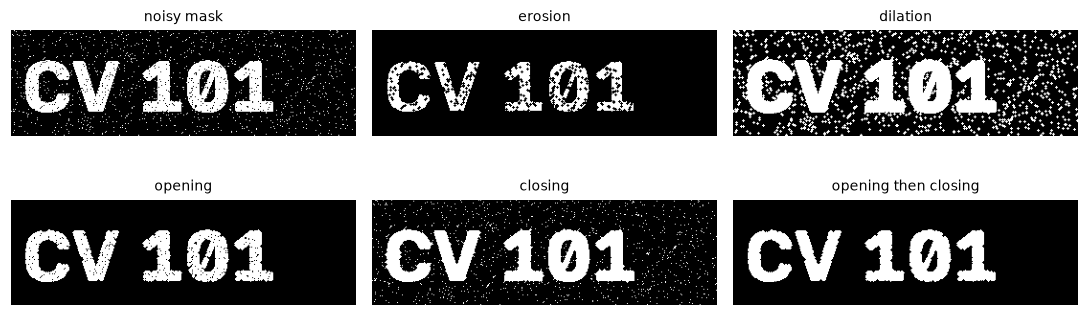
Erosion kills the specks, but the holes grow; dilation fills the holes but fattens everything. Opening removes the specks, closing fills the holes, and the two in sequence come closest to the clean text.
Erosion and dilation alone make things worse, because they change the strokes' thickness. Opening alone or closing alone fixes only one kind of noise. Opening then closing cuts the error to about a fifth of the original. Closing first does even better here: with this many holes, the opening's erosion also nibbles at the letters, while closing first repairs the strokes before the opening cleans the background. Which order wins depends on which noise is worse, so try both.
Grayscale morphology and the top-hat
On grayscale images, erosion is a minimum filter and dilation a maximum filter. Opening with a large SE removes bright structures smaller than the SE, leaving an estimate of the background: bright coins on a dark table vanish if the disk can't fit inside them, while the slowly varying table brightness survives. The difference is the white top-hat:
It keeps only the bright details smaller than \(B\), on a flat, zero background. The black top-hat, \((f \bullet B) - f\), does the same for dark details (text on paper, cracks on a wall). The morphological gradient, \((f \oplus B) - (f \ominus B)\), outlines edges.
The top-hat is the morphological fix for uneven illumination, an alternative to the adaptive thresholds of Chapter 1, and you'll use its cousin (estimate the background, then divide it out) in the capstone document scanner. On the coins image, the table is noticeably brighter at the top left than at the bottom, which is what made Otsu's mask messy in Chapter 1.
Connected components
A mask is just pixels. To count and measure objects, you need to group the foreground pixels into connected components: maximal sets of foreground pixels where any two are linked by a path of neighboring foreground pixels. Labeling assigns each component an integer: 0 for the background, 1 to \(n\) for the objects.
The simplest algorithm is flood fill by breadth-first search: scan the image; at each foreground pixel that has no label yet, start a new label and spread it to all connected foreground pixels using a queue. Each pixel is visited a constant number of times, so it's linear in the image size. Libraries use the faster two-pass algorithm (label provisionally row by row, record which provisional labels touch in a union-find structure, then relabel; Exercise 5), which is cache-friendly and easy to vectorize.
from collections import deque

def label_components(mask, connectivity=8):
    """Breadth-first flood-fill labeling. Returns (labels, count)."""
    H, W = mask.shape
    labels = np.zeros((H, W), np.int32)
    if connectivity == 8:
        nbrs = [(-1, -1), (-1, 0), (-1, 1), (0, -1), (0, 1), (1, -1), (1, 0), (1, 1)]
    else:
        nbrs = [(-1, 0), (0, -1), (0, 1), (1, 0)]
    current = 0
    for r0, c0 in zip(*np.nonzero(mask)):
        if labels[r0, c0]:
            continue
        current += 1
        labels[r0, c0] = current
        queue = deque([(r0, c0)])
        while queue:
            r, c = queue.popleft()
            for dr, dc in nbrs:
                rr, cc = r + dr, c + dc
                if 0 <= rr < H and 0 <= cc < W and mask[rr, cc] and not labels[rr, cc]:
                    labels[rr, cc] = current
                    queue.append((rr, cc))
    return labels, current
Now let's count the coins. The pipeline: remove the uneven background with a top-hat, threshold with Otsu, fill the holes inside coins (dark details in the coin faces), open to remove specks, and label.
coins = data.coins()
disk_se = cv2.getStructuringElement(cv2.MORPH_ELLIPSE, (61, 61))     # bigger than any coin
background = cv2.morphologyEx(coins, cv2.MORPH_OPEN, disk_se)
tophat = cv2.subtract(coins, background)                              # = cv2.MORPH_TOPHAT

def coin_mask(img):
    _, m = cv2.threshold(img, 0, 255, cv2.THRESH_BINARY + cv2.THRESH_OTSU)
    m = ndimage.binary_fill_holes(m > 0).astype(np.uint8)
    return cv2.morphologyEx(m, cv2.MORPH_OPEN, cv2.getStructuringElement(cv2.MORPH_ELLIPSE, (5, 5)))

raw_mask, mask = coin_mask(coins), coin_mask(tophat)
labels, n = label_components(mask > 0)
n_cv, labels_cv, stats, centroids = cv2.connectedComponentsWithStats(mask, connectivity=8)
n_sk = measure.label(mask > 0, connectivity=2).max()
print("coins counted -> ours:", n, "| OpenCV:", n_cv - 1, "(it counts the background as label 0) | skimage:", n_sk)
areas = stats[1:, cv2.CC_STAT_AREA]
print("coin areas: min", areas.min(), "max", areas.max())
raw_areas = cv2.connectedComponentsWithStats(raw_mask)[2][1:, cv2.CC_STAT_AREA]
print("without the top-hat:", len(raw_areas), "components, largest area", raw_areas.max())

fig, axes = plt.subplots(1, 4, figsize=(10, 2.4))
for ax, (im, t, cm) in zip(axes, [(coins, "coins", "gray"), (raw_mask, "Otsu on raw image", "gray"),
                                  (tophat, "top-hat (background removed)", "gray"),
                                  (labels, f"labeled mask: {n} coins", "nipy_spectral")]):
    ax.imshow(im, cmap=cm, interpolation="nearest"); ax.set_title(t, fontsize=9); ax.axis("off")
plt.tight_layout()
plt.show()
coins counted -> ours: 24 | OpenCV: 24 (it counts the background as label 0) | skimage: 24
coin areas: min 668 max 2848
without the top-hat: 25 components, largest area 8906
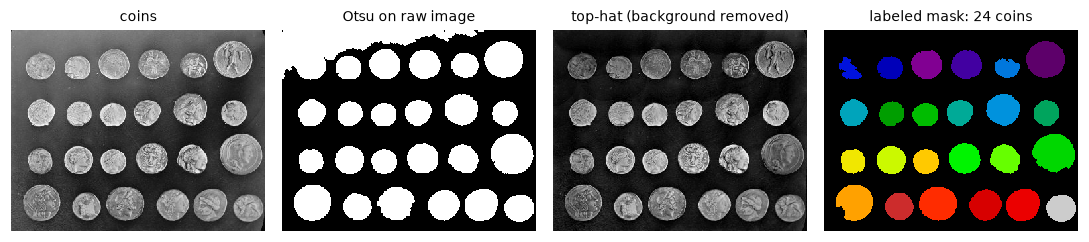
Without background removal, bright table regions merge with several coins into one big component. After the top-hat, every coin is its own component: 24 coins.
All three implementations agree: 24 coins. Without the top-hat, the count also happens to be close (25), but it's wrong for the wrong reasons: one "component" of almost 9,000 pixels is several coins fused with a bright patch of table, and a speck makes up the difference. Always check areas, not just counts. Note that cv2.connectedComponentsWithStats returns the number of labels including the background.
Contours and shape descriptors
A contour is the boundary of a connected component, stored as an ordered list of boundary points. It's a compact representation (a few hundred points instead of thousands of pixels) and the input to most shape measurements. cv2.findContours(mask, mode, method) traces them with Suzuki's border-following algorithm:
mode:cv2.RETR_EXTERNALreturns only outer boundaries;cv2.RETR_TREEalso returns holes and their nesting (a hierarchy).method:cv2.CHAIN_APPROX_NONEkeeps every boundary pixel;cv2.CHAIN_APPROX_SIMPLEcompresses straight runs to their endpoints.- Points come back as
(x, y), not(row, col), with shape(N, 1, 2).
From a contour you compute shape descriptors, numbers that summarize a shape:
| Descriptor | Formula | Tells you |
|---|---|---|
| Area \(A\) | cv2.contourArea |
Size |
| Perimeter \(P\) | cv2.arcLength(c, True) |
Boundary length |
| Circularity | \(4\pi A / P^2\) | 1 for a circle, about 0.785 for a square, lower for elongated or jagged shapes |
| Aspect ratio | \(w/h\) of the bounding box or of cv2.minAreaRect |
Elongation |
| Extent | \(A\) / bounding-box area | How much of its box the shape fills |
| Solidity | \(A\) / convex-hull area | Concavity: 1 for convex shapes, lower for stars and C shapes |
| Equivalent diameter | \(\sqrt{4A/\pi}\) | Diameter of the circle with the same area |
| Centroid | \(\left(\frac{m_{10}}{m_{00}}, \frac{m_{01}}{m_{00}}\right)\) from cv2.moments |
Position |
| Hu moments | cv2.HuMoments |
Seven numbers invariant to translation, scale, and rotation |
Here \(m_{pq} = \sum_{x, y} x^p y^q f(x, y)\) are the image moments: \(m_{00}\) is the area, and \(m_{10}, m_{01}\) give the centroid. Central moments (taken about the centroid) give orientation and elongation, and Hu combined them into rotation invariants.
Polygon approximation simplifies a contour to a few vertices with the Douglas-Peucker algorithm: connect the endpoints with a line; find the contour point farthest from it; if that distance exceeds a tolerance \(\varepsilon\), keep the point and recurse on both halves; otherwise, drop everything in between. cv2.approxPolyDP(c, eps, True), with \(\varepsilon\) set to a percentage of the perimeter (1–5%), turns a noisy page outline into exactly four corners. That's the key step of the capstone document scanner.
shapes = np.zeros((200, 560), np.uint8)
cv2.circle(shapes, (60, 100), 45, 255, -1)
cv2.rectangle(shapes, (130, 55), (220, 145), 255, -1)
cv2.fillPoly(shapes, [np.array([[260, 150], [350, 150], [305, 50]])], 255)
rect = cv2.boxPoints(((410, 100), (130, 40), 30)).astype(np.int32)        # elongated, rotated 30 deg
cv2.fillPoly(shapes, [rect], 255)
star = [(505 + r * np.sin(a), 100 - r * np.cos(a))
        for a, r in zip(np.linspace(0, 2 * np.pi, 11)[:-1], [48, 20] * 5)]
cv2.fillPoly(shapes, [np.round(star).astype(np.int32)], 255)

contours, _ = cv2.findContours(shapes, cv2.RETR_EXTERNAL, cv2.CHAIN_APPROX_NONE)
contours = sorted(contours, key=lambda c: cv2.boundingRect(c)[0])           # left to right
vis = cv2.cvtColor(shapes // 3, cv2.COLOR_GRAY2RGB)
print(f"{'shape':9s} {'area':>6s} {'circ.':>6s} {'solid.':>6s} {'aspect':>6s} {'verts':>5s}")
for name, c in zip(["circle", "square", "triangle", "bar", "star"], contours):
    A, P = cv2.contourArea(c), cv2.arcLength(c, True)
    hull = cv2.contourArea(cv2.convexHull(c))
    (cx, cy), (w, h), ang = cv2.minAreaRect(c)
    approx = cv2.approxPolyDP(c, 0.02 * P, True)
    print(f"{name:9s} {A:6.0f} {4 * np.pi * A / P ** 2:6.2f} {A / hull:6.2f} {max(w, h) / min(w, h):6.2f} {len(approx):5d}")
    cv2.drawContours(vis, [approx], -1, (255, 80, 80), 2)
    for (px, py) in approx[:, 0]:
        cv2.circle(vis, (int(px), int(py)), 4, (80, 200, 255), -1)

plt.figure(figsize=(9, 3.2))
plt.imshow(vis); plt.axis("off"); plt.title("contours simplified with approxPolyDP (ε = 2% of perimeter)", fontsize=9)
plt.show()
shape       area  circ. solid. aspect verts
circle      6234   0.89   0.99   1.00     8
square      8100   0.79   1.00   1.00     4
triangle    4500   0.53   0.98   1.11     3
bar         5142   0.49   0.97   3.26     4
star        2827   0.28   0.51   1.05    10
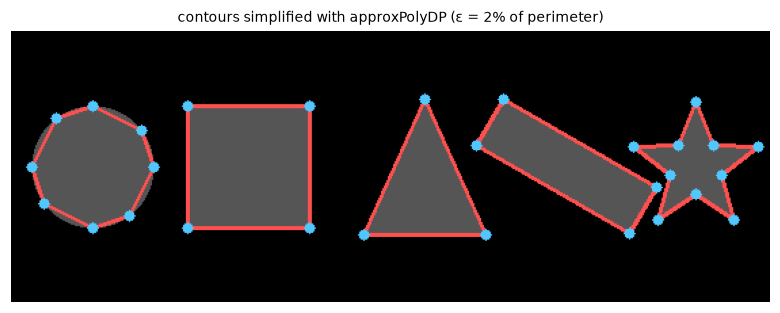
Douglas-Peucker reduces each traced contour to a handful of vertices: 4 for the square and the bar, 3 for the triangle, 10 for the star. The circle needs 8 at this tolerance.
A few descriptors already separate these shapes: vertex count for polygons, solidity for the star, aspect ratio for the bar, circularity for the circle. The circle's circularity is 0.89 rather than 1.0 because a pixelated boundary is longer than a smooth one; descriptors computed on pixel grids always have such biases, so compare against references measured the same way rather than against textbook values.
The distance transform
The distance transform of a binary image replaces each foreground pixel with its distance to the nearest background pixel. Background pixels get 0. Inside an object, the values rise from 0 at the boundary to a maximum at the "middle": for a disk of radius \(r\), the center gets \(r\). The ridges of the distance transform form the object's medial axis (its skeleton), and its peaks mark the centers of the "thickest" parts.
Computing the exact Euclidean distance naively compares every foreground pixel with every background pixel, which is far too slow. The classic fast approximation is the two-pass chamfer algorithm: sweep top-left to bottom-right, setting each pixel to the minimum of its own value and its already-visited neighbors' values plus the step cost (1 for an axis step, \(\sqrt{2}\) for a diagonal); then sweep back from bottom-right with the other half of the neighbors. Each pass propagates distances in "half" the directions. The result is exact along axes and diagonals and slightly overestimates distances in other directions. Exact linear-time Euclidean algorithms exist (Felzenszwalb and Huttenlocher's, for example), and scipy.ndimage.distance_transform_edt implements one. OpenCV's cv2.distanceTransform(mask, cv2.DIST_L2, 5) uses a 5 × 5 chamfer mask with better weights.
Watershed: separating touching objects
Now the pill problem. When objects touch, the mask has one component for several objects, but the distance transform still has one peak per object, with a "saddle" at each narrow neck between them.
The watershed transform treats an image as a topographic surface (intensity as height) and floods it. Picture water rising from a set of sources. Each source's water fills its own catchment basin. Where two basins' waters would meet, you build a dam. When the whole surface is flooded, the dams are the watershed lines, and each basin is a region.
To split touching objects:
- Compute the distance transform of the mask, and negate it, so that object centers become the deepest valleys and necks become ridges.
- Find markers, one per object: local maxima of the distance transform (with a minimum separation), or the components of a strongly eroded mask.
- Flood \(-\)distance from the markers, restricted to the mask. The dams form along the necks.
Without markers, the watershed floods from every local minimum, and noise creates thousands of tiny minima: severe over-segmentation. Marker control is what makes it work. You can also run the watershed on a gradient image (Chapter 3) with markers inside objects and in the background, which places boundaries on strong edges; scikit-image's coin-segmentation tutorial does exactly that.
def chamfer_distance(mask):
    """Two-pass chamfer distance (costs 1 and sqrt(2)) for a binary mask."""
    d = np.where(mask, np.inf, 0.0)
    H, W = mask.shape
    s2 = np.sqrt(2)
    fwd = [(-1, -1, s2), (-1, 0, 1), (-1, 1, s2), (0, -1, 1)]
    for passes, rows, cols in [(fwd, range(H), range(W)),
                               ([(-a, -b, w) for a, b, w in fwd], range(H - 1, -1, -1), range(W - 1, -1, -1))]:
        for r in rows:
            for c in cols:
                if d[r, c] == 0:
                    continue
                for dr, dc, w in passes:
                    rr, cc = r + dr, c + dc
                    if 0 <= rr < H and 0 <= cc < W and d[rr, cc] + w < d[r, c]:
                        d[r, c] = d[rr, cc] + w
    return d

H, W = 220, 340
yy, xx = np.mgrid[:H, :W]
discs = [(60, 60, 32), (60, 112, 30), (110, 85, 28), (150, 210, 34), (150, 262, 30),
         (90, 240, 26), (175, 60, 24), (60, 300, 22), (180, 140, 20)]
pile = np.zeros((H, W), bool)
for cy, cx, r in discs:
    pile |= (yy - cy) ** 2 + (xx - cx) ** 2 <= r * r

exact = ndimage.distance_transform_edt(pile)
ours = chamfer_distance(pile)
ocv = cv2.distanceTransform(pile.astype(np.uint8), cv2.DIST_L2, 5)
print(f"chamfer (ours) vs exact: max error {np.abs(ours - exact).max():.2f} px, "
      f"mean relative error {np.mean(np.abs(ours - exact)[pile] / exact[pile]):.3f}")
print(f"OpenCV DIST_L2 5x5 vs exact: max error {np.abs(ocv - exact).max():.2f} px")

blob_labels, n_blobs = ndimage.label(pile)
peaks = feature.peak_local_max(exact, min_distance=10, labels=blob_labels, exclude_border=False)
markers = np.zeros((H, W), np.int32)
markers[tuple(peaks.T)] = np.arange(1, len(peaks) + 1)
ws = segmentation.watershed(-exact, markers, mask=pile)
print("true discs:", len(discs), "| connected components:", n_blobs, "| watershed regions:", ws.max())

fig, axes = plt.subplots(1, 4, figsize=(10, 2.2))
axes[0].imshow(pile, cmap="gray"); axes[0].set_title(f"mask: {n_blobs} components", fontsize=9)
axes[1].imshow(exact, cmap="magma"); axes[1].set_title("distance transform", fontsize=9)
axes[2].imshow(exact, cmap="gray"); axes[2].plot(peaks[:, 1], peaks[:, 0], "r+", ms=8)
axes[2].set_title("markers: distance peaks", fontsize=9)
axes[3].imshow(ws, cmap="nipy_spectral", interpolation="nearest"); axes[3].set_title(f"watershed: {ws.max()} objects", fontsize=9)
for ax in axes:
    ax.axis("off")
plt.tight_layout()
plt.show()
chamfer (ours) vs exact: max error 1.80 px, mean relative error 0.027
OpenCV DIST_L2 5x5 vs exact: max error 0.47 px
true discs: 9 | connected components: 6 | watershed regions: 9

Six blobs, nine discs. The distance transform has one peak per disc; flooding from those peaks splits every blob along its necks.
The watershed recovers all nine discs from six blobs. The chamfer approximation is within about 3% of the exact distance on average; OpenCV's 5 × 5 mask does better.
Region growing
Thresholding and watershed decide each pixel by global rules. Region growing starts from a seed pixel and adds neighboring pixels as long as they satisfy a similarity rule, typically "intensity within a tolerance \(\tau\) of the seed" (or of the region's running mean). It's a flood fill with a condition, the same BFS as connected-component labeling. It's the "magic wand" in photo editors, and in medical imaging a clinician clicks inside an organ and region growing segments it.
Its weaknesses: the result depends on the seed and the tolerance, and a single weak spot in the boundary lets the region leak into the neighbor. Smoothing first, or growing on a gradient-limited criterion, helps.
k-means color segmentation
When regions differ in color, cluster the pixels' colors. k-means (covered in depth in the ML Handbook's Clustering) splits \(n\) points into \(k\) clusters by alternating two steps until nothing changes:
- Assign each point to the nearest of the \(k\) centers.
- Update each center to the mean of its assigned points.
Each step can only lower the total squared distance from points to their centers (the inertia), so it converges, though possibly to a local minimum; run it several times from different starts, or use the k-means++ initialization. For images, each pixel is a point in color space. Cluster in Lab rather than RGB, because Euclidean distance in Lab roughly matches perceived color difference.
k-means ignores where pixels are, so a cluster can be scattered across the image, and the result is a color quantization as much as a segmentation. Appending scaled \((x, y)\) coordinates to each pixel's features encourages compact regions; restricting each center's search to a local window is the idea behind SLIC superpixels (skimage.segmentation.slic).
def region_grow(img, seed, tol):
    """Flood from seed, adding 8-connected pixels with |value - seed value| <= tol."""
    target = int(img[seed])
    ok = np.abs(img.astype(int) - target) <= tol
    region = np.zeros(img.shape, bool)
    region[seed] = True
    queue = deque([seed])
    H, W = img.shape
    while queue:
        r, c = queue.popleft()
        for dr in (-1, 0, 1):
            for dc in (-1, 0, 1):
                rr, cc = r + dr, c + dc
                if 0 <= rr < H and 0 <= cc < W and ok[rr, cc] and not region[rr, cc]:
                    region[rr, cc] = True
                    queue.append((rr, cc))
    return region

cam = data.camera()
sky = region_grow(cam, (60, 60), tol=25)
print("matches skimage.segmentation.flood:", np.array_equal(sky, segmentation.flood(cam, (60, 60), tolerance=25)))

def kmeans(X, k, iters=30, seed=0):
    rng = np.random.default_rng(seed)
    centers = X[rng.choice(len(X), k, replace=False)]
    for _ in range(iters):
        d2 = ((X[:, None, :] - centers[None, :, :]) ** 2).sum(-1)
        assign = d2.argmin(1)
        new = np.array([X[assign == j].mean(0) if np.any(assign == j) else centers[j] for j in range(k)])
        if np.allclose(new, centers):
            break
        centers = new
    return centers, assign, d2[np.arange(len(X)), assign].sum()

astro = data.astronaut()
small = cv2.resize(astro, (128, 128), interpolation=cv2.INTER_AREA)       # keep it fast
X = cv2.cvtColor(small, cv2.COLOR_RGB2LAB).reshape(-1, 3).astype(np.float64)
k = 5
centers, assign, inertia = kmeans(X, k)
crit = (cv2.TERM_CRITERIA_EPS + cv2.TERM_CRITERIA_MAX_ITER, 50, 0.01)
inertia_cv, _, _ = cv2.kmeans(X.astype(np.float32), k, None, crit, 5, cv2.KMEANS_PP_CENTERS)
print(f"inertia: ours {inertia:.4g} | cv2.kmeans (best of 5, k-means++) {inertia_cv:.4g}")
quant = cv2.cvtColor(centers[assign].reshape(small.shape).astype(np.uint8), cv2.COLOR_LAB2RGB)

fig, axes = plt.subplots(1, 4, figsize=(10, 2.7))
overlay = cv2.cvtColor(cam, cv2.COLOR_GRAY2RGB); overlay[sky] = (0.5 * overlay[sky] + [0, 0, 127]).astype(np.uint8)
axes[0].imshow(overlay); axes[0].plot(60, 60, "r*", ms=10); axes[0].set_title("region grown from ★ (tol 25)", fontsize=9)
axes[1].imshow(small); axes[1].set_title("astronaut (128×128)", fontsize=9)
axes[2].imshow(quant); axes[2].set_title(f"k-means in Lab, k = {k}", fontsize=9)
axes[3].imshow(assign.reshape(small.shape[:2]), cmap="tab10", interpolation="nearest"); axes[3].set_title("cluster labels", fontsize=9)
for ax in axes:
    ax.axis("off")
plt.tight_layout()
plt.show()
matches skimage.segmentation.flood: True
inertia: ours 7.562e+06 | cv2.kmeans (best of 5, k-means++) 7.561e+06
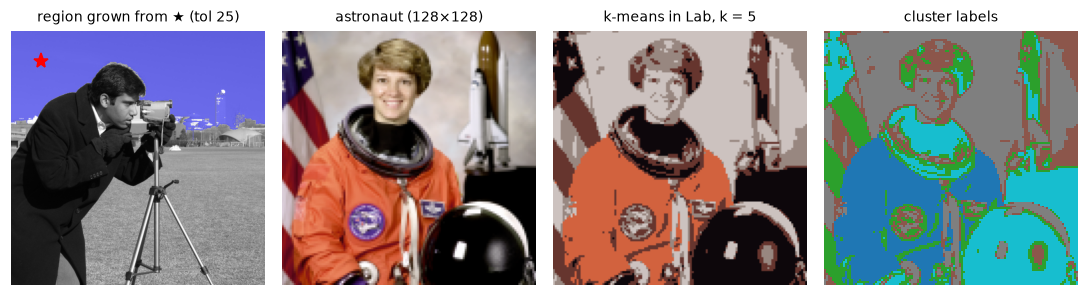
Region growing captures the connected sky; k-means groups the astronaut's pixels into five colors, regardless of where they are in the image.
Our single run reaches essentially the same inertia as OpenCV's best of five restarts, so it found a comparable solution.
In practice
Measuring every object at once
Once you have a label image, skimage.measure.regionprops_table computes dozens of properties for every region in one call and returns a dictionary ready for pandas. In a factory, this is how you go from "a mask of parts" to "a table of part sizes, positions, and defects":
props = measure.regionprops_table(labels, intensity_image=coins,
                                  properties=("label", "area", "equivalent_diameter_area",
                                              "eccentricity", "solidity", "intensity_mean"))
d = props["equivalent_diameter_area"]
print("coins:", len(d), "| diameters (px): min %.1f, median %.1f, max %.1f" % (d.min(), np.median(d), d.max()))
print("least solid region: %.3f (label %d)" % (props["solidity"].min(), props["label"][props["solidity"].argmin()]))
print("mean eccentricity: %.2f (0 = perfect circle)" % props["eccentricity"].mean())
coins: 24 | diameters (px): min 29.2, median 43.3, max 60.2
least solid region: 0.841 (label 5)
mean eccentricity: 0.38 (0 = perfect circle)
The least solid region (0.84) deserves a look. It's the top-left coin, which is also the smallest region (668 pixels): part of it fell below the threshold, so its mask has a bite taken out. Solidity flags such segmentation errors, and also touching pairs, which a watershed would split. Every other coin has a solidity above 0.9.
A recipe for counting objects
flowchart LR
    A["Image"] --> B["Correct lighting<br/>(top-hat or<br/>background division)"]
    B --> C["Threshold<br/>(Otsu or adaptive)"]
    C --> D["Clean the mask<br/>(open, close,<br/>fill holes)"]
    D --> E{"Objects<br/>touch?"}
    E -- no --> F["Connected<br/>components"]
    E -- yes --> G["Distance transform<br/>+ markers<br/>+ watershed"]
    F --> H["Measure and filter<br/>(area, solidity,<br/>circularity)"]
    G --> H
The OpenCV version of the watershed step, which you'll see in many tutorials, is slightly different: it needs a 3-channel uint8 image and an int32 marker image, marks the boundaries with \(-1\), and expects you to mark "sure background" and leave "unknown" pixels as 0:
sure_fg = (ocv > 0.5 * ocv.max()).astype(np.uint8)          # strongly inside some object
n_markers, markers_cv = cv2.connectedComponents(sure_fg)
sure_bg = cv2.dilate(pile.astype(np.uint8), np.ones((3, 3), np.uint8), iterations=3)
markers_cv = markers_cv + 1                                  # background becomes 1, objects 2..n
markers_cv[(sure_bg > 0) & (sure_fg == 0)] = 0               # unknown band: let the watershed decide
rgb = cv2.cvtColor((pile * 255).astype(np.uint8), cv2.COLOR_GRAY2BGR)
result = cv2.watershed(rgb, markers_cv.astype(np.int32))
print("objects found by cv2.watershed:", len(np.unique(result[result > 1])),
      "| boundary pixels (-1):", np.count_nonzero(result == -1))
With a single global threshold at half the maximum distance, the "sure foreground" cores of some strongly overlapping discs are still connected to each other, so two pairs share a marker, and OpenCV's version finds only 7 objects. Raise the threshold and the cores separate, but then the smallest discs lose their cores entirely. No global threshold on the distance fits objects of different sizes; markers from local maxima (as with peak_local_max above) adapt to each object. This is the most common failure of the tutorial recipe.
Common mistake: off-by-one counts
cv2.connectedComponents and cv2.connectedComponentsWithStats return the number of labels including the background (label 0). skimage.measure.label(...).max() and scipy.ndimage.label return the number of objects. Subtract 1 from OpenCV's count.
Common mistake: contour coordinates are (x, y)
cv2.findContours returns points as (x, y) = (column, row). Indexing a NumPy array with them directly, img[pt[0], pt[1]], reads the wrong pixel. Use img[y, x]. The same holds for cv2.moments centroids, cv2.boundingRect, and cv2.minAreaRect.
Common mistake: dark objects and white backgrounds
cv2.findContours, cv2.connectedComponents, and morphology all treat nonzero as foreground. Thresholding dark text or dark cells with THRESH_BINARY makes the background the "object", and you get one giant contour around the image. Invert with THRESH_BINARY_INV or 255 - mask.
Exercises
Exercise 1: Erosion and dilation by hand (easy)
For the 1D binary signal 0 1 1 1 0 1 0 0 1 1 1 1 1 0 and a structuring element of three ones centered at the middle, compute by hand the erosion, the dilation, the opening, and the closing (treat values outside the signal as background for dilation and foreground for erosion, as OpenCV does). Check with code.
Solution
Erosion keeps a 1 only where it and both neighbors are 1: 0 0 1 0 0 0 0 0 0 1 1 1 0 0. Dilation sets a 1 wherever any of the three is 1: 1 1 1 1 1 1 1 1 1 1 1 1 1 1. Opening = dilate the erosion: 0 1 1 1 0 0 0 0 1 1 1 1 1 0, the isolated 1 at index 5 is gone and the runs of 3 and 5 are intact. Closing = erode the dilation: everything is 1 in the dilation, so erosion leaves it all 1 (outside counts as foreground for erosion), filling the gaps of width 1 and 2.
sig = np.array([[0, 1, 1, 1, 0, 1, 0, 0, 1, 1, 1, 1, 1, 0]], np.uint8)
se3 = np.ones((1, 3), np.uint8)
for name, op in [("erode", cv2.MORPH_ERODE), ("dilate", cv2.MORPH_DILATE),
                 ("open", cv2.MORPH_OPEN), ("close", cv2.MORPH_CLOSE)]:
    print(f"{name:7s}", cv2.morphologyEx(sig, op, se3)[0])
erode   [0 0 1 0 0 0 0 0 0 1 1 1 0 0]
dilate  [1 1 1 1 1 1 1 1 1 1 1 1 1 1]
open    [0 1 1 1 0 0 0 0 1 1 1 1 1 0]
close   [1 1 1 1 1 1 1 1 1 1 1 1 1 1]
Notice how closing joined everything, because the gaps (widths 1 and 2) were all narrower than what a 3-wide SE bridges after dilation. On real data, choose the SE from the size of the gaps you want to close.
Exercise 2: Predict the component count (easy)
Before running anything, predict how many connected components this 5 × 5 pattern has with 4-connectivity and with 8-connectivity. Then check with measure.label.
Solution
With 4-connectivity, no two ones share an edge, so each of the 9 ones is its own component: 9. With 8-connectivity, every one touches the center diagonally (through the X shape), so there's 1 component.
Exercise 3: Sort the coins by size (medium)
The coins photo contains coins of several denominations. Using props["equivalent_diameter_area"] from this chapter, group the 24 coins into size classes by running your 1D k-means (or np.histogram) on the diameters. How many size classes are there, and how many coins in each? Draw each class in a different color.
Solution
diam = props["equivalent_diameter_area"]
for k in [2, 3, 4]:
    c, a, inert = kmeans(diam[:, None], k, seed=1)
    order = np.argsort(c[:, 0])
    sizes = [int((a == j).sum()) for j in order]
    print(f"k={k}: centers {np.round(np.sort(c[:, 0]), 1)}  counts {sizes}  inertia {inert:.0f}")
k=2: centers [39.5 52.5]  counts [16, 8]  inertia 449
k=3: centers [36.5 44.3 54.2]  counts [9, 9, 6]  inertia 213
k=4: centers [31.  38.4 45.7 56.5]  counts [2, 8, 10, 4]  inertia 107
Inertia always falls as \(k\) grows, so you look for an "elbow" where the gains suddenly shrink. Here the inertia roughly halves at every step, so there is no clear elbow: the measured diameters don't form well-separated groups (the partly segmented top-left coin, for one, sits in the wrong size range). An honest report would say that size alone doesn't reliably separate the denominations in this photo. In a real coin counter you'd calibrate with known coins and add a color feature (copper vs silver) rather than rely on size alone.
Exercise 4: Opening by reconstruction (medium)
Opening with a disk removes small objects but also rounds the corners of the large ones. Opening by reconstruction fixes this: erode to find which objects survive, then regrow those objects to their exact original shape by repeated dilation constrained to the original mask (skimage.morphology.reconstruction(seed, mask, method="dilation")). Apply both to noisy from this chapter with the 3 × 3 structuring element k3 and compare the pixel errors against clean.
Solution
eroded = cv2.erode(u8, k3)
by_recon = morphology.reconstruction(eroded, u8, method="dilation").astype(np.uint8)
print("plain opening, pixels wrong:", errors(opened))
print("opening by reconstruction, pixels wrong:", errors(by_recon))
print("then closing:", errors(cv2.morphologyEx(by_recon, cv2.MORPH_CLOSE, k3)))
Reconstruction restores every surviving letter to its exact original pixels, so it beats plain opening. Specks that touch a letter survive too, because reconstruction regrows the whole connected component; that's the trade-off. The closing then fills the holes as before.
Exercise 5: Two-pass labeling with union-find (hard)
Implement the classic two-pass connected-component algorithm with 8-connectivity: (1) scan row by row; for each foreground pixel look at its already-visited neighbors (left, up-left, up, up-right); if none is labeled, assign a new provisional label; otherwise take the smallest neighbor label and record that all the neighbor labels are equivalent, using a union-find structure; (2) replace each provisional label by its set's representative, then renumber consecutively. Check it against your BFS version on the coins mask and on random noise.
Solution
def label_two_pass(mask):
    H, W = mask.shape
    lab = np.zeros((H, W), np.int32)
    parent = [0]

    def find(a):
        while parent[a] != a:
            parent[a] = parent[parent[a]]                 # path halving
            a = parent[a]
        return a

    def union(a, b):
        ra, rb = find(a), find(b)
        if ra != rb:
            parent[max(ra, rb)] = min(ra, rb)

    for r in range(H):
        for c in range(W):
            if not mask[r, c]:
                continue
            nb = [lab[r + dr, c + dc] for dr, dc in [(0, -1), (-1, -1), (-1, 0), (-1, 1)]
                  if 0 <= r + dr and 0 <= c + dc < W and lab[r + dr, c + dc]]
            if not nb:
                parent.append(len(parent)); lab[r, c] = len(parent) - 1
            else:
                m = min(nb); lab[r, c] = m
                for x in nb:
                    union(m, x)
    roots = np.array([find(i) for i in range(len(parent))])
    _, renum = np.unique(roots, return_inverse=True)
    return renum[lab], len(np.unique(roots)) - 1

def same_partition(a, b):
    pairs = set(zip(a.ravel(), b.ravel()))
    return len(pairs) == len(np.unique(a)) == len(np.unique(b))

rand = np.random.default_rng(5).random((120, 160)) < 0.45
for name, m in [("coins mask", mask > 0), ("random noise", rand)]:
    l1, n1 = label_two_pass(m)
    l2, n2 = label_components(m)
    print(f"{name}: two-pass {n1}, BFS {n2}, identical partition: {same_partition(l1, l2)}")
coins mask: two-pass 24, BFS 24, identical partition: True
random noise: two-pass 166, BFS 166, identical partition: True
Labels can be numbered differently by the two methods, so compare the partitions: every (label A, label B) pair must be one-to-one. Random noise near 45% density is a good stress test, because its components have complicated, merging shapes (it's close to the percolation threshold, where components start to span the image).
Exercise 6: Watershed without markers (hard)
Run segmentation.watershed(-exact, mask=pile) without markers (it then uses every local minimum), and count the regions. Then add a little noise to the distance transform (rng.normal(0, 0.5, exact.shape)) and count again. Explain the result, and show two ways to fix it.
Solution
rng = np.random.default_rng(0)
no_markers = segmentation.watershed(-exact, mask=pile)
noisy_dist = exact + rng.normal(0, 0.5, exact.shape)
no_markers_noisy = segmentation.watershed(-noisy_dist, mask=pile)
print("no markers, clean distance:", no_markers.max())
print("no markers, noisy distance:", no_markers_noisy.max())
smoothed = ndimage.gaussian_filter(noisy_dist, 2)
peaks2 = feature.peak_local_max(smoothed, min_distance=10, labels=blob_labels, exclude_border=False)
mk = np.zeros_like(markers); mk[tuple(peaks2.T)] = np.arange(1, len(peaks2) + 1)
print("markers from smoothed noisy distance:", segmentation.watershed(-smoothed, mk, mask=pile).max())
no markers, clean distance: 13
no markers, noisy distance: 1417
markers from smoothed noisy distance: 9
Even on the clean distance transform, plateaus and pixelation create a few extra minima (13 regions for 9 discs). With slight noise, local minima appear everywhere, and you get well over a thousand regions: classic over-segmentation. Fixes: (1) markers with a minimum separation (peak_local_max(min_distance=...)), ideally on a smoothed surface, as shown; (2) the h-maxima transform (morphology.h_maxima), which keeps only peaks that rise at least \(h\) above their surroundings, suppressing shallow noise peaks.
Check yourself
-
What do erosion and dilation do to a binary object, in words?
Answer
Erosion keeps only pixels where the structuring element fits entirely inside the object: it shrinks objects, removes thin parts, and breaks narrow bridges. Dilation adds every pixel where the structuring element touches the object: it grows objects, fills small holes and gaps, and merges nearby objects.
-
What's the difference between opening and closing, and what kind of noise does each remove?
Answer
Opening (erode then dilate) removes small bright specks and thin protrusions. Closing (dilate then erode) fills small dark holes and narrow gaps. Both roughly preserve the size of larger objects.
-
How does a white top-hat correct uneven illumination?
Answer
Opening with a structuring element larger than the objects removes them and leaves an estimate of the smooth background. Subtracting that from the image leaves only the objects, on a flat zero background.
-
Why does connectivity (4 vs 8) change the number of components?
Answer
With 8-connectivity, pixels touching only diagonally are neighbors, so diagonal chains and corner-touching shapes form one component. With 4-connectivity they're separate.
-
Name three shape descriptors and what each would distinguish.
Answer
Circularity \(4\pi A/P^2\) (circles vs elongated or jagged shapes), solidity \(A/A_{\text{hull}}\) (convex shapes vs stars, C shapes, or touching pairs), aspect ratio (bars vs squares). Also vertex count after
approxPolyDP(triangles vs quadrilaterals). -
Why do you negate the distance transform before running the watershed to split touching objects?
Answer
The watershed floods from minima. Negating makes object centers (distance peaks) into the deepest basins and the necks between objects into ridges, so the dams form along the necks.
-
Why does the watershed need markers?
Answer
Without them it floods from every local minimum, and noise and pixelation create many spurious minima, causing massive over-segmentation. Markers specify one source per object.
-
Why cluster pixel colors in Lab rather than RGB, and what does k-means ignore?
Answer
Euclidean distances in Lab approximately match perceived color differences, unlike RGB. k-means ignores pixel positions, so clusters need not be spatially connected; add coordinates as features, or use superpixels, for compact regions.
Key takeaways
- Morphology probes shapes with a structuring element. Erosion is "fits inside" (a min filter), dilation is "touches" (a max filter), and they're duals.
- Opening removes small bright specks and closing fills small holes, while roughly preserving size; top-hats remove uneven backgrounds.
- Connected-component labeling turns a mask into countable objects. Mind connectivity and OpenCV's background label.
- Contours plus descriptors (area, circularity, solidity, aspect ratio, polygon vertices) describe and filter shapes;
approxPolyDPfinds corners. - The distance transform has one peak per roughly convex object; a marker-controlled watershed on its negative separates touching objects.
- Region growing and k-means segment by similarity: one from a seed with a tolerance, the other by clustering colors without regard to position.
Further reading
- Rafael C. Gonzalez and Richard E. Woods, Digital Image Processing, 4th edition, chapters 9 and 10 (morphological processing and segmentation).
- Pierre Soille, Morphological Image Analysis: Principles and Applications, 2nd edition, Springer, 2003. The reference on mathematical morphology.
- Luc Vincent and Pierre Soille, "Watersheds in Digital Spaces: An Efficient Algorithm Based on Immersion Simulations", IEEE Transactions on Pattern Analysis and Machine Intelligence, 1991.
- scikit-image gallery: Watershed segmentation and the coins segmentation example.
- OpenCV tutorials: Morphological transformations and Contour features.
Next
You can now find objects and their outlines. The last chapter moves pixels around: rotating, scaling, and rectifying images. Geometric transformations.