Convolution and Filtering
Level 1 · Chapter 2 · ⏱️ ~65 min read · Prerequisites: Point operations and histograms, Images as arrays
Point operations look at one pixel. Filters look at a pixel and its neighbors. This chapter covers correlation and convolution (and why the difference matters), kernels, box and Gaussian blur, separable filters, sharpening and unsharp masking, noise models, median and bilateral filters, border handling, and a from-scratch implementation of convolution checked against OpenCV and SciPy.
Why it matters
Wei maintained a steel-sheet inspection system. The original prototype, written by a researcher in SciPy, found scratches by filtering each image with a small directional kernel that responds to "dark on the left, bright on the right", then flagging strong responses. Wei's job was to port it to OpenCV for speed.
The port ran ten times faster and flagged a completely different set of defects. Some scratches were missed, others were found on the wrong side. Wei spent two days checking the thresholds and the camera before finding the cause: SciPy's convolve flips the kernel before sliding it, and OpenCV's filter2D doesn't. For a symmetric blur kernel this makes no difference, which is why nobody noticed in the blur stage. For a directional kernel it flips the sign of every response. To make it worse, the OpenCV output was stored as uint8, so every negative response was silently clipped to zero, throwing away half the edges.
Both bugs disappear once you know exactly what a filter computes. This chapter builds it up from the definition, implements it from scratch, and checks it against the libraries, so you'll never again have to guess which way a kernel faces.
Concepts
Neighborhood operations and kernels
A neighborhood operation computes each output pixel from a small window of input pixels around the same location. The most important kind is a linear filter: the output is a weighted sum of the window, with the weights stored in a small array called the kernel (also called a filter, mask, or, in deep learning, the weights of a convolutional layer).
Think of the kernel as a stencil. Lay it over the image so that its center sits on pixel \((x, y)\), multiply each kernel weight by the pixel underneath it, add everything up, and write the sum into the output at \((x, y)\). Then slide the stencil one pixel over and repeat.
The weights decide what the filter does:
- All weights equal and summing to 1: each output is a local average, so the image gets blurred.
- A positive center and negative surround: each output emphasizes how much a pixel differs from its neighbors, so the image gets sharpened.
- Negative on one side and positive on the other: each output measures the change across the window, a derivative, which responds to edges (the next chapter).
Because the same weights are used at every location, the filter is shift-invariant: shifting the input shifts the output by the same amount. Linear plus shift-invariant (LSI) is the property that makes these filters so analyzable, and it's the link to the Fourier transform in The frequency domain.
Correlation and convolution
Let \(f\) be the image, \(h\) the kernel with indices running from \(-k\) to \(k\) in each direction (so it's \((2k+1) \times (2k+1)\)), and \(g\) the output. Use \((i, j)\) for (row, column). The sliding-stencil operation is cross-correlation, usually just called correlation, written \(g = h \otimes f\):
Convolution, written \(g = h * f\), is the same thing with the kernel flipped in both directions (rotated by 180°):
Why would anyone flip the kernel? Feed each operation an impulse, an image that is 0 everywhere except for a single 1. Correlation outputs a flipped copy of the kernel around the impulse. Convolution outputs the kernel itself. So with convolution, the kernel is the impulse response: the picture that one bright point turns into. A camera's blur is naturally described this way (the point spread function is what one star looks like in the photo), and the output image is the sum of shifted, scaled copies of it, one per input pixel. That's convolution.
The flip also gives convolution nice algebra that correlation lacks:
- Commutative: \(h * f = f * h\).
- Associative: \(h_2 * (h_1 * f) = (h_2 * h_1) * f\). Filtering twice is the same as filtering once with the combined kernel. This is what makes separable filters and the "derivative of Gaussian" trick work.
- Distributive: \(h * (f_1 + f_2) = h * f_1 + h * f_2\).
In practice:
- For symmetric kernels (box, Gaussian, Laplacian), correlation and convolution are identical, because flipping changes nothing.
- For asymmetric kernels (derivatives, motion blur, any learned kernel), they differ by a flip. Getting it wrong mirrors the response or flips its sign.
cv2.filter2Dcomputes correlation.scipy.ndimage.correlatecomputes correlation andscipy.ndimage.convolvecomputes convolution.scipy.signal.convolve2dcomputes convolution. PyTorch'snn.Conv2dandF.conv2dcompute correlation, despite the name: since the weights are learned, flipping them would make no difference to what the network can represent, so deep learning frameworks skip the flip.
import numpy as np
import cv2
import matplotlib.pyplot as plt
from scipy import ndimage
from skimage import data

k = np.arange(1, 10, dtype=np.float64).reshape(3, 3)
impulse = np.zeros((5, 5)); impulse[2, 2] = 1
print("kernel:\n", k)
print("correlation of an impulse:\n", ndimage.correlate(impulse, k, mode="constant")[1:4, 1:4])
print("convolution of an impulse:\n", ndimage.convolve(impulse, k, mode="constant")[1:4, 1:4])
kernel:
 [[1. 2. 3.]
 [4. 5. 6.]
 [7. 8. 9.]]
correlation of an impulse:
 [[9. 8. 7.]
 [6. 5. 4.]
 [3. 2. 1.]]
convolution of an impulse:
 [[1. 2. 3.]
 [4. 5. 6.]
 [7. 8. 9.]]
Implementing it from scratch
The definition translates directly into four nested loops: two over output pixels, two over kernel entries. That's correct but painfully slow in Python, about \(H \cdot W \cdot K^2\) interpreted multiply-adds. The trick to making it fast is to swap the loop order. For each kernel entry \((u, v)\), the contribution to every output pixel is that weight times the whole image shifted by \((u, v)\). So loop over the \(K^2\) kernel entries, and for each one add a scaled, shifted copy of the (padded) image with a single vectorized NumPy operation:
Same arithmetic, but now Python executes only \(K^2\) loop iterations, and NumPy does the per-pixel work in C.
The image must be padded first, because near the border the kernel hangs off the edge. More on how to fill the padding in a moment. Here are both versions, checked against each other, against OpenCV, and against SciPy, using a random asymmetric kernel so that any flip would show up:
PAD_MODES = {"reflect101": "reflect", "reflect": "symmetric", "replicate": "edge",
             "zero": "constant", "wrap": "wrap"}

def correlate2d(img, kernel, border="reflect101"):
    """2D correlation of a grayscale image with an odd-sized kernel, as float64."""
    kh, kw = kernel.shape
    ph, pw = kh // 2, kw // 2
    padded = np.pad(img.astype(np.float64), ((ph, ph), (pw, pw)), mode=PAD_MODES[border])
    H, W = img.shape
    out = np.zeros((H, W))
    for u in range(kh):                      # K^2 iterations, each one a whole-image add
        for v in range(kw):
            out += kernel[u, v] * padded[u:u + H, v:v + W]
    return out

def convolve2d(img, kernel, border="reflect101"):
    return correlate2d(img, kernel[::-1, ::-1], border)

def correlate2d_loops(img, kernel):
    """The definition, literally. Only for tiny images."""
    kh, kw = kernel.shape
    padded = np.pad(img.astype(np.float64), ((kh // 2,) * 2, (kw // 2,) * 2), mode="reflect")
    out = np.zeros(img.shape)
    for i in range(img.shape[0]):
        for j in range(img.shape[1]):
            out[i, j] = np.sum(kernel * padded[i:i + kh, j:j + kw])
    return out

img = data.camera()
rng = np.random.default_rng(0)
kern = rng.normal(size=(5, 5))                                  # asymmetric on purpose

small = img[200:240, 200:240]
print("loops == vectorized:", np.allclose(correlate2d_loops(small, kern), correlate2d(small, kern)))
ours = correlate2d(img, kern)
print("vs cv2.filter2D (correlation):", np.abs(ours - cv2.filter2D(img.astype(np.float64), -1, kern)).max())
print("vs ndimage.correlate:", np.abs(ours - ndimage.correlate(img.astype(np.float64), kern, mode="mirror")).max())
print("convolution vs ndimage.convolve:",
      np.abs(convolve2d(img, kern) - ndimage.convolve(img.astype(np.float64), kern, mode="mirror")).max())
print("correlation vs convolution differ by:", np.abs(ours - convolve2d(img, kern)).max().round(1))
loops == vectorized: True
vs cv2.filter2D (correlation): 0.0
vs ndimage.correlate: 0.0
convolution vs ndimage.convolve: 0.0
correlation vs convolution differ by: 768.7
All three agree exactly here (any difference would be floating-point round-off, around \(10^{-12}\)). The last line is the size of Wei's bug: with an asymmetric kernel, correlation and convolution give completely different images.
Naming across libraries
The border mode names are a mess. OpenCV's default BORDER_REFLECT_101 (gfedcb|abcdefgh|gfedcba, the edge pixel is not repeated) is NumPy's "reflect" and SciPy's "mirror". OpenCV's BORDER_REFLECT (fedcba|abcdefgh|hgfedcb, the edge pixel is repeated) is NumPy's "symmetric" and SciPy's "reflect". When results from two libraries differ only near the border, this is almost always why.
Border handling
Every filter needs values outside the image. The choices:
| Mode | Fills with | OpenCV | NumPy np.pad |
Good for |
|---|---|---|---|---|
| Zero (constant) | 0 (or a constant) | BORDER_CONSTANT |
"constant" |
Matching deep learning "same" padding; otherwise darkens borders |
| Replicate | the edge pixel, repeated | BORDER_REPLICATE |
"edge" |
Median filters, adaptive thresholds |
| Reflect 101 | mirror without repeating the edge | BORDER_REFLECT_101 (default) |
"reflect" |
General-purpose smoothing: no artificial edges |
| Reflect | mirror, repeating the edge | BORDER_REFLECT |
"symmetric" |
Same, slightly different at the very edge |
| Wrap | the opposite side | BORDER_WRAP |
"wrap" |
Periodic signals; matches the FFT's assumption |
The wrong choice creates artificial edges. Zero padding surrounds a bright image with black, so a blur pulls dark values in and every border gets a dark frame. An edge detector then reports a strong "edge" around the whole image. Reflection continues the image's own texture, so no new structure appears. Wrap brings in the opposite edge: the bottom of the sky bleeds into the top of the grass.
box31 = np.ones((31, 31)) / 31 ** 2
fig, axes = plt.subplots(1, 4, figsize=(10, 2.7))
for ax, mode in zip(axes, ["zero", "replicate", "reflect101", "wrap"]):
    blurred = correlate2d(img, box31, border=mode)
    ax.imshow(blurred[:120, :120], cmap="gray", vmin=0, vmax=255)
    ax.set_title(f"{mode}: top row mean {blurred[0].mean():.0f}", fontsize=9); ax.axis("off")
plt.tight_layout()
plt.show()
print("interior mean of the blurred image:", correlate2d(img, box31)[100].mean().round(0))
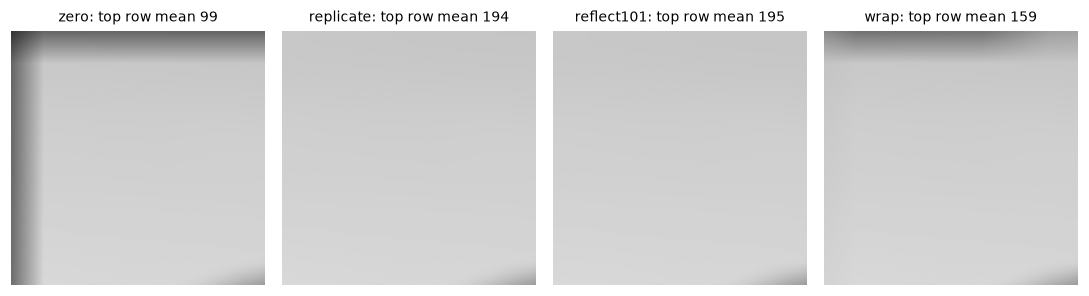
Zero padding darkens the border into a frame. Replicate and reflect continue the bright sky. Wrap pulls in dark pixels from the bottom of the image (the coat and grass).
Box blur
The simplest smoothing kernel is the box filter (or mean filter): a \(K \times K\) array with every weight \(1/K^2\). Each output pixel is the plain average of its window. Averaging reduces noise: if each pixel has independent noise with standard deviation \(\sigma_n\), the average of \(K^2\) pixels has standard deviation \(\sigma_n / K\). A 5 × 5 box cuts the noise by a factor of 5.
The price is detail: every edge gets spread over \(K\) pixels. And the box has two specific flaws. Its footprint is a square, so a single bright point turns into a bright square, an artifact that doesn't look like any real optical blur. And its sharp cutoff in space causes ripples in frequency: some fine patterns are not just weakened but inverted (you'll see why in The frequency domain).
The box filter's strength is speed. With a running sum or an integral image (Chapter 1), its cost per pixel is constant, independent of \(K\). That makes it the building block for fast local statistics: the local means in adaptive thresholding, box filters in SURF and Viola-Jones, and repeated box blurs as a cheap approximation of a Gaussian.
Gaussian blur
The Gaussian kernel weights neighbors by a bell curve of their distance from the center:
The parameter \(\sigma\) (the standard deviation) sets the blur's radius. Nearby pixels count most, and the weight falls smoothly to almost nothing by about \(3\sigma\). In practice the kernel is cut off at a radius of \(3\sigma\) or \(4\sigma\) (OpenCV uses \(3\sigma\) for 8-bit images and \(4\sigma\) for floats when you pass a kernel size of 0) and renormalized so the sampled weights sum to exactly 1.
Why is the Gaussian the default blur?
- It's isotropic. \(u^2 + v^2\) depends only on distance, so it blurs equally in every direction and turns a point into a round spot, like a real defocused lens.
- It's separable. \(\exp(-(u^2 + v^2)/2\sigma^2) = \exp(-u^2/2\sigma^2)\exp(-v^2/2\sigma^2)\), so the 2D blur is a 1D blur along rows followed by one along columns (next section).
- Gaussians compose. Blurring with \(\sigma_1\) and then \(\sigma_2\) equals one blur with \(\sigma = \sqrt{\sigma_1^2 + \sigma_2^2}\). Variances add, just as for sums of independent random variables. This is the basis of scale space and pyramids.
- It creates no new structure. Blurring more never creates a new local maximum or a new edge, a property that box filters lack. That makes it the natural way to look at an image "at a coarser scale".
- It's smooth in frequency too. The Fourier transform of a Gaussian is another Gaussian, so it attenuates fine detail gradually without ripples.
Let's build the 1D kernel from the formula, check it against OpenCV, and compare box and Gaussian blur on a "starfield" of single bright points, where each output spot is literally the kernel's picture:
def gaussian_kernel1d(sigma, radius=None):
    radius = int(np.ceil(3 * sigma)) if radius is None else radius
    x = np.arange(-radius, radius + 1)
    g = np.exp(-x ** 2 / (2 * sigma ** 2))
    return g / g.sum()

g1 = gaussian_kernel1d(2.0)
print("size:", g1.size, "| matches cv2.getGaussianKernel:",
      np.allclose(g1, cv2.getGaussianKernel(g1.size, 2.0).ravel()))
print("weights:", np.round(g1, 4))

stars = np.zeros((120, 200))
for y, x in [(30, 30), (60, 100), (90, 160), (95, 40), (25, 150)]:
    stars[y, x] = 255.0
crop = img[180:300, 180:380].astype(np.float64)
box9 = np.ones((9, 9)) / 81
gauss2d = np.outer(g1, g1)

fig, axes = plt.subplots(2, 3, figsize=(10, 4.4))
for row, src in enumerate([stars, crop]):
    for ax, (im, t) in zip(axes[row], [(src, "input"), (correlate2d(src, box9), "box 9×9"),
                                       (correlate2d(src, gauss2d), "Gaussian σ = 2 (13×13)")]):
        ax.imshow(im if row else np.sqrt(im), cmap="gray"); ax.set_title(t, fontsize=9); ax.axis("off")
plt.tight_layout()
plt.show()
size: 13 | matches cv2.getGaussianKernel: True
weights: [0.0022 0.0088 0.027  0.0648 0.1211 0.1762 0.1997 0.1762 0.1211 0.0648
 0.027  0.0088 0.0022]
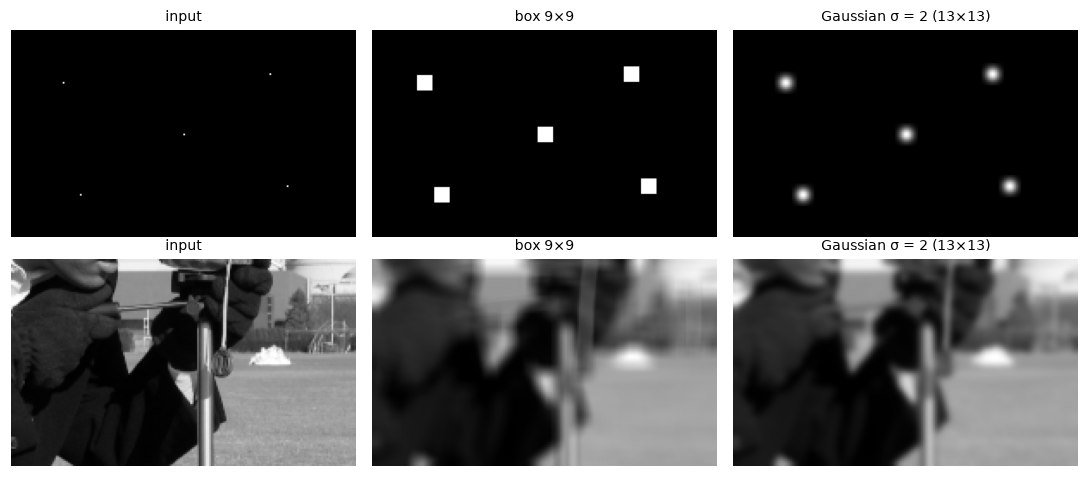
Each blurred star is the kernel's own picture (the impulse response, shown with a square-root stretch): a hard-edged square for the box, a smooth round spot for the Gaussian.
Separable filters
A 2D kernel is separable if it's the outer product of a column vector and a row vector: \(h(u, v) = a(u)\, b(v)\), or \(\mathbf{H} = \mathbf{a}\mathbf{b}^\top\). Then, by associativity, filtering with \(\mathbf{H}\) equals filtering every column with \(\mathbf{a}\) and then every row with \(\mathbf{b}\):
A \(K \times K\) kernel costs \(K^2\) multiply-adds per pixel. Two 1D passes cost \(2K\). For \(K = 31\) that's 961 versus 62, a 15× saving, and the gap grows with \(K\).
How do you tell whether a kernel is separable? A matrix is an outer product exactly when its rank is 1. The singular value decomposition (SVD) from linear algebra answers this directly: \(\mathbf{H} = \sum_r s_r \mathbf{u}_r \mathbf{v}_r^\top\), and a separable kernel has exactly one nonzero singular value \(s_1\). Then \(\mathbf{a} = \sqrt{s_1}\,\mathbf{u}_1\) and \(\mathbf{b} = \sqrt{s_1}\,\mathbf{v}_1\). If there are a few nonzero singular values, the kernel is a sum of a few separable ones, which is still cheaper than the full 2D filter. (See the ML Handbook's Matrix decompositions for the SVD.)
The box, the Gaussian, and the Sobel derivative kernels (next chapter) are separable. The Laplacian and disk-shaped kernels are not.
import time

sobel_x = np.array([[-1, 0, 1], [-2, 0, 2], [-1, 0, 1]], float)
laplacian = np.array([[0, 1, 0], [1, -4, 1], [0, 1, 0]], float)
yy, xx = np.mgrid[-7:8, -7:8]
disk = (xx ** 2 + yy ** 2 <= 49).astype(float)
for name, K in [("Gaussian", gauss2d), ("box", box9), ("Sobel x", sobel_x),
                ("Laplacian", laplacian), ("disk", disk)]:
    s = np.linalg.svd(K, compute_uv=False)
    print(f"{name:10s} rank {np.sum(s > 1e-10 * s[0])}")

f = img.astype(np.float64)
g31 = gaussian_kernel1d(5.0, radius=15)                          # 31 taps
G31 = np.outer(g31, g31)

def timed(fn, reps=3):
    best = np.inf
    for _ in range(reps):
        t0 = time.perf_counter(); out = fn(); best = min(best, time.perf_counter() - t0)
    return out, best * 1000

full, t_full = timed(lambda: correlate2d(f, G31), reps=1)
sep, t_sep = timed(lambda: correlate2d(correlate2d(f, g31[:, None]), g31[None, :]))
cv_full, t_cv_full = timed(lambda: cv2.filter2D(f, -1, G31))
cv_sep, t_cv_sep = timed(lambda: cv2.sepFilter2D(f, -1, g31, g31))
print("max difference, full vs separable:", np.abs(full - sep).max())
print(f"from scratch: 2D {t_full:7.1f} ms | separable {t_sep:6.1f} ms")
print(f"OpenCV:       2D {t_cv_full:7.1f} ms | separable {t_cv_sep:6.1f} ms")
Gaussian   rank 1
box        rank 1
Sobel x    rank 1
Laplacian  rank 2
disk       rank 6
max difference, full vs separable: 1.0516032489249483e-12
from scratch: 2D   220.2 ms | separable   13.9 ms
OpenCV:       2D     4.1 ms | separable    2.1 ms
The separable from-scratch version is more than 15 times faster than the full 2D one, as the operation count predicts, and gives the same result to round-off. OpenCV is much faster in both cases. For large kernels, filter2D switches internally to an FFT-based method (the convolution theorem in Chapter 4), which is why its 2D time doesn't grow with \(K^2\); GaussianBlur and sepFilter2D use the separable route. Your timings will differ, but the ordering won't.
Noise models
To choose a denoising filter, you need to know what the noise looks like. The four standard models:
- Gaussian (additive) noise: \(f = f_0 + n\) with \(n \sim \mathcal{N}(0, \sigma_n^2)\) independent per pixel. It models electronic read noise and thermal noise, and it's the default assumption of most methods.
- Poisson (shot) noise: photons arrive randomly, so a pixel that expects \(\lambda\) photons counts a Poisson-distributed number with mean \(\lambda\) and variance \(\lambda\). The noise grows with the signal (as \(\sqrt{\lambda}\)), but the relative noise \(\sqrt{\lambda}/\lambda\) shrinks, which is why dark photos look grainier. Low-light photography, astronomy, X-ray, and fluorescence microscopy are dominated by it.
- Salt-and-pepper (impulse) noise: a random fraction of pixels is replaced by 0 or 255. It comes from dead or stuck sensor pixels, transmission bit errors, and dust. Most pixels are perfect, and a few are wildly wrong.
- Speckle (multiplicative) noise: \(f = f_0 (1 + n)\). It's characteristic of coherent imaging: ultrasound, radar (SAR), and laser illumination.
A standard way to measure how far a result is from the clean image \(f_0\) is the peak signal-to-noise ratio, in decibels:
Higher is better. Every halving of the error's standard deviation adds about 6 dB. Roughly, below 20 dB looks badly degraded, 30 dB looks good, and above 40 dB differences are hard to see, though PSNR doesn't always match perception (it ignores where the errors are).
def psnr(a, b):
    mse = np.mean((a.astype(np.float64) - b.astype(np.float64)) ** 2)
    return 10 * np.log10(255.0 ** 2 / mse)

rng = np.random.default_rng(0)
clean = img.astype(np.float64)
gauss_noisy = np.clip(clean + rng.normal(0, 20, clean.shape), 0, 255).astype(np.uint8)
photons = 10                                                     # expected photons at white
poisson_noisy = np.clip(rng.poisson(clean / 255 * photons) / photons * 255, 0, 255).astype(np.uint8)
sp_noisy = img.copy()
u = rng.random(img.shape)
sp_noisy[u < 0.05] = 0; sp_noisy[u > 0.95] = 255                 # 10% of pixels hit
speckle_noisy = np.clip(clean * (1 + rng.normal(0, 0.2, clean.shape)), 0, 255).astype(np.uint8)

fig, axes = plt.subplots(1, 4, figsize=(10, 2.7))
for ax, (im, t) in zip(axes, [(gauss_noisy, "Gaussian σ=20"), (poisson_noisy, "Poisson (10 photons)"),
                              (sp_noisy, "salt and pepper 10%"), (speckle_noisy, "speckle 20%")]):
    ax.imshow(im[150:350, 150:350], cmap="gray", vmin=0, vmax=255)
    ax.set_title(f"{t}\nPSNR {psnr(im, img):.1f} dB", fontsize=9); ax.axis("off")
plt.tight_layout()
plt.show()
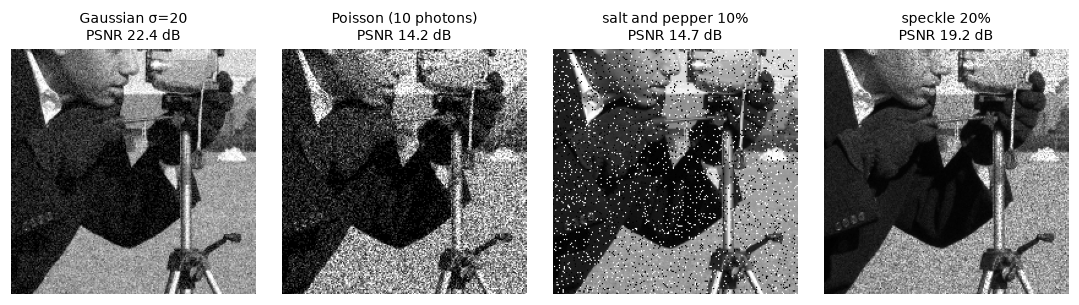
Gaussian noise is uniform grain. Poisson noise is stronger in bright regions in absolute terms. Salt and pepper leaves most pixels perfect. Speckle scales with brightness, so the dark coat stays clean.
The median filter
Linear filters average, and averaging is the wrong tool for salt-and-pepper noise. A single 255 in a dark 5 × 5 window adds \(255/25 \approx 10\) to the mean: it doesn't disappear, it smears into a gray blob. You need a statistic that ignores outliers.
The median filter replaces each pixel with the median of its window: sort the \(K^2\) values and take the middle one. As long as fewer than half the window's pixels are corrupted, the median is a real, uncorrupted value from the neighborhood, and the outliers have no influence at all. It's a nonlinear filter (the median of a sum isn't the sum of the medians), so the convolution theorems don't apply, and it's a member of the family of rank or order-statistic filters, along with the min and max filters you'll meet as erosion and dilation in Chapter 5.
The median also preserves edges. On a clean step edge, every window is mostly on one side or the other, and the median picks a value from the majority side, so the step stays sharp. (A mean would produce a ramp.) What the median destroys is thin structure: lines narrower than half the window and sharp corners get eaten.
from numpy.lib.stride_tricks import sliding_window_view

def median_filter(img, k=5):
    padded = np.pad(img, k // 2, mode="edge")                   # OpenCV's medianBlur replicates
    windows = sliding_window_view(padded, (k, k))                # shape (H, W, k, k), no copy
    return np.median(windows.reshape(*img.shape, -1), axis=-1).astype(img.dtype)

med = median_filter(sp_noisy, 5)
print("matches cv2.medianBlur:", np.array_equal(med, cv2.medianBlur(sp_noisy, 5)))
gauss5 = cv2.GaussianBlur(sp_noisy, (5, 5), 0)
print(f"PSNR noisy {psnr(sp_noisy, img):.1f} | Gaussian 5x5 {psnr(gauss5, img):.1f} | median 5x5 {psnr(med, img):.1f}")
The median filter wins by more than 4 dB on impulse noise. sliding_window_view gives a zero-copy view of every window, a handy tool for prototyping any window statistic, though sorting 25 values per pixel in NumPy is much slower than OpenCV's optimized median.
The bilateral filter
A Gaussian blur smooths noise and edges alike, because the weight of a neighbor depends only on its distance. The bilateral filter adds a second factor that depends on the intensity difference. A neighbor gets a high weight only if it's both close in space and similar in value:
where \(\mathbf{p}\) is the output pixel, \(\Omega(\mathbf{p})\) its window, \(\sigma_s\) the spatial scale (in pixels), \(\sigma_r\) the range scale (in intensity levels), and \(W(\mathbf{p})\) the sum of all the weights, so they're normalized.
The intuition: near an edge, the pixels on the other side have very different intensities, so the range factor gives them almost zero weight. The filter averages only along the pixel's own side of the edge. In flat regions all neighbors are similar, and it acts like an ordinary Gaussian. The result: smooth regions get smoothed, edges stay sharp. Set \(\sigma_r\) a bit above the noise level: much smaller and the noise itself looks like "edges" and survives; much larger and the filter becomes a plain Gaussian.
The filter is no longer linear or shift-invariant (the weights depend on the image), so it can't be computed with a fixed kernel. It's slower, and large \(\sigma_r\) values with repeated application produce a flat, "cartoon" look, which photo apps use on purpose for skin smoothing.
def bilateral(img, d=9, sigma_r=30.0, sigma_s=3.0):
    """Bilateral filter on a uint8 image with a circular window (like OpenCV)."""
    r = d // 2
    f = img.astype(np.float64)
    padded = np.pad(f, r, mode="reflect")                        # BORDER_REFLECT_101
    H, W = img.shape
    num = np.zeros((H, W)); den = np.zeros((H, W))
    for du in range(-r, r + 1):
        for dv in range(-r, r + 1):
            if du * du + dv * dv > r * r:
                continue
            q = padded[r + du:r + du + H, r + dv:r + dv + W]
            w = np.exp(-(du * du + dv * dv) / (2 * sigma_s ** 2)) * np.exp(-(q - f) ** 2 / (2 * sigma_r ** 2))
            num += w * q; den += w
    return np.round(num / den).astype(np.uint8)

ours_bl = bilateral(gauss_noisy, 9, 40, 3)
cv_bl = cv2.bilateralFilter(gauss_noisy, 9, 40, 3)
print("max |ours - OpenCV|:", np.abs(ours_bl.astype(int) - cv_bl).max(),
      "| pixels differing:", np.count_nonzero(ours_bl != cv_bl), "of", ours_bl.size)
gauss_bl = cv2.GaussianBlur(gauss_noisy, (9, 9), 3)
print(f"PSNR noisy {psnr(gauss_noisy, img):.1f} | Gaussian {psnr(gauss_bl, img):.1f} | bilateral {psnr(cv_bl, img):.1f}")

fig, axes = plt.subplots(1, 4, figsize=(10, 2.7))
for ax, (im, t) in zip(axes, [(gauss_noisy, "noisy"), (gauss_bl, "Gaussian σ=3"), (cv_bl, "bilateral")]):
    ax.imshow(im[60:260, 180:380], cmap="gray", vmin=0, vmax=255); ax.set_title(t, fontsize=9); ax.axis("off")
row = 200
for im, t in [(img, "clean"), (gauss_bl, "Gaussian"), (cv_bl, "bilateral")]:
    axes[3].plot(im[row, 230:330].astype(int), label=t, lw=1)
axes[3].legend(fontsize=7); axes[3].set_title(f"row {row} profile", fontsize=9)
plt.tight_layout()
plt.show()
max |ours - OpenCV|: 1 | pixels differing: 2 of 262144
PSNR noisy 22.4 | Gaussian 24.8 | bilateral 29.1
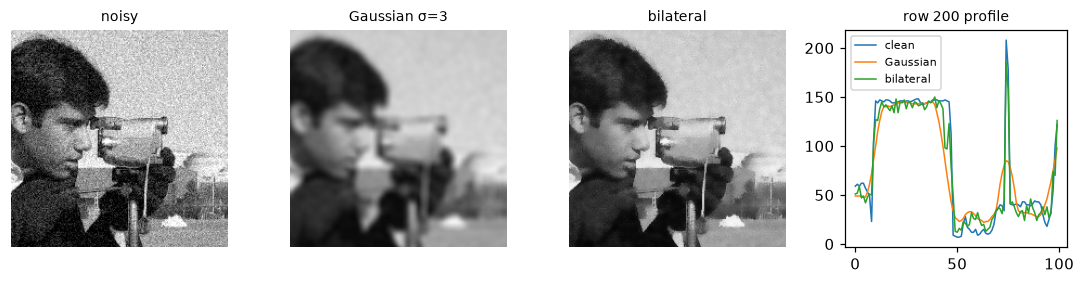
The Gaussian blur turns the head's outline into a soft ramp. The bilateral filter smooths the noise inside the face and the sky while keeping the outline crisp.
The from-scratch version matches OpenCV except for a one-level difference on a handful of pixels (OpenCV computes in single precision and rounds slightly differently). The bilateral filter also beats the Gaussian by several dB of PSNR here, because it doesn't pay the price of blurred edges.
Sharpening and unsharp masking
Blurring removes fine detail. Turn that around: the detail is what blurring removes. Define the detail layer as the image minus its blurred version, \(f - G_\sigma * f\). It's near zero in flat regions and large near edges and texture. Add some of it back, and fine detail gets stronger:
This is unsharp masking, named after a darkroom technique that used a blurred ("unsharp") negative as a mask. The amount \(\lambda\) sets the strength, and \(\sigma\) sets which scale of detail gets boosted (small \(\sigma\) sharpens fine texture, large \(\sigma\) boosts local contrast).
Because everything is linear, unsharp masking is itself one convolution: \(g = \big((1 + \lambda)\delta - \lambda G_\sigma\big) * f\), where \(\delta\) is the impulse (identity kernel). With a tiny box blur in place of the Gaussian, you get the familiar 3 × 3 sharpening kernel: a big positive center and negative neighbors. The Laplacian version, \(g = f - \nabla^2 f\) with kernel \(\begin{smallmatrix} 0 & -1 & 0 \\ -1 & 5 & -1 \\ 0 & -1 & 0 \end{smallmatrix}\), works the same way: the Laplacian, a second derivative, also measures how much a pixel differs from its neighbors.
Sharpening has two side effects. It amplifies noise, which is detail too. And it creates halos (overshoot): along an edge, the dark side gets darker and the bright side brighter than either was. Small amounts look crisp; large ones look obviously processed. A threshold variant only sharpens where the detail layer exceeds some level, which keeps flat, noisy regions from getting grainier.
from skimage import filters

soft = cv2.GaussianBlur(img, (0, 0), 2.0)                        # a slightly out-of-focus photo
def unsharp(img, sigma=2.0, amount=1.0):
    f = img.astype(np.float64)
    blurred = ndimage.gaussian_filter(f, sigma, mode="reflect", truncate=4.0)
    return f + amount * (f - blurred)

sharp1, sharp3 = unsharp(soft, 2.0, 1.0), unsharp(soft, 2.0, 3.0)
sk = filters.unsharp_mask(soft, radius=2.0, amount=1.0, preserve_range=True)
print("max diff vs skimage.filters.unsharp_mask:", np.abs(sharp1 - sk).max().round(6))
print(f"PSNR vs the original sharp image: soft {psnr(soft, img):.2f} dB, "
      f"sharpened {psnr(np.clip(sharp1, 0, 255), img):.2f} dB")

fig, axes = plt.subplots(1, 4, figsize=(10, 2.7))
for ax, (im, t) in zip(axes, [(img, "original"), (soft, "blurred σ=2"), (sharp1, "unsharp, amount 1"),
                              (sharp3, "unsharp, amount 3 (halos)")]):
    ax.imshow(np.clip(im, 0, 255)[80:230, 230:380], cmap="gray", vmin=0, vmax=255)
    ax.set_title(t, fontsize=9); ax.axis("off")
plt.tight_layout()
plt.show()
max diff vs skimage.filters.unsharp_mask: 0.0
PSNR vs the original sharp image: soft 25.94 dB, sharpened 27.28 dB
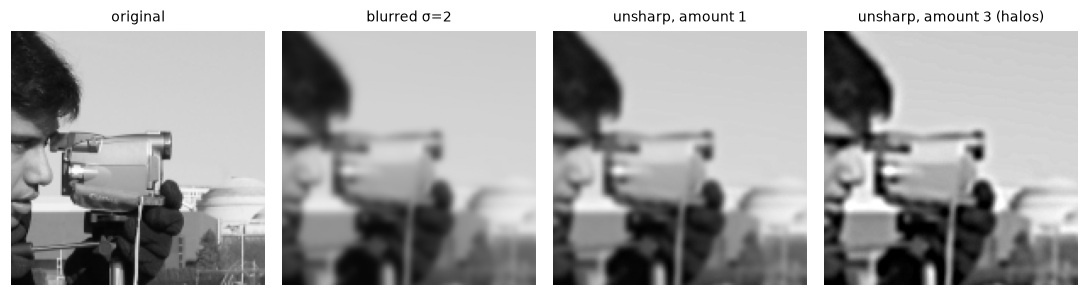
Amount 1 recovers much of the lost crispness. Amount 3 overshoots: bright and dark halos outline every edge.
Sharpening moved the blurred image measurably closer to the original. It can't fully undo the blur, because the finest detail was attenuated to below the 8-bit quantization step and is gone. True deconvolution (for example Wiener or Richardson-Lucy, in skimage.restoration) inverts a known blur more aggressively, at the cost of amplifying noise.
In practice
A denoising shoot-out
Which filter should you use? It depends on the noise. Here's every filter from this chapter, plus OpenCV's non-local means (which averages pixels whose surrounding patches look similar, wherever they are in the image), on Gaussian and on salt-and-pepper noise:
candidates = {
    "box 5x5": lambda x: cv2.blur(x, (5, 5)),
    "Gaussian σ=1.5": lambda x: cv2.GaussianBlur(x, (0, 0), 1.5),
    "median 5x5": lambda x: cv2.medianBlur(x, 5),
    "bilateral": lambda x: cv2.bilateralFilter(x, 9, 40, 3),
    "non-local means": lambda x: cv2.fastNlMeansDenoising(x, None, h=20),
}
print(f"{'filter':16s} {'Gaussian noise':>15s} {'salt & pepper':>14s}")
print(f"{'(noisy input)':16s} {psnr(gauss_noisy, img):15.1f} {psnr(sp_noisy, img):14.1f}")
for name, fn in candidates.items():
    print(f"{name:16s} {psnr(fn(gauss_noisy), img):15.1f} {psnr(fn(sp_noisy), img):14.1f}")
filter            Gaussian noise  salt & pepper
(noisy input)               22.4           14.7
box 5x5                     26.2           23.5
Gaussian σ=1.5              26.8           23.9
median 5x5                  26.8           27.7
bilateral                   29.1           15.0
non-local means             29.3           15.4
The pattern is the point:
- For Gaussian noise, non-local means and the bilateral filter are best, about 2.5 dB above the Gaussian blur, because they smooth without blurring edges. Non-local means exploits the fact that natural images repeat themselves (sky next to sky, grass next to grass).
- For impulse noise, the median is the only good choice. The bilateral filter and non-local means are fooled: an outlier pixel looks like an "edge" or a unique patch, so they protect it.
- For Poisson noise, a common trick is the Anscombe transform, \(2\sqrt{x + 3/8}\), which makes the noise approximately Gaussian with unit variance; denoise, then invert.
Modern learned denoisers beat all of these, but these remain the go-to preprocessing for classical pipelines and the baselines every paper compares against.
Filtering with the right output type
Common mistake: clipping negative filter responses
cv2.filter2D(img, -1, kernel) keeps the input's dtype. For a uint8 image and a kernel with negative weights (derivatives, Laplacians, sharpening), every negative response is clipped to 0 and every response above 255 to 255. Ask for a float output with ddepth=cv2.CV_32F or cv2.CV_64F, or convert the input to float first.
deriv = np.array([[-1, 0, 1]], float)                            # horizontal derivative
as_uint8 = cv2.filter2D(img, -1, deriv)
as_float = cv2.filter2D(img, cv2.CV_64F, deriv)
print("float responses: min", as_float.min(), "max", as_float.max())
print("negative responses lost in uint8:", np.count_nonzero(as_float < 0),
      "| min of uint8 output:", as_uint8.min())
float responses: min -228.0 max 215.0
negative responses lost in uint8: 101451 | min of uint8 output: 0
That's Wei's second bug: more than 100,000 bright-to-dark transitions disappeared.
Common mistake: unnormalized kernels
A blur kernel must sum to 1, or it changes the overall brightness: np.ones((5, 5)) multiplies the image by 25 and everything saturates. Derivative kernels, by contrast, should sum to 0, so flat regions give zero response. Check kernel.sum() when you write a kernel by hand.
Common mistake: even-sized kernels
An even-sized kernel has no center pixel, so the output is shifted by half a pixel relative to the input. OpenCV puts the anchor at (K // 2, K // 2) by default, so a 4 × 4 box shifts content. Use odd sizes unless you're deliberately computing something "between" pixels.
Convolution layers are correlation
Deep learning's convolutional layers apply exactly the operation from this chapter, with learned kernels, many input and output channels, and zero padding. You can check that PyTorch's F.conv2d is correlation with zero borders:
import torch
import torch.nn.functional as F

x = torch.from_numpy(img.astype(np.float32))[None, None]          # (N, C, H, W)
w = torch.from_numpy(kern.astype(np.float32))[None, None]         # (out, in, kH, kW)
torch_out = F.conv2d(x, w, padding=2)[0, 0].numpy()
ref = correlate2d(img, kern, border="zero")
print("max |torch - correlation with zero padding|:", np.abs(torch_out - ref).max().round(3))
The difference is single-precision round-off. Note the layout: PyTorch wants NCHW (batch, channels, height, width), the CHW convention from Images as arrays. You'll build on this in Level 3.
Choosing a filter
| Goal | Filter | OpenCV | scikit-image / SciPy |
|---|---|---|---|
| Fast smoothing, local means | Box | cv2.blur, cv2.boxFilter |
ndimage.uniform_filter |
| General smoothing, pre-blur before edges or resizing | Gaussian | cv2.GaussianBlur(img, (0, 0), sigma) |
filters.gaussian, ndimage.gaussian_filter |
| Salt-and-pepper noise | Median | cv2.medianBlur(img, k) |
filters.median, ndimage.median_filter |
| Smooth but keep edges | Bilateral | cv2.bilateralFilter(img, d, sr, ss) |
restoration.denoise_bilateral |
| Best classical Gaussian-noise removal | Non-local means | cv2.fastNlMeansDenoising |
restoration.denoise_nl_means |
| Sharpening | Unsharp mask | cv2.addWeighted(img, 1 + a, blur, -a, 0) |
filters.unsharp_mask |
| Any custom kernel | Correlation | cv2.filter2D |
ndimage.correlate, ndimage.convolve |
Exercises
Exercise 1: Correlation and convolution by hand (easy)
Compute, by hand, the 1D correlation and convolution of the signal \(f = [0, 0, 1, 2, 3, 0, 0]\) with the kernel \(h = [1, 0, -1]\) (center at index 1), using zero padding. Which output is positive on the rising part of the signal? Check with NumPy.
Solution
Correlation: \(g(i) = h(-1) f(i-1) + h(0) f(i) + h(1) f(i+1) = f(i-1) - f(i+1)\). Convolution flips the kernel: \(g(i) = f(i+1) - f(i-1)\).
f1 = np.array([0, 0, 1, 2, 3, 0, 0], float)
h1 = np.array([1, 0, -1], float)
print("correlation:", ndimage.correlate1d(f1, h1, mode="constant"))
print("convolution:", ndimage.convolve1d(f1, h1, mode="constant"))
print("np.convolve:", np.convolve(f1, h1, mode="same"))
correlation: [ 0. -1. -2. -2.  2.  3.  0.]
convolution: [ 0.  1.  2.  2. -2. -3.  0.]
np.convolve: [ 0.  1.  2.  2. -2. -3.  0.]
Convolution with \([1, 0, -1]\) computes \(f(i+1) - f(i-1)\), a central difference that is positive where the signal rises. Correlation with the same array gives the negative. That's why derivative kernels are often written as \([-1, 0, 1]\) for use with correlation (OpenCV) and \([1, 0, -1]\) for convolution: they describe the same filter.
Exercise 2: Gaussians compose (medium)
Show numerically that blurring with \(\sigma_1 = 3\) and then \(\sigma_2 = 4\) equals blurring once with \(\sigma = 5\). Use ndimage.gaussian_filter on the camera image (as float), and report the maximum difference away from the border. Then explain why, using the fact that a Gaussian kernel is the probability density of a normal random variable.
Solution
f = img.astype(np.float64)
twice = ndimage.gaussian_filter(ndimage.gaussian_filter(f, 3), 4)
once = ndimage.gaussian_filter(f, 5)
inner = (slice(40, -40), slice(40, -40))
print("max difference in the interior:", np.abs(twice - once)[inner].max().round(4))
print("for comparison, sigma = 7 (3 + 4) differs by:",
      np.abs(twice - ndimage.gaussian_filter(f, 7))[inner].max().round(1))
Normalized Gaussian kernels are probability densities. Convolving two densities gives the density of the sum of the two independent random variables, and the sum of independent normals with variances \(\sigma_1^2\) and \(\sigma_2^2\) is normal with variance \(\sigma_1^2 + \sigma_2^2\). So \(G_{\sigma_2} * G_{\sigma_1} = G_{\sqrt{\sigma_1^2 + \sigma_2^2}}\), and by associativity, blurring twice is blurring once with \(\sqrt{9 + 16} = 5\). The tiny residual comes from truncating and sampling the kernels.
Exercise 3: Which kernels are separable? (easy)
Without computing anything, predict which of these are separable: (a) the 5 × 5 box, (b) the kernel \(\begin{smallmatrix} 1 & 2 & 1 \\ 2 & 4 & 2 \\ 1 & 2 & 1 \end{smallmatrix}/16\), (c) the sharpening kernel \(\begin{smallmatrix} 0 & -1 & 0 \\ -1 & 5 & -1 \\ 0 & -1 & 0 \end{smallmatrix}\), (d) a 45° diagonal line kernel np.eye(5) / 5. Then check with the SVD, and for each separable one, recover the 1D factors.
Solution
(a) Yes: it's \(\frac{1}{5}[1,1,1,1,1]^\top\) times the same row. (b) Yes: it's \(\frac{1}{4}[1, 2, 1]^\top \cdot \frac{1}{4}[1, 2, 1]\), the binomial approximation of a Gaussian. (c) No: it's the identity minus a Laplacian. If it were an outer product \(\mathbf{a}\mathbf{b}^\top\), then \(a_0 b_1 = -1\) and \(a_1 b_0 = -1\) would force \(a_0 \ne 0\) and \(b_0 \ne 0\), so the corner \(a_0 b_0\) couldn't be 0. Its rank is 2, so it's a sum of two separable filters. (d) No: an identity matrix has full rank.
tests = {"box 5x5": np.ones((5, 5)) / 25,
         "binomial 3x3": np.outer([1, 2, 1], [1, 2, 1]) / 16,
         "sharpen": np.array([[0, -1, 0], [-1, 5, -1], [0, -1, 0]], float),
         "diagonal": np.eye(5) / 5}
for name, K in tests.items():
    U, s, Vt = np.linalg.svd(K)
    rank = np.sum(s > 1e-10 * s[0])
    msg = f"{name:13s} rank {rank}"
    if rank == 1:
        a, b = U[:, 0] * np.sqrt(s[0]), Vt[0] * np.sqrt(s[0])
        if a.sum() < 0:
            a, b = -a, -b                                   # fix the sign ambiguity
        msg += f"  a={np.round(a, 3)}  b={np.round(b, 3)}  exact: {np.allclose(np.outer(a, b), K)}"
    print(msg)
box 5x5       rank 1  a=[0.2 0.2 0.2 0.2 0.2]  b=[0.2 0.2 0.2 0.2 0.2]  exact: True
binomial 3x3  rank 1  a=[0.25 0.5  0.25]  b=[0.25 0.5  0.25]  exact: True
sharpen       rank 2
diagonal      rank 5
The singular vectors are only defined up to sign, so flip both factors if needed. A diagonal blur (motion blur at 45°) is not separable, though it can be done by rotating the image or with a 1D filter along the diagonal.
Exercise 4: A box filter whose cost doesn't depend on its size (medium)
Implement a box filter with running sums: a cumulative sum along each axis lets you compute any window's sum with one subtraction per axis. Check it against cv2.blur with BORDER_REFLECT_101 for \(K = 3\) and \(K = 51\), and time both against the shift-and-add correlate2d.
Solution
Along one axis, the sum of the window \([i - r, i + r]\) is \(C(i + r + 1) - C(i - r)\), where \(C\) is the cumulative sum of the padded signal with a leading zero. Do rows, then columns (the box is separable).
def box_running(img, K):
    r = K // 2
    p = np.pad(img.astype(np.float64), r, mode="reflect")
    c = np.cumsum(np.pad(p, ((1, 0), (0, 0))), axis=0)
    p = c[K:] - c[:-K]                                      # vertical window sums
    c = np.cumsum(np.pad(p, ((0, 0), (1, 0))), axis=1)
    return (c[:, K:] - c[:, :-K]) / K ** 2

for K in [3, 51]:
    ref = cv2.blur(img.astype(np.float64), (K, K), borderType=cv2.BORDER_REFLECT_101)
    _, t_run = timed(lambda: box_running(img, K))
    _, t_shift = timed(lambda: correlate2d(img, np.ones((K, K)) / K ** 2), reps=1)
    print(f"K={K:2d} max diff {np.abs(box_running(img, K) - ref).max():.1e} | "
          f"running sums {t_run:6.1f} ms | shift-and-add {t_shift:7.1f} ms")
K= 3 max diff 2.8e-14 | running sums    2.5 ms | shift-and-add     2.5 ms
K=51 max diff 2.8e-14 | running sums    2.8 ms | shift-and-add   618.5 ms
The running-sum version takes the same few milliseconds at any size, while shift-and-add grows with \(K^2\). For \(K = 3\) the two are about equally fast; at \(K = 51\) shift-and-add is hundreds of times slower.
Exercise 5: The unsharp-mask kernel (medium)
Write unsharp masking with a 3 × 3 box blur and amount \(\lambda\) as a single 3 × 3 kernel. What is the center weight and what are the others? Verify that cv2.filter2D with your kernel matches computing \(f + \lambda(f - \text{box}(f))\) directly, for \(\lambda = 2\). What does the kernel sum to, and why must it?
Solution
\(g = (1 + \lambda)\delta - \lambda B\), with \(B\) the box kernel (\(1/9\) everywhere). The center is \(1 + \lambda - \lambda/9 = 1 + \frac{8\lambda}{9}\), and every other entry is \(-\lambda/9\).
lam = 2.0
K = -lam / 9 * np.ones((3, 3)); K[1, 1] = 1 + 8 * lam / 9
f = img.astype(np.float64)
direct = f + lam * (f - cv2.blur(f, (3, 3)))
print(np.round(K, 3))
print("sum:", K.sum().round(10), "| matches:", np.allclose(cv2.filter2D(f, -1, K), direct))
The kernel sums to \((1 + \lambda) - \lambda = 1\), so flat regions are left unchanged: sharpening should only affect places where something changes. A kernel summing to more than 1 would also brighten the image.
Exercise 6: Blur then differentiate (hard)
Associativity says \(D * (G * f) = (D * G) * f\): smoothing then differentiating equals filtering once with the derivative of the smoothing kernel. (a) Show this numerically for \(D = [-1, 0, 1]/2\) along rows and a Gaussian with \(\sigma = 2\). (b) Count the multiply-adds per pixel for each route with 13-tap Gaussians. (c) Explain why the combined correlation kernel is approximately the mirror image of the analytic derivative of a Gaussian, \(G_\sigma'(-x) = \frac{x}{\sigma^2}G_\sigma(x)\), and check it.
Solution
f = img.astype(np.float64)
D = np.array([-0.5, 0.0, 0.5])
g = gaussian_kernel1d(2.0)                                  # 13 taps
route1 = correlate2d(correlate2d(correlate2d(f, g[:, None]), g[None, :]), D[None, :])
dG = np.convolve(g, D)                                      # combined row kernel (15 taps)
route2 = correlate2d(correlate2d(f, g[:, None]), dG[None, :])
inner = (slice(20, -20), slice(20, -20))
print("max difference (interior):", np.abs(route1 - route2)[inner].max())
x = np.arange(-7, 8)
analytic = x / 4.0 * np.exp(-x ** 2 / 8.0); analytic /= np.sqrt(2 * np.pi * 4.0)
print("combined kernel:", np.round(dG, 3))
print("analytic dG/dx: ", np.round(analytic, 3))
max difference (interior): 7.57449658550513e-14
combined kernel: [-0.001 -0.004 -0.012 -0.028 -0.047 -0.056 -0.039  0.     0.039  0.056
  0.047  0.028  0.012  0.004  0.001]
analytic dG/dx:  [-0.001 -0.003 -0.011 -0.027 -0.049 -0.06  -0.044  0.     0.044  0.06
  0.049  0.027  0.011  0.003  0.001]
(a) The two routes agree to round-off in the interior (near the border, padding happens at different stages, so they can differ slightly).
(b) Route 1: 13 (columns) + 13 (rows) + 3 (derivative) = 29 multiply-adds per pixel, in three passes over the image. Route 2: 13 + 15 = 28, in two passes. The arithmetic is similar; the real win is that the derivative of Gaussian is one kernel you can design, tabulate, and analyze directly, which is how most libraries implement smoothed derivatives.
One subtlety: correlating with \(\mathbf{a}\) and then with \(\mathbf{b}\) equals correlating once with the convolution \(\mathbf{a} * \mathbf{b}\) (two flips cancel), which is why the code builds the combined kernel with np.convolve(g, D).
(c) Correlating with \([-\frac12, 0, \frac12]\) is a central-difference approximation of the derivative, so the combined filter approximates differentiating the Gaussian-smoothed image, \(\frac{d}{dx}(G_\sigma * f) = G_\sigma' * f\). As a correlation kernel, \(G_\sigma'\) appears mirrored: \(G_\sigma'(-x) = \frac{x}{\sigma^2}G_\sigma(x)\), negative on the left and positive on the right, exactly the sign pattern of the printed kernel. The peak magnitudes are a bit smaller than the analytic curve because a central difference over 2 pixels underestimates the steepest slope of a narrow Gaussian. This "derivative of Gaussian" is exactly what the next chapter uses to compute gradients robustly.
Check yourself
-
What's the difference between correlation and convolution, and when does it not matter?
Answer
Convolution flips the kernel by 180° before sliding it; correlation doesn't. For symmetric kernels (box, Gaussian, Laplacian), the flip changes nothing, so the results are identical.
-
Which of
cv2.filter2D,scipy.ndimage.convolve, andtorch.nn.functional.conv2dcompute a true convolution?Answer
Only
scipy.ndimage.convolve.cv2.filter2Dand PyTorch'sconv2dcompute correlation. -
Why is the Gaussian preferred over the box filter for blurring?
Answer
It's isotropic (a point becomes a round spot, not a square), it creates no new structure as you increase the blur, its frequency response falls off smoothly without ripples, and it's still separable and composes cleanly (\(\sigma^2\) values add).
-
How do you test whether a kernel is separable, and what do you gain if it is?
Answer
Check that its matrix has rank 1, for example with the SVD (exactly one nonzero singular value). Then a \(K \times K\) filter becomes two 1D passes, costing \(2K\) instead of \(K^2\) multiply-adds per pixel.
-
Why does the median filter remove salt-and-pepper noise while a Gaussian only smears it?
Answer
The median ignores outliers: as long as fewer than half the window's pixels are corrupted, it returns a real neighborhood value. A weighted mean always includes each outlier with its weight, so a 255 spreads into a gray blob.
-
In the bilateral filter, what do \(\sigma_s\) and \(\sigma_r\) control, and how should you set \(\sigma_r\)?
Answer
\(\sigma_s\) is the spatial extent of the smoothing in pixels; \(\sigma_r\) is how different in intensity a neighbor can be and still be averaged in. Set \(\sigma_r\) somewhat above the noise standard deviation: smaller keeps the noise, much larger blurs edges like a Gaussian.
-
Why does zero padding create a dark frame when blurring, and what border mode avoids it?
Answer
The kernel averages in the zeros outside the image, pulling border pixels toward black. Reflection (
BORDER_REFLECT_101, OpenCV's default) or replication continues the image's own values, so no artificial edge appears. -
You filter a
uint8image with a derivative kernel usingcv2.filter2D(img, -1, k). What goes wrong?Answer
The output keeps the
uint8type, so negative responses are clipped to 0 (and large ones to 255). Half of the edges vanish. Useddepth=cv2.CV_32Forcv2.CV_64F.
Key takeaways
- A linear filter is a weighted sum over a window. Correlation slides the kernel as is; convolution flips it first. OpenCV and PyTorch correlate. The difference only matters for asymmetric kernels, but there it flips the result.
- Implement filters by looping over kernel offsets and adding shifted copies of the padded image. Choose borders deliberately: reflection for smoothing, and know each library's naming.
- The Gaussian is the default blur: isotropic, separable, composable (\(\sigma^2\) adds), and free of artifacts. Separable kernels cost \(2K\) instead of \(K^2\) per pixel.
- Match the filter to the noise: Gaussian or non-local means for Gaussian noise, the median for impulse noise, the bilateral filter when edges must stay sharp.
- Unsharp masking adds back the detail layer \(f - G * f\); it's a single linear kernel that sums to 1, and too much amount creates halos.
- Keep filter outputs in a signed or float type whenever the kernel has negative weights.
Further reading
- Richard Szeliski, Computer Vision: Algorithms and Applications, 2nd edition, sections 3.2–3.3 (linear and nonlinear filtering), free at szeliski.org/Book.
- Rafael C. Gonzalez and Richard E. Woods, Digital Image Processing, 4th edition, chapters 3 and 5 (spatial filtering and noise models).
- Carlo Tomasi and Roberto Manduchi, "Bilateral Filtering for Gray and Color Images", ICCV 1998. The paper that introduced the bilateral filter.
- Antoni Buades, Bartomeu Coll, and Jean-Michel Morel, "A non-local algorithm for image denoising", CVPR 2005. Non-local means.
- OpenCV tutorial: Smoothing images.
Next
Derivative kernels respond to change. Next you'll turn them into a full edge detector: Edges and gradients.