Motion and tracking
Level 2 · Chapter 5 · ⏱️ ~80 min read · Prerequisites: Features and keypoints (the structure tensor), The frequency domain (pyramids), Morphology and classical segmentation
Video adds time, and with it motion. This chapter covers how to measure motion between frames and how to follow objects through a sequence. You'll derive optical flow from the brightness constancy assumption, meet the aperture problem, and implement Lucas-Kanade (dense, then pyramidal and iterative), checked against ground-truth flow on a synthetic sequence and against OpenCV's KLT tracker and Farnebäck flow. Then you'll separate moving objects from a static background, track a colored object with mean-shift and CamShift, and build a Kalman filter that smooths noisy detections and coasts through missed ones.
Why it matters
Alex worked on a traffic-counting system for a city: cameras at intersections, a detector that found vehicles in each frame, and a counter that incremented whenever a vehicle crossed a virtual line. The detector was good, about 95% recall per frame. The counts were terrible: some vehicles were counted twice, some never.
The problem wasn't detection; it was association over time. A car missed in one frame and found again in the next looked like a new car. Two cars that overlapped briefly swapped identities. Detections jittered by a few pixels, so a car stopped right on the counting line crossed it back and forth.
The fix was classical tracking. A Kalman filter per vehicle predicted where it would be in the next frame, so detections could be matched to existing tracks by distance to the prediction, and a track could survive a few frames without detections by coasting on its predicted motion. The filter's smoothed position stopped the jitter. Counts went from about 80% to 98% accurate without touching the detector. Modern multi-object trackers (SORT, DeepSORT, ByteTrack) still use exactly this structure around deep-learning detectors.
Concepts
Motion fields and optical flow
When objects or the camera move, each scene point moves in 3D, and its projection moves in the image. The 2D vector field of these projected motions is the motion field. You can't observe it directly. What you can observe is how image brightness patterns move, which is called optical flow. Usually the two agree. Sometimes they don't: a uniformly colored rotating sphere has a motion field but no visible flow, and a static scene under a moving light has visible flow but no motion. Optical flow algorithms estimate the apparent motion, and you should remember that it's only a proxy for the real one.
Optical flow is written as a vector \((u, v)\) per pixel: the displacement, in pixels per frame, of the brightness pattern at that pixel. A dense flow method estimates it at every pixel; a sparse method estimates it only at selected points (usually corners).
The brightness constancy assumption
How can you measure flow? Assume that a point keeps its brightness as it moves. This is the brightness constancy assumption:
It's often violated (shading changes as surfaces turn, specular highlights move, auto-exposure changes), but it's a good approximation between consecutive frames.
For small motions, expand the left side to first order in a Taylor series:
where \(I_x\), \(I_y\) are the spatial derivatives and \(I_t = I(x, y, t + 1) - I(x, y, t)\) is the temporal derivative. Substituting into brightness constancy and cancelling \(I(x, y, t)\) gives the optical flow constraint equation:
Read it carefully. It's one equation in two unknowns per pixel. Geometrically, in the \((u, v)\) plane, the solutions form a line perpendicular to the gradient \(\nabla I\). You can determine the component of motion along the gradient (the normal flow, \(-I_t / \lVert\nabla I\rVert\)), but not the component along the edge.
The aperture problem
This is the aperture problem, and it's physical, not a flaw of the math. Look at a long diagonal edge through a small hole (an aperture). Whether the edge moves right, down, or diagonally, what you see through the hole is the same: the edge sliding perpendicular to itself. Motion along the edge produces no change at all.
It's the same situation as in Features and keypoints: along an edge, a window can slide without the content changing. And the cure is the same: look at a region where gradients point in more than one direction, a corner or a textured patch.
Lucas-Kanade
Lucas and Kanade (1981) added one assumption: the flow is constant within a small window around each pixel. Then every pixel \(\mathbf{p}_i\) in the window (say \(15 \times 15\), so \(n = 225\)) contributes its own constraint with the same unknowns:
Now there are \(n\) equations and two unknowns. The least-squares solution satisfies the normal equations \(\mathbf{A}^\top\mathbf{A}\,\mathbf{u} = -\mathbf{A}^\top\mathbf{b}\):
with sums over the window (optionally weighted by a Gaussian). The matrix on the left is exactly the structure tensor \(\mathbf{M}\) from the Harris detector. Solving a \(2 \times 2\) system per pixel needs \(\mathbf{M}\) to be well conditioned:
- On a flat region, both eigenvalues are near zero: no information, and the solution is noise.
- On an edge, one eigenvalue is near zero: the aperture problem, and only the normal flow is reliable.
- On a corner or textured patch, both eigenvalues are large: the flow is well determined.
So the points where Lucas-Kanade works are exactly the points with a large smaller eigenvalue: the Shi-Tomasi corners. Shi and Tomasi's 1994 paper was titled "Good Features to Track" for this reason. The detector and the tracker are two sides of the same matrix.
Large motions: iteration and pyramids
The Taylor expansion is only valid for small motions, roughly up to a pixel or two (it depends on how smooth the image is). Two techniques extend Lucas-Kanade to larger displacements.
Iterative refinement. Estimate \(\mathbf{d}\), warp the second image back by \(\mathbf{d}\) (resample \(I_2\) at \(\mathbf{x} + \mathbf{d}\)), and solve again for the remaining displacement, which is now small. Repeat until the update is tiny (a Newton-Raphson iteration on the matching error). This is the classical form of Lucas-Kanade image registration.
Coarse to fine. Build a Gaussian pyramid of each frame. A 16-pixel motion at full resolution is 2 pixels at a quarter of the resolution, where linearization works. Estimate the flow at the coarsest level, multiply it by 2 to initialize the next finer level, refine there, and continue down to full resolution. Pyramidal Lucas-Kanade (Bouguet's implementation, cv2.calcOpticalFlowPyrLK) combines both: a pyramid of 3–5 levels, with a few iterations per level.
The combination of Shi-Tomasi corners and pyramidal Lucas-Kanade tracking is called the KLT tracker (Kanade-Lucas-Tomasi). It's still widely used in visual odometry and SLAM front ends, video stabilization, and anywhere you need to follow points cheaply. Typical additions: track forward and then backward and reject points whose round trip doesn't return to the start (the forward-backward check); drop points whose status flag says tracking failed; re-detect corners when too few remain.
Dense flow: Horn-Schunck and Farnebäck
Lucas-Kanade is local: each window is solved independently. Horn-Schunck (1981) solves for a dense field globally, minimizing
the data term plus a smoothness term with weight \(\alpha^2\). Flow fills in from textured regions into flat ones, the same idea as SGM's smoothness term in stereo. Its quadratic penalty blurs motion boundaries, which later methods fixed with robust penalties (TV-L1).
Farnebäck's method (2003), available as cv2.calcOpticalFlowFarneback, takes a different route. It approximates each neighborhood of each frame by a quadratic polynomial, \(f(\mathbf{x}) \approx \mathbf{x}^\top\mathbf{A}\mathbf{x} + \mathbf{b}^\top\mathbf{x} + c\), fitted by weighted least squares (polynomial expansion). If the second frame is the first shifted by \(\mathbf{d}\), then \(f_2(\mathbf{x}) = f_1(\mathbf{x} - \mathbf{d})\), and expanding the shifted quadratic gives
In practice the estimate is averaged over a neighborhood, iterated, and run on a pyramid. Its key parameters are pyr_scale and levels (the pyramid), winsize (the averaging window: larger is smoother and more robust, but blurs motion boundaries), iterations, and poly_n, poly_sigma (the size of the neighborhood used for the polynomial fit).
Modern dense flow is dominated by learned methods (RAFT and its successors), which you'll meet in Level 8. But the classical methods are fast, need no training data, and are still used for video stabilization, compression, and as baselines.
Background subtraction
With a static camera (security, traffic, retail footfall), a simpler question is often enough: which pixels belong to moving objects? Background subtraction maintains a model of the background and flags pixels that don't fit it as foreground.
- Frame differencing: foreground where \(|I_t - I_{t-1}| > \tau\). Trivial, but it only detects the leading and trailing edges of uniformly colored objects, and it misses objects that stop.
- Running average: \(B_t = (1 - \alpha)B_{t-1} + \alpha I_t\), foreground where \(|I_t - B_t| > \tau\). Adapts to slow lighting changes, but moving objects leak into the background and leave ghosts, and \(\tau\) is global.
- Temporal median of the last \(N\) frames: robust as long as each pixel shows the background more than half the time.
- Per-pixel Gaussian mixtures (Stauffer and Grimson, 1999): model each pixel's history as a mixture of \(K\) Gaussians, because a pixel can legitimately have several background appearances (a waving tree, a flickering screen). Components with high weight and low variance are background; a new value that doesn't fit any of them is foreground. Each frame updates the matching component's mean, variance, and weight. Zivkovic's improved version, which also chooses the number of components per pixel, is OpenCV's MOG2 (
cv2.createBackgroundSubtractorMOG2). The KNN subtractor uses a nonparametric model (the last \(N\) samples) instead.
Real systems then clean the mask with morphology (opening to remove speckles, closing to fill holes), find connected components, and filter them by size. MOG2 can also flag shadows (darker but same chromaticity as the background) with a separate value, 127, so you can discard them.
Mean-shift and CamShift
Sometimes you want to follow one object by its appearance, such as a colored ball or a face. Mean-shift finds the mode (peak) of a density by repeatedly moving a window to the centroid of the data inside it. For tracking (Comaniciu, Ramesh, and Meer, 2000):
- Build a histogram of the object's color (usually hue, which is robust to brightness changes) from the first frame.
- In each new frame, compute the back-projection: replace each pixel by the histogram's value for its color, which gives a map of "how much this pixel looks like the object".
cv2.calcBackProjectdoes this. - Starting from the previous window, compute the centroid of the back-projection inside the window, move the window there, and repeat until it stops moving.
Mean-shift keeps the window size fixed, so it fails when the object approaches or recedes. CamShift (Continuously Adaptive Mean Shift, Bradski, 1998) adapts it: after mean-shift converges, it computes the zeroth moment \(M_{00}\) of the back-projection in the window (the "mass" of the object) and sets the window size proportional to \(\sqrt{M_{00}}\), and it uses the second moments to estimate the object's orientation. cv2.CamShift returns a rotated rectangle.
Both are fast and simple. Both fail when the background contains the object's colors, or when the object changes appearance. Modern trackers learn appearance online (correlation filters such as KCF and MOSSE) or offline (Siamese networks), and OpenCV 5 ships several learned ones (TrackerVit, TrackerNano, TrackerDaSiamRPN) that need model files.
The Kalman filter
Detections are noisy and sometimes missing. A Kalman filter (Kalman, 1960) combines a model of how the object moves with noisy measurements to produce the best estimate of its state, together with an uncertainty. For a 2D tracker, a common choice is the constant-velocity model with state \(\mathbf{x} = (p_x, p_y, v_x, v_y)^\top\):
Here \(\mathbf{w}_k \sim \mathcal{N}(\mathbf{0}, \mathbf{Q})\) is process noise (the motion isn't exactly constant velocity; unknown accelerations), \(\mathbf{z}_k\) is the measured position (a detection's center), and \(\mathbf{n}_k \sim \mathcal{N}(\mathbf{0}, \mathbf{R})\) is measurement noise. The filter keeps a Gaussian belief: a mean \(\hat{\mathbf{x}}\) and a covariance \(\mathbf{P}\). Each frame has two steps.
Predict (move the belief forward with the motion model; uncertainty grows):
Update (fold in the measurement; uncertainty shrinks):
Where does the gain come from? Take the 1D case. You have a prediction \(\hat{x}^-\) with variance \(\sigma_p^2\) and a measurement \(z\) with variance \(\sigma_m^2\), both unbiased and independent. Combine them as \(\hat{x} = \hat{x}^- + K(z - \hat{x}^-) = (1 - K)\hat{x}^- + Kz\). Its variance is
Set the derivative with respect to \(K\) to zero: \(-2(1 - K)\sigma_p^2 + 2K\sigma_m^2 = 0\), so
The gain trusts whichever source is less uncertain: if the prediction is vague (\(\sigma_p^2 \gg \sigma_m^2\)), \(K \to 1\) and you follow the measurement; if the measurement is noisy, \(K \to 0\) and you follow the prediction. The fused variance is smaller than either. The matrix formulas are the same computation for vectors, with \(\mathbf{P}^-\mathbf{H}^\top\) in place of \(\sigma_p^2\) and \(\mathbf{S}\) in place of \(\sigma_p^2 + \sigma_m^2\). (This is also the posterior of a Gaussian prior times a Gaussian likelihood, if you prefer the Bayesian view from the ML Handbook's probability chapter.)
Three practical points:
- Missing measurements: just skip the update. The filter coasts on its prediction, and \(\mathbf{P}\) grows each frame, so the next measurement gets more weight.
- Tuning: \(\mathbf{R}\) comes from the detector's noise (measure it). \(\mathbf{Q}\) sets how much the motion may deviate from constant velocity: too small and the filter lags behind turns; too large and it passes the measurement noise straight through. For white acceleration noise with variance \(q\), the standard per-axis block is \(q\begin{bmatrix}\Delta t^4/4 & \Delta t^3/2 \\ \Delta t^3/2 & \Delta t^2\end{bmatrix}\).
- Data association: with several objects, use the predicted positions (and \(\mathbf{S}\), which defines a gating region via the Mahalanobis distance \(\mathbf{y}^\top\mathbf{S}^{-1}\mathbf{y}\)) to match detections to tracks, typically with the Hungarian algorithm on a cost matrix. That's the SORT tracker in one sentence.
flowchart LR
    A["Detections<br/>frame k"] --> C["Associate to tracks<br/>(gating + Hungarian)"]
    B["Track predictions<br/>x⁻ = F x"] --> C
    C --> D["Update matched tracks<br/>(Kalman update)"]
    C --> E["Unmatched tracks:<br/>coast (predict only)"]
    C --> F["Unmatched detections:<br/>start new tracks"]
    D --> G["Next frame"]
    E --> G
    F --> G
In practice
A synthetic sequence with known flow
Ground truth for optical flow is hard to get on real video. On synthetic video it's free. The code below makes a smooth random texture (a "moving pattern") and warps it by a known rotation plus translation, so the true flow at every pixel is known exactly: a point \(\mathbf{x}\) moves to \(\mathbf{M}\mathbf{x}\), so its flow is \(\mathbf{M}\mathbf{x} - \mathbf{x}\).
import time
import numpy as np
import cv2
import matplotlib.pyplot as plt

rng = np.random.default_rng(0)
H, W = 240, 320
tex = cv2.GaussianBlur(rng.normal(0, 1, (H, W)).astype(np.float32), (0, 0), 3)
tex = ((tex - tex.min()) / (tex.max() - tex.min()) * 200 + 25).astype(np.float32)

def make_pair(angle_deg, tx, ty):
    """Second frame = first frame rotated about the center and translated. Returns I1, I2, true flow, M."""
    M = cv2.getRotationMatrix2D((W / 2, H / 2), angle_deg, 1.0)
    M[:, 2] += [tx, ty]
    I2 = cv2.warpAffine(tex, M, (W, H), flags=cv2.INTER_CUBIC, borderMode=cv2.BORDER_REFLECT)
    ys, xs = np.mgrid[0:H, 0:W].astype(np.float32)
    u = M[0, 0] * xs + M[0, 1] * ys + M[0, 2] - xs
    v = M[1, 0] * xs + M[1, 1] * ys + M[1, 2] - ys
    return tex.copy(), I2.astype(np.float32), np.dstack([u, v]), M

MARGIN = 20
def epe(flow, gt):
    """Mean endpoint error (pixels), ignoring a border margin."""
    return np.linalg.norm(flow - gt, axis=2)[MARGIN:-MARGIN, MARGIN:-MARGIN].mean()

I1s, I2s, gt_small, _ = make_pair(1.0, 0.6, -0.4)        # small motion: up to ~4 px
I1L, I2L, gt_large, M_large = make_pair(3.0, 6.0, -3.0)  # large motion: up to ~17 px
for name, gt in [("small", gt_small), ("large", gt_large)]:
    mag = np.linalg.norm(gt, axis=2)
    print(f"{name} motion: flow magnitude {mag.min():.2f} to {mag.max():.2f} px")
Dense Lucas-Kanade from scratch
The dense version solves the \(2 \times 2\) normal equations at every pixel at once. The window sums are box filters (as in Harris), and the \(2 \times 2\) inverse is written out by hand: for \(\mathbf{M} = \begin{bmatrix} a & b \\ b & c \end{bmatrix}\) and right-hand side \(-(p, q)\), the solution is \(u = (-cp + bq)/\det\), \(v = (bp - aq)/\det\).
def lucas_kanade_dense(I1, I2, win=15):
    """Single-scale, non-iterative Lucas-Kanade at every pixel. Returns flow (H, W, 2) and min eigenvalue."""
    Ix = cv2.Sobel(I1, cv2.CV_32F, 1, 0, ksize=3) / 8.0     # /8 makes Sobel a true derivative estimate
    Iy = cv2.Sobel(I1, cv2.CV_32F, 0, 1, ksize=3) / 8.0
    It = I2 - I1
    box = lambda x: cv2.boxFilter(x, -1, (win, win))
    a, b, c = box(Ix * Ix), box(Ix * Iy), box(Iy * Iy)    # structure tensor
    p, q = box(Ix * It), box(Iy * It)
    det = a * c - b * b
    u = (-c * p + b * q) / det
    v = (b * p - a * q) / det
    lam_min = (a + c) / 2 - np.sqrt(((a - c) / 2) ** 2 + b ** 2)
    return np.dstack([u, v]), lam_min

flow_s, lam = lucas_kanade_dense(I1s, I2s)
flow_l, _ = lucas_kanade_dense(I1L, I2L)
print(f"dense LK, small motion: EPE {epe(flow_s, gt_small):.3f} px")
print(f"dense LK, large motion: EPE {epe(flow_l, gt_large):.3f} px   <- linearization breaks down")

mag_gt = np.linalg.norm(gt_small, axis=2)
err_s = np.linalg.norm(flow_s - gt_small, axis=2)
inner = np.s_[MARGIN:-MARGIN, MARGIN:-MARGIN]
for lo, hi in [(0, 1), (1, 2), (2, 4.5)]:
    sel = (mag_gt[inner] >= lo) & (mag_gt[inner] < hi)
    print(f"  true motion {lo}-{hi} px: EPE {err_s[inner][sel].mean():.3f} px")
dense LK, small motion: EPE 0.221 px
dense LK, large motion: EPE 6.700 px   <- linearization breaks down
  true motion 0-1 px: EPE 0.065 px
  true motion 1-2 px: EPE 0.124 px
  true motion 2-4.5 px: EPE 0.411 px
For motions under a pixel the error is a few hundredths of a pixel; it grows quickly with the motion size, and for the large motion the estimate is useless. That's the first-order Taylor expansion running out of range, and it's what pyramids and iteration fix.
Pyramidal, iterative Lucas-Kanade from scratch, versus KLT
The sparse version tracks individual points. For each point, it extracts a window from frame 1 (the template), then iterates: resample frame 2 at the current displacement estimate, compute the mismatch, solve the \(2 \times 2\) system for an update, and repeat. The pyramid runs this from the coarsest level down, doubling the displacement at each step.
def lk_track_level(I1, I2, pts, init, win=21, iters=10):
    """Iterative LK at one pyramid level for each point. pts, init: (N, 2) arrays."""
    r = win // 2
    Ix = cv2.Sobel(I1, cv2.CV_32F, 1, 0, ksize=3) / 8.0
    Iy = cv2.Sobel(I1, cv2.CV_32F, 0, 1, ksize=3) / 8.0
    dy, dx = np.mgrid[-r:r + 1, -r:r + 1].astype(np.float32)
    out = init.copy()
    for k, (x, y) in enumerate(pts):
        X, Y = x + dx, y + dy
        T = cv2.remap(I1, X, Y, cv2.INTER_LINEAR)          # template from frame 1
        gx, gy = cv2.remap(Ix, X, Y, cv2.INTER_LINEAR), cv2.remap(Iy, X, Y, cv2.INTER_LINEAR)
        G = np.array([[np.sum(gx * gx), np.sum(gx * gy)], [np.sum(gx * gy), np.sum(gy * gy)]])
        d = out[k].copy()
        for _ in range(iters):
            J = cv2.remap(I2, X + d[0], Y + d[1], cv2.INTER_LINEAR)
            e = T - J                                      # remaining mismatch
            step = np.linalg.solve(G, [np.sum(gx * e), np.sum(gy * e)])
            d += step
            if np.hypot(*step) < 0.01:
                break
        out[k] = d
    return out

def lk_pyramidal(I1, I2, pts, levels=3, win=21):
    pyr1, pyr2 = [I1], [I2]
    for _ in range(levels - 1):
        pyr1.append(cv2.pyrDown(pyr1[-1])); pyr2.append(cv2.pyrDown(pyr2[-1]))
    d = np.zeros_like(pts)
    for L in range(levels - 1, -1, -1):
        d = lk_track_level(pyr1[L], pyr2[L], pts / 2 ** L, d, win)
        if L > 0:
            d *= 2                                         # displacement doubles at the next finer level
    return d

pts = cv2.goodFeaturesToTrack(I1L.astype(np.uint8), maxCorners=100, qualityLevel=0.01, minDistance=8).reshape(-1, 2)
pts = pts[np.all((pts > MARGIN) & (pts < [W - MARGIN, H - MARGIN]), axis=1)]
truth = pts @ M_large[:, :2].T + M_large[:, 2] - pts      # exact flow at sub-pixel positions

d_single = lk_track_level(I1L, I2L, pts, np.zeros_like(pts))
d_pyr = lk_pyramidal(I1L, I2L, pts)
p_cv, status, _ = cv2.calcOpticalFlowPyrLK(I1L.astype(np.uint8), I2L.astype(np.uint8),
                                           pts.reshape(-1, 1, 2).astype(np.float32), None,
                                           winSize=(21, 21), maxLevel=2)
d_cv = p_cv.reshape(-1, 2) - pts
for name, d in [("iterative LK, one level", d_single), ("iterative LK, 3-level pyramid", d_pyr),
                ("cv2.calcOpticalFlowPyrLK", d_cv)]:
    e = np.linalg.norm(d - truth, axis=1)
    print(f"{name:30s} mean error {e.mean():6.3f} px   tracked within 0.5 px: {np.mean(e < 0.5):.0%}")
print(f"{len(pts)} Shi-Tomasi points; OpenCV status OK for {status.mean():.0%}")
iterative LK, one level        mean error  3.024 px   tracked within 0.5 px: 76%
iterative LK, 3-level pyramid  mean error  0.136 px   tracked within 0.5 px: 100%
cv2.calcOpticalFlowPyrLK       mean error  0.135 px   tracked within 0.5 px: 100%
68 Shi-Tomasi points; OpenCV status OK for 100%
Iteration alone rescues about three quarters of the points (those whose motion is small enough for the first linearization to point in the right direction). The pyramid rescues all of them, and the from-scratch tracker matches OpenCV's KLT to a thousandth of a pixel.
Common mistake: point array shapes and types for calcOpticalFlowPyrLK
The points must be float32 with shape (N, 1, 2), as returned by goodFeaturesToTrack. Passing float64 or (N, 2) raises an assertion error in some versions. And always filter by the returned status: a point with status 0 has meaningless coordinates. The images must be 8-bit (or float32) and single-channel or same-type.
Farnebäck dense flow
cv2.calcOpticalFlowFarneback(prev, next, None, pyr_scale, levels, winsize, iterations, poly_n, poly_sigma, flags) returns an (H, W, 2) array of \((u, v)\). Run it on the large-motion pair and compare with the ground truth, then visualize flow with the standard color coding: hue for direction, brightness for magnitude.
t0 = time.perf_counter()
fb = cv2.calcOpticalFlowFarneback(I1L.astype(np.uint8), I2L.astype(np.uint8), None,
                                  pyr_scale=0.5, levels=3, winsize=15, iterations=3,
                                  poly_n=5, poly_sigma=1.2, flags=0)
print(f"Farneback: EPE {epe(fb, gt_large):.3f} px in {(time.perf_counter() - t0) * 1e3:.0f} ms")

def flow_to_rgb(flow, max_mag=None):
    mag, ang = cv2.cartToPolar(flow[..., 0], flow[..., 1], angleInDegrees=True)
    max_mag = max_mag or mag.max()
    hsv = np.zeros((*flow.shape[:2], 3), np.uint8)
    hsv[..., 0] = (ang / 2).astype(np.uint8)                 # OpenCV hue range is 0..179
    hsv[..., 1] = 255
    hsv[..., 2] = np.clip(mag / max_mag * 255, 0, 255).astype(np.uint8)
    return cv2.cvtColor(hsv, cv2.COLOR_HSV2RGB)

fig, axes = plt.subplots(1, 4, figsize=(10, 2.4))
axes[0].imshow(I1L, cmap="gray"); axes[0].set_title("frame 1 (texture)")
axes[1].imshow(flow_to_rgb(gt_large, 17)); axes[1].set_title("true flow")
axes[2].imshow(flow_to_rgb(fb, 17)); axes[2].set_title("Farnebäck")
axes[3].imshow(flow_to_rgb(flow_l, 17)); axes[3].set_title("dense LK, 1 level")
for ax in axes: ax.axis("off")
plt.tight_layout(); plt.show()
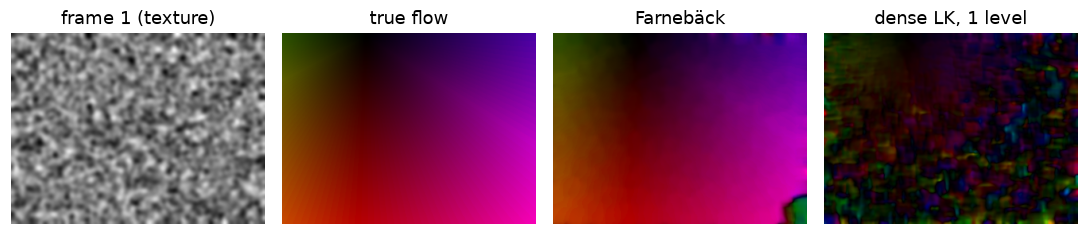 Color encodes direction and brightness encodes magnitude. Farnebäck reproduces the rotation-plus-translation field almost exactly; single-scale dense LK breaks up where the motion exceeds a pixel or two.
Farnebäck's pyramid handles motions of up to 17 pixels with a mean endpoint error of about 0.15 px over the whole frame, in a few milliseconds.
Background subtraction on a synthetic video
Build a video with a known foreground mask: a static background (the coffee image, downscaled), sensor noise, a slow 3% lighting flicker, and two moving objects. One object enters halfway through and then stops for a while, the classic hard case.
from skimage import data

bg = cv2.resize(data.coffee(), (W, H), interpolation=cv2.INTER_AREA).astype(np.float32)
N_FRAMES = 90
frames, masks = [], []
vrng = np.random.default_rng(1)
for k in range(N_FRAMES):
    img = bg * (1 + 0.03 * np.sin(2 * np.pi * k / 40))                  # slow lighting flicker
    m = np.zeros((H, W), np.uint8)
    cx, cy = int(20 + 3.2 * k), int(120 + 40 * np.sin(k / 12))         # object 1: green disk, always moving
    cv2.circle(img, (cx, cy), 18, (60, 200, 70), -1); cv2.circle(m, (cx, cy), 18, 1, -1)
    if k >= 30:                                                          # object 2 enters at frame 30...
        x2 = max(300 - 2 * (k - 30), 220)                                # ...and stops at x = 220 from frame 70
        cv2.rectangle(img, (x2, 30), (x2 + 40, 70), (40, 60, 190), -1); cv2.rectangle(m, (x2, 30), (x2 + 40, 70), 1, -1)
    img = np.clip(img + vrng.normal(0, 4, img.shape), 0, 255).astype(np.uint8)
    frames.append(img); masks.append(m.astype(bool))
print(f"{N_FRAMES} frames of {frames[0].shape}; foreground fraction in frame 60: {masks[60].mean():.1%}")
Now compare five background models. Each produces a binary mask per frame. Score them with pixel precision, recall, and F1 against the ground truth over frames 30–69, while both objects are moving (after a 30-frame warm-up), and separately measure how much of the box each one still detects just after it stops (frames 71–75) and once it has been still for 15 frames (85–89).
col = [f.astype(np.float32) for f in frames]
dist = lambda a, b: np.abs(a - b).max(axis=2)                           # largest change over R, G, B
kernel = cv2.getStructuringElement(cv2.MORPH_ELLIPSE, (3, 3))
clean = lambda m: cv2.morphologyEx(m.astype(np.uint8), cv2.MORPH_OPEN, kernel).astype(bool)

results = {}
results["frame difference"] = [np.zeros((H, W), bool)] + [clean(dist(col[k], col[k - 1]) > 30) for k in range(1, N_FRAMES)]

avg, ra = col[0].copy(), []
for c in col:
    ra.append(clean(dist(c, avg) > 30))
    avg = 0.95 * avg + 0.05 * c                                          # running average, alpha = 0.05
results["running average"] = ra

results["median of last 25"] = [clean(dist(col[k], np.median(col[max(0, k - 25):k + 1], axis=0)) > 30)
                                for k in range(N_FRAMES)]

mog2 = cv2.createBackgroundSubtractorMOG2(history=200, varThreshold=16, detectShadows=False)
results["MOG2"] = [clean(mog2.apply(f) > 0) for f in frames]
mog2_slow = cv2.createBackgroundSubtractorMOG2(history=200, varThreshold=16, detectShadows=False)
results["MOG2, rate 0.002"] = [clean(mog2_slow.apply(f, learningRate=0.5 if k == 0 else 0.002) > 0)
                               for k, f in enumerate(frames)]
knn = cv2.createBackgroundSubtractorKNN(history=200, dist2Threshold=400, detectShadows=False)
results["KNN"] = [clean(knn.apply(f) > 0) for f in frames]

def f1_range(pred_masks, start, stop):
    tp = fp = fn = 0
    for k in range(start, stop):
        p, g = pred_masks[k], masks[k]
        tp += np.sum(p & g); fp += np.sum(p & ~g); fn += np.sum(~p & g)
    prec, rec = tp / max(tp + fp, 1), tp / max(tp + fn, 1)
    return prec, rec, 2 * prec * rec / max(prec + rec, 1e-9)

box_region = np.zeros((H, W), bool); box_region[30:71, 220:261] = True
stopped_recall = lambda pm, a, b: np.mean([pm[k][box_region].mean() for k in range(a, b)])
print(f"{'':18s} {'frames 30-69 (all moving)':^26s}   stopped box recall")
print(f"{'method':18s} {'precision':>9s} {'recall':>7s} {'F1':>6s}   {'71-75':>6s} {'85-89':>6s}")
for name, pm in results.items():
    p, r, f = f1_range(pm, 30, 70)
    print(f"{name:18s} {p:9.2f} {r:7.2f} {f:6.2f}   {stopped_recall(pm, 71, 76):6.2f} {stopped_recall(pm, 85, 90):6.2f}")
                   frames 30-69 (all moving)    stopped box recall
method             precision  recall     F1    71-75  85-89
frame difference        0.54    0.05   0.10     0.00   0.00
running average         0.54    1.00   0.70     1.00   0.72
median of last 25       0.79    0.84   0.82     0.49   0.00
MOG2                    1.00    0.67   0.80     0.50   0.00
MOG2, rate 0.002        0.77    1.00   0.87     1.00   0.93
KNN                     1.00    0.96   0.98     0.95   0.51
fig, axes = plt.subplots(1, 5, figsize=(10, 1.9))
k = 85
for ax, (im, title) in zip(axes, [(frames[k], f"frame {k}"), (masks[k], "ground truth"),
                                  (results["frame difference"][k], "frame difference"),
                                  (results["MOG2"][k], "MOG2 (default)"), (results["MOG2, rate 0.002"][k], "MOG2, rate 0.002")]):
    ax.imshow(im, cmap=None if im.ndim == 3 else "gray"); ax.set_title(title, fontsize=9); ax.axis("off")
plt.tight_layout(); plt.show()
 Frame 85: the blue box has been still for 15 frames. Frame differencing sees only slivers of the moving disk, default MOG2 has absorbed the stopped box into its background, and MOG2 with a slow fixed learning rate still reports it.
Each row tells a story you'll meet in real deployments:
- Frame differencing finds only the slivers of the disk that changed since the last frame, which the 3 × 3 opening mostly removes, and nothing of the slow box. Its recall is almost zero.
- The running average finds everything (recall 1.00), but its precision is only 0.54, because moving objects leave fading ghost trails in the averaged background.
- The temporal median is cleaner, but anything that covers a pixel for more than half its 25-frame window becomes background. The slowly sliding box covers its interior pixels for many frames even while moving, so half of it is already gone just after it stops, and all of it after 15 frames.
- Default MOG2 has perfect precision but misses a third of the moving pixels. Until it has seen
historyframes, MOG2 learns at a rate of 1/(frames seen so far), which is fast, so the interior of the slowly sliding, uniformly colored box is absorbed into the background while it moves. With a slow fixed learning rate (apply(frame, learningRate=0.002)), recall goes to 1.00 and the stopped box is kept, but precision drops: the disk present in the very first frame was learned as background and now shows up as a ghost at its starting position. - KNN is the best all-rounder on this clip.
None of these behaviors is a bug. Whether a stopped object should become background (a parked car: yes, eventually; a person standing at a counter: probably not) is an application decision, set by the history length and learning rate. Choose them from how long objects of interest stay still in your scene, and initialize the model from frames without foreground if you can.
Common mistake: calling apply on a subsampled set of frames
Background models learn from every frame you pass to apply, at a rate set by history (or the learningRate argument). If you process only every 5th frame, the effective history is 5 times longer in real time. Also, apply returns 255 for foreground and, with detectShadows=True, 127 for shadows: thresholding with > 0 counts shadows as foreground; use == 255 to drop them.
Mean-shift and CamShift on a colored object
Track a green disk with a hue histogram. To make the window size matter, render a sequence in which the disk grows as it moves (as if approaching the camera), and compare mean-shift (fixed window) with CamShift (adaptive window) by the intersection over union (IoU) of the tracked box with the true box.
def disk_sequence(n=60):
    seq, boxes = [], []
    for k in range(n):
        img = bg.copy()
        r = int(10 + 0.5 * k)                                             # radius grows from 10 to ~40
        cx, cy = int(40 + 3.5 * k), int(120 + 30 * np.sin(k / 10))
        cv2.circle(img, (cx, cy), r, (40, 200, 60), -1)                   # a green disk
        seq.append(np.clip(img + vrng.normal(0, 4, img.shape), 0, 255).astype(np.uint8))
        boxes.append((cx - r, cy - r, 2 * r, 2 * r))
    return seq, boxes

def iou(a, b):
    ax, ay, aw, ah = a; bx, by, bw, bh = b
    iw = max(0, min(ax + aw, bx + bw) - max(ax, bx)); ih = max(0, min(ay + ah, by + bh) - max(ay, by))
    inter = iw * ih
    return inter / (aw * ah + bw * bh - inter)

seq, boxes = disk_sequence()
hsv0 = cv2.cvtColor(seq[0], cv2.COLOR_RGB2HSV)
x, y, w0, h0 = boxes[0]
x, y, w0, h0 = x + 6, y + 6, w0 - 12, h0 - 12                           # histogram from inside the object only
roi_mask = cv2.inRange(hsv0[y:y + h0, x:x + w0], (0, 80, 60), (180, 255, 255))   # ignore dull pixels
hist = cv2.calcHist([hsv0[y:y + h0, x:x + w0]], [0], roi_mask, [32], [0, 180])
cv2.normalize(hist, hist, 0, 255, cv2.NORM_MINMAX)
term = (cv2.TERM_CRITERIA_EPS | cv2.TERM_CRITERIA_COUNT, 10, 1)

win_ms, win_cs = boxes[0], boxes[0]
iou_ms, iou_cs = [], []
for img, gt_box in zip(seq[1:], boxes[1:]):
    bp = cv2.calcBackProject([cv2.cvtColor(img, cv2.COLOR_RGB2HSV)], [0], hist, [0, 180], 1)
    _, win_ms = cv2.meanShift(bp, win_ms, term)
    rot_rect, win_cs = cv2.CamShift(bp, win_cs, term)
    iou_ms.append(iou(win_ms, gt_box)); iou_cs.append(iou(win_cs, gt_box))
print(f"mean IoU, first 20 frames: mean-shift {np.mean(iou_ms[:20]):.2f}, CamShift {np.mean(iou_cs[:20]):.2f}")
print(f"mean IoU, last 20 frames:  mean-shift {np.mean(iou_ms[-20:]):.2f}, CamShift {np.mean(iou_cs[-20:]):.2f}")
print("final window sizes (w, h): mean-shift", win_ms[2:], " CamShift", win_cs[2:], " true", boxes[-1][2:])
mean IoU, first 20 frames: mean-shift 0.50, CamShift 0.90
mean IoU, last 20 frames:  mean-shift 0.09, CamShift 0.88
final window sizes (w, h): mean-shift (20, 20)  CamShift (80, 80)  true (78, 78)
Mean-shift keeps its initial 20 × 20 window, so as the disk grows, the window covers a shrinking fraction of it and the IoU collapses. CamShift resizes the window from the back-projection's moments and stays locked on.
Common mistake: building the histogram from a box that includes background
The first version of this example took the hue histogram from the disk's full bounding box. The box's corners contain the brown table, so the histogram included brown, the back-projection lit up about 90% of the frame, and CamShift's window grew to cover the whole image within a few frames. Build the model histogram from pixels that belong to the object only (an inner region, or a mask), and mask out low-saturation pixels whose hue is meaningless.
A Kalman filter from scratch, checked against cv2.KalmanFilter
Finally, smooth a noisy track. The object follows a curving path; the "detector" reports its position with 5-pixel noise, misses 15% of frames at random, and misses frames 60–69 entirely (an occlusion).
class Kalman2D:
    """Constant-velocity Kalman filter; state (px, py, vx, vy)."""
    def __init__(self, q=0.05, r=5.0, dt=1.0):
        self.F = np.array([[1, 0, dt, 0], [0, 1, 0, dt], [0, 0, 1, 0], [0, 0, 0, 1]], float)
        self.Hm = np.array([[1, 0, 0, 0], [0, 1, 0, 0]], float)
        G = np.array([[dt ** 4 / 4, dt ** 3 / 2], [dt ** 3 / 2, dt ** 2]])
        self.Q = q * np.block([[G[0, 0] * np.eye(2), G[0, 1] * np.eye(2)], [G[1, 0] * np.eye(2), G[1, 1] * np.eye(2)]])
        self.R = r ** 2 * np.eye(2)
        self.x = np.zeros(4)
        self.P = np.diag([100.0, 100.0, 100.0, 100.0])

    def predict(self):
        self.x = self.F @ self.x
        self.P = self.F @ self.P @ self.F.T + self.Q
        return self.x

    def update(self, z):
        y = z - self.Hm @ self.x                          # innovation
        S = self.Hm @ self.P @ self.Hm.T + self.R
        K = self.P @ self.Hm.T @ np.linalg.inv(S)         # Kalman gain
        self.x = self.x + K @ y
        self.P = (np.eye(4) - K @ self.Hm) @ self.P
        return self.x

T = 120
t = np.arange(T)
true_pos = np.column_stack([20 + 2.2 * t, 120 + 60 * np.sin(t / 25)])
krng = np.random.default_rng(3)
meas = true_pos + krng.normal(0, 5, (T, 2))
have = krng.random(T) > 0.15
have[60:70] = False                                       # occlusion

kf = Kalman2D(q=0.05, r=5.0)
kf.x[:2] = meas[0]
cvkf = cv2.KalmanFilter(4, 2)
cvkf.transitionMatrix = kf.F.astype(np.float32)
cvkf.measurementMatrix = kf.Hm.astype(np.float32)
cvkf.processNoiseCov = kf.Q.astype(np.float32)
cvkf.measurementNoiseCov = kf.R.astype(np.float32)
cvkf.errorCovPost = kf.P.astype(np.float32)
cvkf.statePost = kf.x.reshape(4, 1).astype(np.float32)

est, est_cv = [], []
for k in range(T):
    kf.predict(); cvkf.predict()
    if have[k]:
        kf.update(meas[k]); cvkf.correct(meas[k].reshape(2, 1).astype(np.float32))
    est.append(kf.x[:2].copy()); est_cv.append(cvkf.statePost[:2, 0].copy())
est, est_cv = np.array(est), np.array(est_cv)

rmse = lambda a, b: np.sqrt(np.mean(np.sum((a - b) ** 2, axis=1)))
print(f"max |ours - cv2.KalmanFilter|: {np.abs(est - est_cv).max():.1e} px")
print(f"RMSE of raw detections (where present): {rmse(meas[have], true_pos[have]):.2f} px")
print(f"RMSE of Kalman estimate (all frames):   {rmse(est[10:], true_pos[10:]):.2f} px")
print(f"RMSE during the occlusion (frames 60-69, prediction only): {rmse(est[60:70], true_pos[60:70]):.2f} px")

plt.figure(figsize=(8, 3.2))
plt.plot(*true_pos.T, "k-", lw=1, label="true path")
plt.scatter(*meas[have].T, s=8, c="tab:orange", label="detections")
plt.plot(*est.T, c="tab:blue", lw=1.5, label="Kalman estimate")
plt.axvspan(true_pos[60, 0], true_pos[69, 0], color="gray", alpha=0.2, label="occlusion")
plt.gca().invert_yaxis(); plt.legend(fontsize=8, ncol=4, loc="lower center"); plt.title("Constant-velocity Kalman filter")
plt.tight_layout(); plt.show()
max |ours - cv2.KalmanFilter|: 5.5e-05 px
RMSE of raw detections (where present): 7.36 px
RMSE of Kalman estimate (all frames):   4.49 px
RMSE during the occlusion (frames 60-69, prediction only): 7.35 px
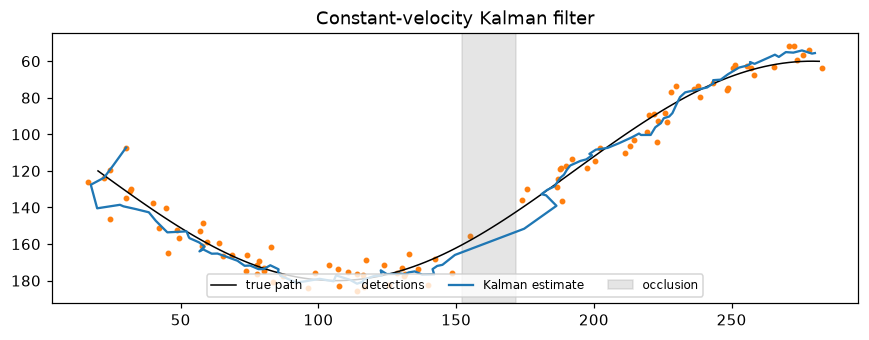 The filter smooths the scattered detections and coasts through the occlusion on its velocity estimate; it drifts slightly there because the path curves while no measurements arrive.
The from-scratch filter matches OpenCV's to within float32 rounding. It cuts the error of the raw detections by about 40% (the raw 2D error of 7.4 px is what 5 px of noise per axis gives, \(5\sqrt{2}\)), and it keeps an estimate through ten frames with no detections at all, with an error no worse than a raw detection's. During the occlusion the error grows, because a constant-velocity model can't know the path is curving; after it, the first few detections pull the estimate back.
Common mistake: forgetting to predict on frames without detections
The predict step must run every frame, whether or not a detection arrived; the update runs only when one did. If you skip the predict on missed frames, the state stops moving, and the velocity estimate becomes wrong. With cv2.KalmanFilter, predict() also copies the prediction into statePost, so reading statePost after a missed frame gives the coasted estimate.
Exercises
Exercise 1: The optical flow constraint by hand (easy)
At a pixel, \(I_x = 4\), \(I_y = 3\), and \(I_t = -10\) (gray levels per pixel and per frame). (a) Write the constraint equation. (b) Compute the normal flow (the component of motion along the gradient). (c) Give two different flow vectors that both satisfy the constraint. (d) What extra information does Lucas-Kanade use to choose between them?
Solution
(a) \(4u + 3v - 10 = 0\).
(b) The gradient has magnitude 5 and direction \((0.8, 0.6)\). The normal flow has magnitude \(-I_t / \lVert\nabla I\rVert = 10/5 = 2\) pixels along the gradient: \((1.6, 1.2)\).
(c) \((1.6, 1.2)\) satisfies it (\(6.4 + 3.6 = 10\)), and so does \((2.5, 0)\) (\(10 + 0 = 10\)), or \((1, 2)\). Any vector of the form \((1.6, 1.2) + s(-0.6, 0.8)\) works: the second term is motion along the edge, which is invisible.
(d) It assumes all pixels in a window share the same flow. If the window contains gradients in other directions, their constraint lines intersect the first one at a single point.
Exercise 2: The aperture problem, measured (medium)
Make a pattern of diagonal stripes, \(I(x, y) = 100 + 80\sin\big(2\pi (x + y) / 20\big)\), and translate it by \((1.0, 0.0)\) pixels with cv2.warpAffine. Run lucas_kanade_dense and report: the median estimated flow, the median smallest eigenvalue of the structure tensor (compared with the textured image in the chapter), and the flow component along the gradient direction \((1, 1)/\sqrt{2}\). Explain the result.
Solution
yy, xx = np.mgrid[0:H, 0:W].astype(np.float32)
stripes = (100 + 80 * np.sin(2 * np.pi * (xx + yy) / 20)).astype(np.float32)
shifted = cv2.warpAffine(stripes, np.float32([[1, 0, 1.0], [0, 1, 0]]), (W, H), flags=cv2.INTER_CUBIC,
                         borderMode=cv2.BORDER_REFLECT)
f_st, lam_st = lucas_kanade_dense(stripes, shifted)
inner_f = f_st[inner].reshape(-1, 2)
good = np.all(np.isfinite(inner_f), axis=1)
print("median flow:", np.median(inner_f[good], axis=0).round(3))
print(f"median min eigenvalue: stripes {np.median(lam_st[inner]):.2e}, texture {np.median(lam[inner]):.2e}")
n = np.array([1, 1]) / np.sqrt(2)
print(f"flow along the gradient: {np.median(inner_f[good] @ n):.3f} px (true: {np.array([1.0, 0]) @ n:.3f})")
median flow: [0.5 0.5]
median min eigenvalue: stripes 0.00e+00, texture 1.88e+01
flow along the gradient: 0.707 px (true: 0.707)
The true motion is \((1, 0)\), but LK reports about \((0.5, 0.5)\): the normal flow, the projection of the true motion onto the gradient direction. The smallest eigenvalue is zero: the structure tensor is singular, so the system has no unique solution. At most pixels the determinant is exactly zero and the division produces inf or nan (filtered out above); where rounding leaves it barely nonzero, the solution that comes out is the normal flow. The component along the gradient (0.707 px) is correct; the component along the stripes is unobservable. Real trackers reject such points by thresholding the minimum eigenvalue (minEigThreshold in calcOpticalFlowPyrLK).
Exercise 3: A one-dimensional Kalman update by hand (easy)
A tracker predicts an object at \(x = 10\) with variance 4. A detection reports \(x = 13\) with variance 1. Compute the Kalman gain, the updated estimate, and its variance. Then repeat with the variances swapped. Which source does the filter trust more in each case?
Solution
Case 1: \(K = 4/(4 + 1) = 0.8\); \(\hat{x} = 10 + 0.8 \times 3 = 12.4\); variance \((1 - 0.8) \times 4 = 0.8\). The measurement is more precise, so the estimate moves most of the way toward it.
Case 2: \(K = 1/(1 + 4) = 0.2\); \(\hat{x} = 10 + 0.2 \times 3 = 10.6\); variance \(0.8 \times 1 = 0.8\). Now the prediction is more precise and dominates. In both cases the fused variance (0.8) is smaller than either input variance, because two independent estimates are better than one.
Exercise 4: Forward-backward check (medium)
Track the Shi-Tomasi points from I1L to I2L with cv2.calcOpticalFlowPyrLK, then track the results back from I2L to I1L. Compute each point's forward-backward error (distance between the start and the round-trip end). Repeat with maxLevel=0 (no pyramid). Show that the forward-backward error flags the points whose forward track is wrong, without using the ground truth.
Solution
def fb_check(level):
    p0 = pts.reshape(-1, 1, 2).astype(np.float32)
    a, b = I1L.astype(np.uint8), I2L.astype(np.uint8)
    p1, st1, _ = cv2.calcOpticalFlowPyrLK(a, b, p0, None, winSize=(21, 21), maxLevel=level)
    p0r, st2, _ = cv2.calcOpticalFlowPyrLK(b, a, p1, None, winSize=(21, 21), maxLevel=level)
    fb_err = np.linalg.norm(p0r - p0, axis=2).ravel()
    true_err = np.linalg.norm(p1.reshape(-1, 2) - pts - truth, axis=1)
    return fb_err, true_err

for level in [2, 0]:
    fb_err, true_err = fb_check(level)
    flagged = fb_err > 1.0
    print(f"maxLevel={level}: flagged {flagged.sum():2d}/{len(pts)} points;"
          f" true error of kept points {true_err[~flagged].mean():.2f} px,"
          f" of flagged points {true_err[flagged].mean() if flagged.any() else float('nan'):.2f} px")
maxLevel=2: flagged  0/68 points; true error of kept points 0.14 px, of flagged points nan px
maxLevel=0: flagged 16/68 points; true error of kept points 0.41 px, of flagged points 11.15 px
With the pyramid, every track is good and nothing is flagged. Without it, about a quarter of the tracks fail; those points have large forward-backward errors (their true errors average about 11 px) and are flagged, while the kept ones are mostly correct. A wrong track rarely returns to its exact starting point, so the round trip is a free, label-free quality check.
Exercise 5: Tuning Q and R (hard)
Using the Kalman tracking example, sweep the process-noise scale q over \(\{0.001, 0.01, 0.05, 0.5, 5\}\) with r=5 and report the RMSE over frames 10–119. Then fix q=0.05 and sweep the assumed measurement noise r over \(\{1, 5, 25\}\) (the true noise stays at 5). Explain the shape of the results in terms of lag and noise.
Solution
def run_kf(q, r):
    f = Kalman2D(q=q, r=r); f.x[:2] = meas[0]
    out = []
    for k in range(T):
        f.predict()
        if have[k]:
            f.update(meas[k])
        out.append(f.x[:2].copy())
    return rmse(np.array(out)[10:], true_pos[10:])

print("q sweep (r=5):", {q: round(float(run_kf(q, 5.0)), 2) for q in [0.001, 0.01, 0.05, 0.5, 5]})
print("r sweep (q=0.05):", {r: round(float(run_kf(0.05, r)), 2) for r in [1, 5, 25]})
q sweep (r=5): {0.001: 12.61, 0.01: 6.18, 0.05: 4.49, 0.5: 5.27, 5: 10.78}
r sweep (q=0.05): {1: 7.26, 5: 4.49, 25: 10.4}
The error is U-shaped in both. With tiny q, the filter believes the motion is almost perfectly constant-velocity, gives measurements little weight, and lags behind the curving path. With large q, it trusts each measurement and passes their noise through (the error approaches the raw detection noise). An r smaller than the truth has the same effect as a large q (too much trust in measurements); a larger r causes lag. The best values balance the two, and the optimum is at the true measurement noise. In practice, tune on recorded tracks with ground truth, or monitor the normalized innovation \(\mathbf{y}^\top\mathbf{S}^{-1}\mathbf{y}\), which should average about 2 (the measurement dimension) when \(\mathbf{Q}\) and \(\mathbf{R}\) are right.
Check yourself
-
State the brightness constancy assumption and derive the optical flow constraint equation from it.
Answer
\(I(x + u, y + v, t + 1) = I(x, y, t)\). A first-order Taylor expansion of the left side gives \(I + I_x u + I_y v + I_t\); setting it equal to \(I\) gives \(I_x u + I_y v + I_t = 0\).
-
What is the aperture problem, and which component of motion can be recovered at an edge?
Answer
One constraint per pixel can't determine two unknowns; at an edge, motion along the edge doesn't change the image. Only the normal flow, the component along the gradient, is recoverable.
-
How is Lucas-Kanade related to the Harris and Shi-Tomasi detectors?
Answer
LK's normal-equation matrix is the structure tensor \(\mathbf{M}\). LK is well-posed where both eigenvalues of \(\mathbf{M}\) are large, which is exactly what Shi-Tomasi (min eigenvalue) and Harris detect. Corners are the points you can track.
-
Why does Lucas-Kanade need a pyramid for large motions?
Answer
Its Taylor linearization is only valid for displacements of about a pixel or two. On a coarse pyramid level, the motion is a fraction of its full-resolution size, so it can be estimated there and then refined level by level.
-
Why does frame differencing fail on a car that stops at a red light, and which background model handles it better?
Answer
A stopped car produces no change between consecutive frames, so differencing reports nothing. A background model with long memory (MOG2 or KNN with a long history, or a slow learning rate) keeps reporting it as foreground until it's been stationary long enough to be absorbed.
-
What does CamShift add to mean-shift?
Answer
It adapts the window size (from the zeroth moment of the back-projection) and estimates the orientation (from the second moments), so it keeps tracking an object that changes size or rotates.
-
Explain the Kalman gain in one sentence, and what happens to it when a measurement is missed.
Answer
The gain weighs the measurement against the prediction in proportion to their uncertainties (\(K = \sigma_p^2/(\sigma_p^2 + \sigma_m^2)\) in 1D). On a missed frame there's no update; the prediction step increases \(\mathbf{P}\), so the next measurement gets a larger gain.
Key takeaways
- Optical flow is the apparent motion of brightness patterns; brightness constancy plus linearization gives \(I_x u + I_y v + I_t = 0\), one equation in two unknowns.
- The aperture problem means only normal flow is measurable at edges. Lucas-Kanade assumes constant flow in a window and solves a \(2 \times 2\) system whose matrix is the structure tensor, so it works at corners.
- Iteration and pyramids extend Lucas-Kanade to large motions; Shi-Tomasi corners plus pyramidal LK is the KLT tracker. Farnebäck gives dense flow via polynomial expansion.
- Background subtraction ranges from frame differencing to per-pixel Gaussian mixtures (MOG2); the model's memory decides what happens to objects that stop.
- Mean-shift climbs a color back-projection to its mode; CamShift also adapts the window's size and orientation.
- The Kalman filter alternates predict (uncertainty grows) and update (gain-weighted fusion), smooths noisy detections, coasts through misses, and is the backbone of tracking-by-detection.
Further reading
- B. D. Lucas and T. Kanade, "An Iterative Image Registration Technique with an Application to Stereo Vision," IJCAI, 1981.
- J. Shi and C. Tomasi, "Good Features to Track," CVPR, 1994.
- J.-Y. Bouguet, "Pyramidal Implementation of the Lucas Kanade Feature Tracker," Intel Corporation technical report, 2000. The algorithm behind
calcOpticalFlowPyrLK. - G. Farnebäck, "Two-Frame Motion Estimation Based on Polynomial Expansion," Scandinavian Conference on Image Analysis, 2003.
- G. Welch and G. Bishop, "An Introduction to the Kalman Filter," UNC Chapel Hill technical report TR 95-041. A short, widely used tutorial.
Next
You can now find, match, and follow things. The last chapter of this level, Classical recognition, asks what they are: hand-crafted features such as HOG and LBP, bags of visual words, sliding-window detectors, and the Viola-Jones face detector.